
Inleiding
The TAXNELE THC30A is a digital programmable timer switch designed for automatic control of various electrical equipment. It features daily and weekly programming capabilities with up to 20 ON/OFF settings, a manual override function, and a built-in lithium battery for power-off memory. This manual provides detailed instructions for installation, operation, and maintenance to ensure safe and efficient use of your timer switch.
Veiligheidsinligting
- Maak seker dat die kragtoevoer ontkoppel is voor installasie of instandhouding.
- Installasie moet deur 'n gekwalifiseerde elektrisiën of kundige persoon uitgevoer word.
- Moenie die maksimum laaikapasiteit van 30A / 5000W oorskry nie.
- Hou die toestel weg van water en uiterste temperature.
- Verify correct wiring connections to prevent damage to the device or connected appliances.
Produk Kenmerke
- Programmable Control: Up to 20 ON/OFF settings per day or week.
- Afskakelgeheue: Built-in 3V lithium battery maintains timing, display, and data storage for up to 3 years during power interruptions.
- Hoë presisie: Industrial-grade chip for accurate timing.
- Handmatige vervanging: Allows temporary or permanent manual control.
- LCD-skerm: Clear digital display for easy programming and monitoring.
- Din Rail Mount: Designed for easy installation on a standard DIN rail.
- Wye toepassing: Suitable for street lights, neon lamps, advertising signs, production equipment, and home appliances.

Figure 1: The THC30A timer switch highlighting its power-off memory function, which retains data for up to 3 years using a built-in CR2032 lithium battery.

Figure 2: The THC30A timer switch featuring a 30A big load relay for stable and safe operation with various electrical loads.
Product Components and Display
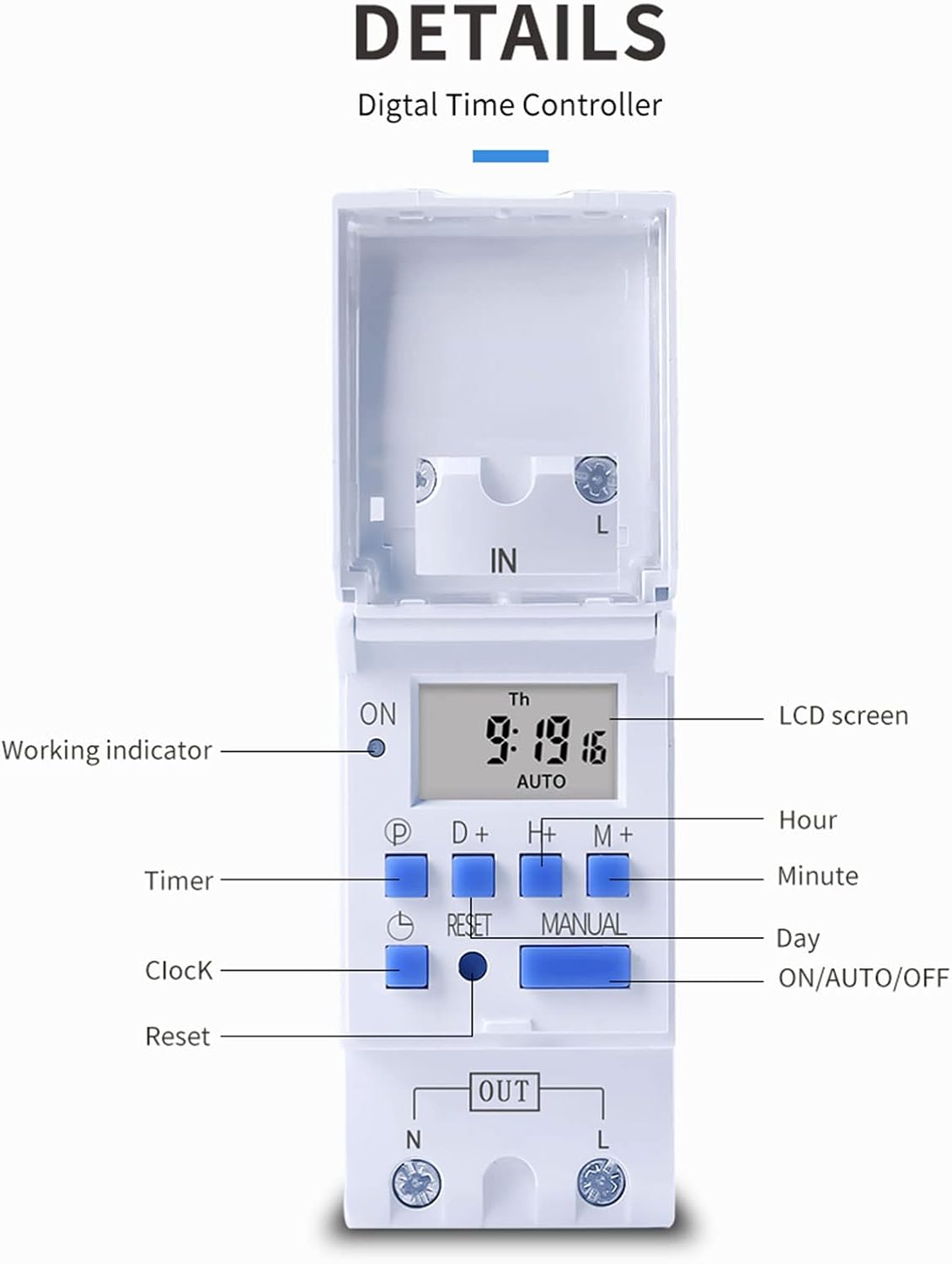
Figuur 3: Gedetailleerd view of the THC30A timer switch's LCD screen and control buttons. Labels include Working indicator, Timer, Clock, Reset, P (Program), D+ (Day), H+ (Hour), M+ (Minute), Manual, and ON/AUTO/OFF status.
- LCD skerm: Displays current time, day, and ON/OFF status.
- Werkende aanwyser: LED light indicating operation status.
- P-knoppie: Gaan in die programmeringsmodus.
- D+ Button: Adjusts day in clock setting or program.
- H+ Button: Adjusts hour in clock setting or program.
- M+ Button: Adjusts minute in clock setting or program.
- Horlosie-knoppie: Returns to clock display or exits programming mode.
- Herstel-knoppie: Clears all settings and resets the timer.
- Handknop: Wissel tussen AAN-, OUTO- en AF-modusse.
Spesifikasies
| Parameter | Waarde |
|---|---|
| Model | THC30A |
| Huidige gradering | 30A |
| Kraggradering | 5000 W |
| Voltage Opsies | 12V DC AC, 24V DC AC, 48V DC AC, 110V AC, 220V AC |
| Tyd fout | ≤2 seconds/day |
| Vertoon | LCD |
| Tydsberekening | 1 minute to 168 hours (7 days) |
| AAN/UIT-instellings | 20 groepe |
| Bedryfstemperatuur | -20℃ tot 50℃ |
| Afmetings | 86 x 36 x 65mm (3.38 x XUMX x 1.41 duim) |
| Kragreserwe | 3V Lithium battery (CR2032 type) for 3 years data retention |

Figure 4: Dimensions of the THC30A timer switch, showing measurements for height, width, and depth for proper installation planning.
Opstelling en installasie
1. Montering
The THC30A timer switch is designed for DIN rail mounting. Securely attach the device to a standard 35mm DIN rail in an appropriate electrical enclosure.
2. Bedrading
WAARSKUWING: Ensure all power is disconnected before performing any wiring.
Connect the input power supply to the "IN" terminals (N for Neutral, L for Live). Connect the load (e.g., light, appliance) to the "OUT" terminals (N for Neutral, L for Live). The timer acts as a switch for the live wire. Refer to the wiring diagram below for correct connections.

Figure 5: Simplified wiring diagram for the THC30A timer switch. The new version offers direct power output, simplifying connections compared to older models.
- Invoer (IN): Connect your main power supply (e.g., AC 12V, 24V, 48V, 110V, 220V) to these terminals.
- Uitset (UIT): Connect your electrical load (e.g., light, motor) to these terminals. The timer controls the power flow to this output.
Bedryfsinstruksies
1. Initial Setup / Reset
Upon first use or after a prolonged power outage, the display may be blank. Press the Stel terug button (located in a small hole, use a pointed object) to clear all settings and initialize the timer. The LCD will display "0:00" and "AUTO".
2. Instelling van Huidige Tyd en Dag
- Druk en hou die Horlosie knoppie.
- Terwyl jy vashou Horlosie, druk D+ to set the current day (Monday to Sunday).
- Terwyl jy vashou Horlosie, druk H+ om die huidige uur in te stel (0-23).
- Terwyl jy vashou Horlosie, druk M+ om die huidige minuut (0-59) in te stel.
- Los die Horlosie knoppie. Die tyd is nou ingestel.
3. Programming ON/OFF Cycles
The timer supports up to 20 ON/OFF programs. Each program consists of an ON time and an OFF time.
- Druk die P button once. The display will show "1 ON". This is for the first ON setting.
- Druk D+ to select the day(s) for this ON event. You can choose a single day, specific days, or blocks of days (e.g., Mon-Fri, Sat-Sun, Mon-Sun).
- Druk H+ to set the hour for the first ON event.
- Druk M+ to set the minute for the first ON event.
- Druk die P button again. The display will show "1 OFF". This is for the first OFF setting.
- Repeat steps 2-4 to set the day(s), hour, and minute for the first OFF event.
- Hou aan druk P to cycle through "2 ON", "2 OFF", up to "20 ON", "20 OFF" and set additional programs as needed.
- Nadat al die verlangde programme ingestel is, druk die Horlosie knoppie om die programmeringsmodus te verlaat en terug te keer na die huidige tydvertoning.
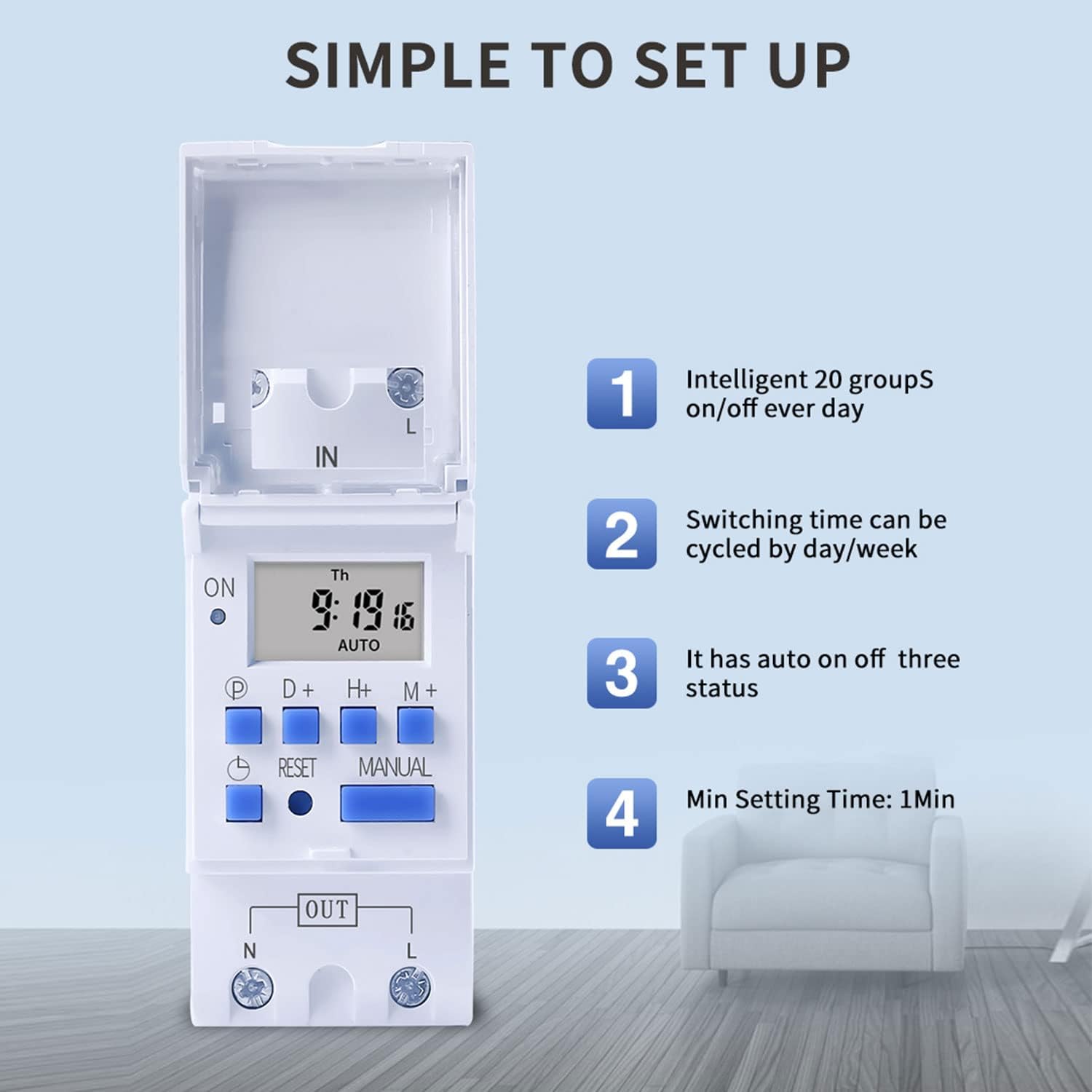
Figure 6: Visual guide to the simple setup of the THC30A timer, highlighting its 20 ON/OFF groups, daily/weekly cycling, auto ON/OFF status, and minimum 1-minute setting time.
4. Handmatige oorskrywing
Druk die Handleiding button to cycle through the output modes:
- OP: The output is continuously ON, overriding all programs.
- VOERTUIG: The output operates according to the programmed ON/OFF cycles. This is the standard operating mode.
- AF: The output is continuously OFF, overriding all programs.
Maak seker dat die timer in is AUTO mode for programmed operations to function.
Onderhoud
- Keep the timer clean and free from dust. Use a dry, soft cloth for cleaning.
- Moenie skuur skoonmaakmiddels of oplosmiddels gebruik nie.
- The internal lithium battery (CR2032) has a long lifespan (up to 3 years). If the display consistently goes blank after power outages, the battery may need replacement. This should be done by a qualified technician.
Probleemoplossing
| Probleem | Moontlike oorsaak | Oplossing |
|---|---|---|
| Die vertoning is leeg. | Geen kragtoevoer nie; interne battery is leeg. | Check power connections. Press the Reset button. If problem persists, internal battery may need replacement. |
| Timer does not switch ON/OFF as programmed. | Timer is not in AUTO mode; incorrect program settings; current time/day is wrong. | Druk Handleiding until "AUTO" is displayed. Verify program settings (ON/OFF times, days). Check and correct current time and day. |
| Output is always ON or always OFF. | Timer is in manual ON or OFF mode. | Druk Handleiding totdat "AUTO" vertoon word. |
| Programs are lost after power outage. | Internal backup battery is depleted. | The internal CR2032 battery may need replacement. Contact support if necessary. |
Aansoeke
The TAXNELE THC30A timer switch is versatile and can be used in various applications to automate electrical devices:

Figuur 7: Examples of common applications for the THC30A timer switch, including street light control, home appliance control, battery charging control, and advertising light control.
- Street Light Control: Automate the turning ON/OFF of street lights based on time.
- Home Appliance Control: Schedule operation of water heaters, fans, or other household devices.
- Battery Charging Control: Manage charging cycles for batteries to prevent overcharging.
- Advertising Light Control: Program display times for neon signs and advertising boards.
- Production Equipment: Control machinery operation in industrial settings.
Waarborg en Ondersteuning
For warranty information or technical support, please refer to the contact details provided with your purchase or visit the official TAXNELE webwebwerf. Bewaar u aankoopbewys as bewys van aankoop.