Inleiding
This manual provides detailed instructions for the setup, operation, maintenance, and troubleshooting of your Fluance RT81 Elite High Fidelity Vinyl Turntable. Please read this manual thoroughly before using your turntable to ensure proper function and longevity.
The Fluance RT81 is designed to deliver a pure analog listening experience with premium components, including an Audio Technica AT95E cartridge, a belt-drive system, and a high-mass MDF wood plinth for superior vibration isolation.
Wat is ingesluit
Verifieer dat alle komponente in die verpakking teenwoordig is:
- RT81 Turntable Unit
- Stofbedekking
- 45 Adapter
- Rubber Platter Mat
- 3ft RCA Cable with Ground Wire
- 100V - 240V (50/60Hz) AC Power Adapter
- Vinnige Begingids
- Audio Technica AT95E Cartridge (pre-installed on headshell)
- Teengewig
- Hinges (x2)
- Rubber Gordel

Image: All components included with the Fluance RT81 turntable, including the plinth, aluminum platter, platter mat, headshell & AT95E cartridge, dust cover, hinges, RCA cable, 45 adapter, counterweight, 5ft power adapter, and rubber belt.
Opstelling
1. Uitpak en Plasing
Verwyder alle komponente versigtig uit die verpakking. Plaas die draaitafel op 'n stabiele, gelyk oppervlak weg van direkte sonlig, hittebronne en oormatige vibrasie.
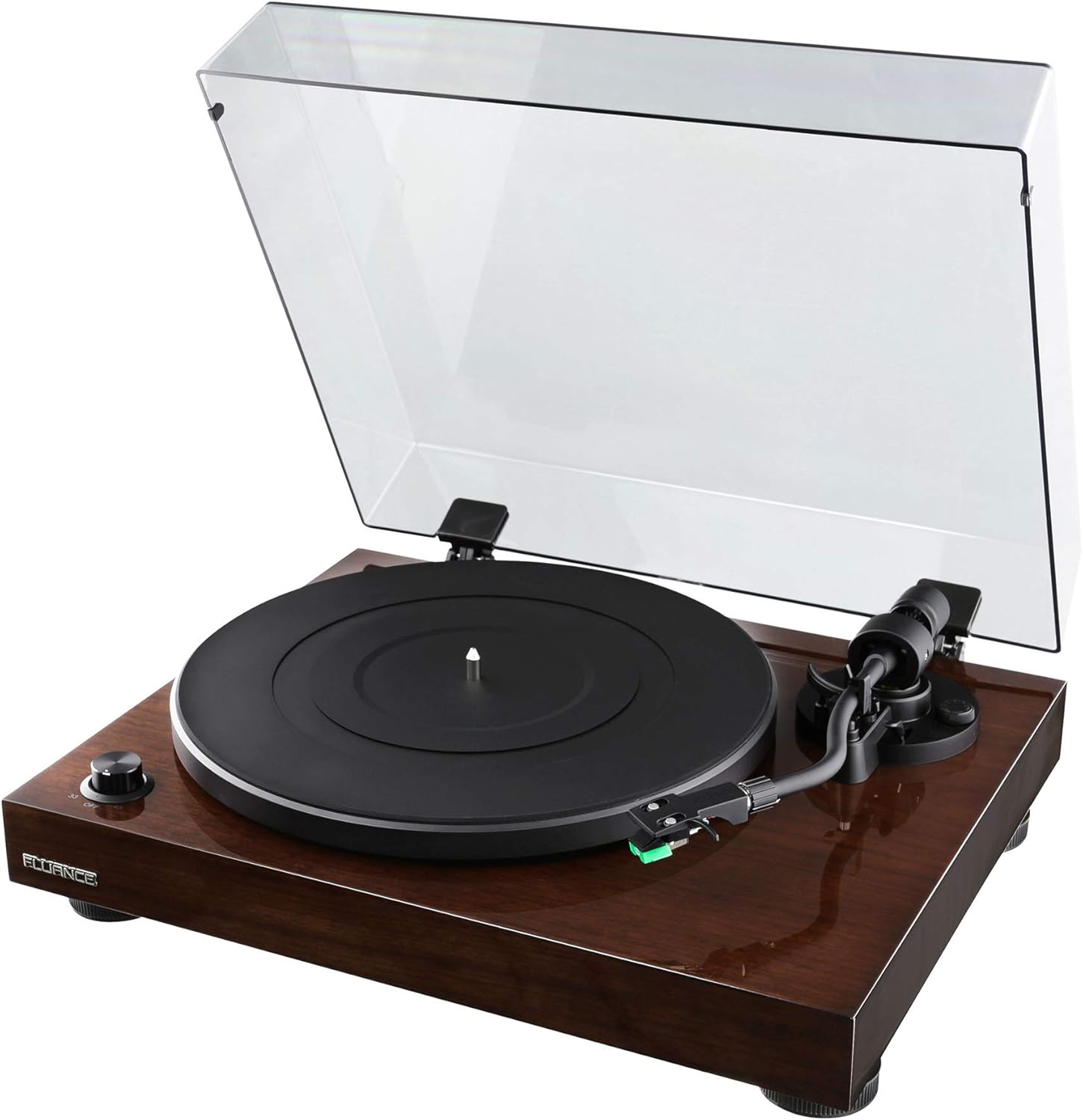
Image: The Fluance RT81 turntable in its walnut finish, with the clear dust cover open, showcasing die skottel en toonarm.
2. Skottel- en bandinstallasie
- Plaas die aluminiumplaat op die spil.
- Carefully loop the rubber belt around the motor pulley and the inner rim of the platter. Ensure the belt is not twisted.
- Place the rubber platter mat on top of the aluminum platter.

Beeld: 'n Nabyskoot view of the Fluance RT81 turntable's tonearm, highlighting the Audio Technica AT95E cartridge with its green stylus.
3. Tonearm Setup
The Audio Technica AT95E cartridge is pre-installed on the headshell. You will need to balance the tonearm and set the tracking force.
- Heg die teengewig aan die agterkant van die toonarm vas.
- Adjust the counterweight until the tonearm is balanced and floats horizontally.
- Set the tracking force to the recommended 2.0 grams by rotating the counterweight.
- Set the anti-skating control to '2' to match the tracking force.
4. Verbinding met klankstelsel
The RT81 features a built-in Texas Instruments preamp, offering flexibility in connection options.
- Using Built-in Preamp: Set the PHONO/LINE switch on the back of the turntable to LYN. Connect the RCA cables from the turntable's AUDIO OUTPUT to any available line-level input (e.g., AUX, CD) on your amplifier or powered speakers. The ground wire is not needed in this configuration.
- Using External Preamp: Set the PHONO/LINE switch on the back of the turntable to FONO. Connect the RCA cables from the turntable's AUDIO OUTPUT to the PHONO input on your external preamp or receiver. Connect the ground wire from the turntable's ground post to the ground terminal on your external preamp/ontvanger.

Image: Rear panel of the Fluance RT81 turntable, displaying the RCA audio output jacks, ground terminal, PHONO/LINE switch, AUTO STOP switch, and DC 12V power input.
5. Kragverbinding
Connect the AC power adapter to the DC 12V input on the back of the turntable, then plug it into a wall outlet.
Bedryfsinstruksies
1. Speel 'n plaat
- Place a record on the platter mat. For 7-inch singles, use the included 45 adapter.
- Select the appropriate speed (33 or 45 RPM) using the selector dial on the front left.
- Lig die toonarm op met behulp van die stoothefboom.
- Manually position the tonearm over the desired starting groove of the record.
- Laat sak die toonarm stadig met die stoothefboom. Die plaat sal begin speel.
2. Auto Stop Function
The RT81 features an auto-stop function. When enabled (AUTO STOP switch set to ON), the platter will automatically stop spinning once the tonearm reaches the end of the record. If disabled (AUTO STOP switch set to OFF), the platter will continue to spin until manually stopped.
Video: A demonstration of the Fluance RT81 turntable in operation, showcasing the automatic stop feature at the end of a record. This video is provided by Shoptronics, a seller of the product.
3. Stop afspeel
- Lig die toonarm op met behulp van die stoothefboom.
- Plaas die toonarm terug in sy rusposisie.
- Turn the speed selector dial to "OFF" to stop the platter.
Onderhoud
1. Skoonmaak van die draaitafel
Regular cleaning will help maintain the performance and appearance of your RT81.
- Use a soft, dry cloth to wipe the plinth and dust cover. Avoid abrasive cleaners.
- Gently brush the stylus with a soft brush in a back-to-front motion to remove dust.
- Clean records regularly with a carbon fiber brush or record cleaning solution to prevent dust buildup and improve sound quality.
2. Belt Replacement
The drive belt may need replacement over time due to wear. Refer to the "What's Included" section for the location of the belt and instructions for re-installation.
Probleemoplossing
| Probleem | Moontlike oorsaak | Oplossing |
|---|---|---|
| Geen klank nie | Incorrect PHONO/LINE switch setting; loose RCA connections; amplifier/speaker issues. | Ensure PHONO/LINE switch is set correctly (LINE for built-in preamp, PHONO for external). Check all cable connections. Verify ampDie luidsprekers/versterker is aangeskakel en op die korrekte invoer gestel. |
| Verwronge klank | Incorrect tracking force; dirty stylus; damaged record. | Re-balance tonearm and set tracking force to 2.0g. Clean the stylus. Inspect record for damage. |
| Skottel draai nie | Power not connected; belt dislodged; AUTO STOP engaged and tonearm not moved. | Check power connection. Re-seat the drive belt. Move tonearm over platter or disable AUTO STOP. |
| Brummende Geraas | Ground wire not connected (if using external preamp); interference. | Ensure ground wire is securely connected (if PHONO mode). Move turntable away from other electronic devices. |
Spesifikasies
- Model: RT81 Elite
- Handelsmerk: Fluans
- Afmetings (L x B x H): 13.75 x 16.5 x 5.5 duim
- Item gewig: 14.1 pond
- Sokkelmateriaal: MDF Hout
- Bord: Aluminium
- Patroon: Audio Technica AT95E (Elliptical Stylus)
- Aandrywingstelsel: Belt Drive
- Snelhede: 33 1/3, 45 RPM
- Preamp: Built-in Texas Instruments Preamp (switchable PHONO/LINE)
- Verbinding: Wired RCA Output with Ground Terminal
- Outostop: Yes (switchable ON/OFF)
- Kleur: Okkerneut

Beeld: Oorhoofse view of the Fluance RT81 turntable with a record spinning, demonstrating its operational state.
Waarborg & Ondersteuning
Jou Fluance RT81 draaitafel word voorsien met 'n 2 Jaar Vervaardiger se Waarborg. For warranty claims or technical support, please contact Fluance customer service directly.
Lewenslange kliëntediens is also provided by Fluance to assist with any questions or issues you may encounter with your turntable.
For additional resources, including detailed setup videos and FAQs, please visit the official Fluance website or refer to the included Quick Start Guide.

Image: The Fluance company logo, "FLUANCE. Serious Performance."


