
1. Belangrike kennisgewing
Please carefully check the store name and ensure you are purchasing products sold by "LUZHAN." We have received customer feedback stating that products received did not match the description and were of poor quality. Upon investigation, we found that these customers did not purchase the products from us. To prevent such incidents from happening again in the future and to avoid unnecessary misunderstandings, please carefully verify the store name LUZHAN.

Image: Important notice to verify seller name LUZHAN for authentic products.
2. oorview
The XIAOMI POCO X8 Pro Max 5G is a high-performance smartphone designed for advanced users. It features a powerful Mediatek Dimensity 9500s processor, a vibrant 1.5K 120Hz AMOLED display, a large 8500mAh battery with 100W HyperCharge, and a 50 MP Light Fusion 600 camera system with OIS. This manual provides essential information for setting up and operating your device.
Beeld: Voor en agter view of the POCO X8 Pro Max 5G smartphone.
Video: 'n Oorview of the POCO X8 Pro Series, highlighting key features and design.
3. Opstelling
3.1 Wat is in die boks
- XIAOMI POCO X8 Pro Max 5G Smartphone
- Lader
- Skermbeskermer (vooraf aangebring of ingesluit)
3.2 Aanvanklike toestelopstelling
- Krag aan: Press and hold the power button located on the side of the device until the XIAOMI logo appears.
- Taal en streek: Volg die aanwysings op die skerm om jou voorkeurtaal en -streek te kies.
- Koppel aan Wi-Fi: Select your Wi-Fi network and enter the password to connect to the internet. This is necessary for initial setup and software updates.
- Google-rekening: Meld aan met jou Google-rekening of skep 'n nuwe een. Dit is noodsaaklik om toegang tot die Google Play Winkel en ander Google-dienste te verkry.
- Data-oordrag: If you are upgrading from another device, you may have the option to transfer your data (apps, photos, contacts) during this stage.
- Sekuriteitsopstelling: Set up your preferred security method, such as a PIN, pattern, password, or fingerprint. The device supports an ultrasonic fingerprint sensor.
- Voltooi opstelling: Volg enige oorblywende aanwysings om die opstelproses te finaliseer.
3.3 SIM Card and eSIM Setup
The POCO X8 Pro Max 5G supports physical SIM cards and eSIM functionality.
- Physical SIM: Use the provided SIM ejector tool to open the SIM tray. Insert your Nano-SIM card(s) into the tray, ensuring proper orientation. Close the tray securely.
- eSIM: For eSIM activation, navigate to Instellings > Netwerk en internet > SIM-kaarte and follow the instructions to add an eSIM profile provided by your carrier.
4. Bedryfsinstruksies
4.1 Vertoonkenmerke
Your device features a 6.83-inch 1.5K ultra-bright AMOLED display with a 120Hz refresh rate for smooth visuals and a 24x super resolution touch for enhanced responsiveness. It also includes eye protection features and Corning Gorilla Glass 7i for durability.
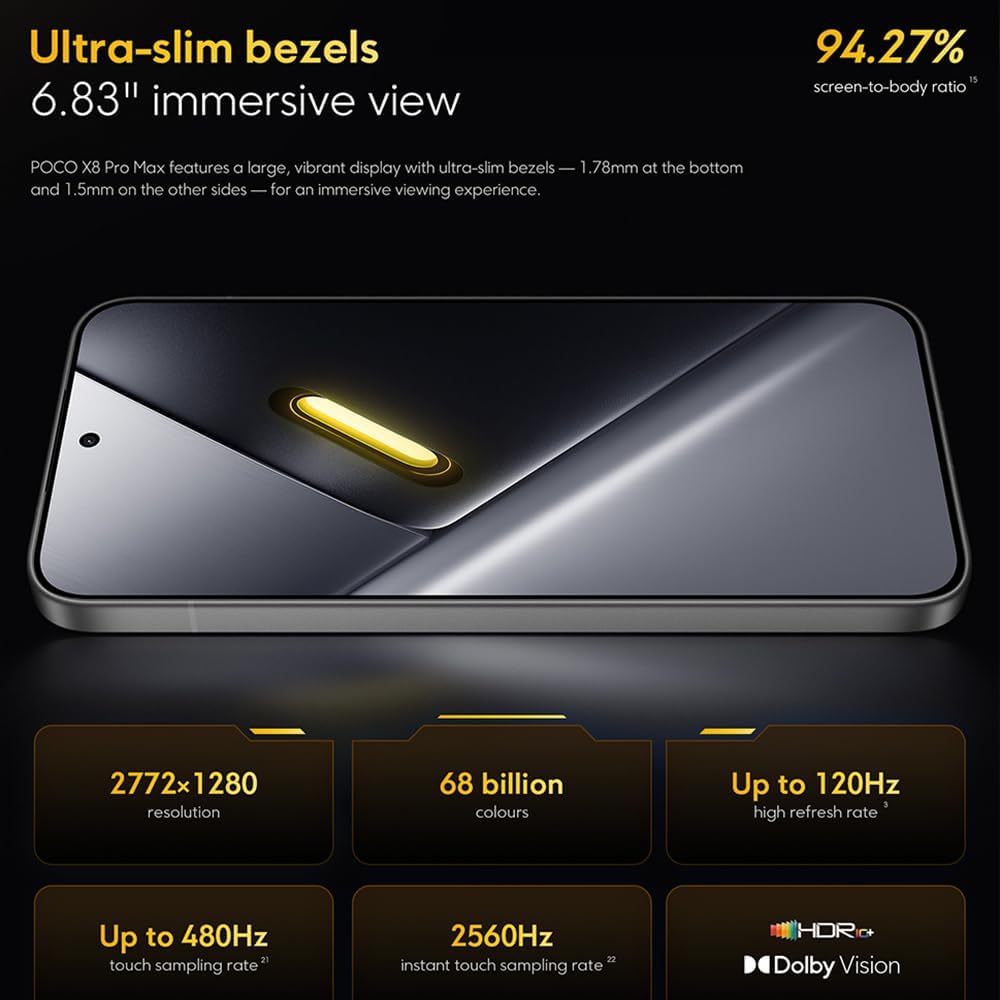
Image: The 6.83-inch 1.5K ultra-bright AMOLED display with minimal bezels.
4.2 Prestasie
Powered by the Mediatek Dimensity 9500s chipset (3nm, 4+4 All Big Core architecture, NPU890 AI processor), the POCO X8 Pro Max 5G delivers high performance. The POCO 3D IceLoop cooling system ensures efficient heat dissipation, maintaining optimal performance during intensive tasks like gaming.

Image: Diagram illustrating the Mediatek Dimensity 9500s flagship platform.

Image: Illustration of the 5800mm² ultra-large LHP area for cooling.
4.3 Kamerastelsel
The device features a 50 MP Light Fusion 600 main camera with OIS (Optical Image Stabilization) and an 8 MP ultra-wide camera. It supports portrait mode with bokeh + HDR and dynamic video-to-still conversion.

Image: Close-up of the 50 MP main camera and 8 MP ultra-wide camera system.
4.4 Battery en laai
Equipped with a massive 8500 mAh (typical) battery, the POCO X8 Pro Max 5G offers extended usage. It supports 100W HyperCharge, allowing for rapid recharging. A 16% ultra-high carbon-silicon content contributes to its high energy density.

Image: Illustration highlighting the massive 8500mAh battery capacity.

Image: Visual representation of the 100W HyperCharge technology.
4.5 oudio
The device features symmetrical dual stereo speakers (1115F) for a balanced and immersive audio experience.
4.6 sagteware
The POCO X8 Pro Max 5G comes with Xiaomi HyperOS 3 installed, offering an optimized and user-friendly interface based on Android 16.
5. Onderhoud
5.1 Skoonmaak van jou toestel
- Gebruik 'n sagte, pluisvrye lap om die skerm en agterpaneel af te vee.
- Vermy die gebruik van harde chemikalieë, skuurmiddels of aërosolspuitmiddels.
- Vir hardnekkige vlekke, effens dampMaak die lap skoon met water of 'n skermreiniger wat vir elektronika ontwerp is.
5.2 Stof- en waterbestandheid
The device is certified for IP68 dust and water resistance. This means it can withstand immersion in up to 2 meters of water for 30 minutes under specific laboratory conditions. However, water and dust resistance may deteriorate over time with normal wear and tear. The warranty does not cover liquid damage. Avoid exposing the device to hot water, saltwater, or other liquids.

Image: Visual representation of the IP68 dust and water resistance.
5.3 Sagteware-opdaterings
Kontroleer gereeld vir sagteware-opdaterings en installeer dit om te verseker dat jou toestel die nuutste kenmerke, sekuriteitsopdaterings en werkverrigtingverbeterings het. Jy kan gewoonlik hierdie opsie vind in Instellings > Meer oor foon > Stelselopdatering.
6. Probleemoplossing
6.1 Algemene kwessies en oplossings
- Toestel skakel nie aan nie: Maak seker dat die battery gelaai is. Koppel die toestel aan die laaier en wag 'n paar minute voordat jy dit weer probeer aanskakel.
- Skerm reageer nie: Try restarting the device by holding the power button for an extended period (e.g., 10-15 seconds) until it reboots.
- Programme wat vasval: Maak die kasgeheue van die problematiese toepassing skoon (Instellings > Programme > [Programnaam] > Berging > Vee kasgeheue uit) or reinstall the app. Ensure your device software is up to date.
- Swak batterylewe: Check background app usage, reduce screen brightness, disable unnecessary features like GPS or Bluetooth when not in use, and ensure your software is updated.
- Netwerkverbindingsprobleme: Restart your device. Check if your SIM card is properly inserted. Toggle Airplane Mode on and off. Reset network settings (Instellings > Stelsel > Herstelopsies > Herstel Wi-Fi, selfoon en Bluetooth).
6.2 Fabrieksterugstelling
If you encounter persistent issues, a factory reset may be necessary. Waarskuwing: Dit sal alle data op jou toestel uitvee. Rugsteun belangrike data voordat jy voortgaan. Gaan na Instellings > Stelsel > Herstel opsies > Vee alle data uit (fabriekterugstelling) en volg die instruksies op die skerm.
7. Spesifikasies
| Kenmerk | Spesifikasie |
|---|---|
| Handelsmerk | XIAOMI |
| Model Naam | POCO X8 Pro Max 5G |
| Bedryfstelsel | Android 16 (with Xiaomi HyperOS 3) |
| Geheue berging kapasiteit | 512 GB |
| Skerm grootte | 6.83 duim |
| Tipe vertoon | AMOLED, 1.5K, 120Hz refresh rate |
| Sellulêre Tegnologie | 5G |
| Kleur | Noir (Swart) |
| Connector Tipe | USB Tipe C |
| Biometriese sekuriteit | Fingerprint Recognition (Ultrasonic) |
| Battery kapasiteit | 8500 mAh (Litium-polimeer) |
| Laai | 100W Hiperlaai |
| Hoofkamera | 50 MP Light Fusion 600 with OIS |
| Ultrawye kamera | 8 MP |
| Verwerker | Mediatek Dimensity 9500s |
| Stof- en Waterweerstand | IP68 |
| Jaar van model | 2025 |
| Land van oorsprong | China |
8. Waarborg en Ondersteuning
For detailed warranty information and customer support, please refer to the warranty card included with your product or visit the official XIAOMI webwebwerf. Bewaar u bewys van aankoop vir waarborgeise.
Online resources and FAQs may also be available on the XIAOMI support portal.