
1. Inleiding
Dankie vir die aankoopasing the Audizio Laredo Bluetooth Turntable. This manual provides essential information for the safe and correct operation of your device. Please read it thoroughly before use and keep it for future reference.
Sleutel kenmerke:
- Integrated HiFi speakers with 160W total power output.
- Bidirectional Bluetooth for wireless audio streaming (in and out).
- High-quality Audio Technica cartridge for precise playback.
- Supports 7, 10, and 12-inch vinyl records at 33 and 45 RPM.
- Adjustable counterweight on the aluminum tonearm.
- RCA Line Out for external amplifier/luidsprekers.
- AUX Input for connecting external audio sources.
- Elegant bamboo finish.
Wat is in die boks:
- Audizio Laredo Turntable Unit
- Instruksie Handleiding
- Kragadapter
- 45 RPM Adapter for singles
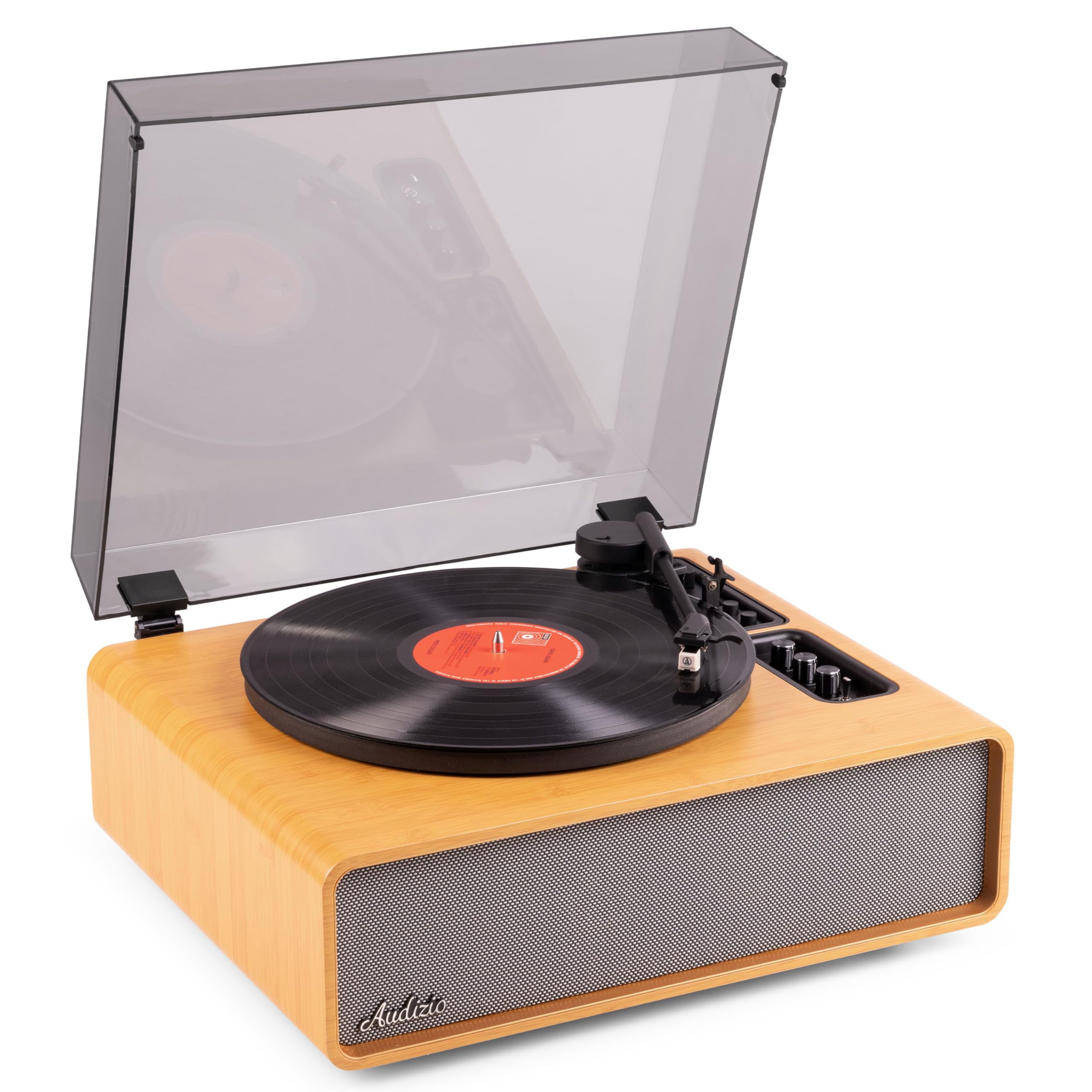
Figure 1.1: Audizio Laredo Turntable, overall view.
2. Veiligheidsinstruksies
Please read and follow these safety instructions carefully to prevent damage to the unit and ensure your safety.
- Moenie die eenheid aan reën of vog blootstel om brand of elektriese skok te voorkom nie.
- Moenie die c oopmaak nieasing. Daar is geen onderdele binne wat deur die gebruiker onderhou kan word nie. Verwys alle onderhoud na gekwalifiseerde personeel.
- Place the unit on a stable, level surface to prevent it from falling.
- Hou die eenheid weg van direkte sonlig, hittebronne en oormatige stof.
- Verseker behoorlike ventilasie rondom die eenheid. Moenie ventilasie-openinge blokkeer nie.
- Gebruik slegs die meegeleverde kragadapter.
- Ontkoppel die eenheid tydens weerligstorms of wanneer dit vir lang tye ongebruik word.
3. Produk verbyview
Familiarize yourself with the components and controls of your Audizio Laredo turntable.
Hoofkomponente:
- Bord: Supports the vinyl record.
- Tonarm: Hou die patroon en stylus vas.
- Cartridge & Stylus: Reads the grooves of the record. (Audio Technica ATN-3600)
- Stofbedekking: Beskerm die plaat en toonarm teen stof.
- Geïntegreerde luidsprekers: For direct audio playback.
- Beheerpaneel: For power, volume, tone, and mode selection.
- Agterste verbindings: RCA Line Out, AUX In, Power Input.

Figuur 3.1: Bo view of the turntable with key components visible.

Figure 3.2: Control Panel for volume, bass, and treble adjustments.

Figure 3.3: Audio Technica ATN-3600 Cartridge and Stylus.

Figure 3.4: Tonearm base with speed and auto-stop controls.

Figure 3.5: Rear connection panel.
4. Opstelling
4.1 Uitpak
- Verwyder die draaitafel versigtig uit sy verpakking.
- Remove all protective materials, including the stylus guard.
- Bewaar die verpakking vir toekomstige vervoer of berging.
4.2 Plasing
- Place the turntable on a stable, level surface to prevent vibrations and ensure proper playback.
- Avoid placing the unit near strong magnetic fields, heat sources, or areas with high humidity.
4.3 Dust Cover Installation
- Align the hinges of the dust cover with the slots on the back of the turntable.
- Gently push down until the cover is securely in place.
- The dust cover can be removed for playback if desired.

Figure 4.1: Turntable with dust cover.
4.4 Kragverbinding
- Connect the power adapter to the DC IN port on the rear of the turntable.
- Plug the adapter into a suitable wall outlet (220V).
4.5 Toonarm- en patroonopstelling
- The Audio Technica cartridge is pre-installed.
- The tonearm features an adjustable counterweight. Refer to the detailed instructions in the included manual for precise counterweight adjustment to optimize tracking force.
5. Bedryfsinstruksies
5.1 Speel 'n plaat
- Place a vinyl record on the platter. If playing a 7-inch single, use the included 45 RPM adapter.
- Select the appropriate speed (33 or 45 RPM) using the speed selector switch near the tonearm base.
- Lig die toonarm versigtig op met behulp van die stoothefboom.
- Position the tonearm over the desired track of the record.
- Laat sak die toonarm stadig met die stoothefboom. Die stylus sal kontak maak met die plaat, en die terugspeel sal begin.
- At the end of the record, the auto-stop function will automatically stop the platter rotation. Lift the tonearm and return it to its rest.

Figure 5.1: Playing a vinyl record.
5.2 Bluetooth Operation (Bidirectional)
The Laredo turntable supports both Bluetooth input (receiving audio from a device) and Bluetooth output (sending audio to a Bluetooth speaker/headphones).
Bluetooth Input (BT IN):
- Press the MODE/POWER button to select Bluetooth mode. The LED indicator will flash.
- On your smartphone or tablet, enable Bluetooth and search for 'Audizio Laredo'.
- Select the turntable to pair. Once connected, the LED will glow solid.
- You can now stream audio from your device to the turntable's integrated speakers.
Bluetooth Output (BT OUT):
- Maak seker dat jou Bluetooth-oorfone of -luidspreker in paringsmodus is.
- Set the BT OUT switch (located near the tonearm base) to 'ON'.
- The turntable will automatically search for and connect to the nearest Bluetooth audio device.
- Once connected, the audio from your vinyl record will be transmitted to your Bluetooth device.

Figure 5.2: Bidirectional Bluetooth functionality.
5.3 AUX-invoer
- Connect an external audio device (e.g., MP3 player, CD player) to the AUX IN port on the rear of the turntable using a 3.5mm audio cable.
- Press the MODE/POWER button to select AUX mode.
- Audio from the external device will play through the turntable's speakers.
5.4 RCA Lynuitvoer
- To connect the turntable to an external amplifier or powered speakers, use an RCA cable (not included) to connect the LINE OUT ports on the rear of the turntable to the corresponding input on your audio system.
- Ensure the 'Speaker ON/OFF' switch on the rear is set to 'OFF' if you only want sound from external speakers.
5.5 Volume and Tone Control
- Use the VOLUME knob on the control panel to adjust the overall playback volume.
- Adjust the BASS and TREBLE knobs to fine-tune the audio output to your preference.
6. Onderhoud
6.1 Skoonmaak van die eenheid
- Vee die stofkap en kas af met 'n sagte, droë lap.
- Moenie skuurmiddels, wasse of oplosmiddels gebruik nie.
- For the platter, use a slightly damp doek en droog deeglik af.
6.2 Stylus Care and Replacement
- The stylus is a delicate component. Handle it with care.
- Maak die stylus gereeld skoon met 'n sagte borsel wat ontwerp is vir die skoonmaak van die stylus, en borsel van agter na voor.
- A stylus typically lasts for approximately 300-500 hours of playback. If you notice a decrease in sound quality or increased skipping, it may be time to replace the stylus.
- Replacement styli (e.g., Audio Technica ATN-3600L or compatible) can be purchased from authorized dealers. Refer to the detailed instructions provided with the replacement stylus for installation.
7. Probleemoplossing
If you encounter issues with your turntable, please consult the following table before contacting support.
| Probleem | Moontlike oorsaak | Oplossing |
|---|---|---|
| Geen krag nie | Kragadapter nie gekoppel nie; Kragaansluiting werk nie. | Ensure power adapter is securely connected to the unit and a working outlet. |
| Geen geluid van luidsprekers nie | Volume too low; Speaker ON/OFF switch is OFF; Incorrect mode selected. | Increase volume; Set 'Speaker ON/OFF' switch to ON; Select correct input mode (Phono, BT IN, AUX). |
| Oorslaan van rekords | Record is dirty or damaged; Stylus is worn or dirty; Turntable not level; Tracking force incorrect. | Clean record; Clean or replace stylus; Place turntable on a level surface; Adjust tonearm counterweight. |
| Probleme met Bluetooth-paring | Device too far; Turntable not in pairing mode; Interference. | Ensure devices are within range; Re-enter pairing mode; Turn off other Bluetooth devices. |
| Klankvervorming | Volume too high; Stylus worn; Record damaged. | Reduce volume; Replace stylus; Try a different record. |
8. Spesifikasies
Technical specifications for the Audizio Laredo Turntable.
| Kenmerk | Spesifikasie |
|---|---|
| Model Naam | Laredo (101.537) |
| Afmetings (L x B x H) | 43.2 x 43.2 x 21 cm (17 x 17 x 8.3 duim) |
| Produk Gewig | 7.65 kg (16.86 lbs) |
| Materiaal | Wood (Bamboo finish) |
| Rotasie Snelhede | 33 RPM, 45 RPM |
| Patroon tipe | Audio Technica (ATN-3600) |
| Motor tipe | Belt Drive |
| Seinformaat | Analoog |
| Geïntegreerde luidsprekers | Yes, 160W total output |
| Bluetooth weergawe | 5.4 (Bidirectional) |
| Konnektiwiteit | Bluetooth (In/Out), RCA Line Out, AUX In |
| Kragbron | Elektries bedraad |
| Voltage | 220 Volt |
| Versoenbare toestelle | Speakers, Headphones, Smartphone, Tablet |
9. Waarborg en Ondersteuning
9.1 Waarborginligting
This Audizio Laredo Turntable comes with a 2 jaar waarborg from the date of purchase. This warranty covers manufacturing defects and faults under normal use. It does not cover damage caused by misuse, accidents, unauthorized modifications, or normal wear and tear (e.g., stylus wear).
Behou asseblief jou aankoopbewys vir waarborgeise.
9.2 Kliëntediens
If you have any questions, require technical assistance, or need to make a warranty claim, please contact your retailer or visit the official Audizio webwebwerf vir ondersteuningsbronne en kontakbesonderhede.
Official Audizio Webwebwerf: www.audizio.com