
Inleiding
This manual provides detailed instructions for the installation, operation, and maintenance of your GEARGO RV Tire Pressure Monitoring System (TPMS). This system is designed to monitor the pressure and temperature of your vehicle's tires in real-time, enhancing driving safety by alerting you to potential tire issues.
The system includes a main monitor unit with solar and USB charging capabilities, and four external sensors for precise tire data collection. It is suitable for various four-wheel vehicles, including sedans, SUVs, MPVs, pick-up trucks, and RVs.
Pakketinhoud
Voor installasie, maak asseblief seker dat alle komponente in die pakket teenwoordig is:
- 1 x LCD Display Monitor
- 4 x Eksterne banddruksensors
- 4 x Anti-diefstalmoere
- 1 x Installation Clamp
- 1 x USB-laaikabel (tipe-C)
- 1 x Gebruikershandleiding (hierdie dokument)
- 1 x Dubbelzijdige kleefband
- 1 x Wrench for anti-theft nuts

Figuur 1: Pakketinhoud
Produk Kenmerke
- Intydse monitering: Simultaneously displays pressure and temperature for four tires.
- 6 Alarmmodusse: Includes high/low pressure, high temperature, disconnection, low battery, and sensor fault alarms.
- Precise External Sensors: Compact, lightweight, and highly accurate sensors (0-99 PSI detection range) with easy installation.
- Dubbele laai-opsies: Supports both solar and USB charging for continuous power.
- Kleur LCD-skerm: Intelligent screen with automatic backlighting adjustment for clear visibility in various light conditions.
- Outomatiese aan/af: The monitor automatically powers on when the vehicle starts and off when parked.
- Stemboodskap: Provides audible alerts for detected issues.
- Duursame ontwerp: Sensors are waterproof and dust-proof.

Figure 2: System Features Overview
Opstelling en installasie
Follow these steps to install your GEARGO RV TPMS:
- Berei die monitor voor: Place the monitor unit on your dashboard using the provided double-sided tape or installation clamp. Ensure it is in a position where it receives sufficient sunlight for solar charging and does not obstruct your view.
- Laai die monitor: Before first use, fully charge the monitor via the USB cable.
- Install Anti-theft Nuts: For each tire, remove the original valve cap. Screw an anti-theft nut onto the tire valve stem.
- Installeer sensors: Screw the corresponding sensor (marked FL, FR, RL, RR for Front Left, Front Right, Rear Left, Rear Right) onto the valve stem until it is hand-tight.
- Secure Anti-theft Nuts: Use the provided wrench to tighten the anti-theft nut against the sensor, securing it in place. This prevents unauthorized removal of the sensors.
- Krag aan: The monitor will automatically power on when the vehicle starts. The sensors are pre-paired and will begin transmitting data automatically.
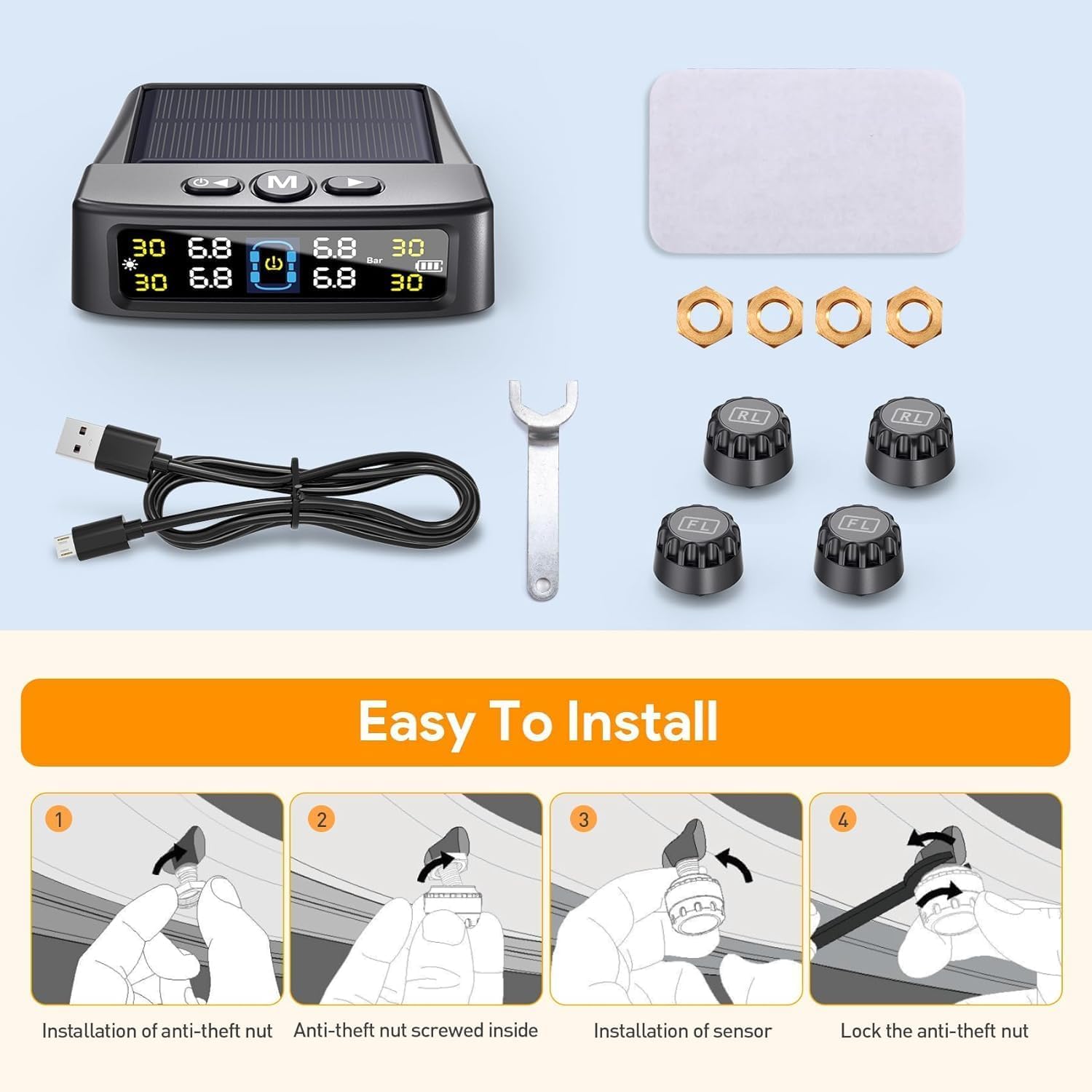
Figure 3: Sensor Installation Steps
Bedryfsinstruksies
Monitor vertoon
The color LCD screen displays real-time tire pressure and temperature for all four tires. The display automatically adjusts its brightness based on ambient light conditions for optimal visibility.

Figure 4: Monitor Display and Sensor Components
Outomatiese aan/af
The system is designed for convenience. It will automatically turn on when your vehicle starts moving and turn off when the vehicle is parked for an extended period, conserving battery life.
Stel alarmdrempels in
Upon initial pairing (which occurs automatically), the system configures the current tire pressure as the reference point. You can adjust high/low pressure and high temperature alarm thresholds through the monitor's menu. Refer to the detailed instructions in the included printed manual for specific button functions and menu navigation.
Alarmmodusse
The GEARGO TPMS provides comprehensive alerts for various tire conditions:
- Hoëdruk alarm: Waarskuwings wanneer banddruk die ingestelde boonste limiet oorskry.
- Laedruk alarm: Waarskuwings wanneer banddruk onder die ingestelde ondergrens daal.
- Hoë temperatuur alarm: Waarskuwings wanneer bandtemperatuur die ingestelde boonste limiet oorskry.
- Fast Leak Alarm: Bespeur en waarsku vinnig afnameasing banddruk.
- Disconnection Alarm: Waarskuwings indien kommunikasie met 'n sensor verlore gaan.
- Lae battery alarm: Indicates low battery level in either the monitor or a sensor.
- Sensor fout alarm: Alerts if a sensor malfunctions.
Upon an alarm, the monitor will display the specific tire affected, emit an audible warning (voice prompt), and flash the relevant icon.

Figuur 5: oorview of 6 Alarm Modes
Laai die monitor
The monitor unit can be charged using two methods:
- Sonkrag laai: The integrated solar panel on top of the monitor charges the internal battery when exposed to sunlight. Ensure the monitor is placed in a location on your dashboard that receives adequate sun exposure.
- USB-laai: For faster charging or when solar charging is insufficient (e.g., during prolonged cloudy weather or night driving), connect the monitor to a USB power source using the provided Type-C charging cable.

Figure 6: Solar and USB Charging Options
Onderhoud
- Skoonmaak: Wipe the monitor and sensors with a soft, dry cloth. Avoid using abrasive cleaners or solvents.
- Sensorbattery: The external sensors have a long lifespan. If a sensor low battery alarm occurs, the sensor may need replacement. Contact customer support for assistance.
- Monitor battery: Ensure the monitor is regularly charged via solar power or USB to maintain optimal performance.
- Berging: If storing the system for an extended period, ensure the monitor battery is fully charged and store in a cool, dry place.
Probleemoplossing
| Probleem | Moontlike oorsaak | Oplossing |
|---|---|---|
| Monitor skakel nie aan nie. | Low battery; vehicle not moving. | Charge the monitor via USB. Ensure the vehicle is in motion for auto-on feature. |
| No tire data displayed. | Sensors not installed correctly; sensor battery low; signal interference. | Re-check sensor installation. Drive for a few minutes to allow sensors to transmit. Ensure no large metal objects are blocking the signal. |
| Onakkurate druklesings. | Sensor not fully tightened; sensor malfunction. | Ensure sensors are securely tightened. Compare readings with a reliable tire gauge. If discrepancy persists, contact support. |
| Alarm klink gereeld. | Alarm thresholds set too sensitively; actual tire issue. | Check tire pressure and temperature manually. Adjust alarm thresholds if necessary (refer to printed manual). Address any actual tire issues immediately. |
Spesifikasies
| Kenmerk | Detail |
|---|---|
| Modelnommer | AM50-PRO |
| Handelsmerk | GEARGO |
| Pressure Detection Range | 0-99 PSI (0-6.8 bar) |
| Laai opsies | Solar, USB Type-C |
| Tipe vertoon | Color LCD with auto-brightness |
| Alarmmodusse | 6 (High/Low Pressure, High Temp, Disconnection, Low Battery, Sensor Fault, Fast Leak) |
| Working Distance (TPMS) | Tot 32.8 voet |
| Monitor afmetings | Approximately 3.7 x 3.55 x 1.18 inches (95mm x 80mm x 20mm) |
| Item gewig | 6.3 onse |
| Batterye | 1 A-battery benodig (ingesluit) |
Voertuigversoenbaarheid
The GEARGO RV Tire Pressure Monitoring System is suitable for a wide range of four-wheel vehicles, including but not limited to:
- Sedans
- SUVs (Sport Utility Vehicles)
- MPVs (Multi-Purpose Vehicles)
- Pick-up Trucks
- RV's (Ontspanningsvoertuie)
- Off-Road Vehicles

Figure 7: Compatible Vehicle Types
Waarborg en Ondersteuning
For warranty information, technical support, or any inquiries regarding your GEARGO RV Tire Pressure Monitoring System, please refer to the contact details provided in the original product packaging or visit the official GEARGO webwerf. Hou jou aankoopkwitansie vir waarborgeise.
GEARGO Official Store: Visit GEARGO Store on Amazon