
FUNYET NY-01
FUNYET 2026 14.1-inch Laptop User Manual
Model: NY-01
Inleiding
This manual provides essential information for setting up, operating, maintaining, and troubleshooting your FUNYET 2026 14.1-inch Laptop. Please read this manual thoroughly before using your device to ensure proper function and longevity.
Wat is in die boks
Verifieer dat alle items in die pakket teenwoordig is:
- FUNYET 2026 14.1-inch Laptop
- Power Adapter (12V2A DC)
- Instructiehandleiding (hierdie dokument)
- Waarborgkaart
Produk verbyview
The FUNYET 2026 laptop is designed for productivity and entertainment, featuring a powerful processor and versatile connectivity.
Sleutel kenmerke
- Bedryfstelsel: Pre-installed Windows 11 Pro for enhanced multitasking and security.
- Verwerker: Intel Celeron N5095 (4 cores, 4 threads, up to 2.9 GHz) for smooth performance.
- Geheue en berging: 16GB LPDDR4 RAM and 512GB M.2 SSD, with support for up to 1TB TF Card expansion.
- Vertoon: 14.1-inch IPS Full HD (1920x1080) screen, offering clear and vibrant visuals, with a 180° foldable hinge for flexible viewing.
- Verbinding: Dual-band 5G Wi-Fi and Bluetooth 5.0 for fast and stable wireless connections.
- Poorte: Includes 2x USB 3.0, 1x 3.5mm Headphone Jack, 1x 3.5mm DC Adapter port, 1x Mini-HDMI, and 1x TF Card slot.
- Battery: Integrated 5000mAh battery providing 4-5 hours of normal use and over 50 hours of standby time.
- Kamera en klank: Built-in 0.3-megapixel front camera and dual microphones for video calls and online meetings.
Komponent Identifikasie
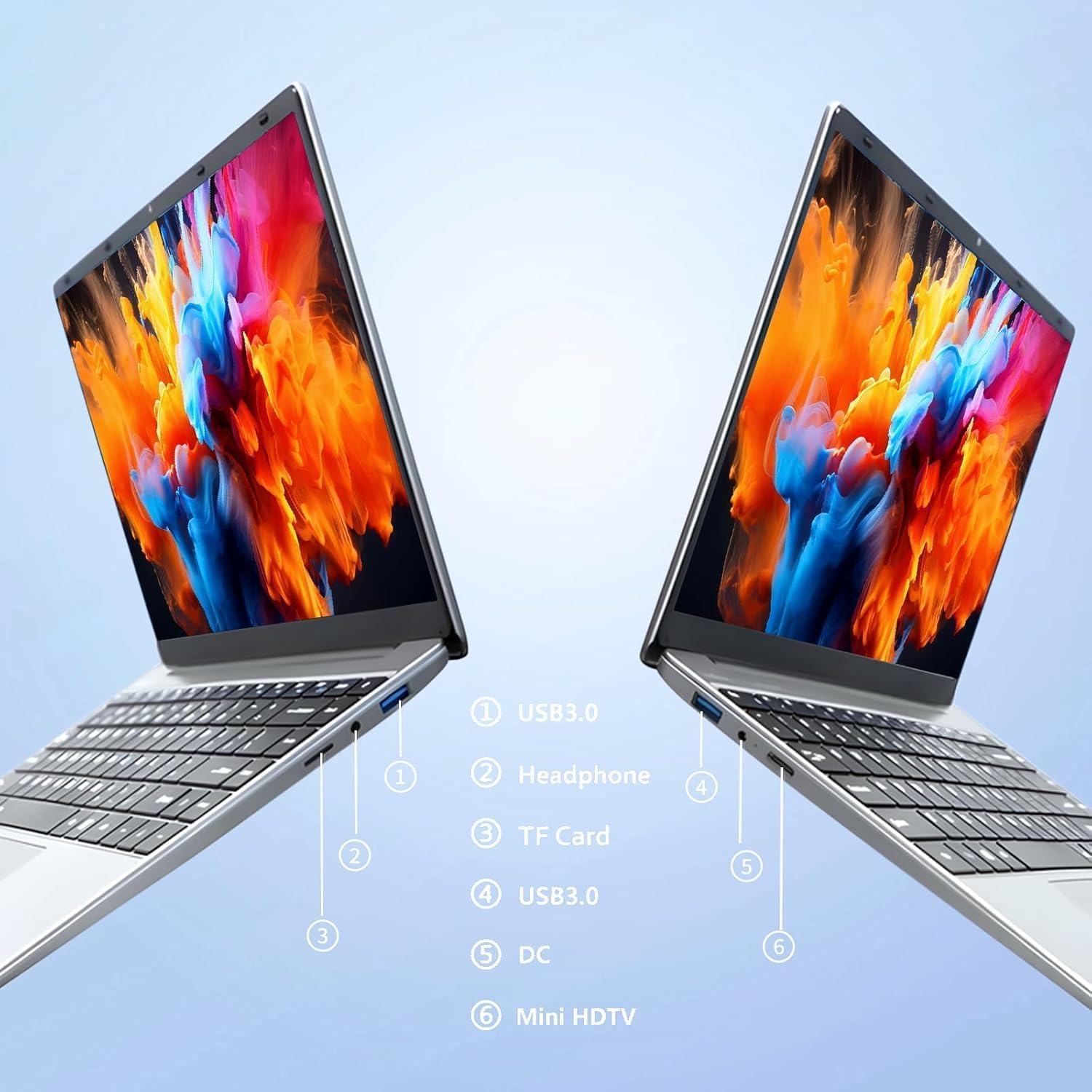
Prent: Kant view of the laptop highlighting port locations.
This image illustrates the various ports available on the FUNYET 2026 laptop. On one side, you will find a USB 3.0 port, a 3.5mm headphone jack, and a TF Card slot. On the opposite side, there is another USB 3.0 port, the DC power input, and a Mini-HDMI port.

Prent: Laptop screen displaying its 14-inch Full HD IPS features.
The laptop features a 14-inch Full HD (1920x1080) IPS display with a 16:9 aspect ratio and ultra-narrow bezels, providing a wide perspective and vivid images.

Prent: Laptop demonstrating its 180-degree foldable hinge.
The laptop's hinge allows the screen to fold back 180 degrees, offering versatile viewing angles and usage modes.
Opstelgids
1. Aanvanklike laai
- Pak die skootrekenaar en kragadapter uit die boks.
- Connect the power adapter to the DC input port on the side of the laptop.
- Steek die kragadapter in 'n muuraansluiting.
- Allow the laptop to charge for at least 30 minutes before first use, or until the battery indicator shows a sufficient charge.
2. Eerste aanskakeling
- Maak die skootrekenaardeksel oop.
- Press the power button, usually located on the keyboard deck or side.
- Volg die instruksies op die skerm om die Windows 11 Pro-opstellingsproses te voltooi, insluitend taalkeuse, netwerkverbinding en die skep van 'n gebruikersrekening.
3. Koppel aan Wi-Fi
- During the initial Windows setup, you will be prompted to connect to a Wi-Fi network. Select your network from the list and enter the password.
- If setting up later, click the Wi-Fi icon in the taskbar, select your network, and click "Connect".
Bedryfsinstruksies
Kragbestuur
- Krag aan: Druk die kragknoppie.
- Slaap stelling: Maak die deksel toe of druk die aan/uit-knoppie kortliks.
- Sluit af: Klik die Start-knoppie, dan Aan/Aan en dan Skakel af.
- Herbegin: Klik die Start-knoppie, dan die Aan/Aan-knoppie en dan die Herbegin-knoppie.
Using the Touchpad and Touchscreen
- Raakblad: Use gestures for navigation. Single tap for left-click, two-finger tap for right-click, two-finger scroll for scrolling.
- Raakskerm: Tap to select, pinch to zoom, swipe to scroll.
Eksterne skermverbinding
To connect an external monitor or projector:
- Connect a Mini-HDMI cable from the laptop's Mini-HDMI port to the external display's HDMI input.
- If necessary, use a Mini-HDMI to HDMI adapter (not included).
- Druk Windows-sleutel + P to open the Project menu and select your desired display mode (Duplicate, Extend, Second screen only).
Using TF Card Expansion
Insert a TF card into the designated slot for additional storage. The laptop supports up to 1TB TF card expansion.
Sorg en Onderhoud
- Skoonmaak: Gebruik 'n sagte, pluisvrye lap om die skerm en onderstel skoon te maak. Vir hardnekkige merke, vee dit effens af.ampMaak die lap skoon met water of 'n skermreiniger. Vermy harde chemikalieë.
- Batterysorg: Om die batterylewe te verleng, vermy om die battery gereeld heeltemal te ontlaai. Bêre die skootrekenaar op 'n koel, droë plek as dit nie vir lang tye gebruik word nie.
- Temperatuur: Operate the laptop within a temperature range of 5°C to 35°C (41°F to 95°F). Avoid direct sunlight or extreme heat/cold.
- Ventilasie: Ensure the ventilation openings are not blocked to prevent overheating. Do not place the laptop on soft surfaces like beds or sofas during operation.
- Sagteware-opdaterings: Dateer Windows en drywers gereeld op om optimale werkverrigting en sekuriteit te verseker.
Probleemoplossing
Algemene kwessies en oplossings
| Probleem | Moontlike Oplossing |
|---|---|
| Skootrekenaar skakel nie aan nie. | Ensure the power adapter is securely connected and plugged into a working outlet. Check if the battery is charged. Try holding the power button for 10-15 seconds for a hard reset. |
| Wi-Fi-verbindingsprobleme. | Check if Wi-Fi is enabled in Windows settings. Restart your router and the laptop. Ensure you are within range of the Wi-Fi signal. Verify the Wi-Fi password. |
| Stadige werkverrigting. | Close unnecessary applications. Check for background processes in Task Manager. Ensure Windows is updated. Consider running a disk cleanup. |
| Eksterne skerm nie bespeur nie. | Ensure the Mini-HDMI cable is connected correctly. Check the input source on your external display. Press Windows-sleutel + P to cycle through display modes. |
| Battery raak vinnig leeg. | Adjust screen brightness. Close power-intensive applications. Check power settings in Windows and select a power-saving plan. Disconnect external peripherals when not in use. |
Tegniese spesifikasies
| Handelsmerk | FUNYET |
| Model Naam | NY-01 |
| Skerm grootte | 14.1 duim |
| Resolusie | 1920 x 1080 (Vol HD) |
| Skermtegnologie | IPS LCD |
| Verwerker | Intel Celeron N5095 (tot 2.9 GHz) |
| RAM | 16 GB LPDDR4 (2400 MHz) |
| Berging | 512 GB M.2 SSD (expandable via TF Card up to 1TB) |
| Bedryfstelsel | Windows 11 Pro |
| Grafika | Geïntegreerde Intel-grafika |
| Draadlose konneksie | 5G Wi-Fi (2.4 GHz, 5.8 GHz), Bluetooth 5.0 |
| Hawens | 2x USB 3.0, 1x 3.5mm Headphone, 1x 3.5mm DC Adapter, 1x Mini-HDMI, 1x TF Card Slot |
| Webnok | 0.3 Megapixel Front Camera |
| Battery kapasiteit | 5000 mAh / 38.5 Wh |
| Afmetings (L x B x H) | 32.2 x 21 x 2.1 cm (12.68 x 8.27 x 0.83 duim) |
| Gewig | 1.4 KG (3.09 lbs) |
| Spesiale kenmerk | 180° Foldable Hinge |
Waarborg en Ondersteuning
Waarborg inligting
Your FUNYET 2026 laptop comes with a 2 jaar waarborg from the date of purchase. Please retain your proof of purchase for warranty claims. The warranty covers manufacturing defects and malfunctions under normal use. It does not cover damage caused by misuse, accidents, unauthorized repairs, or normal wear and tear.
Daarbenewens, a 6-month free exchange/return policy may apply, subject to the terms and conditions of your purchase platform.
Kliënte ondersteuning
For any issues, questions, or technical assistance, please contact FUNYET customer support:
- Aanlyn ondersteuning: Available 24/7. You can typically find support by logging into your Amazon account, navigating to "Your Account" -> "Your orders", and selecting "Ask Product Question" for your FUNYET laptop.
- E-pos: funyestore@outlook.com
- Telefoon: +49 800-000-7147 (Please note operating hours may vary)

Prent: Customer service contact details and warranty information.
This image provides a visual summary of the support options, including the 2-year warranty, 6-month exchange/return policy, and contact information for phone and email support.
Verwante Dokumente - NY-01
 |
Dichiarazione di Trasparenza dei Dati per Portatili FUNYET Informativa completa sulla raccolta, memorizzazione, utilizzo e condivisione dei dati generati dai portatili FUNYET, in conformità con il Data Act e il RGPD. |
 |
Auusda Skootrekenaar: Kenmerke, Spesifikasies en Belangrike Kennisgewings Omvattend oorview van die Auusda-skootrekenaar, insluitend onderdele, hoogtepunte, belangrike gebruiksriglyne en waarborginligting. Beskik oor Intel Celeron N5095, 15.6" FHD IPS-skerm, 16GB RAM, 512GB SSD en Windows 11 Pro. |
 |
Microsoft Surface Pro 5-afbreek: Gedetailleerde komponentanalise en herstelbaarheid Verken die interne argitektuur van die Microsoft Surface Pro 5 met hierdie omvattende afbreekgids. Ontdek gedetailleerde spesifikasies, komponentidentifikasie en insigte in die herstelbaarheidspunt. |
 |
Beelink GTR7 Mini-rekenaar: Gids vir die aktivering van TPM 2.0 vir Windows 11 Stap-vir-stap instruksies oor hoe om TPM 2.0 op die Beelink GTR7 Mini-rekenaar te aktiveer om aan Windows 11-vereistes te voldoen. Leer om BIOS-instellings te navigeer en AMD fTPM te aktiveer. |
 |
ACEMAGIC Notebook User Manual This user manual provides comprehensive information on the ACEMAGIC Notebook, covering its specifications, package contents, safety guidelines, appearance details, and touchpad usage instructions. |
 |
ACEMAGIC AX17 Gebruikershandleiding Gebruikershandleiding vir die ACEMAGIC AX17 skootrekenaar, met besonderhede oor die kenmerke, spesifikasies en gebruiksinstruksies. Sluit veiligheidskennisgewings en 'n handleiding vir die raakvlak in. |
Ask a question about this manual
Ask about setup, troubleshooting, compatibility, parts, safety, or missing instructions. Manuals+ will review the question and use this page’s manual context to help answer it.