
1. Belangrike veiligheidsinstruksies
Lees asseblief alle instruksies sorgvuldig deur voordat u hierdie toestel gebruik en bewaar dit vir toekomstige verwysing. Versuim om hierdie instruksies te volg, kan lei tot elektriese skok, brand of ernstige besering.
- Plaas die waaier altyd op 'n stabiele, plat oppervlak om te verhoed dat dit kantel.
- Moenie die waaier met 'n beskadigde koord of prop gebruik nie. Indien die toevoerkoord beskadig is, moet dit deur die vervaardiger, sy diensagent of soortgelyk gekwalifiseerde persone vervang word om 'n gevaar te vermy.
- Keep the fan away from water or other liquids. Do not immerse the fan in water.
- Do not insert fingers or foreign objects into the fan grille during operation.
- Ontkoppel die waaier uit die kragtoevoer wanneer dit nie gebruik word nie, voor skoonmaak of voor verskuiwing.
- Hierdie toestel is nie bedoel vir gebruik deur persone (insluitend kinders) met verminderde fisiese, sensoriese of geestelike vermoëns, of 'n gebrek aan ervaring en kennis nie, tensy hulle toesig of instruksies oor die gebruik van die toestel gegee is deur 'n persoon wat verantwoordelik is vir hul veiligheid.
- Kinders moet onder toesig wees om te verseker dat hulle nie met die toestel speel nie.
- Do not use the fan near curtains, plants, or other objects that could be drawn into the fan.
- Verseker die voltage indicated on the fan matches the local power supply voltage voor aansluiting.
2. Pakketinhoud
Verifieer dat alle items teenwoordig en in 'n goeie toestand is wanneer u die pakkie oopmaak.
- 1 x DREO Tower Fan (DR-HTF024S)
- 1 x Remote Control (includes 2 x AAA Batteries)
- 1 x Gebruikershandleiding
- A Set of Accessories (for base assembly)
3. Produkdiagram
Familiarize yourself with the components of your DREO Smart Tower Fan.

Beeld: Algeheel view of the DREO Smart Tower Fan, highlighting its sleek design and powerful airflow.

Image: The fan demonstrating its adjustable height feature, extending from 40 to 45 inches.
The fan features a control panel on top, a main tower body with air outlets, and a stable circular base. The adjustable height mechanism is located at the base of the tower.
4. Opstelling
Follow these steps to assemble and prepare your tower fan for use.
- Basissamestelling: Take the two halves of the circular base. Align them and rotate until they securely snap together to form a single unit.
- Attach Tower: Carefully place the main tower fan body onto the assembled base. Ensure it is firmly seated and locked into position. The cord can be routed through designated channels underneath the base.
- Kragverbinding: Steek die kragsnoer in 'n standaard elektriese aansluiting.

Image: Illustration of the fan's one-step height adjustment, allowing it to extend from 40 to 45 inches.
5. Bedryfsinstruksies
Your DREO Smart Tower Fan offers multiple ways to control its functions.
5.1 Beheerpaneel
The intuitive control panel located on the top of the fan allows for direct operation.
- Kragknoppie: Skakel die waaier aan/af.
- Modusknoppie: Wissel deur Normale, Natuurlike, Slaap- en Outomatiese modusse.
- Spoedknoppies (+/-): Verstel waaierspoed van 1 tot 9.
- Ossilasie -knoppie: Activates/deactivates 90° oscillation.
- Timer-knoppie: Stel die outomatiese afskakeltimer (tot 12 uur).
5.2 afstandbeheer
The included remote control provides convenient access to all fan functions from a distance.
- Ensure the remote control batteries (2 x AAA) are correctly installed.
- Point the remote control directly at the fan's receiver for optimal response.
5.3 DREO App Control & Smart Integration
For enhanced control and smart features, download the DREO app and connect your fan.
- Download the DREO app from your smartphone's app store.
- Follow the in-app instructions to pair your fan via Bluetooth or Wi-Fi.
- Once connected, you can control all fan functions, set schedules, and customize modes from your phone.
- The fan is compatible with Google Assistant and Amazon Alexa for voice control. Refer to the DREO app for instructions on linking your fan to these smart home platforms.

Image: A user controlling the DREO Smart Tower Fan via the DREO mobile application.

Image: Screenshot of the DREO app demonstrating customizable sleep modes and scheduling options.
5.4 Modes and Speeds
The fan offers 4 distinct modes and 9 speed settings for personalized comfort.
- Normale modus: Provides a constant airflow at your selected speed.
- Natuurlike modus: Simuleer 'n natuurlike briesie deur die waaierspoed te verander.
- Slaap stelling: Operates at a lower speed with reduced noise for undisturbed rest.
- Outomatiese modus: Adjusts fan speed automatically based on ambient room temperature.
- 9 snelhede: Fine-tune the airflow intensity from a gentle breeze (Speed 1) to powerful cooling (Speed 9).
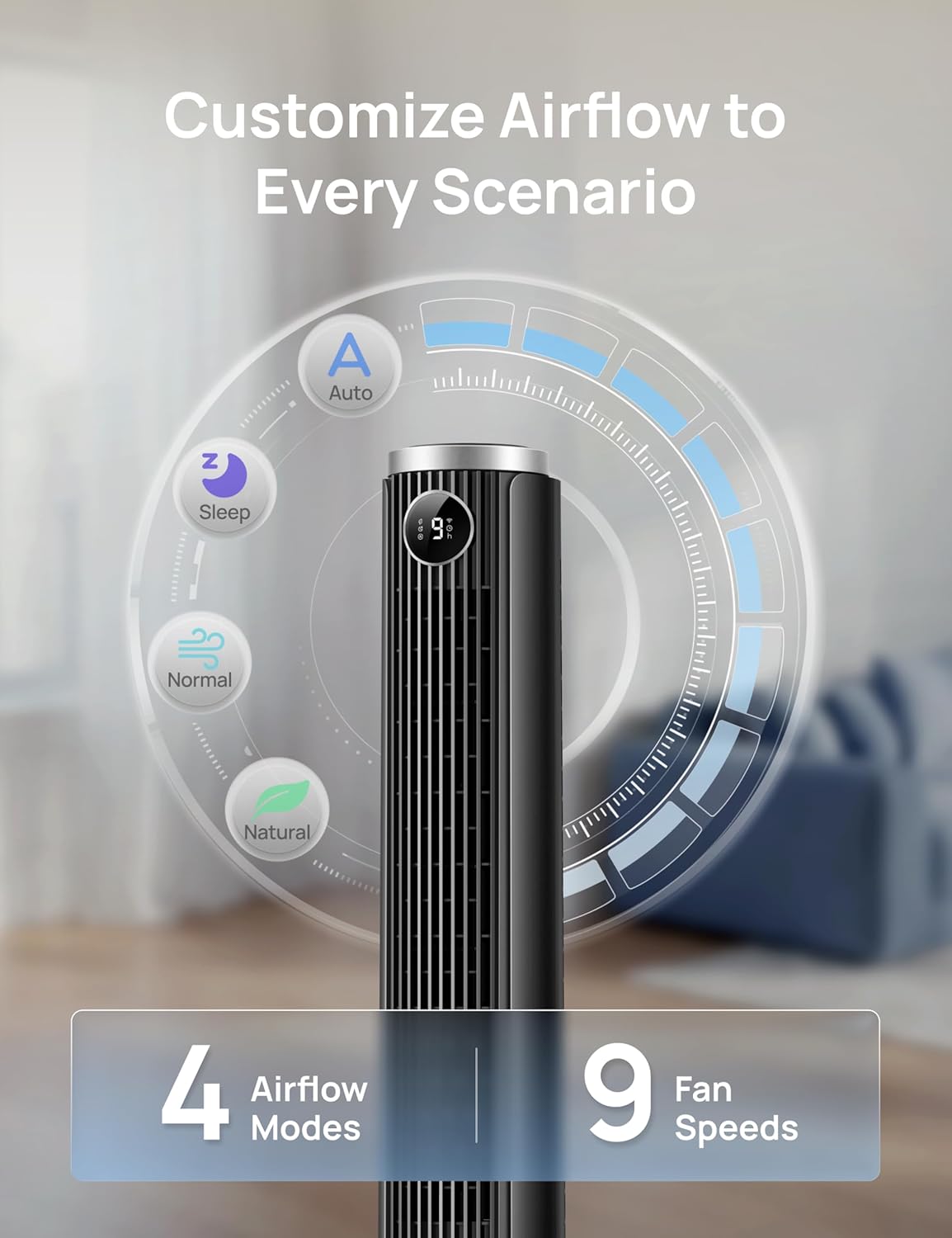
Image: Visual representation of the fan's 4 airflow modes (Auto, Sleep, Normal, Natural) and 9 speed settings.
5.5 Ossillasie
Activate oscillation for wider air distribution.
- The fan oscillates 90° to cover a larger area, ensuring even air circulation throughout the room.

Image: The DREO Smart Tower Fan demonstrating its 90-degree oscillation feature, distributing air across a wide area.
5.6 Tydopnemer
Set the fan to automatically turn off after a specified period.
- The timer can be set for up to 12 hours, allowing you to conserve energy and enjoy cooling as you fall asleep.
5.7 Adjustable Height
Customize the fan's height to suit your needs.
- The fan's height can be adjusted from 40 inches to 45 inches by pressing the foot pedal at the base. This allows you to direct airflow effectively whether you are sitting or standing.
6. Onderhoud
Gereelde onderhoud verseker optimale werkverrigting en lang lewensduur van jou waaier.
6.1 Skoonmaak
- Ontkoppel altyd die waaier voordat dit skoongemaak word.
- Gebruik 'n sagte, damp lap om die buite-oppervlaktes af te vee. Moenie skuurmiddels of oplosmiddels gebruik nie.
- Gebruik 'n stofsuier met 'n borselaanhegsel om stof saggies van die luginlaat- en uitlaatroosters te verwyder.
- Do not allow water to drip into the interior of the fan.
6.2 Berging
- Indien die waaier vir 'n lang tydperk gestoor word, maak dit deeglik skoon.
- Store the fan in its original packaging or a suitable box in a cool, dry place.
- Avoid placing heavy objects on top of the fan during storage.
7. Probleemoplossing
Verwys na hierdie afdeling vir oplossings vir algemene probleme.
| Probleem | Moontlike oorsaak | Oplossing |
|---|---|---|
| Die waaier skakel nie aan nie. | Geen kragtoevoer. Kragkabel nie behoorlik ingeprop nie. Afstandbeheerbatterye is dood. | Kyk of die kragaansluiting werk. Ensure the power cord is securely plugged into the outlet and the fan. Vervang afstandbeheerbatterye. |
| Swak lugvloei. | Waaierspoed is te laag. Luginlate/uitlate is geblokkeer. | Verhoog die waaierspoedinstelling. Clean any dust or obstructions from the grilles. |
| Die waaier is raserig. | Fan is on a high speed setting. Die waaier is nie op 'n stabiele oppervlak nie. Interne obstruksie. | Verminder die waaierspoed. Plaas die waaier op 'n plat, stabiele oppervlak. Unplug and check for any foreign objects inside the grilles. |
| Afstandbeheer werk nie. | Batterye is pap of verkeerd geplaas. Obstruksie tussen afstandbeheerder en waaier. | Vervang batterye en maak seker dat die polariteit korrek is. Ensure a clear line of sight between the remote and the fan. |
| App-beheer werk nie. | Fan not connected to Wi-Fi/Bluetooth. App benodig opdatering. | Check app for connection status and re-pair if necessary. Ensure Wi-Fi is active. Update the DREO app to the latest version. |
8. Spesifikasies
Detailed technical specifications for the DREO Smart Tower Fan (DR-HTF024S).
| Kenmerk | Spesifikasie |
|---|---|
| Handelsmerk | DREO |
| Model Naam | DR-HTF024S |
| Kleur | Swart |
| Elektriese waaierontwerp | Vloerwaaier (Toring) |
| Kragbron | Elektries met koord |
| Produk Afmetings (D x B x H) | 33D x 33B x 115H Sentimeter |
| Verstelbare Hoogte | 40" - 45" |
| Spesiale kenmerke | App Operable, Oscillating, Portable, Quiet Operation, Remote Controlled |
| Aanbevole gebruike | Lugsirkulasie, verkoeling, ventilasie |
| Tipe beheerder | App Control, Remote Control, Touchpad Control |
| Aantal snelhede | 9 |
| Geraasvlak | 20 Decibels (minimum) |
| Wattage | 50 watt |
| Lugvloeikapasiteit | 1473 kubieke voet per minuut |
| Ossillasiehoek | 90° |
| Afteller | 12 ure |
| Materiaal tipe | Plastiek |
| Item gewig | 7.92 pond |
| Sertifisering | ETL |
9. Waarborg en Ondersteuning
DREO provides a warranty for this product. Please refer to the official DREO website or your purchase documentation for the most current and detailed warranty information.
- Waarborgtydperk: Typically, DREO products come with a 1-year limited warranty from the date of purchase.
- Terugsendings: Products purchased from Amazon.ca generally have a 30-day return policy for refund or replacement.
- Kliëntediens: For technical assistance, warranty claims, or general inquiries, please contact DREO customer support through their official webwebwerf of die kontakinligting wat in u produkverpakking verskaf word.
- Aanlyn hulpbronne: Visit the official DREO webwebwerf vir algemene vrae, produkregistrasie en bykomende ondersteuningsbronne.