
1. Produk verbyview
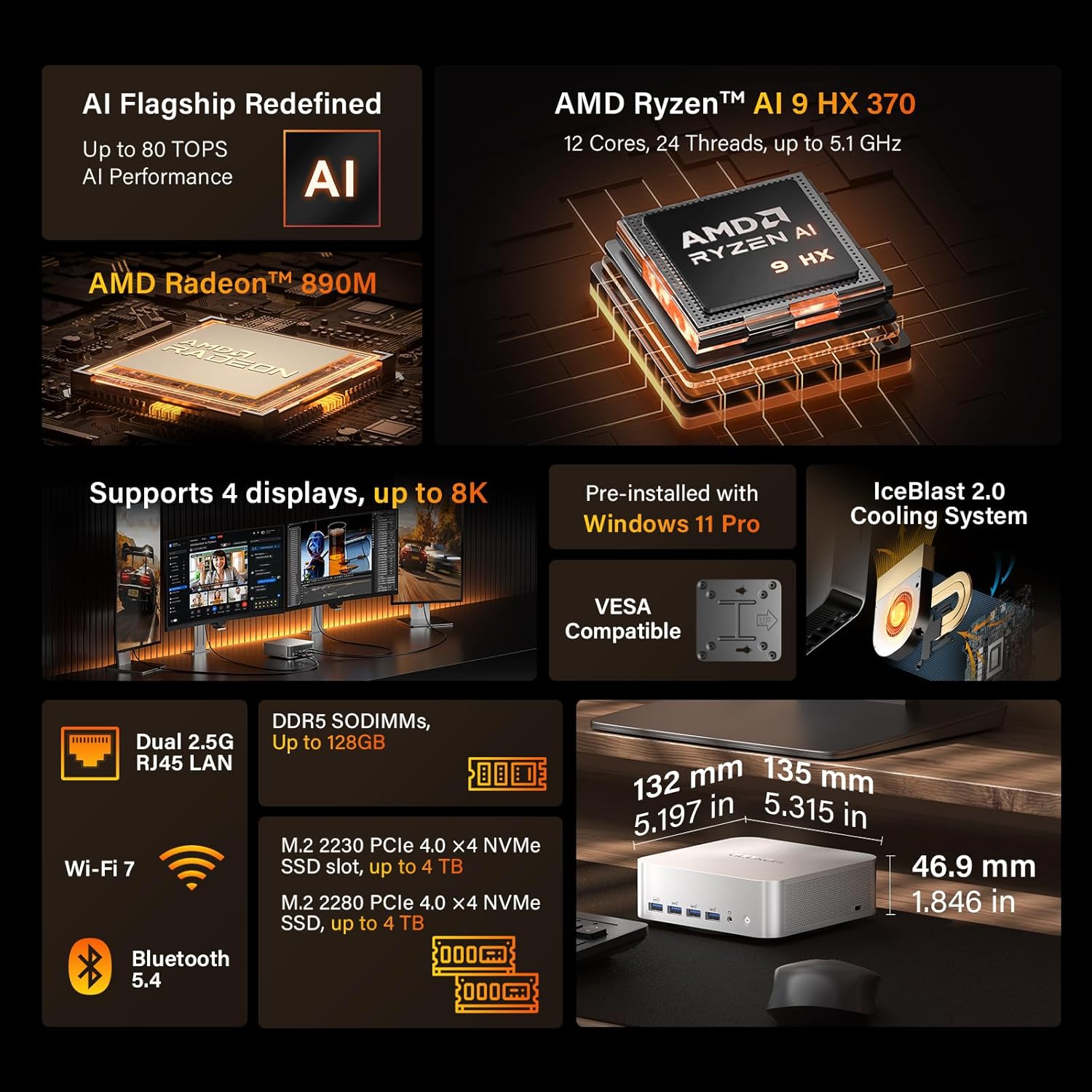
The GEEKOM A9 Max AI Mini PC is a compact and powerful computing solution designed for a wide range of tasks, from advanced AI workloads and gaming to content creation and everyday multitasking. It features the latest AMD Ryzen AI 9 HX 370 processor and AMD Radeon 890M integrated graphics, delivering exceptional performance in a small form factor.

Prent 1: The GEEKOM A9 Max Mini PC, showcasing sy slanke, kompakte ontwerp.
2. Wat is in die boks
Verifieer dat alle items in die pakket teenwoordig is:
- 1 x GEEKOM A9 Max Mini PC
- 1 x HDMI-kabel
- 1 x kragadapter
- 1 x Gebruikersgids
- 1 x VESA-montering

Prent 2: All components included in the GEEKOM A9 Max Mini PC package.
3. Opstelgids
Follow these steps to set up your GEEKOM A9 Max Mini PC:
- Koppel aan krag: Plug the power adapter into the DC-in port on the Mini PC and then into a power outlet.
- Koppel aan skerm: Use the provided HDMI cable to connect your Mini PC to a monitor or TV. The A9 Max supports up to four displays via 2x HDMI 2.1 and 2x USB4 ports.
- Koppel randapparatuur: Koppel jou sleutelbord, muis en ander USB-toestelle aan die beskikbare USB-poorte.
- Krag aan: Press the power button on the front of the Mini PC. The system will boot up with Windows 11 Pro pre-installed.
Knip 1: An unboxing and initial setup guide for the GEEKOM A9 Max Mini PC, demonstrating how to connect essential components.
Prent 3: Voor- en sykant view of the GEEKOM A9 Max, highlighting the USB ports and headphone jack for peripheral connections.
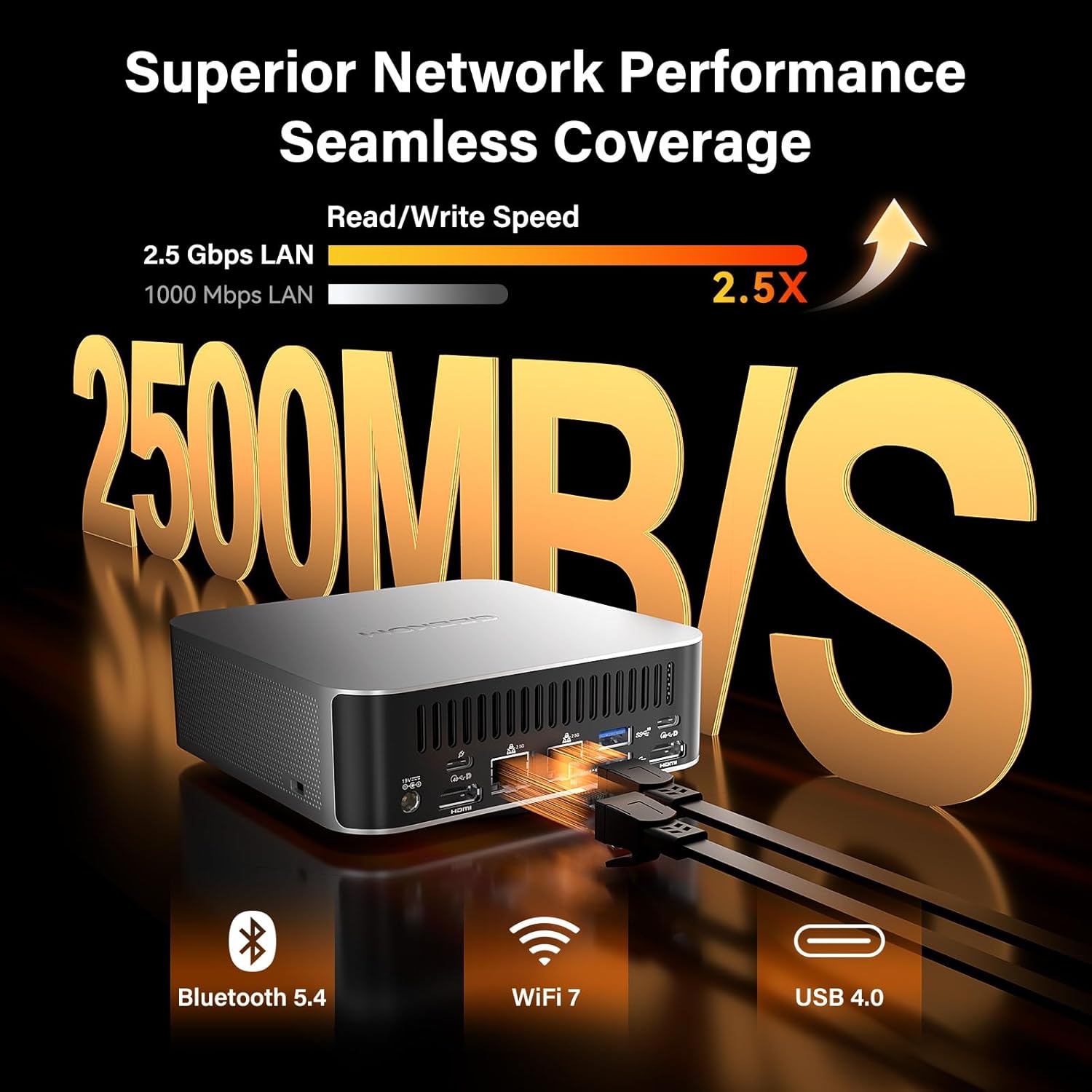
Prent 4: Agter view of the GEEKOM A9 Max, showing the power input, HDMI, USB4, and 2.5GbE LAN ports.
4. Bedryfsinstruksies
4.1 Prestasiemodusse
The GEEKOM A9 Max offers multiple performance modes to suit your needs. These modes can typically be adjusted in the BIOS settings:
- Stille modus: For quiet operation during light tasks.
- Normal Mode (Default): Balanced performance for everyday use.
- Prestasiemodus: Maximizes CPU and GPU power for demanding applications and gaming.
To access BIOS settings, tap the Verwyder (Delete) key at startup/restart.
4.2 Konnektiwiteit
The Mini PC is equipped with advanced connectivity options:
- USB4 Ports: Two USB4 (40Gbps) ports with USB Power Delivery (PD) and display support.
- HDMI 2.1: Two HDMI 2.1 ports supporting up to 8K resolution and up to 4 displays simultaneously.
- USB-A 3.2 Gen2: Five USB-A 3.2 Gen2 ports for various peripherals.
- 2.5GbE LAN: Dual 2.5 Gigabit Ethernet ports for fast and stable wired networking.
- Wi-Fi 7 & Bluetooth 5.4: For high-speed wireless connectivity and reliable device pairing.
- SD 4.0-kaartleser: Full-speed SD 4.0 card reader for creators and professionals.

Prent 5: A multi-monitor setup demonstrating the GEEKOM A9 Max's capability to support up to four 8K displays for enhanced productivity and immersive experiences.
4.3 Bedryfstelselversoenbaarheid
The GEEKOM A9 Max comes with Windows 11 24H2 Pro pre-installed. It also supports other operating systems such as Ubuntu, Manjaro, and Android-x86, making it versatile for various user needs.
Knip 2: A video highlighting the sustained power and performance of the GEEKOM A9 Max, ideal for demanding tasks.
5. Onderhoud en Opgraderings
5.1 Verkoelingstelsel
The A9 Max features the IceBlast 2.0 thermal system, which includes an oversized copper heatsink, dual heat pipes, and a high-performance fan. This system ensures efficient heat dissipation and prevents thermal throttling, maintaining stable performance even under heavy loads.

Prent 6: Diagram illustrating the IceBlast 2.0 cooling system with its copper heatsink and dual heat pipes for optimal thermal management.
5.2 Memory and Storage Upgrades
The Mini PC comes with 32GB DDR5 RAM and supports upgrades up to 128GB. It also features dual PCIe Gen4 NVMe SSD slots (1x M.2 2280 + 1x M.2 2230), each expandable to 4TB, allowing for significant storage and performance enhancements.

Prent 7: Intern view of the GEEKOM A9 Max, showing the accessible DDR5 SODIMM slots and M.2 NVMe SSD slots for easy upgrades.
5.3 Duursaamheid
The GEEKOM A9 Max features a sleek all-metal chassis that enhances durability and improves heat dissipation. It is rigorously tested for thermal stability and long-term reliability under intensive use.
Knip 3: A video explaining the durability and quality control processes that ensure GEEKOM Mini PCs outlast competitors.
6. Probleemoplossing
If you encounter any issues with your GEEKOM A9 Max, consider the following common troubleshooting steps:
- Geen skerm: Ensure all display cables (HDMI, USB4) are securely connected to both the Mini PC and the monitor. Try a different cable or monitor if possible.
- Kragkwessies: Verify the power adapter is correctly plugged into the Mini PC and a working power outlet. If the device does not power on, try a different outlet.
- Stadige prestasie: Check for background applications consuming resources. Ensure your operating system and drivers are up to date. Consider switching to a higher performance mode in BIOS if applicable.
- Randapparatuur nie opgespoor nie: Try connecting the peripheral to a different USB port. Ensure drivers for the peripheral are installed.
- Stelselonstabiliteit/Ineenstortings: Ensure the system is adequately ventilated and not overheating. Update BIOS and all system drivers. If issues persist, consider reinstalling the operating system or contacting support.
7. Spesifikasies
| Kenmerk | Detail |
|---|---|
| Handelsmerk | GEEKOM |
| Model Naam | GEEKOM A9 Max |
| Bedryfstelsel | Windows 11 Pro |
| SVE Model | AMD Ryzen AI 9 HX 370 |
| SVE-spoed | Tot 5.1 GHz |
| Grafiese medeverwerker | AMD Radeon 890M |
| RAM-geheue geïnstalleer | 32 GB DDR5 |
| RAM Geheue Maksimum Grootte | 128 GB |
| Hardeskyf beskrywing | SSD (1TB installed, expandable to 4TB) |
| Video-uitset-koppelvlak | 2 x HDMI 2.1, 2 x USB4 |
| Maksimum vertoonresolusie | 7680x4320 piksels (8K) |
| Verbindingstegnologie | Bluetooth 5.4, Dual 2.5G LAN, USB4, Wi-Fi 7 |
| Item afmetings | 5.32 x 5.2 x 1.8 duim |
| Item gewig | 1.66 kilogram |
| Verkoelingsmetode | Air (IceBlast 2.0) |
8. Waarborg en ondersteuning
The GEEKOM A9 Max AI Mini PC comes with a 3-jaar beperkte waarborg from the date of purchase, covering defects in materials and workmanship. This warranty reflects GEEKOM's commitment to quality and long-term reliability.
For technical support or warranty claims, please refer to the contact information provided in your user guide or visit the official GEEKOM website. You can also contact the seller directly through your Amazon buyer's account by navigating to your order and selecting "Get help" or contacting the After-sales Team via email.