
1. Inleiding
Thank you for choosing the ACEMAGIC M5 Mini PC. This manual provides essential information for setting up, operating, and maintaining your device. Please read it carefully to ensure optimal performance and longevity of your Mini PC.
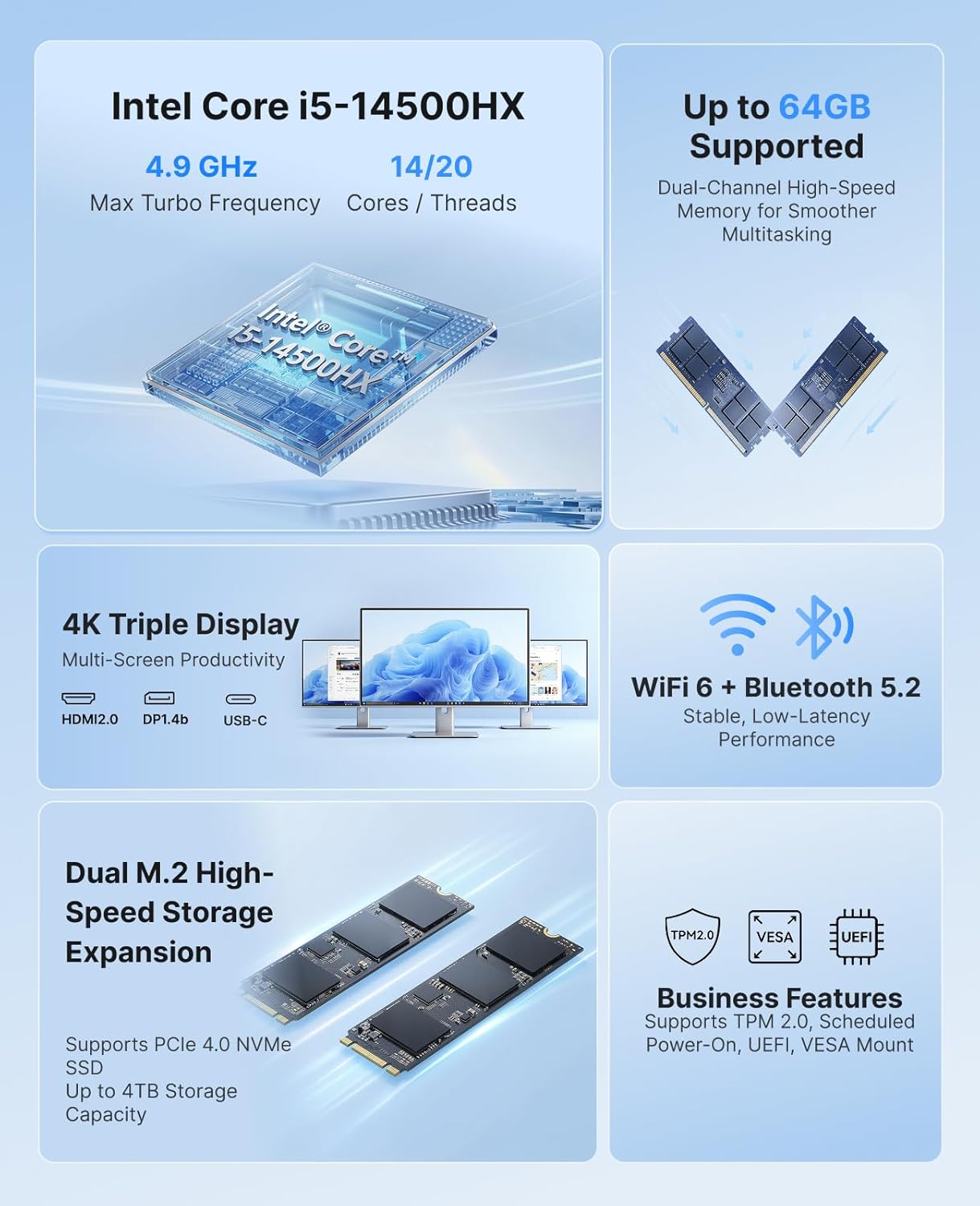
The ACEMAGIC M5 is a compact and powerful computing solution, featuring an Intel Core i5-14500HX processor, 32GB DDR4 RAM, and a 1TB NVMe PCIe4.0 SSD. It comes pre-installed with Windows 11 Pro and supports triple 4K display output, making it suitable for various applications from office work to multimedia entertainment.
2. Wat is in die boks
Kontroleer asseblief die inhoud van u pakket. Indien enige items ontbreek of beskadig is, kontak kliëntediens.
- 1 x ACEMAGIC M5 Mini PC
- 1 x kragadapter
- 1 x HDMI-kabel
- 1 x VESA Mount & Screws
- 1 x Gebruikershandleiding

Image: Contents of the ACEMAGIC M5 Mini PC package, including the Mini PC unit, power adapter, HDMI cable, VESA mount, and user manual.
3. Produk verbyview
The ACEMAGIC M5 Mini PC is designed for high performance in a compact form factor. Below is an overview of its key features and connectivity options.

Beeld: 'n Oorview of the ACEMAGIC M5 Mini PC highlighting its Intel Core i5-14500HX processor, up to 64GB RAM support, dual M.2 high-speed storage expansion, 4K triple display, WiFi 6 + Bluetooth 5.2, and business features like TPM 2.0 and VESA mount.
3.1 Front and Side Ports
Beeld: Nabyskoot view of the ACEMAGIC M5 Mini PC showing the front and side ports. The front includes a power button, USB 3.2 Gen 2 Type-A ports, and a 3.5mm audio jack. The sides feature ventilation grilles.
- Kragknoppie: Om die toestel aan/af te skakel.
- USB 3.2 Gen 2 Tipe-A-poorte (x2): For connecting peripherals like keyboards, mice, or external drives.
- 3.5 mm oudio-aansluiting: Vir oorfone of luidsprekers.
- Ventilasieroosters: Verseker behoorlike lugvloei vir verkoeling.
3.2 Agterpoorte

Image: A diagram illustrating the rear ports of the ACEMAGIC M5 Mini PC. It shows multiple USB ports, HDMI, DisplayPort, LAN, and DC power input.
- Tipe-C-poort (x1): 10Gbps data transfer, DP1.4 4K@60Hz video output, and 15W PD output.
- USB 3.2 Gen 2 Tipe-A-poorte (x4): High-speed connectivity for various USB devices.
- RJ45 Gigabit Ethernet-poort (x1): Vir bedrade netwerkverbinding.
- HDMI 2.0 Port (x1): Ondersteun 4K@60Hz video-uitvoer.
- DisplayPort 1.4b (x1): Ondersteun 4K@60Hz video-uitvoer.
- DC Power Input (x1): Koppel die ingeslote kragadapter hier aan.
4. Opstelinstruksies
Follow these steps to set up your ACEMAGIC M5 Mini PC for the first time.
- Verbind skerm: Connect your monitor(s) to the Mini PC using the HDMI, DisplayPort, or Type-C ports. The device supports up to three 4K displays simultaneously.
- Koppel randapparatuur: Koppel jou sleutelbord, muis en enige ander USB-toestelle aan die beskikbare USB-poorte.
- Koppel krag: Connect the power adapter to the DC power input port on the back of the Mini PC, then plug the adapter into a power outlet.
- Krag aan: Druk die aan/uit-knoppie aan die voorkant van die Mini-rekenaar. Die aan/uit-aanwyserliggie sal brand.
- Aanvanklike opstelling: The Mini PC comes with Windows 11 Pro pre-installed. Follow the on-screen instructions to complete the initial Windows setup. It is recommended to avoid connecting to Wi-Fi or LAN initially to prevent long updates from delaying desktop access.
5. Bedryfsinstruksies
5.1 Basiese werking
- Krag aan/af: Press the power button once to turn on. To turn off, click the Start menu in Windows and select Power > Shut down.
- Herbegin: From the Start menu, select Power > Restart.
- Slaap stelling: From the Start menu, select Power > Sleep.
5.2 Vertoonkonfigurasie
The ACEMAGIC M5 supports triple 4K display output, allowing for enhanced multitasking and visual fidelity.

Image: A user working with three monitors connected to the ACEMAGIC M5 Mini PC, demonstrating its triple 4K display capability via HDMI, DisplayPort, and USB-C.
- Connect up to three monitors using any combination of HDMI, DisplayPort, and Type-C ports.
- To configure display settings in Windows, right-click on the desktop and select
Verwante Dokumente - M5

Dell OptiPlex 7000 Micro Setup and Specifications Guide
Comprehensive setup guide and detailed technical specifications for the Dell OptiPlex 7000 Micro (Models D15U, D15U001, D15U002). Features 12th Gen Intel Core processors (i3, i5, i7, i9), DDR4/DDR5 memory, and Windows 11 support. Covers hardware, connectivity, performance, and support resources.
ASRock B250M DASH Motherboard User Manual
A detailed user manual for the ASRock B250M DASH motherboard, covering installation, specifications, features, and compatibility for PC builders.
HP EliteBook 840 G10 Onderhouds- en Diensgids
Omvattende onderhouds- en diensgids vir die HP EliteBook 840 G10 skootrekenaar, met besonderhede oor komponentidentifikasie, verwyderings-/vervangingsprosedures, stelselherstel, BIOS-instellings, spesifikasies en probleemoplossing vir optimale toestelversorging.
i-TECH WLT14-i5 Rugged Laptop - Specifications and Features
Detailed specifications and features of the i-TECH WLT14-i5 14-inch rugged laptop, powered by Intel Core i5, featuring 32GB DDR5 RAM, 512GB NVMe SSD, and robust connectivity for field performance.
XTREME PC GAMING TUF Grey Desktop with Intel Core i5 & RTX 5060
Discover the XTREME PC GAMING TUF Grey desktop, a high-performance gaming PC featuring an Intel Core i5 12400F processor, NVIDIA GeForce RTX 5060 graphics, 32GB DDR4 RAM, and a 1TB SSD. Optimized for gaming and multitasking with Windows 11.
Fujitsu ESPRIMO G5010 Desktop PC: Mini, Mighty, High-Performance Business Computer
Datasheet for the Fujitsu ESPRIMO G5010, a compact and powerful mini PC designed for modern business environments. Features 10th Gen Intel Core processors, flexible mounting, and extensive connectivity.Ask a question about this manual
Ask about setup, troubleshooting, compatibility, parts, safety, or missing instructions. Manuals+ will review the question and use this page’s manual context to help answer it.