
1. Inleiding
This manual provides detailed instructions for the LAUNCH Creader Elite V3.0 OBD2 Scanner, a professional diagnostic tool designed specifically for Land Rover and Jaguar vehicles. It covers device setup, operational procedures for various diagnostic and service functions, software updates, and troubleshooting tips. Please read this manual thoroughly before operating the device to ensure correct usage and optimal performance.
2. Produk verbyview
2.1. Wat is in die boks
- 1 * LAUNCH Creader Elite V3.0 OBD2 Scanner for JLR
- 1 * OBD2 Diagnostic Cable
- 1 * Vinnige Begingids
- 1 * Gebruikershandleiding
2.2. Sleutel kenmerke
The LAUNCH Creader Elite V3.0 offers a comprehensive suite of features for vehicle diagnostics and maintenance:
- Verbeterde hardeware: Features Android 8.1 operating system, 32GB ROM, 3000mAh battery, and 2.4&5GHz dual-band Wi-Fi for improved performance.
- DoIP Protocol Support: Supports the new DoIP protocol for Land Rover & Jaguar models manufactured after 2017 (requires an adapter).
- Full Systems Diagnostics: Provides in-depth scanning for all available vehicle modules, including engine, transmission, ABS, SRS, and more.
- Tweerigtingbeheer (Aktiewe Toets): Allows control of vehicle components and systems for active testing, such as windows, mirrors, wipers, and horn.
- Comprehensive Service Functions: Includes Oil Reset, Electronic Parking Brake (EPB) Reset, Battery Management System (BMS) Reset, Steering Angle Sensor (SAS) Calibration, Injector Coding, Throttle Relearn, Height Calibration, Transmission Adaptation, Crankshaft/Camshaft Relearn, Sunroof Calibration, and more.
- 4-in-1 Regstreekse datastroom: Displays real-time data from multiple sensors simultaneously in a graphical format, with recording and playback capabilities.
- Smart Diagnostic Functions: Features Auto VIN for automatic vehicle identification, DTC Lookup for code explanations, and the ability to generate and share diagnostic reports.
- Volle OBD2-funksies: Supports all 10 OBD2 test modes for universal vehicle compatibility (post-1996 models).
- Lewenslange gratis opdaterings: Provides lifetime free software updates specifically for Land Rover and Jaguar vehicle brands.
2.3. Device Comparison
The Creader Elite V3.0 offers significant upgrades over previous versions:

Image: Comparison of Creader Elite V3.0, V2.0, and V1.0, highlighting V3.0's superior features like DoIP, Android 8.1, 32GB memory, and 2.4&5GHz WiFi.
2.4. Fisiese beskrywing
The device features a durable orange casing with a 4-inch touchscreen display. The back of the device includes product identification details such as the model number, FCC ID, and serial number.
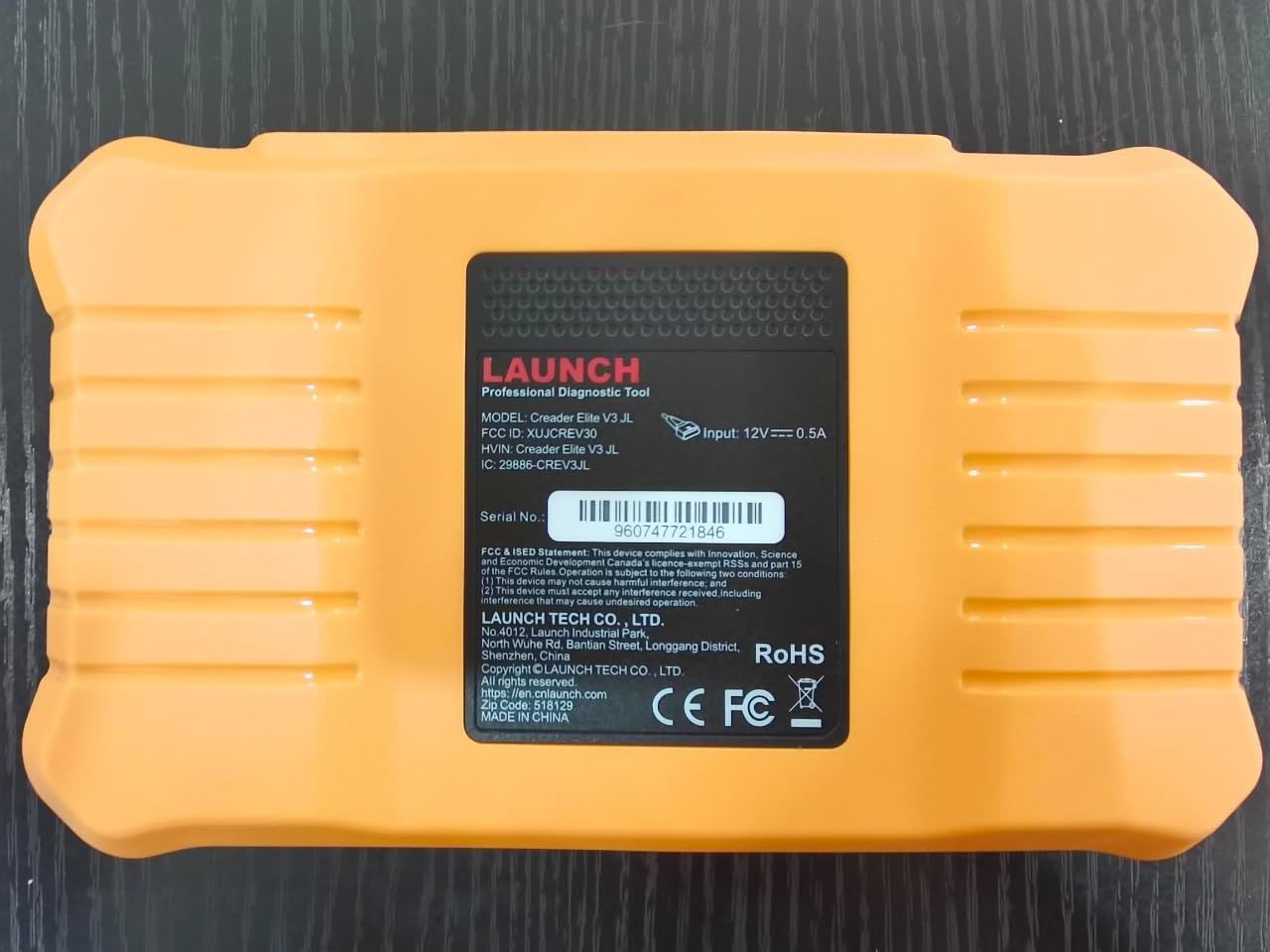
Beeld: Agter view of the LAUNCH Creader Elite V3.0, displaying the model number, FCC ID, and serial number (e.g., 960747721846).
3. Opstelling
3.1. Aanvanklike aanskakeling
- Maak seker dat die toestel ten volle gelaai is of aan 'n kragbron gekoppel is.
- Druk en hou die aan/af-knoppie in totdat die skerm verlig.
- Volg die aanwysings op die skerm om jou voorkeurtaal en -streek te kies.
3.2. Wi-Fi-verbinding
- Vanuit die hoofkieslys, navigeer na Instellings.
- Kies Wi-Fi en skakel dit aan.
- Kies jou verlangde Wi-Fi-netwerk uit die lys en voer die wagwoord in indien gevra.
- Confirm the connection. A stable internet connection is required for software updates and online resources.
3.3. Registrasie en aktivering
Upon first use or after a factory reset, you may be prompted to register your device. Follow the on-screen instructions to create an account or log in. This step is crucial for accessing software updates and technical support.
4. Bedryfsinstruksies
4.1. Verbinding met die voertuig
- Locate the vehicle's OBD2 diagnostic port, typically under the dashboard on the driver's side.
- Ensure the vehicle's ignition is in the ON position (engine off or running, depending on the test).
- Connect the OBD2 diagnostic cable to the vehicle's OBD2 port and to the LAUNCH Creader Elite V3.0 device.
- The device will automatically power on or prompt you to do so.
4.2. Full Systems Diagnostics
This function allows you to scan all available electronic control units (ECUs) in the vehicle.

Image: Display showing OE-level all system diagnostics, including Auto VIN, fault codes, 4-in-1 live data, and MIL reset.
- Kies uit die hoofkieslys Plaaslike diagnose.
- Choose the vehicle brand (Land Rover or Jaguar).
- Kies Outo-soektog or Handmatige seleksie. Auto Search (Auto VIN) will attempt to automatically identify the vehicle.
- Once the vehicle is identified, select Gesondheidsverslag or Stelselskandering to perform a comprehensive scan of all modules.
- Review the diagnostic trouble codes (DTCs) and ECU information. You can then choose to clear codes if necessary.
4.3. Diensfunksies
The Creader Elite V3.0 provides numerous maintenance and reset services. Access these functions via Diagnose > Brand > System Selection > Special Function.

Beeld: Oorview of various service functions including Oil Reset, Brake Reset, SAS Calibration, Start-Stop Reset, TPMS Reset, Injector Coding, Battery Reset, ABS Bleeding, Seat Calibration, and Height Calibration.
Common services include:
- Olie-herstel: Stel die enjinolie-lewensduurstelsel terug.
- EPB-terugstelling: Resets the electronic parking brake after replacement.
- SAS Kalibrasie: Kalibreer die stuurhoeksensor.
- Inspuiterkodering: Codes new injector numbers into the ECU.
- Herleer die versneller: Leer die posisie van die smoorklep weer.
- Hoogte kalibrasie: Calibrates the vehicle's suspension height.
- Battery-terugstelling: Registers a new battery replacement.
- ABS-bloeding: Voer ABS-remontluchtingsprosedures uit.
Note: The availability of specific service functions may vary depending on the vehicle model and year. Always check compatibility before performing a service.
4.4. Tweerigtingbeheer (Aktiewe Toetse)
Active tests allow you to send commands to vehicle systems and components to verify their functionality.

Image: Depicts bi-directional active tests, showing the device sending commands to vehicle actuators like wipers, windows, clutch, and injectors to check their status.
- Navigate to the desired vehicle system within the diagnostic menu.
- Kies Aktiewe toets or Tweerigtingbeheer.
- Choose the specific component or system you wish to test (e.g., 'Wiper Test', 'Window Test', 'Horn Test').
- Volg die instruksies op die skerm om die komponent se reaksie te aktiveer en waar te neem.
4.5. Volle OBD2-funksies
For universal vehicle diagnostics (all OBD2 compliant vehicles after 1996), use the OBD II spyskaart opsie.
- Lees kodes: Retrieves generic (P0, P2, P3, U0) and manufacturer specific (P1, P3, U1) codes.
- Duidelike kodes: Clears diagnostic trouble codes and turns off the Malfunction Indicator Light (MIL).
- Regstreekse data: Displays real-time data stream from the vehicle's sensors.
- I/M-gereedheid: Kontroleer die gereedheid van emissieverwante monitors.
- Vriesraam: Displays a snapshot of operating conditions at the time of an emission-related fault.
- O2-sensortoets: Haal die resultate van die O2-sensormonitor op.
- Toets van die aanboordmonitor (modus 6): Haal resultate op vir emissieverwante aandrywingstelselkomponente en -stelsels.
- EVAP-stelseltoets (Modus 8): Begin 'n toets van die verdampingsemissiebeheerstelsel.
- Voertuiginligting: Haal voertuigidentifikasienommer (VIN), kalibrasie-ID (CALID) en kalibrasieverifikasienommer (CVN) op.
4.6. Real-Time Monitoring and Data Stream
Monitor various vehicle parameters in real-time to diagnose intermittent issues or verify repairs.

Image: Real-time monitoring screen showing battery voltage, transmission oil temperature, coolant temperature, and vehicle speed, with a detailed 4-in-1 data stream graph below.
- From the diagnostic menu, select Regstreekse data.
- Kies die parameters wat jy wil monitor.
- The device can display up to four data streams simultaneously in a graphical format.
- Gebruik die Rekord en Afspeel functions to capture and review data for later analysis.
4.7. Smart Diagnostic Features
The device includes features to streamline the diagnostic process:
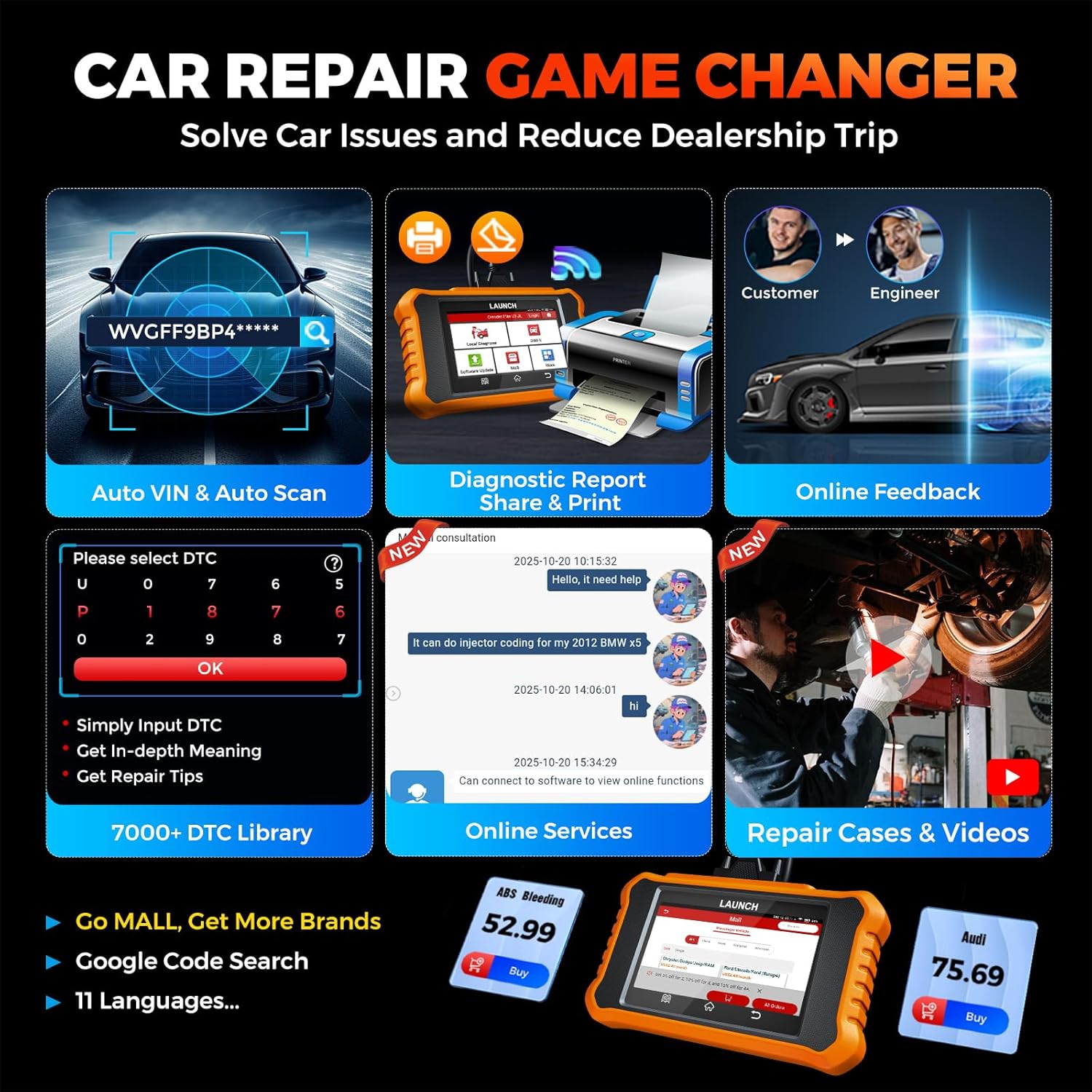
Image: Smart diagnostic features such as Auto VIN, diagnostic report generation and printing, online feedback, 7000+ DTC library, and access to online services.
- Outo-VIN: Automatically identifies vehicle information (year, make, model) for quicker diagnostics.
- DTC-soektog: Provides detailed explanations for diagnostic trouble codes.
- Diagnostiese Verslag: Generates a professional diagnostic report that can be shared or printed.
- Aanlyn terugvoer: Allows users to submit feedback or issues directly to technical support.
5. Maintenance & Updates
5.1. Sagteware-opdaterings
The LAUNCH Creader Elite V3.0 offers lifetime free software updates for Land Rover and Jaguar brands.
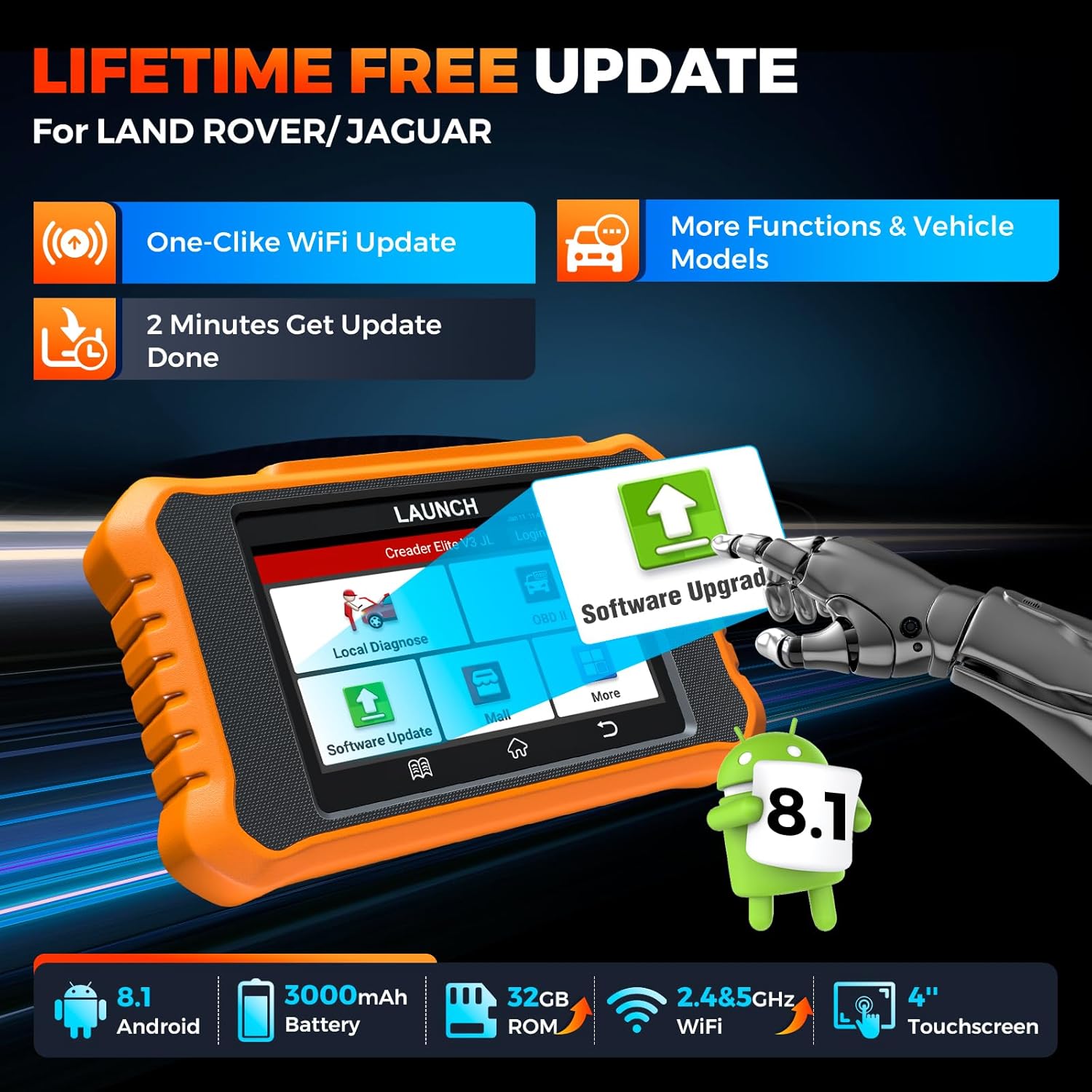
Image: Device screen illustrating the one-click Wi-Fi update process, emphasizing lifetime free updates for Land Rover/Jaguar and the ability to get more functions and vehicle models.
- Maak seker dat die toestel aan 'n stabiele Wi-Fi-netwerk gekoppel is.
- Kies uit die hoofkieslys Sagteware-opdatering.
- The device will check for available updates.
- Select the updates you wish to install and follow the on-screen prompts. Updates typically take a few minutes.
5.2. Expanding Vehicle Coverage (Mall)
If you require diagnostic capabilities for other vehicle brands beyond Land Rover and Jaguar, you can purchase additional software packages from the Mall application on the device. Please note that software purchased from the Mall is typically valid for one year and may require re-purchase after expiry.
5.3. Toestelversorging
- Hou die toestel skoon en vry van stof en vog.
- Vermy om die toestel te laat val of om dit aan sterk impakte te onderwerp.
- Berg die toestel op 'n koel, droë plek wanneer dit nie gebruik word nie.
- Gebruik slegs die meegeleverde laaikabel en bykomstighede.
6. Verenigbaarheid
The LAUNCH Creader Elite V3.0 is primarily designed for:

Image: Device interface showing diagnostic options for Land Rover (Defender, Discovery, Range Rover, Evoque) and Jaguar (E-Pace, F-Pace, F-Type, S-Type, X-Type, XE, XF, XJ, XK) models, with a note on DoIP protocol for models after 2017.
- Land Rover: Compatible with models such as Defender, Discovery, Discovery Sport, Range Rover, Range Rover Evoque, etc.
- Jaguar: Compatible with models such as E-Pace, F-Pace, F-Type, S-Type, X-Type, XE, XF, XJ, XK, etc.
- DoIP-protokol: Supports Land Rover & Jaguar models after 2017, requiring a separate DoIP adapter.
- Universal OBD2: Fully compatible with all OBD2 compliant vehicles manufactured after 1996 for basic OBD2 functions.
For specific vehicle compatibility, it is recommended to contact technical support via obdbox21@163.com.
7. Spesifikasies
| Model | LAUNCH Creader Elite 3.0-JL |
| Bedryfstelsel | Android 8.1 |
| Skerm grootte | 4 duim |
| Interne berging (ROM) | 32 GB |
| Battery kapasiteit | 3000mAh |
| Wi-Fi | 2.4 & 5GHz Dual-band |
| Kragbron | Battery aangedrewe |
| Item gewig | 1.49 pond |
| Pakket afmetings | 8 x 7.5 x 1.5 duim |
| Tipe motorpas | Universal Fit (for OBD2 functions) |
8. Probleemoplossing
8.1. Toestel skakel nie aan nie
- Check battery level. Connect the device to a charger and allow it to charge for at least 30 minutes.
- Maak seker dat die aan/uit-knoppie korrek gedruk en gehou word.
- If connected to the vehicle, ensure the vehicle's ignition is on and the OBD2 cable is securely connected.
8.2. Communication Error with Vehicle
- Verify the OBD2 cable is securely connected to both the device and the vehicle's port.
- Ensure the vehicle's ignition is in the ON posisie.
- Confirm that the vehicle is OBD2 compliant (generally 1996 and newer for US vehicles).
- Try a different OBD2 compliant vehicle to rule out a vehicle-specific issue.
- Ensure the correct vehicle brand software is installed and up to date.
8.3. Sagteware-opdateringsmislukking
- Check your Wi-Fi connection for stability and signal strength.
- Ensure the device has sufficient battery charge or is connected to power during the update process.
- Verify that there is enough free storage space on the device.
- Herbegin die toestel en probeer die opdatering weer.
8.4. Inaccurate Readings or Functions Not Working
- Ensure the vehicle's make, model, and year are correctly identified by the device.
- Verify that the specific function is supported for your vehicle model and year. Refer to the compatibility section or contact support.
- Ensure the device software is fully updated.
9. Waarborg en Ondersteuning
9.1. Waarborginligting
The LAUNCH Creader Elite V3.0 comes with an Extended 60-Day Return & Replacement policy and a 5-Year Quality Backup. Please retain your proof of purchase for warranty claims.
9.2. Tegniese Ondersteuning
For any technical assistance, questions, or compatibility inquiries, please contact our support team:
- E-pos: obdbox21@163.com
- Our support team is available 24/7/365.
Note: Please direct all support inquiries to the provided email address. Do not contact LAUNCH Tech USA for support related to this specific product.