
Inleiding
Thank you for choosing the Boytond Q58 Ultra Open Ear Earbuds. These earbuds are designed to provide a comfortable and immersive audio experience while keeping you aware of your surroundings. This manual will guide you through the setup, operation, and maintenance of your new earbuds to ensure optimal performance.
Produk verbyview
The Boytond Q58 earbuds feature an innovative open-ear design, ensuring comfort for extended wear without blocking ambient sounds. They are lightweight and designed for a secure fit.
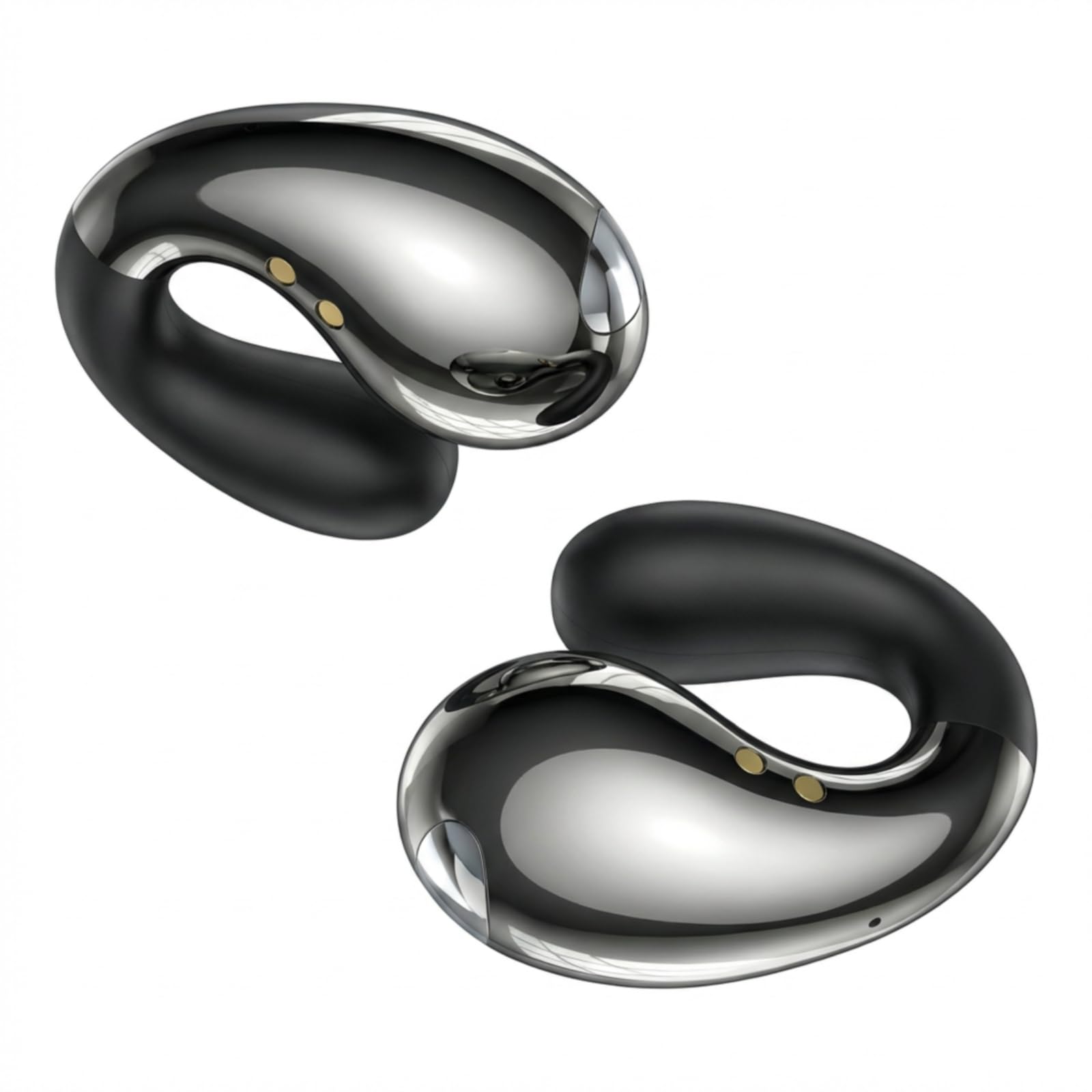
Image: Boytond Q58 Ultra Open Ear Earbuds in their charging case.
Sleutel kenmerke:
- Oop-oor ontwerp: Allows you to hear your music and your surroundings simultaneously.
- Liggewig gemak: Each earbud weighs only 5g, designed for pressure-free wear.
- Bluetooth 5.3: Provides stable and fast wireless connectivity.
- Raakbeheer: Intuitive touch sensors for managing audio and calls.
- Waterdig: Suitable for various activities, including exercise.

Image: A close-up of a single Boytond Q58 earbud, highlighting its ergonomic and lightweight design.
Opstelling
1. Laai die oordopjes en houer
Before first use, fully charge the earbuds and the charging case. Connect the charging case to a USB power source using the provided USB-C cable. The digital display on the case will show the battery percentage.

Image: The Boytond Q58 charging case connected to a power source, showing the digital battery display at 100%.
- Oortelefoon Speeltyd: Tot 10 uur op 'n enkele laai.
- Totale speeltyd met laaikas: Tot 50 uur.
- Vinnige laai: 5 minutes of charge provides 1 hour of playback.
2. Koppeling met jou toestel
- Maak die laaikas oop. Die oorfone sal outomaties in paringsmodus gaan.
- Aktiveer Bluetooth op jou toestel (slimfoon, tablet, skootrekenaar).
- Soek vir available Bluetooth devices and select "Boytond Q58" (or similar name).
- Sodra dit gekoppel is, sal jy 'n bevestigingstoon hoor, en die oorfone sal gereed wees vir gebruik.

Image: Boytond Q58 earbuds seamlessly connected to both a smartphone and a laptop, demonstrating multi-device compatibility.
Bedryfsinstruksies
Dra die oordopjes
Gently clip the earbuds onto your ears. The flexible design allows for adjustment to ensure a comfortable and secure fit for various ear shapes and sizes. Ensure the sound outlet is positioned correctly towards your ear canal for optimal audio.

Image: A woman wearing the Boytond Q58 Ultra Open Ear Earbuds, demonstrating their discreet and comfortable fit.
Raak kontroles
The Boytond Q58 earbuds feature intuitive touch controls on each earbud for easy management of music and calls.

Image: A diagram illustrating the touch control areas on the Boytond Q58 earbuds.
| Aksie | Beheer |
|---|---|
| Beantwoord oproep | Tap either headset x1 |
| Hang op | Tap either headset x1 |
| Pouse Musiek | Tap either headset x1 |
| Speel Musiek | Tap either headset x1 |
| Vorige Liedjie | Tap either headset x3 |
| Volgende Liedjie | Tap either headset x2 |
Onderhoud
To ensure the longevity and optimal performance of your Boytond Q58 earbuds, follow these maintenance guidelines:
- Skoonmaak: Vee die oorfone en laaikas gereeld af met 'n sagte, droë, pluisvrye lap. Moenie harde chemikalieë of skuurmiddels gebruik nie.
- Berging: Wanneer dit nie gebruik word nie, bêre die oordopjes in hul laaikassie om hulle teen stof en skade te beskerm.
- Vermy uiterste toestande: Do not expose the earbuds to extreme temperatures, humidity, or direct sunlight for prolonged periods.
- Waterweerstand: While waterproof, avoid submerging the earbuds in water for extended periods. Dry them thoroughly if they get wet.
Probleemoplossing
If you encounter any issues with your Boytond Q58 earbuds, please refer to the following common solutions:
| Probleem | Oplossing |
|---|---|
| Oorknoppies koppel nie | Maak seker dat die oorfone gelaai is. Skakel Bluetooth op jou toestel af en aan. Vergeet die toestel in Bluetooth-instellings en koppel weer. |
| Geen geluid van een oordopje nie | Place both earbuds back in the case, close it, then reopen to reset. Check device audio balance settings. |
| Laai kwessies | Ensure the charging cable is securely connected. Clean charging contacts on earbuds and case. Try a different USB port or cable. |
| Swak klankgehalte | Ensure earbuds are properly positioned on your ears. Move closer to your connected device to avoid interference. |
| Raakkontroles reageer nie | Ensure your fingers are clean and dry. Try resetting the earbuds by placing them in the case and closing it. |
As die probleem voortduur, kontak asseblief kliëntediens vir verdere hulp.
Spesifikasies
| Kenmerk | Detail |
|---|---|
| Handelsmerk | Boytond |
| Modelnommer | S30i |
| Oorplasing | Oop oor |
| Vormfaktor | Op Oor |
| Geraasbeheer | Geen |
| Beheer metode | Raak |
| Battery Gemiddelde Lewe | 10 uur (oordopjes), 50 uur (met laaikas) |
| Waterweerstandvlak | Waterdig |
| Verbindingstegnologie | Draadloos (Bluetooth) |
| Bluetooth weergawe | 5.3 |
| Versoenbare toestelle | Smartphones, Tablets, Laptops, Desktops, Bluetooth-enabled Devices |
Amptelike Produkvideo
Video: 'n Amptelike produkvideovertoningasing the Boytond Q58 Ultra Open Ear Earbuds, highlighting their lightweight design, comfortable fit, and aesthetic appeal. The video demonstrates the earbuds being worn during daily activities, emphasizing their seamless integration into a user's lifestyle.
Waarborg en Ondersteuning
Boytond products come with a standard manufacturer's warranty. For detailed warranty information, product support, or to report any issues, please refer to the contact information provided with your product packaging or visit the official Boytond webwebwerf.
For additional assistance, you may also refer to the seller's support channels.