
1. Inleiding
Dankie vir die aankoopasing the Sharp PS-916 Bluetooth Party Speaker System. This system includes two identical portable Bluetooth speakers designed to deliver powerful audio with versatile connectivity options. Please read this manual carefully before using the product to ensure proper operation and to maximize your listening experience.
Pakketinhoud:
- 2 x Sharp PS-916 Party Speakers
- 1 x Laaikabel
- 1 x afstandbeheer
- 1 x Gebruikershandleiding

Image: The Sharp PS-916 system includes two speakers for a complete stereo experience.
2. Opstelling
2.1 Laai die luidsprekers
The PS-916 speakers are equipped with rechargeable batteries, providing up to 12 hours of playback. Before initial use, fully charge both speakers.
- Connect the charging cable to the DC IN port on the rear of each speaker.
- Plug the other end of the charging cable into a suitable power adapter (not included) or USB power source.
- The charging indicator light will illuminate. It will change color or turn off once charging is complete.
2.2 Aan-/afskakel
To power on or off each speaker, press and hold the ON/STAND BY INPUT knoppie op die beheerpaneel.
2.3 Bluetooth-paring (enkele luidspreker)
- Ensure the speaker is powered on and in Bluetooth mode. The Bluetooth indicator will flash, indicating it is ready for pairing.
- Aktiveer Bluetooth op jou mobiele toestel en soek vir beskikbare toestelle.
- Select "Sharp PS-916" from the list of devices.
- Once connected, the Bluetooth indicator will stop flashing and remain solid.
2.4 Ware Draadlose Stereo (TWS) Paring (Twee Luidsprekers)
TWS allows you to connect two PS-916 speakers wirelessly for a stereo sound experience.
- Power on both PS-916 speakers.
- Ensure neither speaker is currently connected to a Bluetooth device.
- Op een van die luidsprekers (dit sal die primêre luidspreker wees), druk die TWS knoppie. Die luidspreker sal TWS-paringsmodus betree.
- The primary speaker will automatically search for the secondary speaker. Once connected, you will hear an audible confirmation, and the TWS indicator lights on both speakers will illuminate.
- Koppel nou jou mobiele toestel aan die primêre luidspreker via Bluetooth soos beskryf in afdeling 2.3. Oudio sal deur beide luidsprekers in stereo speel.
3. Bedryf
3.1 Beheerpaneel verbyview

Image: Main control panel for the Sharp PS-916 speaker.
- ON/STAND BY INPUT: Power on/off, switch input modes (Bluetooth, USB, TF, AUX, FM).
- PLAY/PAUSE (►/∕∕): Speel of onderbreek oudio-terugspeel.
- PREVIOUS (◀◀): Slaan oor na die vorige snit.
- NEXT (▶▶): Slaan oor na die volgende snit.
- VOLUMEKNOP: Draai om die hoofvolume aan te pas.
- TWS: Initiate or disconnect True Wireless Stereo pairing.
- gelykmaker: Cycle through preset equalizer modes.
- BAS: Activate or deactivate bass boost.
- LIG: Change or turn off the LED light effects.
- MIC CONTROL: Adjust microphone volume or echo (if applicable).
3.2 Invoerpoorte
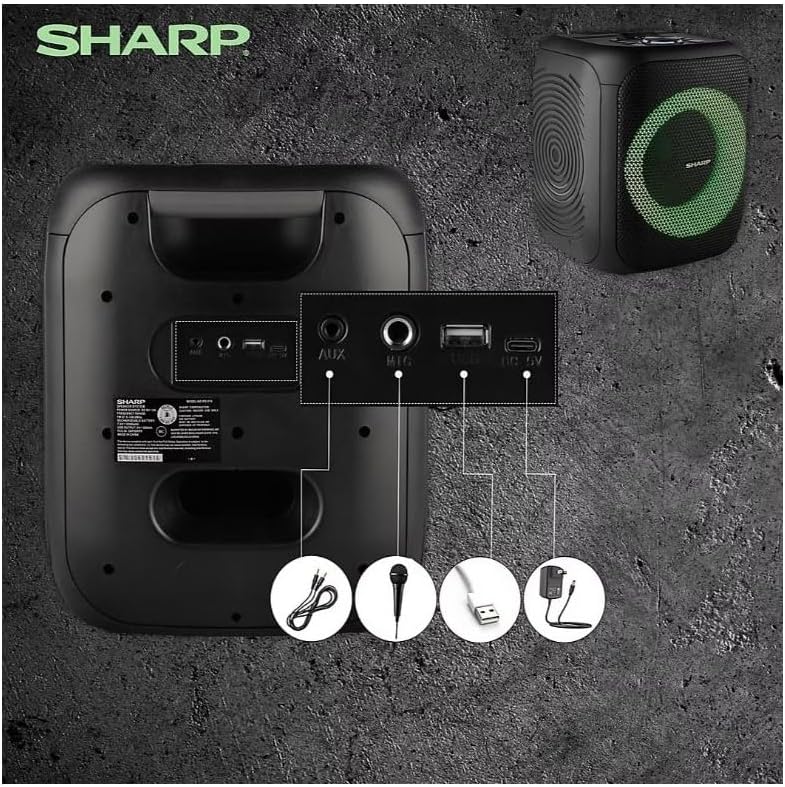
Image: Rear panel with various input and charging ports.
- AUX IN: Koppel eksterne oudiotoestelle met 'n 3.5 mm-oudiokabel.
- MIC IN: Connect a microphone (sold separately) for karaoke or announcements.
- USB: Steek 'n USB-geheuestokkie in vir klankweergawe.
- TF-KAART: Insert a TF (microSD) card for audio playback.
- DC IN: Connect the charging cable to power and charge the speaker.
3.3 Playing Audio from USB/TF Card
- Insert a USB flash drive or TF card into the corresponding port.
- Druk die ON/STAND BY INPUT button repeatedly until the display shows the USB or TF mode.
- Terugspeel sal outomaties begin. Gebruik die SPEEL/POUSEER, VORIGE, en VOLGENDE knoppies om afspeel te beheer.
3.4 Gebruik van AUX-invoer
- Connect one end of a 3.5mm audio cable to the AUX IN port on the speaker.
- Koppel die ander kant aan die koptelefoonaansluiting of klankuitset van jou eksterne toestel.
- Druk die ON/STAND BY INPUT button repeatedly until the display shows AUX mode.
- Beheer terugspeel en volume vanaf jou eksterne toestel.
3.5 FM-radiowerking

Image: The PS-916 features an integrated FM Tuner.
- Druk die ON/STAND BY INPUT button repeatedly until the display shows FM mode.
- Druk en hou die SPEEL/POUSEER knoppie om outomaties beskikbare FM-stasies te skandeer en te stoor.
- Gebruik die VORIGE en VOLGENDE knoppies om deur gestoorde stasies te navigeer.
3.6 LED-ligeffekte
Druk die LIG button to cycle through different LED light modes or to turn the lights off.
4. Onderhoud
4.1 Skoonmaak
- Skakel altyd die luidspreker af en ontkoppel dit van die kragbron voordat u dit skoonmaak.
- Gebruik 'n sagte, droë lap om die buite-oppervlaktes af te vee.
- Moenie vloeibare skoonmaakmiddels, aërosols of oplosmiddels gebruik nie, aangesien dit die afwerking of interne komponente kan beskadig.
4.2 Berging
- Bêre die luidsprekers op 'n koel, droë plek weg van direkte sonlig en uiterste temperature.
- Indien dit vir 'n lang tydperk gestoor word, laai die battery elke paar maande tot ongeveer 50% om die batterygesondheid te handhaaf.
5. Probleemoplossing
If you encounter issues with your Sharp PS-916 speakers, please refer to the following common problems and solutions:
| Probleem | Moontlike Oplossing |
|---|---|
| Luidspreker skakel nie aan nie. | Maak seker dat die battery gelaai is. Koppel die laaikabel aan en probeer weer. |
| Geen geluid van die luidspreker nie. | Check the volume level on both the speaker and your connected device. Ensure the correct input mode is selected. |
| Bluetooth-toestel kan nie koppel nie. | Ensure the speaker is in Bluetooth pairing mode (indicator flashing). Move your device closer to the speaker. Disconnect from other Bluetooth devices. |
| TWS-paring misluk. | Ensure both speakers are powered on and not connected to any other Bluetooth devices. Try initiating TWS pairing again. |
| Verwronge klank. | Reduce the volume on both the speaker and your connected device. Ensure the audio source is not distorted. |
6. Spesifikasies
| Kenmerk | Detail |
|---|---|
| Handelsmerk | Skerp |
| Model Naam | PS-916 |
| Luidsprekerkonfigurasie | 8" Woofer, 1" Tweeter (per speaker) |
| Piek uitsetkrag | 400 Watts (per speaker) |
| RMS-uitsetkrag | 40 Watts (per speaker) |
| Verbindingstegnologie | Bluetooth |
| Bykomende insette | USB, TF Card, 3.5mm AUX, Microphone Input |
| Batterylewe | Tot 12 ure |
| Spesiale kenmerke | True Wireless Stereo (TWS) Pairing, Bass Boost, LED Light Effects, FM Tuner |
| Kleur | Swart |
| Item gewig | 6.5 pond (per luidspreker) |
| UPC | 728434122111 |
| GTIN | 728434122111 |
7. Waarborg en ondersteuning
7.1 Waarborginligting
This Sharp PS-916 product comes with a 90-day limited warranty. This warranty covers manufacturing defects under normal use. It does not cover damage caused by misuse, accidents, unauthorized modifications, or normal wear and tear.
7.2 Kliëntediens
For technical assistance, warranty claims, or further inquiries, please refer to the contact information provided with your purchase documentation or visit the official Sharp support webwebwerf.