
Inleiding
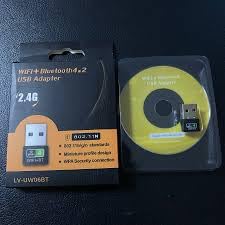
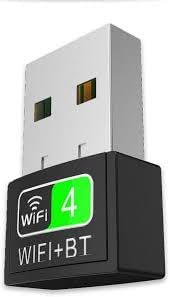
The Generic LV-UW06BT is a dual-function USB adapter designed to provide both Wi-Fi and Bluetooth connectivity to your PC, laptop, or desktop computer. This compact device supports 802.11N Wi-Fi for speeds up to 600Mbps and Bluetooth 4.2 for connecting various peripherals. It offers a convenient plug-and-play solution for Windows, macOS, and Linux operating systems, enhancing your device's wireless capabilities for streaming, gaming, browsing, and connecting audio devices or input peripherals.
Sleutel kenmerke:
- Dual-function USB adapter with 802.11N WiFi and Bluetooth 4.2 support.
- High-speed Wi-Fi up to 600Mbps for gaming, streaming, and browsing.
- Bluetooth 4.2 for seamless connection of headphones, speakers, keyboards, and mice.
- Plug & Play setup for Windows, macOS, and Linux.
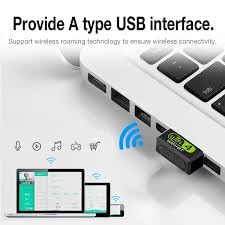
- Compact, portable design for easy integration into any USB port.
Wat is in die boks
As u die pakkie oopmaak, moet u die volgende items vind:
- 1 x LV-UW06BT USB Dongle (WiFi + Bluetooth Adapter)
Opstelling
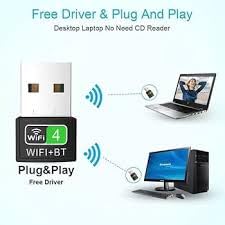
The LV-UW06BT adapter is designed for plug-and-play functionality on most modern operating systems, including Windows, macOS, and Linux. No manual driver installation is typically required.
- Plaas die adapter in: Locate an available USB port on your computer (desktop or laptop). Carefully insert the LV-UW06BT USB adapter into the USB port.
- Outomatiese drywerinstallasie: Your operating system should automatically detect the new hardware and install the necessary drivers. This process may take a few moments. A notification might appear indicating that the device is ready for use.
- Verifieer installasie:
- Vir Windows: Go to Device Manager. Under 'Network adapters' and 'Bluetooth', you should see entries for the newly installed Wi-Fi and Bluetooth components.
- For macOS/Linux: Check your system's network and Bluetooth settings to confirm the adapter is recognized.
If the adapter is not automatically recognized or if you experience issues, refer to the Troubleshooting section.
Bedryfsinstruksies
Once the adapter is successfully installed, you can begin using its Wi-Fi and Bluetooth functionalities.
Gebruik Wi-Fi:
- Toegang tot netwerkinstellings: Click on the Wi-Fi icon in your computer's system tray (Windows) or menu bar (macOS/Linux).
- Kies netwerk: 'n Lys van beskikbare Wi-Fi-netwerke sal verskyn. Kies die gewenste netwerk.
- Voer wagwoord in: Indien gevra, voer die Wi-Fi-wagwoord (sekuriteitsleutel) vir die gekose netwerk in.
- Koppel: Click 'Connect'. Your computer should now be connected to the internet via the LV-UW06BT adapter.
Gebruik Bluetooth:
- Aktiveer Bluetooth: Ensure Bluetooth is enabled on your computer. This can usually be done through your system settings or control panel.
- Koppel toestel: Put your Bluetooth device (e.g., headphones, speaker, keyboard, mouse) into pairing mode. Refer to your device's manual for specific instructions.
- Voeg toestel by: On your computer, go to Bluetooth settings and select 'Add a device' or 'Pair new device'.
- Kies en Verbind: Jou rekenaar sal soek vir Bluetooth-toestelle in die omgewing. Kies jou toestel uit die lys en volg enige aanwysings op die skerm om die paringsproses te voltooi.
Onderhoud
To ensure the longevity and optimal performance of your LV-UW06BT USB adapter, follow these simple maintenance guidelines:
- Hou skoon: Periodically wipe the adapter with a soft, dry cloth to remove dust and debris. Avoid using liquid cleaners.
- Beskerm teen skade: Avoid dropping the adapter or exposing it to extreme temperatures, humidity, or direct sunlight.
- Behoorlike berging: When not in use, store the adapter in a safe place to prevent loss or damage.
- Hanteer versigtig: Always grasp the adapter by its body when inserting or removing it from a USB port, rather than pulling on the exposed USB connector.
Probleemoplossing
If you encounter issues with your LV-UW06BT adapter, try the following solutions:
- Adapter nie opgespoor nie:
- Try inserting the adapter into a different USB port on your computer.
- Herbegin jou rekenaar.
- Check Device Manager (Windows) or System Information (macOS/Linux) to see if the device is listed. If there's an error, try updating or reinstalling drivers.
- Geen Wi-Fi-verbinding nie:
- Maak seker dat jou Wi-Fi-router aangeskakel is en korrek funksioneer.
- Verify you have selected the correct Wi-Fi network and entered the password accurately.
- Restart your computer and the Wi-Fi router.
- Kontroleer of ander toestelle aan dieselfde Wi-Fi-netwerk kan koppel.
- Geen Bluetooth-verbinding:
- Ensure Bluetooth is enabled on your computer and the device you are trying to pair.
- Make sure your Bluetooth device is in pairing mode and within range.
- Verwyder enige vorige parings van die toestel van jou rekenaar en probeer weer om te paring.
- Herbegin jou rekenaar.
- Stadige Wi-Fi-spoed:
- Ensure your computer is within optimal range of your Wi-Fi router.
- Minimaliseer interferensie van ander elektroniese toestelle.
- Gaan jou internetdiensverskaffer se spoed na.
Spesifikasies
| Kenmerk | Detail |
|---|---|
| Handelsmerk | Generies |
| Model | LV-UW06BT |
| Hardeware-koppelvlak | Micro USB 2.0 Type A |
| Kleur | Swart |
| Versoenbare toestelle | Skootrekenaar, rekenaar, tafelrekenaar |
| Produkafmetings (L x B x H) | 10L x 10W x 30H Millimeters |
| Dataskakelprotokol | USB |
| Data Transfer Rate (Wi-Fi) | Up to 600Mbps (802.11N) |
| Frekwensieband | 2.4 GHz |
| Bluetooth weergawe | 4.2 |
| Item gewig | 20 gram |
| Vervaardiger | lapgear |
Waarborg inligting
Hierdie produk kom met 'n 7-dae vervangingswaarborg from the date of purchase. This warranty covers manufacturing defects. Please retain your proof of purchase for any warranty claims. The warranty does not cover damage caused by misuse, accidents, unauthorized modifications, or normal wear and tear.
Ondersteuning
For further assistance or if you encounter issues not covered in this manual, please contact the manufacturer or your retailer. Ensure you have your product model number (LV-UW06BT) and proof of purchase ready when seeking support.
Manufacturer: lapgear