
Inleiding
Thank you for choosing the ONBRILL HOD-123 Executive L Shaped Desk. This manual provides detailed instructions for assembly, operation, maintenance, and troubleshooting to ensure you get the most out of your new desk. Please read this manual thoroughly before assembly and use, and retain it for future reference.
Veiligheidsinstruksies
- Monteer die lessenaar altyd op 'n sagte, skoon oppervlak om skrape te voorkom.
- Maak seker dat alle skroewe en bevestigingsmiddels stewig vasgedraai is voor gebruik. Kontroleer gereeld en draai weer vas soos nodig.
- Do not overload the desk. The desktop supports up to 150 pounds.
- Hou klein dele weg van kinders tydens montering.
- Gebruik slegs die voorsiene hardeware vir montering.
- Vermy die plasing van warm items direk op die lessenaaroppervlak sonder beskerming.
- Moenie op die lessenaar staan of sit nie.
Pakketinhoud
Verifieer asseblief dat alle komponente teenwoordig is voordat u met montering begin. Indien enige onderdele ontbreek of beskadig is, kontak kliëntediens.
- Desktop panels (L-shaped sections)
- Storage unit panels (sides, back, shelves)
- File drawers (fronts, sides, backs, bottoms)
- Power hub with 4 AC outlets and 2 USB ports
- Drawer slides and handles
- Monteringshardeware (skroewe, deuwels, nokslotte, ens.)
- Instruksie handleiding
Opstelling en samestelling
Assembly is straightforward with clear, step-by-step instructions and numbered parts. Two people are recommended for easier and safer assembly.
1. Unpack and Identify Parts
Carefully unpack all components and lay them out on a clean, soft surface. Refer to the parts list in your included assembly guide to identify each piece.
2. Assemble the Storage Unit
Begin by assembling the central storage unit, which includes the shelves and drawer compartments. Follow the numbered steps in your assembly guide to connect the side panels, back panel, and internal shelves using the provided hardware.
3. Installeer File Laaie
Stel die file drawers according to the instructions, ensuring the drawer slides are correctly oriented and securely attached to both the drawers and the storage unit. Test the smooth operation of the drawers.

Image: Regular File Laaie
4. Attach Desktop Panels
Connect the L-shaped desktop panels to the assembled storage unit. Ensure proper alignment and secure all connections with the designated screws and cam locks. The desk is designed for stability once fully assembled.
Beeld: Produk Dimensies
5. Install Power Hub
Carefully insert the integrated power hub into its designated slot on the desktop. Ensure it is flush with the surface and securely fastened. Plug the power cord into a suitable wall outlet.

Image: Convenient Charging Station
Vergadering verbyview Video
Video: Arched L Shaped Office Desk Display. This video provides a visual overview of the desk's features and design, demonstrating its functionality and aesthetic appeal.
Bedryfsinstruksies
Gebruik van die kraghub
The integrated power hub features 4 standard AC outlets and 2 USB ports (1 USB-A, 1 USB-C). Simply plug your devices into the appropriate ports for convenient charging and power access directly on your desktop. Ensure the desk's main power cord is connected to a live wall outlet.
Gebruik te maak File Laaie
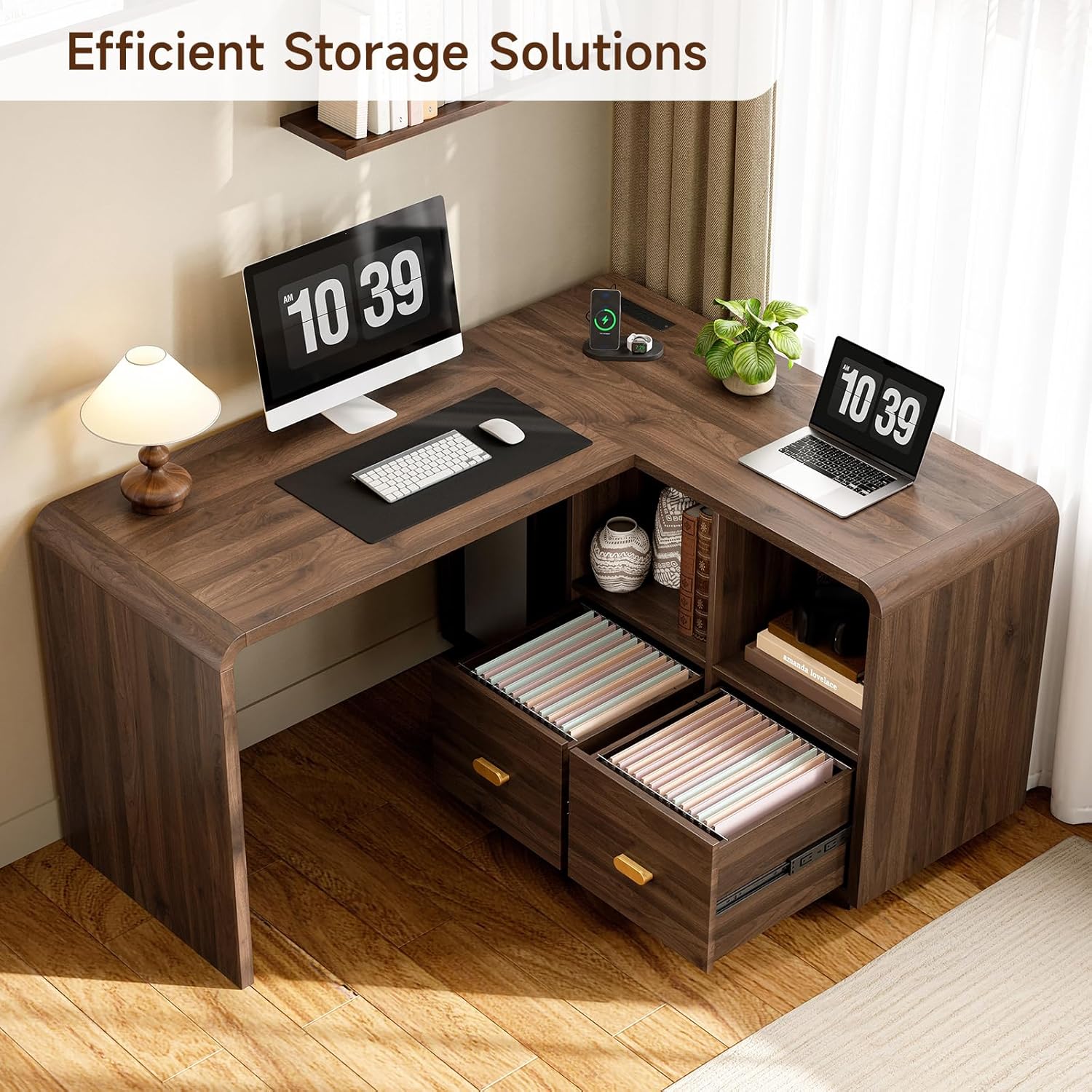
Die twee file drawers are designed to accommodate A4, legal, and letter-sized documents. Use hanging file folders for organized storage. Pull the gold-colored handles to open and close the drawers smoothly.
Bergrakke
The open storage shelves provide easy access for books, office supplies, and decorative items. Arrange items to maximize space and maintain a clutter-free workspace.

Image: Efficient Storage Solutions
Onderhoud
- Skoonmaak: Vee die lessenaaroppervlak af met 'n sagte, damp cloth. Avoid harsh chemicals or abrasive cleaners that may damage the laminated finish.
- Gemors: Maak gemorste vloeistof onmiddellik skoon om vlekke of skade aan die houtafwerking te voorkom.
- Hardeware: Kontroleer gereeld alle skroewe en bevestigingsmiddels om te verseker dat hulle styf bly. Draai weer vas indien nodig om stabiliteit te handhaaf.
- Sonlig: Vermy langdurige blootstelling aan direkte sonlig om vervaag of verkleuring van die houtafwerking te voorkom.
Probleemoplossing
| Probleem | Moontlike oorsaak | Oplossing |
|---|---|---|
| Die lessenaar is wankelrig | Los bevestigingsmiddels; ongelyke vloer | Ensure all screws are tightened. Use shims under legs if the floor is uneven. |
| Laaie skuif nie glad nie | Drawer slides misaligned; debris in tracks | Check alignment of drawer slides. Clear any debris from the tracks. |
| Kragpunte werk nie | Desk not plugged in; circuit breaker tripped | Ensure the desk's power cord is securely plugged into a working wall outlet. Check your home's circuit breaker. |
| Ontbrekende dele tydens montering | Verpakkingsfout | Contact ONBRILL customer support with your purchase details and the specific missing parts. |
Spesifikasies
| Kenmerk | Detail |
|---|---|
| Modelnommer | HOD-123 |
| Afmetings (D x B x H) | 23.43" x 58.66" x 28.35" |
| Materiaal | Gemanipuleerde hout |
| Voltooi Tipe | Gelamineerd |
| Kleur | Okkerneut |
| Gewigskapasiteit (lessenaar) | 150 pond |
| Kragpunte | 4 WS-afsetpunte |
| USB-poorte | 1 USB-A, 1 USB-C |
| Aantal laaie | 2 (File Laaie) |
| Aantal rakke | 2 |
| Vergadering benodig | Ja |
Waarborg en Ondersteuning
ONBRILL is committed to quality and customer satisfaction. This product is backed by ONBRILL's commitment to long-term performance. For any questions, missing parts, or support needs, please contact ONBRILL customer service. Please have your purchase information and model number (HOD-123) ready when contacting support.
Contact information can typically be found on the ONBRILL official webwebwerf of deur u kleinhandelaar se kliëntediensportaal.