
1. Inleiding
The Fenix CL20R Pro is a compact, USB rechargeable camping lantern designed for versatile lighting needs. It features a maximum output of 400 lumens, RGB and white light options, and a motion-sensing function. This manual provides detailed instructions for the safe and effective use of your CL20R Pro lantern.

Image 1.1: Fenix CL20R Pro lantern showcasing its design and key features like 400 lumens, 320 hours runtime, RGB mood lighting, smart sensing function, and magnetic base.
2. Pakketinhoud
Kontroleer asseblief die pakket vir die volgende items:
- Fenix CL20R Pro Campby Lantern
- ARB-LP1900 Battery (pre-installed or included separately)
- USB Type-C laaikabel
- Onderdele O-ring
- Gebruikershandleiding
- Waarborgkaart
3. Opstelling en laai
3.1 Battery installasie
The Fenix CL20R Pro uses a nonstandard battery. Ensure the battery is correctly inserted according to the polarity markings if it is not pre-installed. Refer to the diagram inside the battery compartment if unsure.
3.2 Laai die lantern
Before first use, fully charge the lantern. Connect the provided USB Type-C charging cable to the lantern's charging port and to a USB power source (e.g., computer, wall adapter). The charging indicator will show the charging status.

Beeld 3.1: Nabyskoot view of the USB Type-C charging port on the Fenix CL20R Pro lantern.
4. Operasie
The CL20R Pro features a single multi-function switch for all operations.
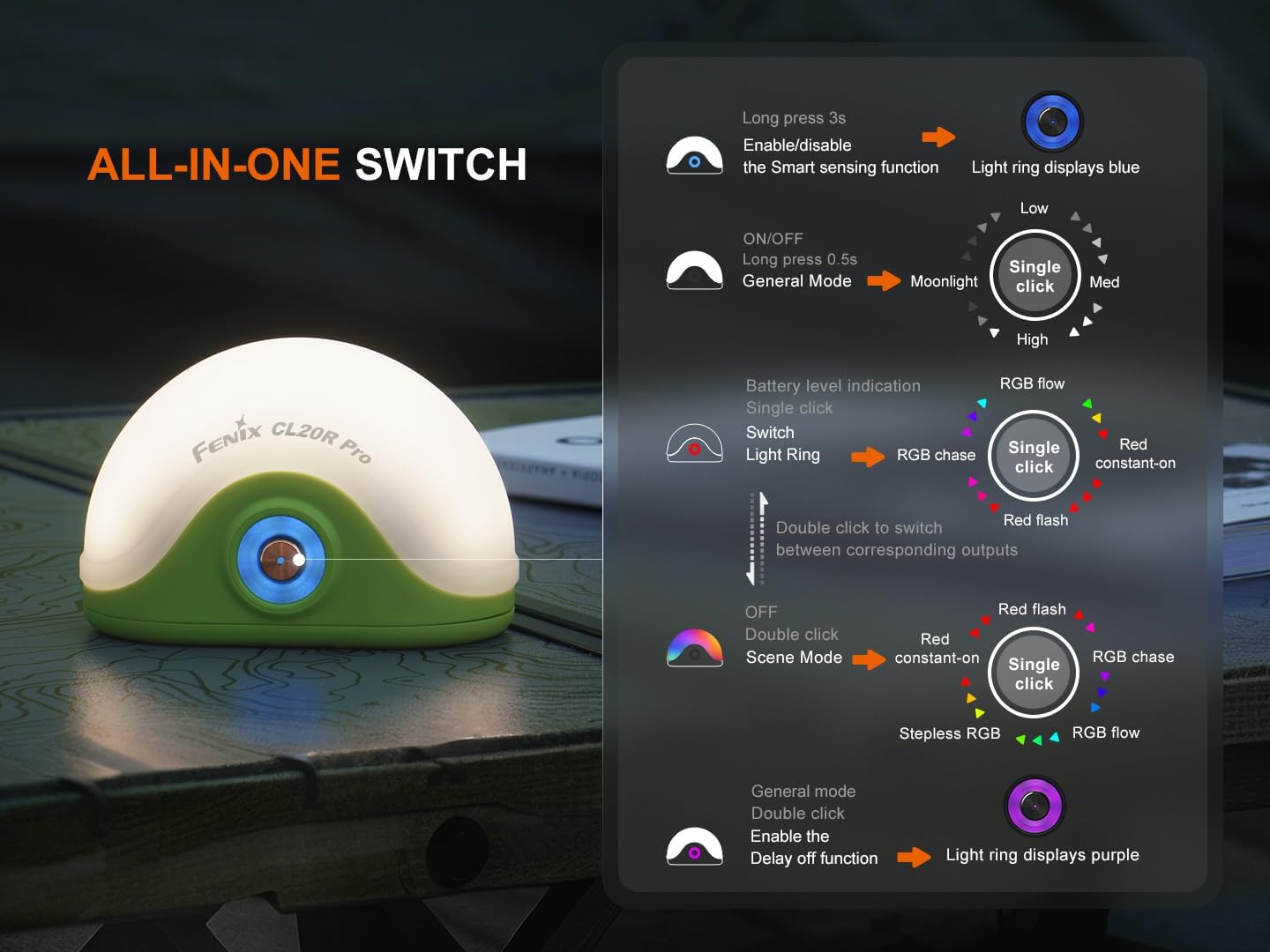
Image 4.1: Detailed diagram illustrating the various functions of the Fenix CL20R Pro's single switch, including power, mode switching, and special features.
4.1 Power On/Off and General Mode
- Om aan/af te skakel: Long press the switch for 0.5 seconds. The lantern will turn on/off in General Mode.
- General Mode Brightness Levels: While in General Mode, single click the switch to cycle through Moonlight, Low, Med, and High brightness levels.

Image 4.2: The Fenix CL20R Pro providing 400 lumens of light, effectively illuminating a camping area at night.
4.2 Scene Mode (RGB/Red Light)
- Switch to Scene Mode: Double click the switch from General Mode to enter Scene Mode.
- Scene Mode Options: In Scene Mode, single click the switch to cycle through Red constant-on, Red flash, RGB chase, and RGB flow.
- Stepless RGB: Double click the switch from Scene Mode to activate Stepless RGB.
4.3 Light Ring Operation
- Switch Light Ring: Double click the switch to switch between corresponding outputs for the light ring (Red constant-on, Red flash, RGB chase, RGB flow).
4.4 Spesiale Funksies
- Smart Sensing Function: Long press the switch for 3 seconds to enable or disable the Smart Sensing function. When enabled, the light ring displays blue.
- Delay Off Function: Double click the switch in General Mode to enable the Delay Off function. The light ring displays purple.
- Batteryvlak aanduiding: Single click the switch when the lantern is off to check the battery level.
5. Montering en Plasing
The Fenix CL20R Pro offers multiple options for placement and mounting:
- Hang: Utilize the integrated hook for hanging inside tents or on branches.
- Aanheg: The magnetic base allows attachment to metal surfaces.
- Plasing: Its stable base allows for placement on flat surfaces.
Beeld 5.1: Voorbeeldamples of how the Fenix CL20R Pro can be used: hanging from a tent, magnetically attached to a car, and placed on a table.
6. Onderhoud
Proper maintenance ensures the longevity and optimal performance of your Fenix CL20R Pro lantern.
- Skoonmaak: Maak die lantern skoon met 'n sagte, damp lap. Moenie skuur skoonmaakmiddels of oplosmiddels gebruik nie.
- O-ring Onderhoud: Regularly inspect the O-ring for wear and tear. Replace it with the provided spare O-ring if necessary to maintain waterproof integrity. Apply silicone grease to the O-ring periodically.
- Batterysorg: If the lantern will not be used for an extended period, remove the battery to prevent leakage. Recharge the battery every four months to maintain optimal performance.
- Berging: Stoor die lantern in 'n koel, droë plek weg van direkte sonlig en uiterste temperature.
7. Probleemoplossing
If your Fenix CL20R Pro lantern is not functioning correctly, please refer to the following common issues and solutions:
- Issue: The lantern does not turn on.
- Oplossing: Check if the battery is correctly inserted and fully charged. Ensure the switch is pressed for the correct duration (0.5 seconds for on/off).
- Issue: The light output is dim or flickers.
- Oplossing: The battery may be low. Recharge the battery. Ensure the battery contacts are clean.
- Issue: The lantern is not charging.
- Oplossing: Check the USB Type-C cable for damage and ensure it is securely connected to both the lantern and the power source. Try a different USB power source or cable.
- Issue: Water ingress after exposure to moisture.
- Oplossing: Ensure the charging port cover is fully sealed. Inspect the O-ring for damage or improper seating and replace if necessary.
If the problem persists, please contact Fenix customer support.
8. Spesifikasies
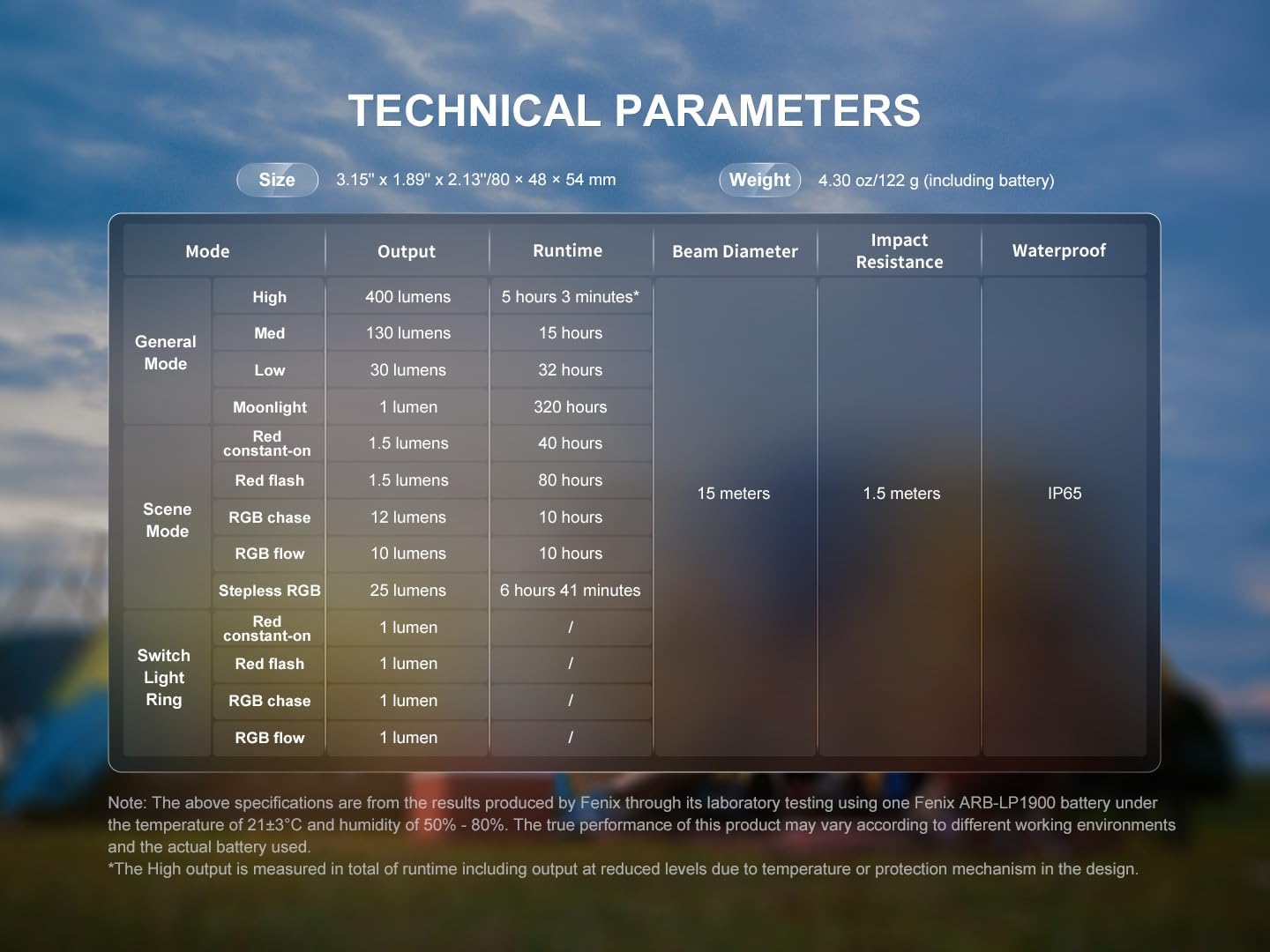
The following table details the technical specifications of the Fenix CL20R Pro lantern:

Image 8.1: Technical parameters table for the Fenix CL20R Pro, outlining performance data for various modes and physical characteristics.
| Kenmerk | Detail |
|---|---|
| Maksimum liguitset | 400 Lumen |
| Aantal batterye | 1 Nie-standaard battery (ingesluit) |
| Vervaardiger | Fenix |
| Deelnommer | CL20RPRO-BBX4 |
| Item gewig | 6.1 onse (173g) |
| Produk afmetings | 2.13 x 1.89 x 3.15 duim (54 x 48 x 80 mm) |
| Item Modelnommer | EDB-FEN-CL20RPRO-BBX4 |
| Ingesluit komponente | Battery, Charging cable |
| Ligbrontipe | Ligemitterende diode (LED) |
| Kleur | Green (variant shown) |
| Materiaal | Plastiek |
Note: The above specifications are from the results produced by Fenix through its laboratory testing using one Fenix ARB-LP1900 battery under the temperature of 21±3°C and humidity of 50% - 80%. The true performance of this product may vary according to different working environments and the actual battery used. The High output is measured in total of runtime including output at reduced levels due to temperature or protection mechanism in the design.
9. Waarborg en Ondersteuning
Fenix provides a warranty for its products. Please refer to the warranty card included in your package for specific terms and conditions. For technical support, warranty claims, or any inquiries regarding your Fenix CL20R Pro lantern, please contact Fenix customer service directly.
You can typically find contact information on the Fenix official webwebwerf of op die waarborgkaart.