
1. Inleiding
Welcome to the OUKITEL C68 Plus smartphone user manual. This guide provides essential information to help you set up, operate, and maintain your device. Please read this manual carefully to ensure proper usage and to maximize the features of your new smartphone.
The OUKITEL C68 Plus features a large 7.2-inch 120Hz display, a unique 1.81-inch rear screen, a powerful 6000mAh battery, and a 64MP main camera, all running on Android 15.
2. Pakketinhoud
Upon opening the package, verify that all items are present. The standard package for the OUKITEL C68 Plus Smartphone typically includes:
- OUKITEL C68 Plus Smartphone
- Datakabel (Tipe-C)
- Tipe C-laaier
- Card Needle (SIM ejector tool)
- Gebruikershandleiding
- Na-verkope kaart
- Beskermende saak

Image: Contents of the OUKITEL C68 Plus retail box.
Video: An unboxing demonstration of the OUKITEL C68 Plus smartphone, showing the phone and included accessories.
3. Toesteluitleg
Familiarize yourself with the physical components of your OUKITEL C68 Plus.

Beeld: Voorkant view of the OUKITEL C68 Plus, highlighting the 7.2-inch display.

Beeld: Agter view of the OUKITEL C68 Plus, showcasing the camera array and the secondary 1.81-inch display.
4. Opstelling
4.1. SIM-kaart en TF-kaartinstallasie
The OUKITEL C68 Plus supports dual Nano SIM cards or one Nano SIM card and one TF (microSD) card for expanded storage up to 1TB.
- Vind die SIM-kaartlaai aan die kant van jou foon.
- Steek die meegeleverde kaartnaald in die klein gaatjie langs die skinkbord om dit uit te werp.
- Place your Nano SIM card(s) and/or TF card into the tray according to the diagram on the tray. Ensure the metal contacts face downwards.
- Plaas die laai versigtig terug in die foon totdat dit vasklik.

Image: Illustration of SIM and TF card installation.
4.2. Initial Power-On and Basic Setup
- Druk en hou die aan/af-knoppie in totdat die OUKITEL-logo verskyn.
- Volg die aanwysings op die skerm om jou taal te kies, aan 'n Wi-Fi-netwerk te koppel en jou Google-rekening op te stel.
- You can also set up security features like Face ID or fingerprint recognition during this initial setup.
4.3. Laai die toestel
Before first use, it is recommended to fully charge your OUKITEL C68 Plus.
- Connect the Type-C data cable to the charging port on your phone.
- Connect the other end of the cable to the provided Type-C charger.
- Steek die laaier in 'n kragaansluiting.
- The phone supports 18W fast charging.
5. Bediening van jou slimfoon
5.1. Main Display (7.2" 120Hz)
The 7.2-inch display offers a 120Hz refresh rate for smooth scrolling and an immersive visual experience.
- Navigasie: Use touch gestures to navigate the Android 15 interface. Swipe up for the app drawer, swipe down for notifications and quick settings.
- Helderheid: Adjust screen brightness from the quick settings panel or in Instellings > Vertoon. The display offers up to 500 nits brightness.

Image: The 7.2-inch 120Hz main display in action.
5.2. Rear Screen (1.81" Sub-display)
The 1.81-inch rear display provides quick access to information without activating the main screen.
- Kennisgewings: View incoming calls, messages, and other notifications.
- Tyd en Datum: Check the current time and date.
- Selfie Previews: Use the rear screen as a viewfinder for taking selfies with the main camera.
Image: The versatile 1.81-inch rear sub-display.
5.3. Kameragebruik
Vang oomblikke vas met die 64MP hoofkamera en 8MP voorkamera.
- Hoofkamera: The 64MP main camera captures high-resolution photos with vivid colors.
- Voorste kamera: The 8MP front camera is suitable for video calls and selfies.
- Skietmodusse: Explore various modes such as Portrait, Beauty, Panorama, and AI Smart Optimization for enhanced photography.

Image: Camera features and sampdie foto's.
5.4. Batterybestuur
The 6000mAh battery provides extended usage.
- Laai: Use the 18W fast charger for quick power restoration.
- OTG Omgekeerde Laai: The phone supports OTG (On-The-Go) reverse charging, allowing you to use it as a power bank for other devices (e.g., headphones, smartwatches) with a compatible OTG cable (sold separately).
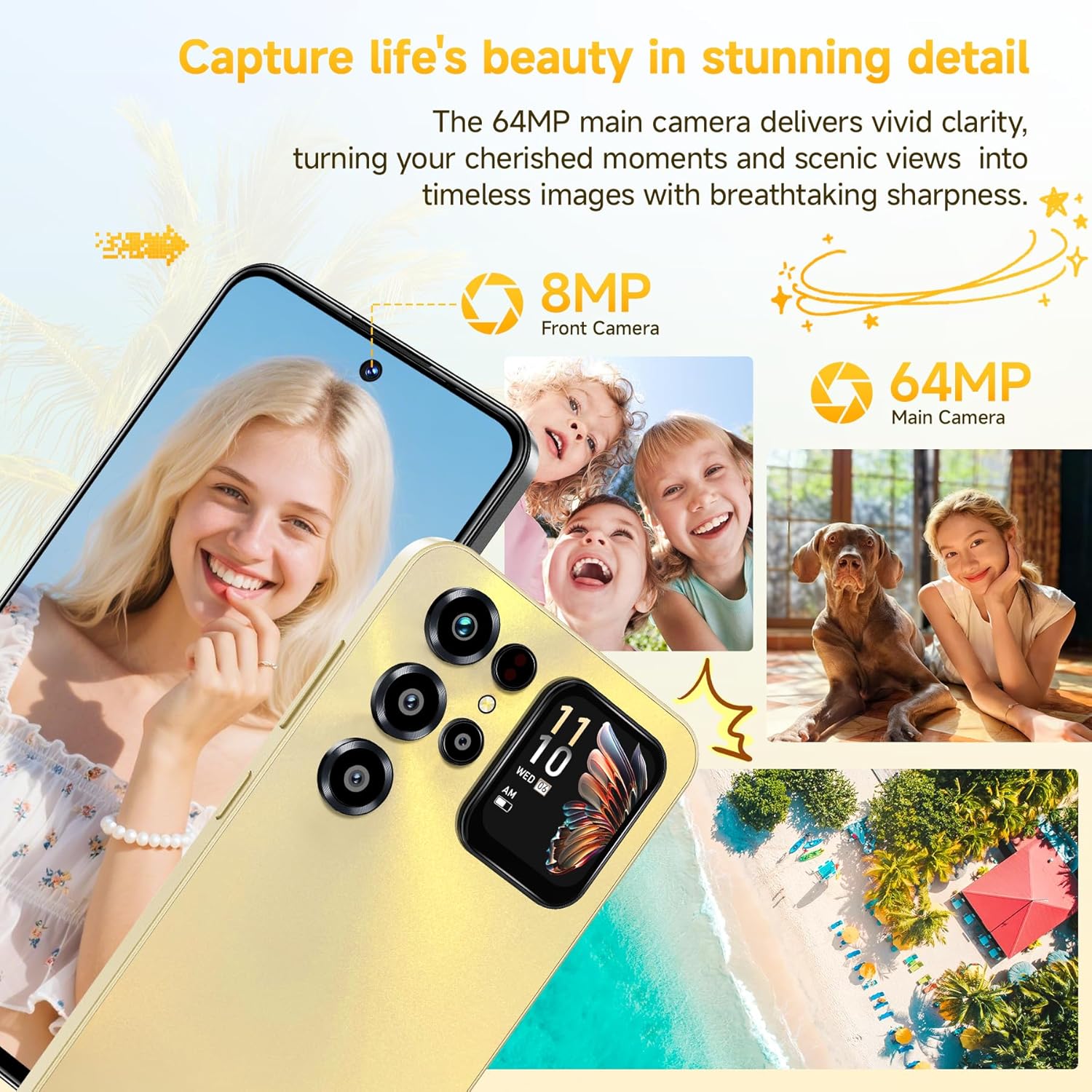
Image: 6000mAh battery and its capabilities.
5.5. Sekuriteitskenmerke
Secure your device with convenient unlocking methods.
- Gesig ID: Unlock your phone using facial recognition. Set this up in Instellings > Sekuriteit > Gesigontsluiting.
- Vingerafdrukherkenning: Use the side-mounted fingerprint sensor for quick and secure access. Set this up in Instellings > Sekuriteit > Vingerafdruk.

Image: Face ID and Fingerprint security features.
5.6. Konnektiwiteit
The OUKITEL C68 Plus offers various connectivity options.
- 4G Dubbele SIM: Supports two Nano SIMs for flexible network usage.
- GPS/GLONASS/Beidou/Galileo: Provides accurate location services.
- 5G WiFi: Connect to high-speed Wi-Fi networks.
- Bluetooth 5.0: Vir die koppeling van draadlose bykomstighede.
Belangrike nota: This smartphone is compatible with T-Mobile. It is not supported by Mint Mobile, AT&T, or Verizon. Please confirm carrier compatibility before use.
6. Onderhoud
6.1. Skoonmaak van jou toestel
- Gebruik 'n sagte, pluisvrye lap om die skerm en liggaam van die foon skoon te maak.
- Vermy die gebruik van harde chemikalieë of skuurmateriaal.
6.2. Sagteware-opdaterings
Kontroleer gereeld vir sagteware-opdaterings en installeer dit om optimale werkverrigting en sekuriteit te verseker.
- Gaan na Instellings > Stelsel > Stelselopdatering om te kyk vir beskikbare opdaterings.
6.3. Bergingbestuur
The phone comes with 128GB of internal storage, expandable up to 1TB via a TF card.
- Monitor your storage usage in Instellings > Berging.
- Maak gereeld kasgeheue en onnodige items skoon files om spasie vry te maak.
- Gebruik wolkbergingsdienste vir rugsteun.

Image: Memory and storage capabilities.
6.4. Batteryversorging
- Vermy uiterste temperature.
- Moenie die battery gereeld heeltemal laat leegloop nie.
- Gebruik die oorspronklike laaier en kabel vir optimale laai.
7. Probleemoplossing
If you encounter issues with your device, try the following solutions.
7.1. Toestel skakel nie aan nie
- Maak seker dat die battery gelaai is. Koppel die laaier aan en wag 'n paar minute voordat jy probeer om dit aan te skakel.
- Druk en hou die aan/af-knoppie vir ten minste 10-15 sekondes in om 'n herbegin te forseer.
7.2. Netwerkverbindingsprobleme
- Kontroleer of jou SIM-kaart behoorlik ingesit is.
- Verifieer dat mobiele data geaktiveer is in Instellings > Netwerk en internet > Mobiele netwerk.
- Herbegin die foon.
- Ensure your carrier is T-Mobile, as other major carriers are not supported.
7.3. Programme wat vasval of vries
- Maak die toepassing toe en heropen.
- Vee die toepassing se kasgeheue en data uit in Instellings > Programme > [Programnaam] > Berging en kasgeheue.
- Dateer die toepassing op vanaf die Google Play Winkel.
- Herbegin die foon.
7.4. Fabrieksterugstelling
If problems persist, a factory reset may resolve them. Waarskuwing: Dit sal alle data op jou foon uitvee. Rugsteun belangrike data voordat jy voortgaan.
- Gaan na Instellings > Stelsel > Herstelopsies.
- Kies Vee alle data uit (fabriekterugstelling).
- Bevestig jou besluit en voer jou PIN/wagwoord in indien gevra.
8. Spesifikasies
| Kenmerk | Detail |
|---|---|
| Handelsmerk | OUKITEL |
| Model | C68 Plus |
| Hoofvertoning | 7.2 Inches, 120Hz Refresh Rate, 500 nits brightness, 2340x1080 pixels (FHD+), OLED or AMOLED |
| Agter skerm | 1.81 duim |
| Geheue (RAM) | 16GB (4GB fisies + 12GB virtueel) |
| Berging (ROM) | 128 GB |
| Uitbreidbare berging | Tot 1 TB via TF-kaart |
| Bedryfstelsel | Android 15 |
| Hoofkamera | 64MP |
| Voorste kamera | 8MP |
| Battery kapasiteit | 6000mAh |
| Laai | 18W vinnige laai, OTG omgekeerde laai |
| SIM-kaart ondersteuning | Dual Nano SIM or 1 Nano SIM + 1 TF Card |
| Konnektiwiteit | 4G, 5G WiFi, Bluetooth 5.0, GPS/GLONASS/Beidou/Galileo |
| Sekuriteit | Face ID, Side Fingerprint Sensor |
| Afmetings (Dikte) | 9.5 mm |
| Gewig | 249g |
| Ondersteunde frekwensiebande | GSM:B2/B3/B5/B8, WCDMA:B1/2/4/5/8, TDD:B34/38/39/40/41, FDD:B1/2/3/4/5/7/8/12/17/18/19/20/25/26/28AB/66 |
9. Waarborg en Ondersteuning
9.1. Waarborginligting
Your OUKITEL C68 Plus smartphone comes with a standard manufacturer's warranty. Please refer to the "After-sales card" included in your package for specific warranty terms, conditions, and duration. Keep your proof of purchase for warranty claims.
9.2. Kliëntediens
For technical assistance, troubleshooting beyond this manual, or warranty inquiries, please contact OUKITEL customer support. Contact details are typically provided on the "After-sales card" or on the official OUKITEL webwebwerf.
You can also visit the official OUKITEL webwebwerf vir algemene vrae, sagteware-aflaaie en bykomende ondersteuningsbronne.