
Produk verbyview
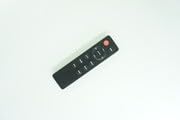
This replacement remote control is designed for use with JVC RM-STHD357 and RM-STHD588 2.1 Soundbar Speaker Systems. It offers basic functionality and is intended as a direct replacement. Please note that some advanced functions of the original remote may not be supported. The remote is constructed from durable ABS plastic, providing a comfortable grip and stable performance. It is compact and easy to operate.
Image: Generic Replacement Remote Control, showing its black casing and button layout.
Opstelling
Battery installasie
Die afstandbeheerder benodig twee AAA-batterye (nie ingesluit nie). Volg hierdie stappe om hulle te installeer:
- Vind die battery kompartement deksel op die agterkant van die afstandbeheer.
- Skuif die deksel afwaarts of druk die grendel om dit oop te maak.
- Plaas twee AAA-batterye in en maak seker dat die positiewe (+) en negatiewe (-) terminale korrek in lyn is met die merke binne-in die kompartement.
- Plaas die batteryklepdeksel terug totdat dit stewig vasklik.
Belangrik: No programming or setup is required for this replacement remote control. Once batteries are installed, it is ready for use.
Bedryfsinstruksies
To operate your JVC soundbar system with this remote control:
- Ensure the soundbar is powered on and within the remote's operating range (up to 15 meters).
- Point the remote control directly towards the soundbar's infrared receiver.
- Press the desired function button (e.g., Power, Volume Up/Down, Mute, Input Select) to control your soundbar.
Nota oor verenigbaarheid: This is a replacement remote. While it provides essential functions, some specific or advanced features found on the original JVC remote control for RM-STHD357 or RM-STHD588 systems may not be fully supported or may operate differently. This is not indicative of a product defect.
Onderhoud
Skoonmaak
Om die afstandbeheerder se voorkoms en funksionaliteit te behou:
- Vee die oppervlak af met 'n sagte, droë lap.
- Do not use liquid cleaners, solvents, or abrasive materials, as these can damage the remote's finish or internal components.
Berging
Wanneer dit nie vir lang tydperke gebruik word nie:
- Store the remote control in a cool, dry place.
- Avoid direct sunlight, high humidity, and extreme temperatures.
- Remove the batteries if storing for more than one month to prevent potential battery leakage and damage to the remote.
Probleemoplossing
Afstand reageer nie
- Gaan batterye na: Maak seker dat batterye met die korrekte polariteit (+/-) ingesit word.
- Vervang batterye: If the remote is unresponsive, replace old batteries with new ones.
- Vee obstruksies uit: Make sure there are no objects blocking the line of sight between the remote and the soundbar's infrared receiver.
- Soundbar Power: Confirm that your JVC soundbar system is powered on.
Sommige funksies werk nie
- This remote is a replacement unit. It is designed to provide essential control but may not replicate all advanced or specific functions of the original JVC remote. This is considered normal operation for a replacement remote and not a defect.
- If a basic function (e.g., Power, Volume) is not working, refer to the "Remote Not Responding" section above.
Spesifikasies
| Handelsmerk | Generies |
| Modelnommer | #fRM703f1682 |
| Materiaal | ABS/Plastiek |
| Versoenbare toestelle | JVC RM-STHD357, JVC RM-STHD588 2.1 Soundbar Speaker Systems |
| Verbindingstegnologie | Infrarooi (IR) |
| Maksimum reeks | 15 meter (ongeveer 49 voet) |
| Kragbron | 2 x AAA-batterye (nie ingesluit nie) |
| Kleur | Swart of wit (kleur kan verskil) |
Waarborg en Ondersteuning
This product is a generic replacement remote control. Specific warranty terms, if any, are provided by the seller at the time of purchase. Please retain your purchase receipt for any warranty claims.
For technical assistance, compatibility questions, or any issues not covered in this manual, please contact the seller directly through your purchase platform. They will be able to provide the most accurate and timely support.