1. Inleiding
This manual provides essential information for the safe and efficient use of your HP 17.3 Inch FHD Business Laptop. Please read this guide thoroughly before operating your device to ensure optimal performance and longevity. This laptop is designed for business and everyday computing tasks, offering a large display, robust performance, and portability.
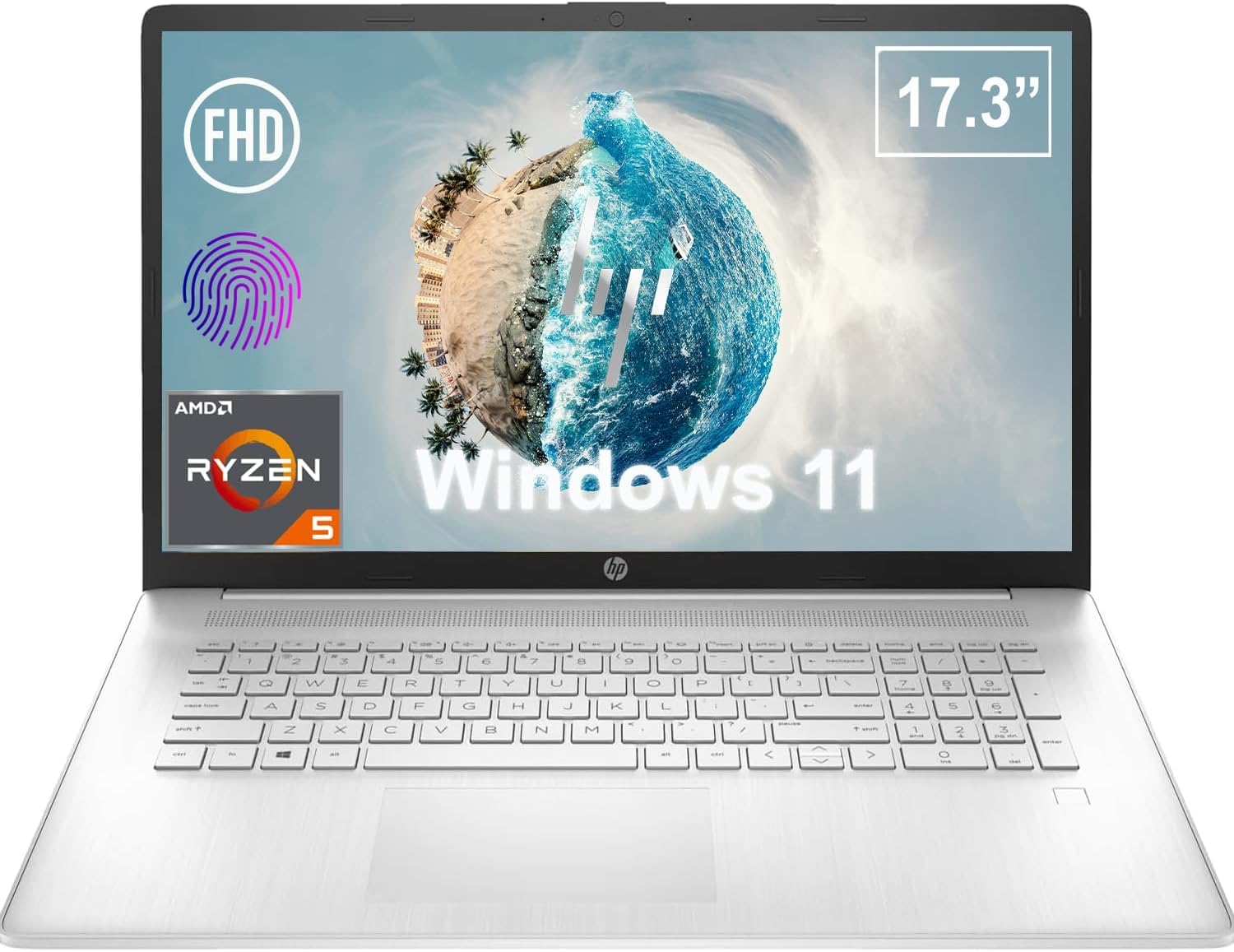
Figuur 1.1: Voorkant view of the HP 17.3 Inch FHD Business Laptop, showcasing die groot skerm en sleutelbord.
2. Opstelling
2.1 Uitpak en Aanvanklike Inspeksie
Verwyder alle komponente versigtig uit die verpakking. Verifieer dat die volgende items teenwoordig is:
- HP 17.3 Inch FHD Business Laptop
- Power Adapter (45 W Smart AC Power Adapter)
- Dokumentasie (hierdie handleiding, waarborginligting)
Inspect the laptop and accessories for any signs of damage. If any items are missing or damaged, contact your retailer or HP support immediately.
2.2 Die kragadapter koppel
Before first use, ensure the laptop is fully charged. Connect the power adapter to the AC smart pin port on the side of the laptop and then plug the adapter into a power outlet.
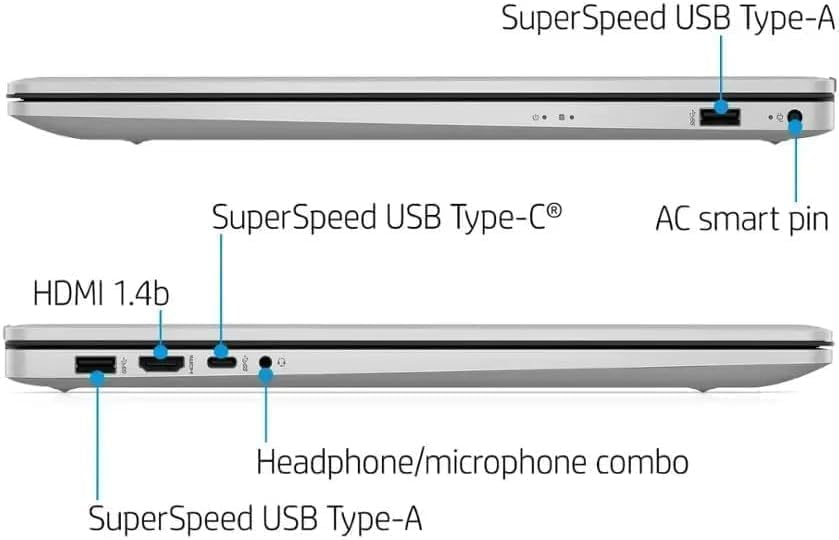
Figuur 2.1: Kant view illustrating the location of the AC smart pin and other ports.
2.3 Aanvanklike aanskakeling en Windows-opstelling
Press the power button to turn on the laptop. Follow the on-screen instructions to complete the Windows 11 Home setup process. This includes setting up your user account, network connection, and initial preferences.
3. Bediening van die skootrekenaar
3.1 Sleutelbord en raakvlak
The laptop features a full-size QWERTY keyboard with a 10-key number pad for efficient data entry. The integrated touchpad provides precise cursor control. Refer to the operating system's settings for customizing touchpad gestures and keyboard shortcuts.
3.2 Vingerafdrukleser
For enhanced security and convenient login, utilize the integrated fingerprint reader. Set up your fingerprints through Windows Hello in the Windows 11 settings.
3.3 Webcam and Microphones
The HP True Vision 720p HD Camera and integrated dual array digital microphones are located at the top of the display. These are suitable for video conferencing and online communication.
3.4 Konnektiwiteit
- Wi-Fi: The laptop supports 802.11a/b/g/n/ac Wi-Fi for wireless internet access. Connect to available networks via the Windows network settings.
- Bluetooth: Bluetooth 5 allows for wireless connection to compatible devices such as headphones, mice, and keyboards. Enable and manage Bluetooth devices through Windows settings.
3.5 Ports and External Devices
Die skootrekenaar is toegerus met verskeie poorte vir die koppeling van eksterne toestelle:
- 1 x USB Type-C (5Gbps, Data Only): For connecting USB-C compatible devices and data transfer.
- 2 x USB Type-A (5Gbps): For connecting standard USB devices like external drives, mice, or keyboards.
- 1 x HDMI 1.4b: For connecting to external displays or projectors.
- 1 x Headphone/Microphone Combo: For connecting a headset with a single 3.5mm jack.
- 1 x AC Smart Pin: For connecting the power adapter.

Figuur 3.1: Oop view of the laptop, highlighting the keyboard and touchpad area.
3.6 Batterybestuur
The laptop is powered by a 3-Cell, 41 Wh Li-ion battery, offering up to 8 hours and 30 minutes of video playback. Use the provided 45 W Smart AC Power Adapter for charging. HP Fast Charge technology allows for quicker charging times.
4. Onderhoud
4.1 Skoonmaak van die skootrekenaar
To maintain the laptop's appearance and functionality:
- Gebruik 'n sagte, pluisvrye lap dampmet water of 'n gespesialiseerde skermreiniger vir die skerm afgespoel.
- Vir die sleutelbord en onderstel, gebruik 'n sagte, droë lap. Vermy harde chemikalieë of skuurmiddels.
- Maak seker dat die skootrekenaar afgeskakel en ontkoppel is voordat jy dit skoonmaak.
4.2 Sagteware-opdaterings
Dateer jou Windows-bedryfstelsel en drywers gereeld op om optimale werkverrigting, sekuriteit en versoenbaarheid te verseker. Windows Update kan verkry word deur die Instellings-kieslys.
4.3 Security Software
The laptop comes preloaded with McAfee LiveSafe for security. Ensure this software is active and updated to protect against viruses and other threats.
5. Probleemoplossing
Hierdie afdeling bespreek algemene probleme wat jy met jou HP-skootrekenaar kan teëkom.
5.1 Kragprobleme
- Skootrekenaar skakel nie aan nie: Ensure the power adapter is securely connected to both the laptop and a working power outlet. Verify the battery is charged.
- Battery laai nie: Check the power adapter and cable for damage. Try a different power outlet.
5.2 Vertoon kwessies
- Geen beeld op skerm: Connect an external monitor to check if the issue is with the laptop's display. Restart the laptop.
- Flikkerende of verwronge beeld: Dateer grafiese drywers op. Pas skermresolusie en verversingstempo in Windows-instellings aan.
5.3 Konnektiwiteitsprobleme
- Wi-Fi verbind nie: Ensure Wi-Fi is enabled. Restart your router and the laptop. Check network settings for correct password and configuration.
- Bluetooth-toestel koppel nie: Ensure Bluetooth is enabled on both devices. Make sure the device is in pairing mode and within range.
Vir meer komplekse probleme, verwys na die HP-ondersteuning webwebwerf of kontak kliëntediens.
6. Spesifikasies
| Kenmerk | Detail |
|---|---|
| Handelsmerk | HP |
| Model Naam | HP17 |
| Modelnommer | i5-1135G7 |
| Skerm grootte | 17.3 duim |
| Tipe vertoon | IPS, Anti-Glare, LED |
| Resolusie | 1920 1080 x XNUMX XNUMX (FHD) |
| Herlaaitempo | 60 Hz |
| Verwerker | AMD Ryzen 5 5500U (6 Cores, 12 Threads, up to 4.0 GHz Max Boost Clock) |
| Grafika | Geïntegreerde AMD Radeon Grafika |
| RAM geheue | 32 GB DDR4-3200 MHz (Max 64 GB) |
| Berging | 1 TB PCIe NVMe M.2 SSD |
| Bedryfstelsel | Windows 11 Home, 64-bit, English |
| Draadlose konneksie | 802.11a/b/g/n/ac Wi-Fi, Bluetooth 5 |
| Hawens | 1x USB Type-C (5Gbps), 2x USB Type-A (5Gbps), 1x HDMI 1.4b, 1x Headphone/Microphone Combo, 1x AC Smart Pin |
| Webnok | HP True Vision 720p HD-kamera |
| Oudio | Dual Speakers, Integrated Dual Array Digital Microphones |
| Battery | 3-Cell, 41 Wh Li-ion (Up to 8.5 hours video playback) |
| Kragadapter | 45 W Slim WS-kragadapter |
| Afmetings (B x D x H) | 40.07 x 25.78 x 2.06 cm (14.14"L x 9.31"W x 0.78"Th) |
| Gewig | Begin by 2.07 kg |
| Spesiale kenmerke | Fingerprint Reader, Lightweight Design, HP Fast Charge |
7. Waarborg en ondersteuning
7.1 Waarborginligting
This HP laptop comes with a 1-year manufacturer's limited warranty. For detailed terms and conditions, please refer to the warranty documentation included with your product or visit the official HP support webwebwerf.
7.2 Kliëntediens
If you encounter issues that cannot be resolved using the troubleshooting steps in this manual, please contact HP customer support. You can find contact information and additional resources on the official HP webwebwerf:
- HP Ondersteuning Webwebwerf: support.hp.com
- HP Winkel: HP Winkel op Amazon