
1. Veiligheidsinligting
Please read all instructions carefully before using the LTC MC741 Mini PC. Keep this manual for future reference. Observe all warnings and instructions marked on the product.
- Moenie die toestel aan reën, vog of uiterste temperature blootstel nie.
- Vermy om die toestel naby hittebronne of in direkte sonlig te plaas.
- Verseker behoorlike ventilasie om oorverhitting te voorkom. Moenie ventilasie-openinge blokkeer nie.
- Gebruik slegs die kragadapter wat by die toestel voorsien is.
- Moenie probeer om die toestel self uitmekaar te haal of te herstel nie. Verwys alle diens na gekwalifiseerde personeel.
2. Pakketinhoud
Verifieer dat alle items in die pakket teenwoordig is:
- LTC MC741 Mini PC
- Kragadapter
- Vinnige installasiegids
3. Produk verbyview
The LTC MC741 is a compact and powerful mini PC designed for various computing tasks, from gaming to productivity. It features a robust AMD Ryzen 7 8845HS processor and Radeon 780M graphics.
3.1 Front and Rear Panel Connections

Prent: Voor en agter view of the LTC MC741 Mini PC, highlighting all available ports and connections.
- Voorpaneel: 3.5mm Audio Jack, 2x USB 3.2 Gen2 Type-A ports, 1x USB 3.2 Gen2 Type-C port, 1x USB4 Type-C port, Power Button, Power Indicator.
- Agter Paneel: 2x USB 2.0 Type-A ports, HDMI 2.1 port, DisplayPort 1.4, 2.5Gbps RJ45 LAN port, DC Power Input.
3.2 Kompakte Ontwerp

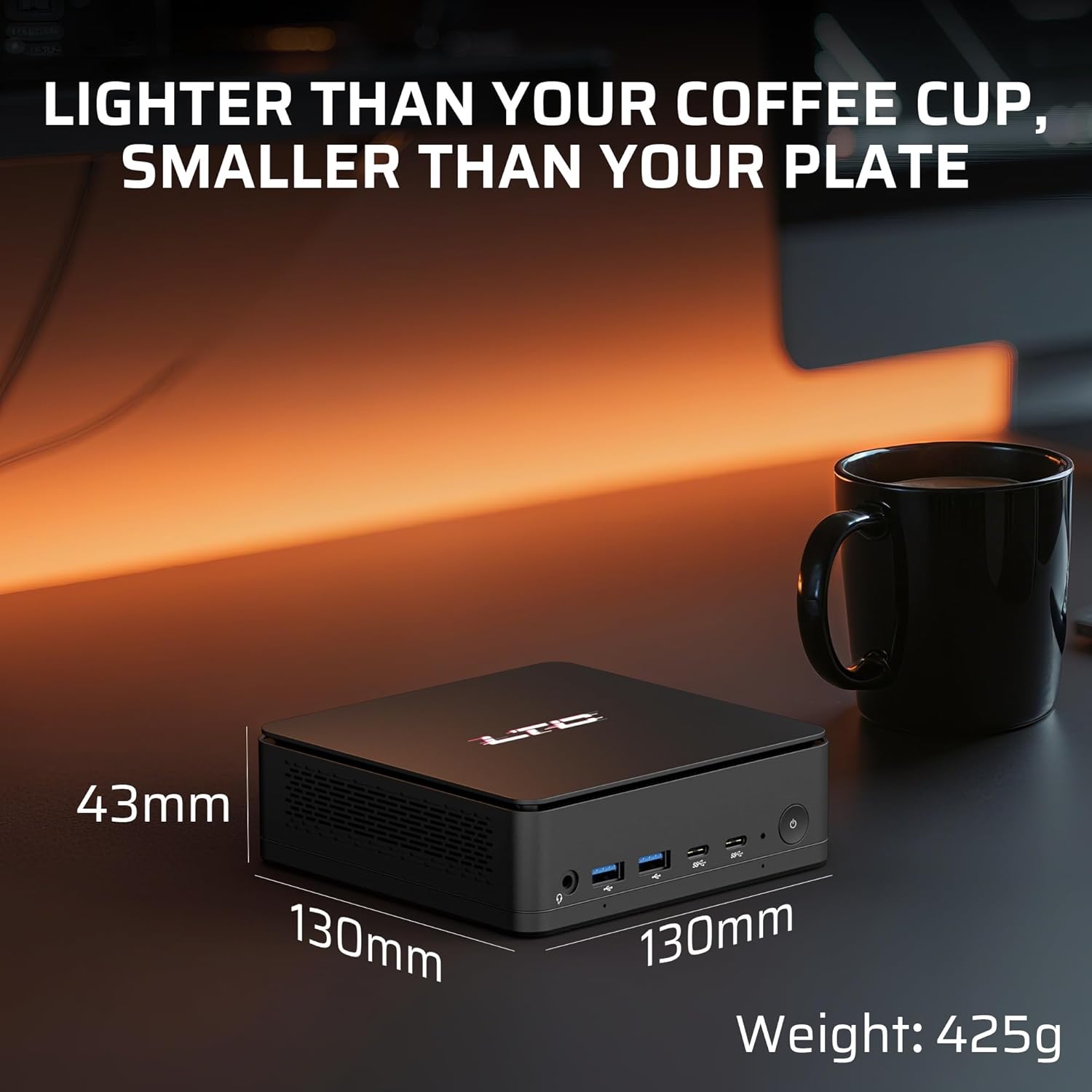
Prent: The compact dimensions of the LTC MC741 Mini PC, shown next to a coffee cup to illustrate its small footprint.
The mini PC measures approximately 130 x 130 x 42 mm and weighs around 300g, making it highly portable and space-efficient.
3.3 Doeltreffende Verkoelingstelsel

Prent: An internal diagram illustrating the advanced thermal system with dual heat pipes and intelligent fan control.
Despite its small size, the MC741 incorporates an advanced thermal system with dual heat pipes and intelligent fan control to maintain optimal performance under heavy workloads while keeping noise levels low.
4. Opstelgids
4.1 Aanvanklike verbinding
- Connect the power adapter to the DC input port on the rear panel of the Mini PC and then to a power outlet.
- Connect your monitor(s) to the HDMI 2.1, DisplayPort 1.4, or USB4 Type-C ports on the rear panel.
- Koppel jou sleutelbord en muis aan die beskikbare USB-poorte.
- Press the Power Button on the front panel to turn on the Mini PC.
4.2 Bedryfstelsel
The LTC MC741 Mini PC typically comes with a Linux operating system pre-installed. If you wish to install Windows or another operating system, please refer to the detailed instructions in the included Quick Installation Guide or the manufacturer's support website for guidance on creating bootable media and installing the OS.
5. Bedryfsinstruksies
5.1 Verwerker en Grafika

Prent: Close-up of the AMD Ryzen 7 8845HS processor, highlighting its 8 cores, 16 threads, 5.1 GHz boost clock, and 45W TDP.
The Mini PC is powered by an AMD Ryzen 7 8845HS processor (8 cores/16 threads, max boost 5.1GHz) with integrated Radeon 780M graphics. This configuration supports smooth multitasking, creative workloads, and 1080P gaming.
5.2 Ondersteuning vir drievoudige skerms
Prent: The LTC MC741 Mini PC connected to three high-resolution monitors, demonstrating its triple display capabilities.
Connect up to three high-resolution monitors simultaneously using the USB4.0 (4K@60Hz), HDMI 2.1 (8K@60Hz), and DisplayPort 1.4 (4K@120/240Hz) outputs. This is ideal for enhanced productivity or immersive entertainment setups.
5.3 Netwerk- en draadlose konnektiwiteit

Prent: Visual representation of the Mini PC's dual-band Wi-Fi 6 and Bluetooth 5.2 capabilities, illustrating seamless wireless connections.
The Mini PC supports 2.5Gbps Ethernet for stable wired connections, Wi-Fi 6 for low-latency wireless networking, and Bluetooth 5.2 for connecting peripherals and devices.
6. Opgradering van komponente
The LTC MC741 Mini PC offers upgradeability for its memory and storage components.
6.1 RAM and SSD Upgrade

Prent: Intern view of the LTC MC741 Mini PC, highlighting the slots for upgradable DDR5 RAM and the PCIe 4.0 M.2 2280 SSD.
- The device comes with 16GB DDR5 RAM (5600MHz, dual-channel) and is expandable up to 32GB.
- It is equipped with a 1TB PCIe 4.0 NVMe SSD and is expandable up to 4TB.
- To access the internal components for upgrade, carefully remove the bottom cover by unscrewing the four screws. Exercise caution to avoid damaging any internal cables or components.
7. Spesifikasies
| Kenmerk | Spesifikasie |
|---|---|
| Verwerker | AMD Ryzen 7 8845HS (8 Cores, 16 Threads, Max Boost 5.1GHz) |
| Grafika | AMD Radeon 780M |
| RAM | 16GB DDR5 (5600MHz, Dual-Channel, Upgradable to 32GB) |
| Berging | 1TB PCIe 4.0 NVMe SSD (Upgradable to 4TB) |
| Bedryfstelsel | Linux (User-installable Windows 11) |
| Video-uitset | 1x HDMI 2.1 (8K@60Hz), 1x DisplayPort 1.4 (4K@120/240Hz), 1x USB4 (4K@60Hz) |
| USB-poorte | 2x USB 3.2 Gen2 Type-A, 1x USB 3.2 Gen2 Type-C, 1x USB4 Type-C, 2x USB 2.0 Type-A |
| Netwerk | 2.5Gbps Ethernet, Wi-Fi 6, Bluetooth 5.2 |
| Oudio | 3.5 mm klankaansluiting |
| Afmetings | 130 x 130 x 42 mm |
| Gewig | Ongeveer. 300g |
8. Probleemoplossing
If you encounter issues with your LTC MC741 Mini PC, refer to the following common troubleshooting steps:
- Geen krag: Maak seker dat die kragadapter stewig aan beide die Mini-rekenaar en 'n werkende kragaansluiting gekoppel is. Probeer 'n ander aansluiting indien nodig.
- Geen skerm: Check all display cable connections (HDMI, DisplayPort, USB4) to your monitor(s). Ensure the monitor is set to the correct input source. Try a different cable or monitor if possible.
- Geen internetverbinding nie: For wired connections, ensure the Ethernet cable is securely plugged into both the Mini PC and your router/modem. For Wi-Fi, check if Wi-Fi is enabled in the operating system settings and ensure you are connected to the correct network with the right password.
- Randapparatuur nie opgespoor nie: Ensure USB devices are properly connected. Try a different USB port. For Bluetooth devices, ensure Bluetooth is enabled and the device is in pairing mode.
- Oorverhitting: Ensure the Mini PC's ventilation openings are not blocked. Operate the device in a well-ventilated area.
9. Waarborg en Ondersteuning
For warranty information, technical support, or service inquiries, please refer to the warranty card included in your package or visit the official LTC webwebwerf. Bewaar u aankoopbewys as bewys van aankoop vir waarborgeise.