
SANSUI W12
SANSUI W12 KI-vertaal-oordopjes gebruikershandleiding
Model: W12 | Brand: SANSUI
1. Inleiding
The SANSUI W12 AI Translation Earbuds are designed to facilitate real-time language translation, high-definition calls, and immersive audio experiences. Featuring advanced Bluetooth 6.0 technology and an open-ear design, these earbuds offer comfort and functionality for various daily activities, including travel, business, and learning.

Image: SANSUI W12 AI Translation Earbuds and their compact charging case.
Video: A detailed physical display of the SANSUI W12 AI Translation Earbuds, showcasinhul ontwerp en kenmerke.
2. Wat is in die boks
Upon unboxing your SANSUI W12 AI Translation Earbuds, you should find the following items:
- SANSUI W12 AI Translation Earbuds (Left and Right)
- Laaikas
- USB-C-laaikabel
- W12 Gebruikershandleiding
- SANSUI AI Smart App User Guide

Image: All items included in the SANSUI W12 product packaging.
3. Opstelling
3.1. Toepassing aflaai en installering
The SANSUI AI Smart App is essential for utilizing the full translation capabilities of your earbuds. You can download it via QR code or by searching in your device's app store.
- Skandeer QR -kode: Locate the QR code on the product packaging or in the included user guide. Use your phone's built-in QR code scanner to scan it. This will direct you to a download page.
- Select Your System: On the download page, select your operating system (Android or iOS).
- Laai af vanaf die App Store: You will be redirected to the Google Play Store (for Android) or the Apple App Store (for iOS). Download and install the "SANSUI" app.
- Direct Search: Alternatively, open your device's app store (Google Play Store or Apple App Store) and search for "SANSUI" to find and install the app directly.
Video: Instructions for downloading and connecting the SANSUI App on Android devices.
Video: Tutorial for downloading the SANSUI AI Smart App on iOS devices.
3.2. Bluetooth-koppeling
Follow these steps to pair your SANSUI W12 earbuds with your smartphone:
- Maak seker dat Bluetooth op jou slimfoon geaktiveer is.
- Maak die laaikas oop en verwyder albei oorfone. Hulle sal outomaties in paringsmodus gaan.
- On your phone, go to Bluetooth settings and search for available devices.
- Select "SANSUI W12" from the list of available devices to connect.
- Once connected, open the SANSUI AI Smart App. In the app, click the "+" sign to search for and connect to your earbuds within the application.

Image: The SANSUI AI Smart App interface, displaying EQ settings and device connection status.
4. Bedryfsinstruksies
4.1. Real-Time Translation
The SANSUI W12 earbuds support over 100 languages for real-time translation through the AI Smart App.
- Open the SANSUI AI Smart App and navigate to the AI function window.
- Select your desired translation mode (e.g., Voice Translation, Text Translation, Simultaneous Interpretation, Conversation Translation).
- Choose the source and target languages for translation.
- Press the record button or follow the on-screen prompts to begin the translation conversation.

Image: Demonstrates various scenarios where the earbuds facilitate communication, such as learning, travel, and business meetings.
Video: 'n Oorview of the SANSUI W12 AI Translation Earbuds model experience, highlighting its features in use.
4.2. Oudio-terugspeel en oproepe
The earbuds provide immersive 8D surround sound and clear communication with dual microphones and advanced noise cancellation.
- Musiek speel: Enjoy high-fidelity audio for music. The AI Smart App allows for customizable sound effects and EQ settings.
- Hoëdefinisie-oproepe: The dual microphones and noise cancellation ensure clear voice transmission during calls.
- Smart Meeting Recording: Utilize the smart meeting recording feature for transcribing conversations.

Image: A user wearing the earbuds, with icons representing key functionalities: Music, Audio control, Calls, Smart meeting transcription, AI models, and Translation.
4.3. Ergonomic Design and Comfort
The SANSUI W12 features an open-ear design with TPEE ear hooks for comfort and stability.
- Oop-oor ontwerp: Allows for ambient sound awareness, enhancing safety during activities like cycling or jogging.
- Veilige pas: TPEE elastic ear hooks prevent the earbuds from falling out during physical activity.
- Glasses-Friendly: The slim ear hooks are designed to be comfortable for users who wear glasses.

Image: A visual comparison of open-ear versus in-ear earbud designs, emphasizing the comfortable and secure fit of the SANSUI W12.

Image: A person wearing the SANSUI W12 earbuds comfortably with eyeglasses, showcasing the ergonomic design for glasses wearers.
5. Onderhoud
To ensure the longevity and optimal performance of your SANSUI W12 AI Translation Earbuds, follow these maintenance guidelines:
- Skoonmaak: Vee die oorfone en laaikassie saggies af met 'n sagte, droë lap. Vermy die gebruik van skuurmiddels of harde chemikalieë.
- Waterweerstand: The earbuds feature a nano-coating for water resistance, protecting against sweat and light rain. However, they are not designed for submersion in water. Avoid prolonged exposure to moisture.
- Laai: Use the provided USB-C cable for charging. Ensure the charging ports are clean and dry before connecting.
- Berging: Bêre die oorfone in hul laaikassie wanneer dit nie gebruik word nie om hulle te beskerm en gelaai te hou. Bêre op 'n koel, droë plek weg van uiterste temperature.
6. Probleemoplossing
If you encounter issues with your SANSUI W12 earbuds, refer to the following common solutions:
- Earbuds Not Connecting to Phone:
- Maak seker dat Bluetooth op jou foon geaktiveer is.
- Maak seker dat die oorfone gelaai is en nie in die laaikas is nie.
- Vergeet die toestel in jou foon se Bluetooth-instellings en probeer weer koppel.
- Restart your phone and the earbuds.
- Programaflaaiprobleme:
- Verifieer jou internetverbinding.
- Maak seker dat jou toestel se bedryfstelsel op datum is.
- Clear the cache of your app store (Google Play Store or Apple App Store).
- If scanning the QR code doesn't work, try searching for "SANSUI" directly in the app store.
- Translation Inaccuracies or Lag:
- Ensure a stable internet connection for optimal real-time translation.
- Praat duidelik en teen 'n matige tempo.
- Check the selected languages in the app to ensure they are correct.
- Update the SANSUI AI Smart App to the latest version.
- Swak klankgehalte:
- Ensure the earbuds are properly positioned on your ears.
- Adjust the EQ settings within the SANSUI AI Smart App.
- Maak enige puin van die oordopjes se luidsprekers skoon.
7. Spesifikasies
| Kenmerk | Detail |
|---|---|
| Model Naam | W12 |
| Handelsmerk | SANSUI |
| Verbindingstegnologie | Draadloos (Bluetooth 6.0) |
| Bluetooth-reeks | 15 meter |
| Batterylewe (Oorfone) | Tot 8 uur per lading |
| Totale batterylewe (met omhulsel) | 42 ure |
| Laai tyd | 1.5 Hours (Type-C) |
| Oudiobestuurdergrootte | 14.2 millimeter |
| Geraasbeheer | Aktiewe geraaskansellasie |
| Waterweerstandvlak | Water Resistant (Nano-coating) |
| Itemgewig (Oorfone) | 8.3g per oordoppie |
| Tipe beheer | App Control / Touch Control / Volume Control |
| Versoenbare toestelle | Cellphones, Gaming Consoles, Laptops, Tablets, Telephones |
| Spesiale kenmerke | Integrated Equalizer, Noise Cancellation, Surround Sound, Touch Control, Volume Control, AI Translation, Smart Meeting Recording |

Image: Technical diagram highlighting the Bluetooth 6.0 technology and 14.2mm dynamic driver for superior audio performance.
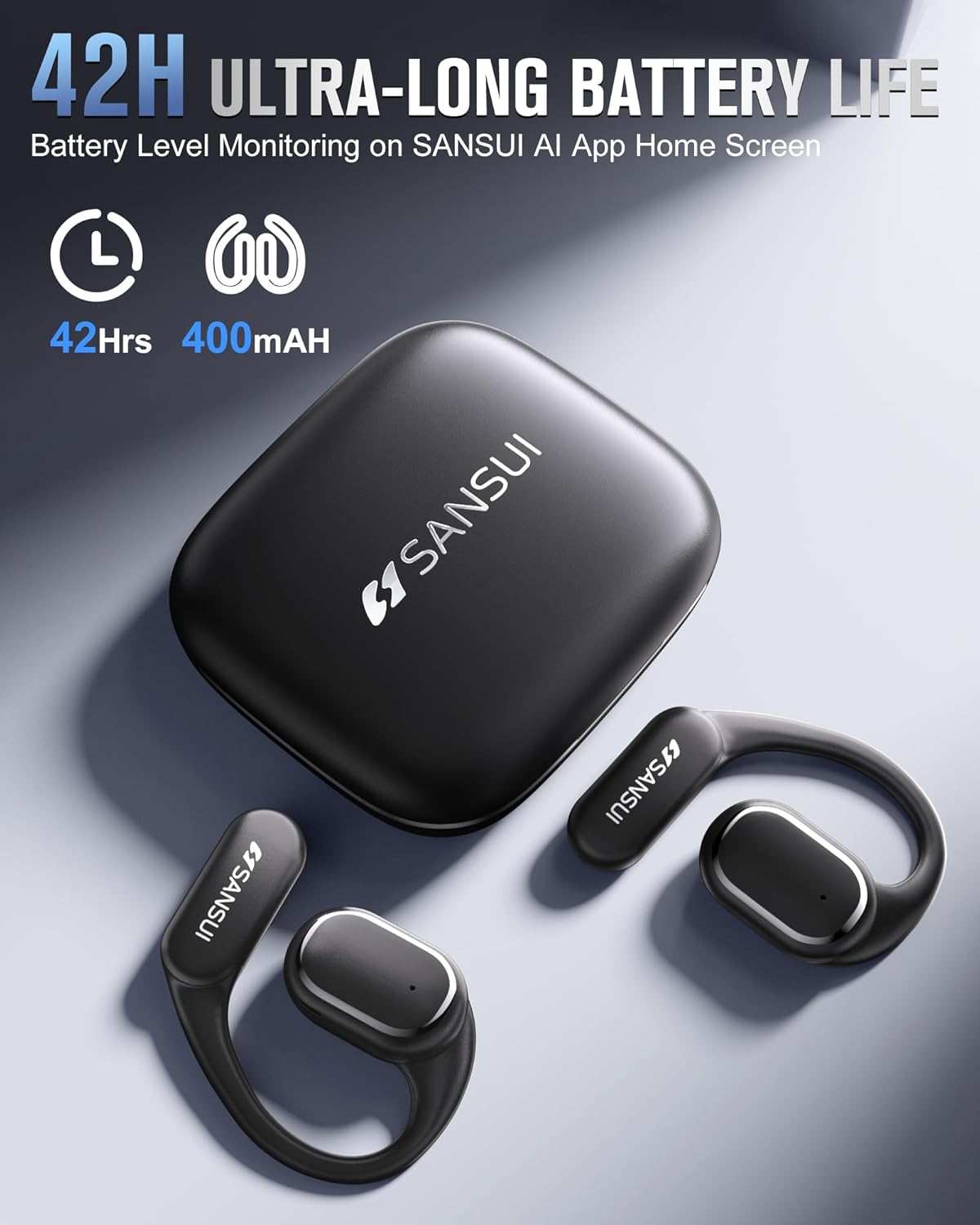
Image: The SANSUI W12 earbuds and charging case, illustrating the 42-hour ultra-long battery life.
8. Waarborg en Ondersteuning
SANSUI is committed to providing quality products and customer satisfaction. For any inquiries or support needs, please refer to the following:
- Waarborg: The product comes with a standard manufacturer's warranty. Please refer to the warranty card included in your packaging for specific terms and conditions.
- Kliëntediens: For technical assistance, troubleshooting, or general inquiries, please visit the official SANSUI website or contact their customer service. Contact information can be found in the user manual or on the SANSUI AI Smart App.
- Beskermingsplanne: Extended protection plans are available for purchase separately to cover your device beyond the standard warranty period.