
1. Inleiding
Thank you for choosing the Angrox Backlit Universal Remote Control for LG Smart TVs. This remote is designed to provide a seamless and enhanced television viewing experience, especially in low-light conditions. It serves as a direct replacement for your original LG TV remote, offering broad compatibility and ease of use without requiring complex setup procedures. This manual provides detailed instructions for setting up, operating, maintaining, and troubleshooting your new remote control.
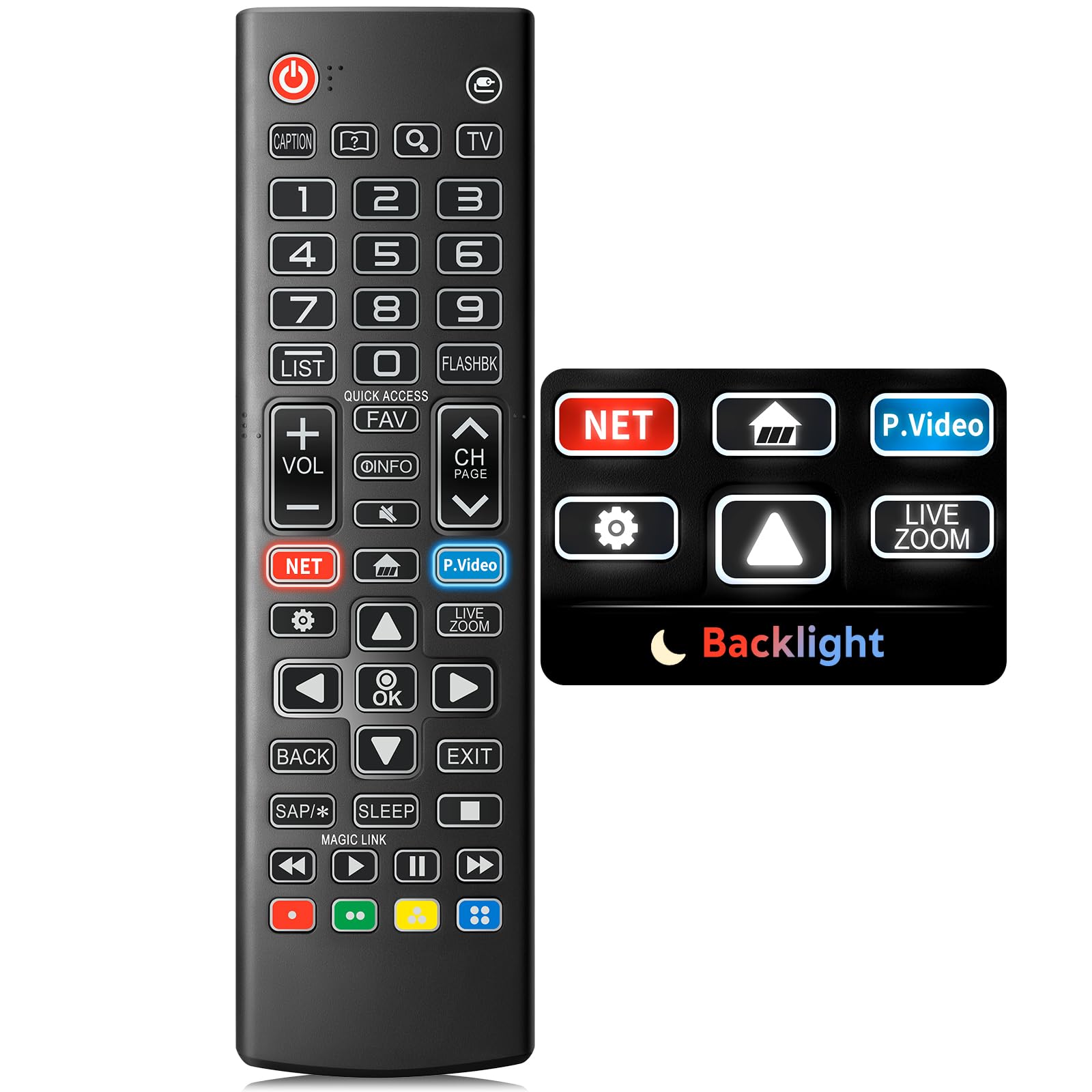
Image: The Angrox Backlit Universal Remote Control, a sleek black remote with clearly labeled buttons.
2. Sleutel kenmerke
- Easy Nighttime Operation: Features soft glow buttons that illuminate, allowing for clear visibility and use in dark environments without causing glare. The backlight activates with any button press and automatically turns off after 10 seconds of inactivity.
- Universele verenigbaarheid: Designed as a direct replacement for LG TV remotes, compatible with all LG TV models. No programming or complex pairing is required; it works immediately out of the box.
- High-Quality Performance: Equipped with sensitive buttons and stable signal transmission for smooth and responsive operation.
- Ergonomiese ontwerp: Shaped to fit comfortably in the hand, reducing fatigue during extended use. The button layout is intuitive for users of all ages.
- Duursaam en betroubaar: Constructed from high-quality, sturdy materials to withstand daily use and accidental drops, ensuring a long lifespan.

Image: A comparison showing the remote control with its backlight off and then with its buttons illuminated, highlighting the easy nighttime operation feature.

Image: The remote control displayed alongside various LG TV models (OLED, UHD, QNED, NanoCell), illustrating its broad compatibility.
3. Opstelinstruksies
3.1 Battery installasie
- Vind die battery kompartement deksel op die agterkant van die afstandbeheer.
- Skuif die deksel afwaarts of druk die grendel om die kompartement oop te maak.
- Plaas twee (2) AAA-batterye in en maak seker dat die positiewe (+) en negatiewe (-) terminale korrek met die aanwysers binne die kompartement in lyn is.
- Plaas die batteryklepdeksel terug deur dit terug te skuif totdat dit stewig klik.
Let wel: Batteries are not included with the remote control. Please use new AAA alkaline batteries for optimal performance.

Image: A visual guide demonstrating the correct insertion of two AAA batteries into the remote control's battery compartment.
3.2 Initial Use (No Pairing Required)
The Angrox Backlit Universal Remote Control is designed for immediate use with LG Smart TVs. No pairing or programming steps are necessary. Once batteries are installed, the remote is ready to control your LG television.
4. Bedryfsinstruksies
This section details the functions of the buttons on your Angrox remote control.

Image: A comprehensive layout of the remote control, with labels pointing to each button and describing its primary function.
4.1 Basiese Funksies
- Krag (
 ): Skakel die TV aan of af.
 - Invoer (): Changes the input source (e.g., HDMI 1, HDMI 2).
- Volume op/af (VOL +/-): Pas die volumevlak aan.
- Kanaal op/af (CH Page): Verander die televisiekanaal.
- Demp (): Demp of ontdemp die TV-oudio.
- Getalknoppies (0-9): Directly enters channel numbers or other numerical inputs.
- Navigasieknoppies (Op/Af/Links/Regs): Word gebruik om deur spyskaarte en opsies te blaai.
- OK knoppie: Selects menu items or confirms your input.
4.2 Spesiale Funksieknoppies
- Netflix-knoppie: Launches the Netflix application directly.
- Amazon Prime Video Button: Launches the Amazon Prime Video application directly.
- Vinnige toegang: A feature that allows you to enter a specified app or Live TV directly by pressing and holding the number buttons.
- Lys: Toegang tot die lys van gestoorde programme.
- Flashback: Keer terug na die vorige viewed channel or input.
- Inligting: Displays information on the current program.
- Gunsteling: Kry toegang tot jou gunsteling kanaallys.
- Instellings (): Accesses the Quick Settings menu.
- Agter: Vee skermskerms uit en keer terug na TV viewing.
- Verlaat: Verlaat die huidige spyskaart.
- Slaap: Accesses the sleep timer.
- Media Control Buttons (Play, Pause, Stop, Fast Forward, Rewind): Controls media content playback.
4.3 Agtergrondbeligtingsfunksie
The remote control features a soft backlight for easy use in the dark. Simply press any button, and the backlight will turn on. It will automatically turn off after 10 seconds of inactivity to conserve battery life.
Video: A demonstration of the Angrox Backlit Remote for LG Smart TV, showcasing its easy nighttime use and responsive buttons. This video highlights the convenience of the backlit feature in dark environments.
5. Spesifikasies
| Handelsmerk | Angrox |
| Model Naam | AKB75095307 |
| Modelnommer | AKB75095307 |
| Spesiale kenmerke | Backlit, Ergonomic, Lightweight, No Programming Required, Universal |
| Versoenbare toestelle | Television (All LG TV models) |
| Maksimum aantal ondersteunde toestelle | 1 |
| Verbindingstegnologie | Infrarooi |
| Knoppie Hoeveelheid | 30 |
| Tipe beheerder | Knoppie beheer |
| Maksimum reeks | 10 Meters (approximately 33 feet) |
| Aantal batterye benodig | 2 AAA batterye |
| Battery Tipe | Alkalies |
| Itemafmetings (L x B x H) | 1.89 cm L x 9.25 cm B x 0.73 cm H |
6. Probleemoplossing
Indien u probleme met u afstandbeheer ondervind, verwys asseblief na die volgende algemene oplossings:
- Afstandsbediening reageer nie:
- Maak seker dat die batterye korrek met die korrekte polariteit (+/-) geplaas is.
- Vervang ou batterye met nuwe AAA alkaliese batterye.
- Check for any obstructions between the remote control and the TV's infrared receiver.
- Ensure you are within the maximum operating range (10 meters) of the TV.
- Agterlig werk nie:
- Verify battery power. Low batteries may affect backlight functionality.
- The backlight is designed to turn off after 10 seconds of inactivity. Press any button to reactivate it.
- Specific buttons not working (e.g., Netflix, Amazon Prime):
- Ensure your LG Smart TV is connected to the internet and the respective applications are installed and updated.
- Some smart TV features or app shortcuts may vary slightly depending on your TV's model and region.
- Remote feels sluggish or unresponsive:
- Vervang batterye met nuwes.
- Clean the remote's infrared emitter (at the top) and the TV's IR receiver with a soft, dry cloth to ensure a clear signal path.
7. Onderhoud
To ensure the longevity and optimal performance of your Angrox remote control, follow these maintenance guidelines:
- Skoonmaak: Use a soft, dry cloth to clean the remote's surface. Avoid using liquid cleaners, aerosols, or harsh chemicals, as they may damage the remote.
- Battery vervanging: Replace batteries promptly when the remote's performance declines or if the backlight becomes dim. Remove batteries if the remote will not be used for an extended period to prevent leakage.
- Berging: Bêre die afstandbeheerder op 'n koel, droë plek weg van direkte sonlig, uiterste temperature en hoë humiditeit.
- Vermy druppels: While durable, repeated drops can damage internal components. Handle the remote with care.
8. Waarborg en ondersteuning
8.1 Waarborginligting
The Angrox Backlit Universal Remote Control (Model AKB75095307) is covered by a 90-dae waarborg from the date of purchase. This warranty covers manufacturing defects and ensures the product functions as described under normal use. It does not cover damage caused by misuse, accidents, unauthorized modifications, or normal wear and tear.
8.2 Kliëntediens
For any questions, technical assistance, or warranty claims, please contact Angrox customer support through the retailer where you purchased the product or visit the official Angrox store online. Please have your purchase receipt and product model number available when contacting support.