
Toputure TP6
Toputure TP6 Opvoubare Loopband Gebruikershandleiding
Model: TP6
Inleiding
Thank you for choosing the Toputure TP6 Folding Treadmill. This manual provides essential information for the safe and efficient operation, maintenance, and troubleshooting of your new fitness equipment. Please read it thoroughly before initial use and keep it for future reference.
Belangrike veiligheidsinstruksies
To reduce the risk of serious injury, read all instructions before using the Toputure TP6 treadmill. Keep this manual in a safe place for future reference.
- Plaas die loopband altyd op 'n gelyke oppervlak.
- Verseker voldoende speling rondom die trapmeul (ten minste 2 meter agter en 0.6 meter aan elke kant).
- Hou kinders en troeteldiere weg van die trapmeul tydens gebruik.
- Do not use the treadmill if you weigh more than 130 KG.
- Heg altyd die veiligheidsleutelklip aan jou klere vas voordat jy die trapmeul begin.
- Raadpleeg 'n dokter voordat u enige oefenprogram begin.
- Moenie die loopband gebruik as dit 'n beskadigde koord of prop het nie, of as dit nie behoorlik werk nie.
- Dra gepaste atletiese skoene en klere.
Opstelling en samestelling
The Toputure TP6 treadmill is designed for easy setup and does not require complex installation. It is ready to use out of the box.
Ontvou die Treadmill
- Verwyder die loopband versigtig uit sy verpakking.
- Plaas die gevoude loopband op 'n plat, stabiele oppervlak.
- Lift the handrail assembly until it locks into the upright position.
- Secure the handrail assembly using the adjustment knobs.

Figuur 1: Unfolding and securing the handrails of the Toputure TP6 treadmill.
Adjusting Handrails and Incline
The telescopic handrails can be adjusted in height from 82 cm to 115 cm and in angle from 95° to 105° to suit various user heights and exercise preferences.
- To adjust height: Loosen the adjustment knobs on the handrails, slide to the desired height, and tighten securely.
- To adjust angle: Use the angle adjustment mechanism at the base of the handrails to select between 95° and 105° positions.

Figuur 2: Adjustable handrails for personalized comfort and support.
The treadmill also features three incline levels: 1%, 6%, and 12%. These can be manually adjusted to simulate different terrains and increase workout intensity.

Figuur 3: Three incline levels for varied workout intensity.
Bedryfsinstruksies
Aan die gang
- Steek die kragkabel in 'n geaarde elektriese aansluiting.
- Attach the safety key to the designated area on the console and clip the other end to your clothing. The treadmill will not operate without the safety key in place.
- Step onto the treadmill belt, holding onto the handrails for balance.
- Press the START button on the console or remote control to begin your workout.

Figuur 4: LED display and magnetic remote control for easy operation.
Adjusting Speed and Monitoring Progress
The treadmill offers a speed range of 1 to 12 KM/H. You can adjust the speed using the '+' and '-' buttons on the console or the remote control.
The multifunction LED display shows real-time data including time, calories burned, speed, and distance. This allows you to monitor your exercise status at a glance.
Smart APP Integration
Connect your treadmill to the sports APP via Bluetooth. The intelligent APP control allows you to record all your exercise data and share it. The enhanced device holder securely holds your phone or tablet, allowing you to enjoy media during your workout.
Oefenmodusse
The 6-in-1 folding treadmill supports various scenarios:
- Stapmodus: Ideal for light exercise or warm-ups.
- Fat Burning Mode: Optimized for calorie expenditure.
- Office Work Mode: Use with a standing desk for active work.
- Pet Training Mode: Suitable for exercising pets.
- Hardloopmodus: For moderate to intense cardio workouts.
- Rehabilitation Mode: Gentle exercise for recovery.

Figuur 5: Versatile 6-in-1 functionality for various exercise needs.
Stop die loopband
To stop the treadmill, press the STOP button on the console or remote control. If the safety key is removed, the treadmill will stop immediately.
Onderhoud
Regular maintenance ensures the longevity and optimal performance of your Toputure TP6 treadmill.
Skoonmaak
- Vee die loopband na elke gebruik af met advertensieamp lap om sweet en stof te verwyder.
- Moenie skuur skoonmaakmiddels of oplosmiddels gebruik nie.
Smering
The treadmill features lubrication holes for easy maintenance. Regular lubrication of the running belt is crucial for smooth operation and to prevent wear.
- Refer to the specific lubrication instructions provided with your treadmill for the correct type and amount of lubricant, and frequency of application.
- The unique design of the lubrication holes allows for easy identification of the lubrication position.
Figuur 6: Lubrication holes for simplified maintenance of the running belt.
Bandverstelling
If the running belt becomes misaligned or too loose/tight, it may need adjustment. Consult the detailed instructions in the full user manual for proper belt tensioning and centering procedures.
Probleemoplossing
This section addresses common issues you might encounter with your Toputure TP6 treadmill.
| Probleem | Moontlike oorsaak | Oplossing |
|---|---|---|
| Trapband begin nie. | Power cord not plugged in; Safety key not in place; Power switch off. | Ensure power cord is securely plugged in; Insert safety key; Turn on power switch. |
| Hardloopband gly of huiwer. | Band te los; Onvoldoende smering. | Pas die bandspanning aan (verwys na die volledige handleiding); Smeer die loopband. |
| Ongewone geraas tydens operasie. | Loose components; Belt misalignment; Motor issue. | Check and tighten all visible bolts and screws; Adjust belt alignment; If noise persists, contact customer support. |
| Inaccurate display readings. | Sensor malfunction; Calibration needed. | Ensure all connections are secure; Refer to the full manual for calibration steps or contact support. |
For issues not listed here or if solutions do not resolve the problem, please contact Toputure customer support.
Spesifikasies
| Kenmerk | Detail |
|---|---|
| Handelsmerk | Toputure |
| Modelnommer | TP6 |
| Motorperdkrag | 2.5 HP |
| Spoedreeks | 1 - 12 km/h |
| Hellingsvlakke | 1%, 6%, 12% (manual adjustment) |
| Hardloopoppervlak | 40 x 100 cm |
| Max gebruiker gewig | 130 kg |
| Handrail Height Adjustment | 82 cm tot 115 cm |
| Handrail Angle Adjustment | 95° tot 105° |
| Vertoon | Multifunction LED (Time, Calories, Speed, Distance) |
| Konnektiwiteit | Bluetooth for APP integration |
| Kussingstelsel | 7-layer anti-slip belt, 8 silicone shock absorbers, 2 soft rubber pads |
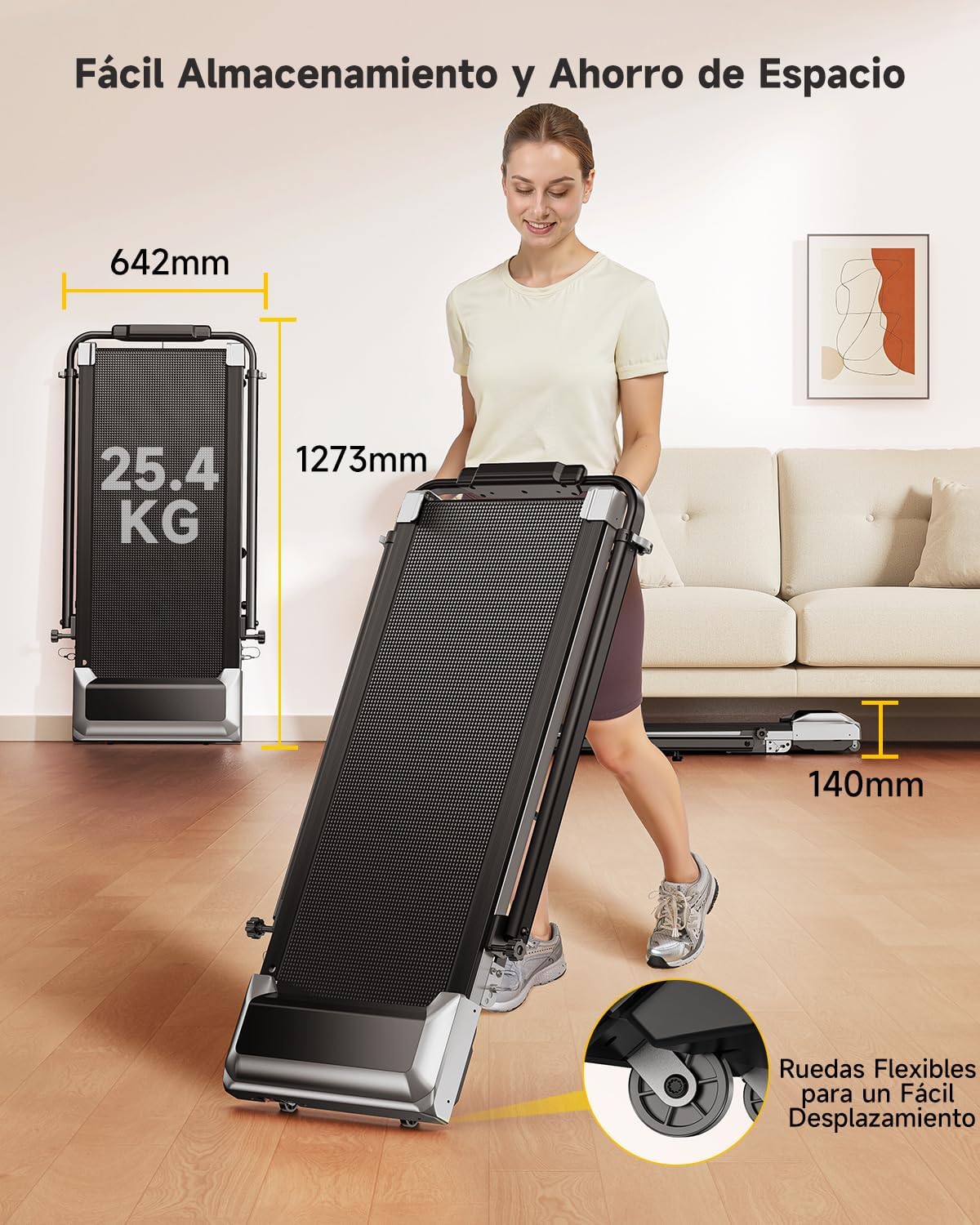
| Produkafmetings (L x B x H) | 127.3 x 64.2 x 13 cm (gevou) |
| Produk Gewig | 25.4 kg |
| Materiaal | Allooi staal |

Figuur 7: Compact design and transport wheels for easy storage and movement.
Produkvideo's
Treadmill Setup and Usage
This video demonstrates the setup process and general usage of a similar treadmill model, including unfolding, securing the handrails, and starting a workout. Note: This video features the FITFIU Fitness MC-160, which shares similar operational principles with the Toputure TP6.
Treadmill Features Overview
Hierdie video bied 'n oorview of the features and benefits of a similar treadmill model, showcasing its compact design, ease of use, and various exercise capabilities. Note: This video features the FITFIU Fitness MC-160, which shares similar operational principles with the Toputure TP6.
Waarborg en Ondersteuning
For warranty information, product support, or to purchase replacement parts, please contact Toputure customer service. Keep your purchase receipt and model number (TP6) handy when contacting support.
The product includes a user manual in the box. Additional warranty information may be available upon product registration with the manufacturer.
Verwante Dokumente - TP6
 |
Toputure TP6 Tuisloopband Gebruikershandleiding Comprehensive user manual for the Toputure TP6 Home Treadmill, covering installation, operation, maintenance, safety, and troubleshooting. |
 |
Toputure TP5 Folding Incline Treadmill User Manual Comprehensive user manual for the Toputure TP5 Folding Incline Treadmill. Learn about installation, operation, safety guidelines, maintenance, and troubleshooting for your home fitness equipment. |
 |
PitPatPower AS02R Home Treadmill: Instruction Manual & User Guide This comprehensive instruction manual provides essential guidance for the PitPatPower AS02R Home Treadmill, covering safety, assembly, operation, maintenance, and troubleshooting for optimal fitness results. |
 |
FoldiMix 5L Pro Smart Trapband Gebruikershandleiding Gebruikershandleiding vir die UREVO FoldiMix 5L Pro 2-in-1 Auto Incline Folding Smart Treadmill, wat veiligheidsinstruksies, toepassinggebruik, spesifikasies, werking, onderhoud, probleemoplossing en waarborg dek. |
 |
Merax Voubare Loopband Gebruikershandleiding: Installasie, Bediening en Onderhoud Omvattende gebruikershandleiding vir die Merax-vouloopband, wat produkkenmerke, veiligheidsmaatreëls, installasie-instruksies, gebruiksgids en roetine-onderhoudsprosedures dek. |
 |
FoldiMix 5L 2-in-1 Outomatiese Helling Voubare Slim Loopband Gebruikershandleiding Gebruikershandleiding vir die UREVO FoldiMix 5L Smart Treadmill, met besonderhede oor die opstelling, werking, veiligheidsriglyne, app-integrasie, spesifikasies, onderhoud, probleemoplossing en waarborginligting vir tuisfiksheid. |
Ask a question about this manual
Ask about setup, troubleshooting, compatibility, parts, safety, or missing instructions. Manuals+ will review the question and use this page’s manual context to help answer it.