
1. Inleiding
Welcome to your new xinwld A97 Pro Wireless Earbuds. These earbuds are designed to provide a high-fidelity audio experience with deep bass, advanced Bluetooth 5.4 connectivity, and effective environmental noise cancellation (ENC) for clear calls. This manual will guide you through the setup, operation, and maintenance of your earbuds.
Sleutel kenmerke:
- Bluetooth 5.4: Vir stabiele en doeltreffende draadlose verbinding.
- HiFi Stereo Sound with Deep Bass: Delivers rich audio quality.
- Tot 40 uur speeltyd: Extended listening with the charging case.
- 4 ENC Noise Cancelling Microphones: Ensures clear calls by reducing ambient noise.
- IP7 Waterbestandheid: Protects earbuds from water splashes and sweat (earbuds only).
- Intuïtiewe aanraakkontroles: Maklike bestuur van musiek en oproepe.
- LED digitale skerm: Shows battery level of the charging case and earbuds.
2. Pakketinhoud
Kontroleer asseblief die pakket vir die volgende items:
- xinwld A97 Pro Wireless Earbuds (Left and Right)
- Laaikas
- USB-C-laaikabel
- Gebruikershandleiding
- (Optional) Various Sizes of Eartips
3. Produk verbyview
Familiarize yourself with the components of your xinwld A97 Pro Wireless Earbuds.
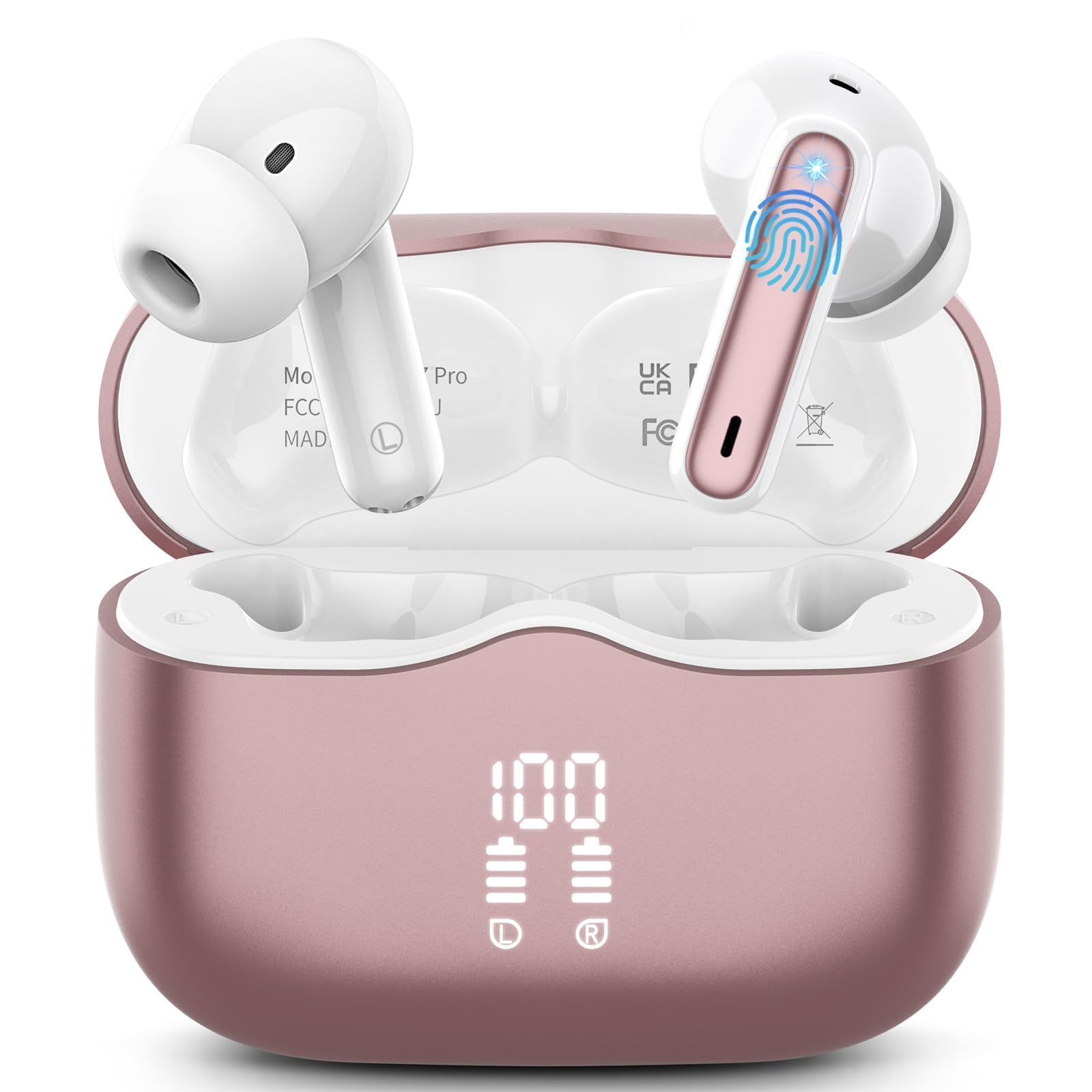
Prent 1: xinwld A97 Pro Wireless Earbuds and Charging Case. The image shows the black earbuds placed inside their charging case, which features a digital LED display on the front indicating battery levels.
Oordopkomponente:
- Raakbeheerarea: Vir die bestuur van terugspeel, oproepe en stemassistent.
- Mikrofoon: For calls and ENC functionality.
- Laai kontakte: Connects with the charging case for power.
- Oorwenk: Provides comfort and sound isolation; replaceable.
Laaikaskomponente:
- LED digitale skerm: Shows the battery level of the case and charging status of the earbuds.
- USB-C-laaipoort: Vir die laai van die saak.
- Oordoplaaigleuwe: Holds and charges the earbuds when placed inside.
4. Opstelgids
4.1. Aanvanklike laai
Laai die oordopjes en die laaikassie volledig voor die eerste gebruik.
- Plaas albei oordopjes in die laaikas.
- Connect the USB-C charging cable to the charging port on the case and the other end to a USB power adapter (not included).
- Die LED-skerm op die laaikas sal die batterypersentasie wystage. The charging indicators for the earbuds will also be visible.
- Sodra dit ten volle gelaai is, ontkoppel die laaikabel.
4.2. Koppeling met jou toestel
- Maak seker dat die oordopjes gelaai is.
- Open the charging case. The earbuds will automatically power on and enter pairing mode, indicated by flashing lights.
- Gaan na Bluetooth-instellings op jou toestel (slimfoon, tablet, ens.) en skakel Bluetooth aan.
- Soek vir available devices. Select "xinwld A97 Pro" from the list.
- Sodra dit gekoppel is, sal jy 'n bevestigingsgeluid hoor, en die oorfone se aanwyserliggies sal afskakel of stadig flikker.
- Indien paring misluk, plaas die oordopjes terug in die houer, maak die deksel toe, wag 'n paar sekondes en herhaal dan die stappe.
5. Bedryfsinstruksies
5.1. Skakel aan/af
- Krag aan: Maak die laaikas oop en die oordopjes sal outomaties aanskakel. Alternatiewelik, druk en hou die aanraakbeheerarea op beide oordopjes vir 3 sekondes in.
- Skakel af: Place the earbuds back into the charging case and close the lid. They will automatically power off and begin charging. Alternatively, disconnect them from Bluetooth, and they will power off after 5 minutes of inactivity.
5.2. Dra van die oordopjes
Insert the earbuds into your ears and gently rotate them to find a comfortable and secure fit. Ensure the microphones are facing downwards for optimal call quality. Experiment with different eartip sizes (if included) for the best seal and sound.
5.3. Raak Kontroles
The xinwld A97 Pro earbuds feature intuitive touch controls on each earbud. The functions are generally mirrored on both earbuds unless specified.
| Funksie | Aksie |
|---|---|
| Speel/Pause Musiek | Enkele tik op enige van die oordopjes |
| Volgende Snit | Dubbeltik op enige van die oordopjes |
| Vorige Snit | Drie keer tik op enige oordopjes |
| Beantwoord/beëindig oproep | Enkele tik op enige van die oordopjes |
| Verwerp oproep | Druk en hou enige oordopjes vir 2 sekondes |
| Aktiveer stemassistent | Druk en hou enige oordopjes vir 3 sekondes |
| Volumebeheer | Control via your connected device (earbuds do not have direct volume control) |
5.4. Omgewingsgeraasdemping (ENC)
The earbuds feature 4 ENC microphones to reduce ambient noise during calls, ensuring clearer conversations for both you and the person you are speaking with. This feature is automatically active during phone calls.
6. Onderhoud en versorging
6.1. Skoonmaak
- Maak die oordopjes en laaikas gereeld skoon met 'n sagte, droë, pluisvrye lap.
- Do not use harsh chemicals, cleaning solvents, or strong detergents, as these may damage the product.
- Gently clean the charging contacts on both the earbuds and inside the case to ensure proper charging and connectivity.
6.2. Waterbestandheid (IP7)
The earbuds are rated IP7 water-resistant, meaning they can withstand immersion in water up to 1 meter for 30 minutes. This rating applies to the earbuds only, not the charging case.
- Moenie die laaikas in water dompel nie.
- Avoid using the earbuds in saunas, steam rooms, or during water sports.
- If the earbuds get wet, dry them thoroughly with a soft cloth before placing them back in the charging case to prevent damage to the charging contacts.
6.3. Berging
When not in use, store the earbuds in their charging case to protect them from dust, scratches, and accidental damage.
6.4. Batteryversorging
To prolong battery life, avoid fully discharging the earbuds and charging case frequently. Charge them regularly, even if not in constant use, to maintain optimal battery health.
7. Probleemoplossing
Indien u enige probleme ondervind, verwys asseblief na die volgende algemene oplossings:
7.1. Earbuds not pairing with device:
- Maak seker dat Bluetooth op jou toestel geaktiveer is.
- Maak seker dat die oorfone gelaai is en nie in die laaikas is nie.
- Try forgetting "xinwld A97 Pro" from your device's Bluetooth list and re-pairing.
- Herbegin jou toestel.
- Plaas die oorfone terug in die houer, maak die deksel toe, wag 10 sekondes en maak dit dan oop om weer in paringsmodus te gaan.
7.2. Only one earbud working:
- Maak seker dat beide oordopjes gelaai is.
- Plaas albei oordopjes terug in die laaikas, maak die deksel toe en maak dit dan weer oop.
- Maak die laaikontakte op beide oordopjes en binne-in die houer skoon.
7.3. Earbuds not charging:
- Maak seker dat die laaikabel stewig aan beide die kas en die kragbron gekoppel is.
- Kontroleer of die laaikontakte op die oordopjes en binne-in die houer skoon en vry van puin is.
- Probeer 'n ander USB-C-kabel of kragadapter.
7.4. Poor sound quality:
- Maak seker dat die oorfone behoorlik in jou ore sit.
- Probeer oordoppe van verskillende groottes vir 'n beter seël.
- Maak enige oorsmeer of puin van die oordopjes se spuitpunte skoon.
- Ensure your device's volume is not too low.
- Beweeg nader aan jou gekoppelde toestel om steuring te vermy.
8. Spesifikasies
| Kenmerk | Detail |
|---|---|
| Handelsmerk | xinwld |
| Model Naam | A97 Pro |
| Modelnommer | A97 |
| Verbindingstegnologie | Draadloos (Bluetooth) |
| Bluetooth weergawe | 5.4 |
| Oorplasing | In Oor |
| Tipe beheer | Raak Beheer |
| Waterweerstandgradering | IP7 (Slegs oordopjes) |
| Speeltyd | Tot 40 uur (met laadkas) |
| Mikrofone | 4 ENC-geraasdempende mikrofone |
| Materiaal | Plastiek |
9. Waarborg en Ondersteuning
9.1. Waarborginligting
Your xinwld A97 Pro Wireless Earbuds come with a limited warranty. Please refer to the warranty card included in your package or visit the official xinwld website for detailed warranty terms and conditions. The warranty period is typically 1 year from the date of purchase, covering manufacturing defects.
9.2. Kliëntediens
For any questions, technical assistance, or warranty claims, please contact xinwld customer support through the following channels:
- E-pos: Please check your product packaging or the official xinwld website for direct customer support email.
- Webwebwerf: Visit the xinwld Store on Amazon (for general inquiries or to find official contact information).
When contacting support, please have your product model (A97 Pro) and purchase details ready to expedite assistance.