
1. Inleiding
The House of Marley Get Together Go is a portable Bluetooth speaker designed for high-quality audio and outdoor durability. It features sustainable materials, multiple sound modes, and a robust, adventure-ready design.

Figure 1: Get Together Go Speaker in an outdoor environment.
Key features include IP67 waterproof and dustproof rating, up to 20 hours of playtime, customizable EQ modes, and Auracast multi-speaker pairing. The speaker is crafted from renewable bamboo and REGRIND silicone, reflecting a commitment to sustainable design.

Figuur 2: oorview of main features including EQ settings, playtime, IP67 protection, and ambient lighting.
2. Pakketinhoud
Maak seker dat alle items in die pakket teenwoordig is:
- House of Marley Get Together Go Portable Bluetooth Speaker
- USB-C-laaikabel
- Vinnige Begingids (nie in hierdie handleiding ingesluit nie)
3. Opstelling
3.1 Laai die luidspreker
- Koppel die meegeleverde USB-C-laaikabel aan die luidspreker se laaipoort.
- Koppel die ander kant van die kabel aan 'n versoenbare USB-kragadapter (nie ingesluit nie).
- Die laai-aanwyserliggie sal tydens laai brand en afskakel wanneer dit volledig gelaai is.
3.2 Aan-/afskakel
- To power on, press and hold the Power button until the indicator lights activate.
- To power off, press and hold the Power button again until the indicator lights turn off.

Figuur 3: Voorkant view of the speaker, illustrating general layout and control area.
3.3 Bluetooth -koppeling
- Maak seker dat die luidspreker aangeskakel is.
- Press and hold the Bluetooth button on the speaker until the Bluetooth indicator light begins to flash, indicating pairing mode.
- Aktiveer Bluetooth op jou toestel (slimfoon, tablet, ens.) en soek vir beskikbare toestelle.
- Select "Get Together Go" from the list of devices.
- Sodra dit gekoppel is, sal die Bluetooth-aanwyserliggie aanhou brand.
3.4 Auracast Multi-Speaker Pairing
The Get Together Go supports Auracast for connecting multiple compatible speakers for a larger sound experience. Refer to the official House of Marley website for detailed instructions on Auracast setup.
4. Bedryfsinstruksies
4.1 Oudio-terugspeel
- Once paired via Bluetooth, play audio from your connected device.
- Use the Volume Up (+) and Volume Down (-) buttons on the speaker to adjust the volume.
- Druk die Speel/Pause-knoppie om terugspeel te beheer.

Figure 4: Speaker control panel for power, Bluetooth, volume, and playback.
4.2 Custom EQ Modes
The speaker features three customizable EQ modes to optimize sound for different environments:
- Marley Signature Sound: Gebalanseerde klankprofile.
- Bas hupstoot: Enhanced low-frequency response.
- Buitelugmodus: Optimized for open-air listening.
To switch between EQ modes, briefly press the Power button while the speaker is on. The ambient lighting may change to indicate the active mode.

Figure 5: Speaker in an outdoor setting, demonstrating its durability and suitability for various environments, where EQ modes can be adjusted.
4.3 Omgewingsbeligting
The speaker includes ambient lighting at its base. This lighting can be toggled or adjusted by pressing a dedicated button (refer to the speaker's physical controls for exact button location, often integrated with power or EQ controls).
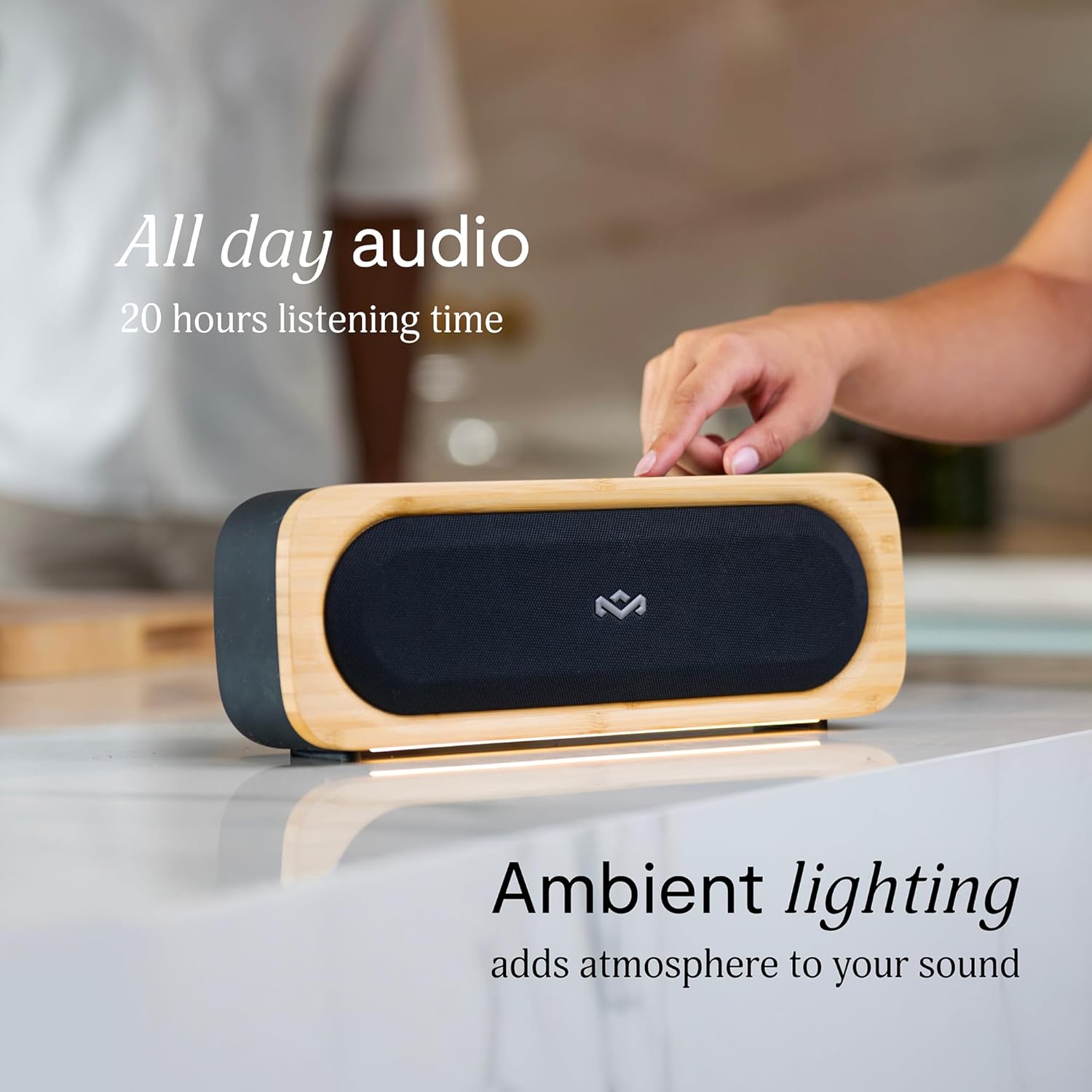
Figure 6: Speaker with ambient lighting active.
4.4 Ingeboude Botteloopmaker
A bottle opener is integrated into the speaker's design for convenience. Locate the bottle opener on the rear or side of the speaker and use it as you would a standard bottle opener.

Figure 7: Demonstrating the use of the built-in bottle opener.
5. Onderhoud
5.1 Skoonmaak
- The speaker features a removable grill for easy cleaning. Gently detach the grill to clean any dust or debris from the speaker drivers.
- Wipe the speaker's exterior with a soft, damp lap. Vermy die gebruik van harde chemikalieë of skuur skoonmakers.
- Ensure the speaker is completely dry before reattaching the grill or using it near water.

Figure 8: Speaker with removable grill detached for cleaning.
5.2 Water and Dust Protection (IP67)
- The IP67 rating means the speaker is protected from dust ingress and can withstand immersion in water up to 1 meter for 30 minutes.
- Maak altyd seker dat die laaipoortdeksel stewig toe is voordat die luidspreker aan water of stof blootgestel word.
- Na blootstelling aan water, droog die luidspreker deeglik af voordat dit gelaai word.
5.3 Batterysorg
- For optimal battery life, avoid fully discharging the speaker frequently.
- Bêre die luidspreker op 'n koel, droë plek wanneer dit nie vir lang tye gebruik word nie.
6. Probleemoplossing
6.1 Luidspreker skakel nie aan nie
- Maak seker dat die battery gelaai is. Koppel die luidspreker aan 'n kragbron en laat dit vir ten minste 30 minute laai voordat jy dit weer probeer aanskakel.
- Press and hold the Power button for a few seconds to ensure it's not a brief press.
6.2 Bluetooth-paringsprobleme
- Maak seker dat die luidspreker in paringsmodus is (flikkerende Bluetooth-aanwyser).
- Ensure your device's Bluetooth is enabled and within range (typically 10 meters or 33 feet).
- Try forgetting the speaker from your device's Bluetooth settings and re-pairing.
- Herbegin beide die luidspreker en jou Bluetooth-toestel.
6.3 Geen geluid of lae volume
- Kontroleer die volumevlakke op beide die luidspreker en jou gekoppelde toestel.
- Ensure the speaker is properly paired and connected to your device.
- Try playing audio from a different application or source on your device.
7. Spesifikasies
| Kenmerk | Detail |
|---|---|
| Model Naam | KOM SAAM GAAN |
| Item Modelnommer | EM-JA036-SB |
| Verbindingstegnologie | Bluetooth |
| Luidspreker Maksimum uitsetkrag | 20 Watt |
| IP-gradering | IP67 (Waterdig en Stofdig) |
| Speeltyd | Tot 20 uur |
| Produk afmetings | 5.75" D x 16.13" B x 4.75" H |
| Item gewig | 4.05 pond |
| Materiaal | Renewable Bamboo, REGRIND Silicone, REWIND Fabric |
| UPC | 846885011706 |
8. Waarborg en Ondersteuning
For warranty information and technical support, please refer to the official House of Marley webwebwerf of kontak hul kliëntediens direk. Bewaar u bewys van aankoop vir waarborgeise.
9. Sustainability Commitment
The House of Marley Get Together Go speaker is designed with sustainability in mind, utilizing:
- Renewable Bamboo: Crafted from one of the world's fastest-growing plants.
- REWIND Fabric: Made from recycled plastic bottles for a durable finish.
- REGRIND Silicone: Produced using reclaimed and upcycled post-process and post-consumer waste.

Figure 9: Details on the sustainable materials used in the speaker's construction.