
Inleiding
Thank you for choosing the KONNAO BH369A Bluetooth Headset. This wireless headset is designed for professional use, featuring AI noise-cancelling technology, Bluetooth 5.3 connectivity, and a convenient charging station. This manual provides detailed instructions for setup, operation, maintenance, and troubleshooting to ensure optimal performance.

Image: The KONNAO BH369A Bluetooth Headset, showcasing its design and included accessories like the charging base and USB dongle.
Opstelling
Pakketinhoud
- KONNAO BH369A Wireless Headset
- USB-dongle
- Herlaai-stasie
- USB-C-laaikabel
- Gebruikershandleiding
Laai die headset
Before first use, fully charge the headset. The headset offers two charging methods:
- Gebruik van die laaibasis: Place the headset onto the charging base. Ensure the charging contacts align. The LED indicator on the base will show charging status.
- Gebruik die USB-C-kabel: Connect the USB-C cable directly to the headset's charging port and to a USB power source (e.g., computer, wall adapter).
A full charge takes approximately 2 hours and provides up to 40 hours of continuous talk time.

Image: The headset can be charged directly via a USB-C cable or conveniently placed on its dedicated charging base.
Koppel die headset
The KONNAO BH369A headset supports dual-mode connectivity: Bluetooth 5.3 and USB Dongle.
1. Connecting via USB Dongle (Plug-and-Play)
- Steek die USB-dongle in 'n beskikbare USB-poort op jou rekenaar.
- The LED indicator on the dongle will flash blue and red alternately, indicating pairing mode.
- Turn on your headset. It will automatically attempt to connect to the dongle.
- Once connected, the LED indicator on the dongle will turn solid blue.
- PC Connection Settings:
- Go to your computer's Sound Settings.
- Set "BH369A-Dongle" as the default input and output device.
- Conference Software Settings (e.g., Zoom, Teams, Skype):
- Open your conference software and navigate to its Audio/Video settings.
- Select "BH369A-Dongle" as your microphone and speaker device.
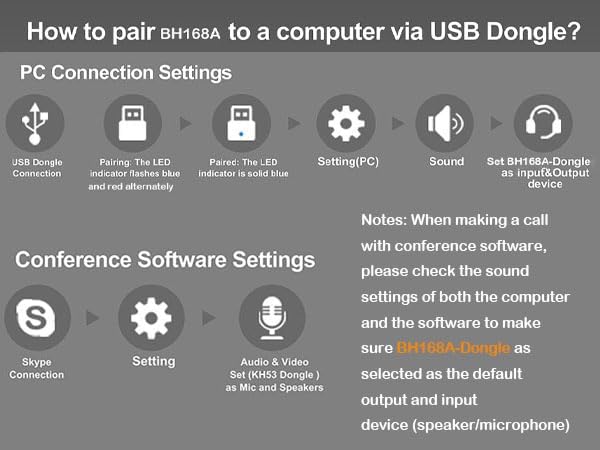
Image: Step-by-step guide for connecting the headset to a computer using the USB dongle and configuring audio settings for PC and conference applications.
2. Verbinding via Bluetooth 5.3
- Maak seker dat die oorfone gelaai en afgeskakel is.
- Press and hold the Multi-Function Button (MFB) on the headset until the LED indicator flashes blue and red alternately, indicating pairing mode.
- On your device (smartphone, tablet, Bluetooth-enabled computer), go to Bluetooth settings and enable Bluetooth.
- Soek vir available devices and select "KONNAO BH369A" from the list.
- Once paired, the headset's LED indicator will turn solid blue or flash blue slowly.
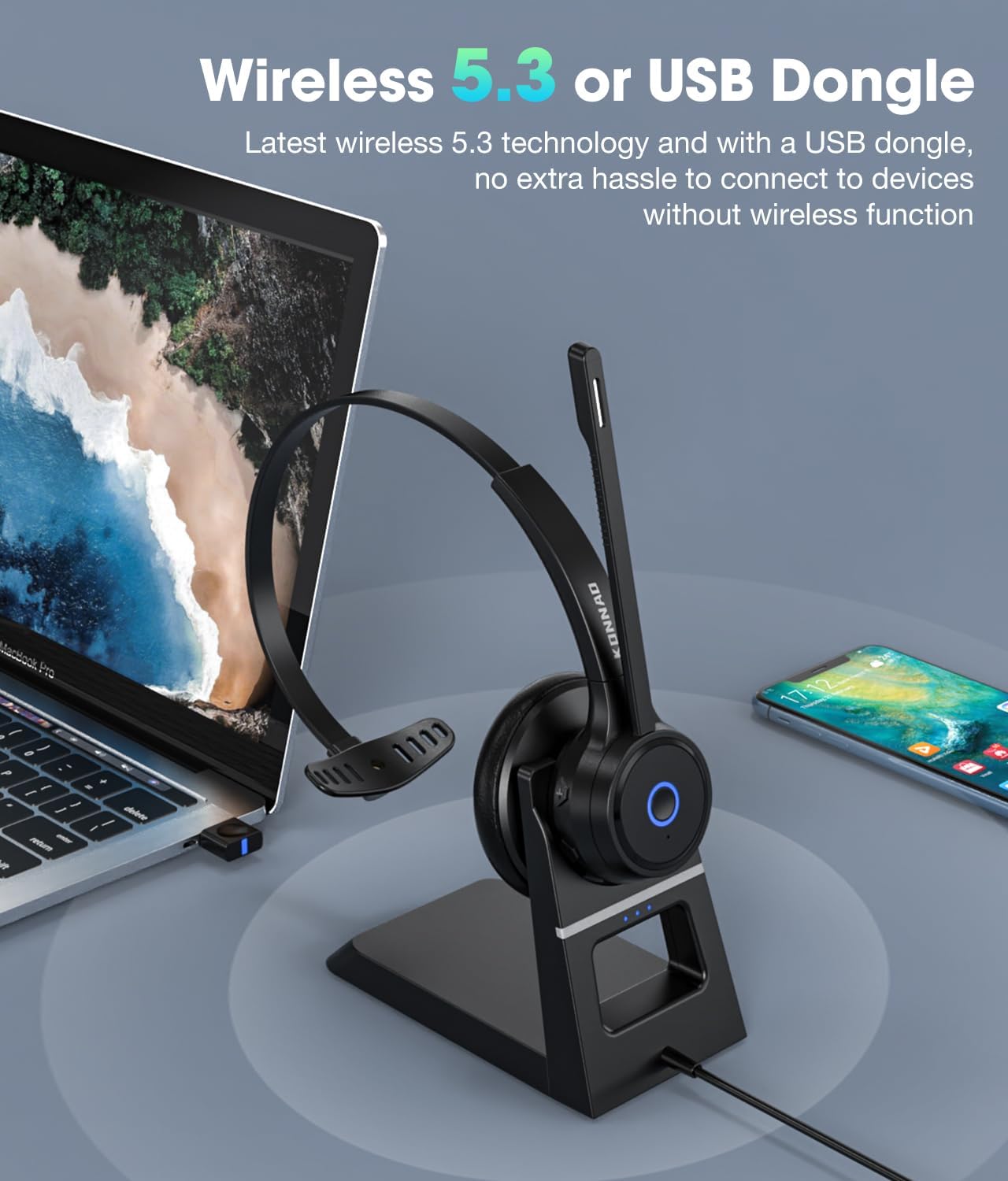
Image: The headset offers flexible connectivity via Bluetooth 5.3 or the included USB dongle, compatible with various devices.
Bedryfsinstruksies
Koptelefoonkontroles

Beeld: Gedetailleerd view of the headset's controls and features for easy identification and use.
- Multifunksie-knoppie (MFB):
- Druk en hou vir 3 sekondes: Aan/Af.
- Short press: Play/Pause music, Answer/End call.
- Dubbeldruk: Herhaal laaste nommer.
- Press and hold for 2 seconds during an incoming call: Reject call.
- Volume + / - Knoppies:
- Short press: Adjust volume up/down.
- Long press: Next/Previous track (music mode).
- Mikrofoondempskakelaar: Located on the microphone boom. Flip up to mute, flip down to unmute.
- LED-aanwyser: Wys krag-, parings- en laaistatus.
KI geraas kansellasie
The KONNAO BH369A features advanced AI noise-cancelling technology that effectively eliminates up to 99.6% of ambient background noise. This ensures your voice is transmitted with clarity, making it ideal for busy office environments, call centers, or remote work.

Image: Visual representation of the headset's AI noise cancellation capabilities, ensuring clear communication.
Universele verenigbaarheid
The headset is universally compatible with major Unified Communications (UC) platforms such as Zoom, Microsoft Teams, Skype, Google Meet, WebEx, and FaceTime. This ensures seamless integration into your existing work setup.
Onderhoud
Skoonmaak
- Wipe the headset and charging base with a soft, dry, lint-free cloth.
- Moenie skuurmiddels, oplosmiddels of aërosolspuitmiddels gebruik nie.
- Vermy dat vog in enige openinge kom.
Battery sorg
- Om die batterylewe te verleng, vermy om die oorfone gereeld heeltemal te ontlaai.
- Bêre die oorfone op 'n koel, droë plek wanneer dit nie vir lang tye gebruik word nie.
- Charge the headset regularly, even if not used, to maintain battery health.
Probleemoplossing
| Probleem | Moontlike Oplossing |
|---|---|
| Die oorfone skakel nie aan nie. | Ensure the headset is fully charged. Press and hold the MFB for 3 seconds. |
| Geen klank of swak klankgehalte. |
|
| Mikrofoon werk nie. |
|
| Die oorfone ontkoppel gereeld. |
|
Spesifikasies
| Kenmerk | Detail |
|---|---|
| Model Naam | BH369A |
| Verbindingstegnologie | Wireless (Bluetooth, USB) |
| Bluetooth weergawe | 5.3 |
| Geraasbeheer | AI Noise Cancellation (Microphone), Passive Noise Cancellation (Earcup) |
| Batterylewe | Tot 40 uur (gesprekstyd) |
| Laai tyd | Ongeveer 2 ure |
| Ingesluit komponente | Wireless Headset, USB Dongle, Charging Station |
| Versoenbare toestelle | Laptops, Desktops, Mobile Phones |
| Oorplasing | Op Oor |
| Item gewig | 12 onse |
Waarborg inligting
For warranty details, please refer to the documentation included with your purchase or visit the official KONNAO webwebwerf. Bewaar u bewys van aankoop vir waarborgeise.
Kliënte ondersteuning
If you encounter any issues or have questions regarding your KONNAO BH369A Bluetooth Headset, please contact KONNAO customer support through their official webwebwerf of die kleinhandelaar van wie jy die produk gekoop het.