
1. Inleiding
Thank you for choosing the Thomson 24-inch HD LED Smart TV, model 24HT2S15. This manual provides essential information to help you set up, operate, and maintain your new television. Please read it thoroughly before use and retain it for future reference.

Beeld: Voorkant view of the Thomson 24-inch HD LED Smart TV, showcasing its frameless design and key features like HD resolution and Dolby Audio.
Sleutel kenmerke:
- TiVo OS with Voice Control: Intuitive interface combining live TV and streaming apps, personalized recommendations, and voice commands.
- Draadlose skerm: Mirror your smartphone, tablet, or laptop screen to the TV.
- Dolby Audio: Enhanced sound experience with improved dialogue, detail, and surround effects.
- HDR10: Sharper contrast and realistic colors for an immersive viewondervinding.
- Agterbeligte afstandbeheer: Easy navigation in low light with direct access buttons for popular streaming services.
- Adjustable Side Feet: Flexible positioning options for the TV.
- Drievoudige ontvanger: Integrated tuners for cable, satellite, and antenna reception.
2. Wat is in die boks
Maak asseblief seker dat al die volgende items teenwoordig is wanneer u dit uitpak:
- Thomson 24-inch HD LED Smart TV (Model 24HT2S15)
- Afstandbeheer
- Kragadapter
- Gebruikershandleiding
- Waarborgkaart
- Adjustable Side Feet (2x)
If any items are missing or damaged, please contact your retailer or Thomson customer support.
3. Opstelling
3.1 Uitpak en plasing
Carefully remove the TV from its packaging. It is recommended to have two people for this process. Place the TV on a stable, flat surface or mount it on a wall using a compatible VESA mount (not included).
Verseker voldoende ventilasie rondom die TV. Moenie ventilasie-openinge blokkeer nie.
3.2 Bevestiging van die staander
If you are not wall-mounting the TV, attach the included side feet:
- Plaas die TV met die gesig na onder op 'n sagte, skoon lap om skermskade te voorkom.
- Rig elke staander met die ooreenstemmende skroefgate aan die onderkant van die TV.
- Secure the stands using the provided screws. The feet are adjustable from 30 cm to 60 cm distance.

Image: The Thomson 24-inch Smart TV showing its dimensions, including a screen diagonal of 60 cm (24 inches), width of 53 cm, and height of 37 cm with the stand. The adjustable stand feet are also illustrated.
3.3 Aansluiting van randapparatuur
Connect your external devices to the TV's ports. Refer to the diagram below for port locations.

Beeld: 'n Gedetailleerde view of the rear connection panel of the Thomson 24-inch Smart TV, illustrating various ports including 2x USB 2.0, Antenna input, Satellite input, 3x HDMI 1.4 (one with ARC), Service port, Headphone jack, AV IN, Digital Optical Audio Out, and LAN port.
- Krag: Connect the power adapter to the TV and then to a wall outlet.
- Antenne/Satelliet: Connect your antenna or satellite cable to the respective input.
- HDMI: Use HDMI cables to connect devices like Blu-ray players, game consoles, or set-top boxes. HDMI 1.4/ARC supports Audio Return Channel.
- USB: Steek USB-skywe in vir mediaweergawe of sagteware-opdaterings.
- LAN: Koppel 'n Ethernet-kabel vir 'n bedrade internetverbinding.
- AV IN: Vir ouer toestelle wat saamgestelde video en stereo-klank gebruik.
- Koptelefoon: Koppel koptelefoon vir privaat luister.
- Digital Optical Audio Out: Koppel aan 'n eksterne klankstelsel vir digitale klank.
3.4 Aanvanklike Aanskakeling en Eerste Opstelling
- Steek die TV in 'n kragaansluiting.
- Druk die aan/uit-knoppie op die afstandbeheerder of die TV.
- Follow the on-screen instructions to select your language, country, and perform channel scanning for your triple tuner (cable/satellite/antenna).
- Koppel aan jou Wi-Fi-netwerk deur dit uit die lys te kies en die wagwoord in te voer.
- Complete the TiVo OS setup, including signing in or creating an account.
4. Gebruik u TV
4.1 Afstandbeheerfunksies
The backlit remote control provides easy access to all TV functions, even in dim lighting. It includes dedicated buttons for popular streaming services.

Image: The Thomson Smart TV remote control, highlighting its backlit buttons, voice control microphone, and direct access buttons for Netflix, YouTube, Prime Video, Disney+, and Canal+.
- Kragknoppie: Skakel die TV aan/af.
- Nommerknoppies: Kies kanale direk.
- Navigasie-knoppie (Op/Af/Links/Regs/OK): Navigeer deur spyskaarte en kies opsies.
- Terug/Verlaat: Keer terug na die vorige skerm of verlaat 'n spyskaart.
- Volume op/af: Pas die volumevlak aan.
- Kanaal op/af: Verander TV-kanale.
- Demp: Demp of skakel die geluid uit.
- Tuis: Access the TiVo OS home screen.
- Stembeheerknoppie: Activate voice commands (microphone icon).
- Direkte Toegangknoppies: Launch Netflix, YouTube, Prime Video, Disney+, Canal+ instantly.
4.2 TiVo OS and Smart Features
The TiVo OS provides a unified platform for live TV and streaming content. Explore personalized recommendations and access your favorite apps.

Image: The Thomson Smart TV screen showing various streaming application icons like Netflix, YouTube, Disney+, Prime Video, Plex, DAZN, Canal+, and Pluto TV, indicating integrated smart TV capabilities.
- Toegang tot toepassing: Navigate to the home screen to find and launch pre-installed apps or download new ones from the app store.
- Stembeheer: Press the voice control button on your remote and speak commands to search for content, launch apps, or control TV functions.
- Draadlose skerm: Use the Wireless Display feature to mirror content from your compatible smartphone, tablet, or laptop directly to your TV screen.

Image: An illustration demonstrating the voice control feature of the Thomson Smart TV, showing a remote control with a microphone icon and examples of voice commands like "Open Netflix" or "Play movies with Tom Hanks."

Image: The Thomson Smart TV displaying content mirrored from a smartphone, illustrating the Wireless Display and Google Cast features for seamless content sharing.
4.3 Beeld- en klankverbeterings
- HDR10: Experience improved contrast, brightness, and color accuracy with HDR10 content. This technology enhances both bright and dark scenes for a more dynamic picture.
- Dolby Audio: Enjoy rich, clear, and powerful sound. Dolby Audio optimizes dialogue, enhances detail, and provides an immersive surround sound experience.

Image: A side-by-side comparison of picture quality, demonstrating the enhanced contrast and color vibrancy of HDR10 on the right compared to standard SDR on the left, with a building and landscape scene.

Image: An illustration depicting sound waves emanating from a TV screen, with the Dolby Audio logo prominently displayed, signifying enhanced audio quality for an immersive viewondervinding.
5. Onderhoud
5.1 Maak jou TV skoon
- Skerm: Vee die skerm liggies af met 'n sagte, pluisvrye lap. Vir hardnekkige merke, vee dit effens af.ampMaak die lap skoon met water of 'n gespesialiseerde skermreiniger. Moet nooit vloeistof direk op die skerm spuit nie.
- Kabinet: Vee die TV-kas en -staander af met 'n sagte, droë lap.
- Afstandbeheer: Maak die afstandbeheerder skoon met 'n sagte, droë lap.
Waarskuwing:
- Ontkoppel altyd die TV voordat u skoonmaak.
- Moenie skuurmiddels, wasse of oplosmiddels gebruik nie.
5.2 Sagteware-opdaterings
Your Smart TV may receive software updates to improve performance and add new features. It is recommended to enable automatic updates or check for updates periodically through the TV's settings menu to ensure optimal functionality and security.
6. Probleemoplossing
As jy probleme met jou TV ondervind, raadpleeg die volgende algemene probleme en oplossings:
| Probleem | Moontlike oorsaak | Oplossing |
|---|---|---|
| Geen krag nie | Kragkabel ontkoppel; kragpuntprobleem | Maak seker dat die kragkabel stewig gekoppel is. Toets die aansluiting met 'n ander toestel. |
| Geen beeld nie, maar klank is teenwoordig | Incorrect input source; faulty cable | Check the input source (e.g., HDMI 1, Antenna). Ensure cables are connected correctly. |
| Geen klank nie, maar beeld is teenwoordig | Volume gedemp of te laag; probleem met eksterne oudiostelsel | Unmute the TV or increase volume. Check audio settings and external audio connections. |
| Afstandbeheer werk nie | Dooie batterye; obstruksie; afstandbeheerder nie gekoppel nie | Replace batteries. Remove any obstructions. Re-pair the remote if necessary (refer to TV settings). |
| Kan nie aan Wi-Fi koppel nie | Verkeerde wagwoord; routerprobleem; TV te ver van router | Verify Wi-Fi password. Restart your router. Move TV closer or use a wired LAN connection. |
| Slim funksies reageer nie | Network issue; temporary software glitch | Check internet connection. Restart the TV by unplugging it for a minute and plugging it back in. |
If the problem persists after trying these solutions, please contact Thomson customer support.
7. Spesifikasies
Detailed technical specifications for the Thomson 24HT2S15 Smart TV:
| Kenmerk | Detail |
|---|---|
| Handelsmerk | Thomson |
| Modelnommer | 24HT2S15 |
| Skerm grootte | 24 duim (60 cm) |
| Vertoon tegnologie | LED |
| Resolusie | 768p (1366 x 768 piksels) |
| Herlaaitempo | 60 Hz |
| Aspekverhouding | 16:9 |
| Verbindingstegnologie | Ethernet, HDMI, USB, Wi-Fi |
| Spesiale kenmerke | Parental Controls, TiVo OS, Voice Control, HDR10, Dolby Audio |
| Produk Afmetings (met staander) | 8P x 53L x 37H cm (ongeveer 8 x 53 x 37 cm) |
| Gewig | 3.33 kg |
| Ingesluit komponente | Power Adapter, User Manual, Warranty Card, Remote Control |
| Tale ondersteun | Frans, Engels, Italiaans, Spaans, Duits |
| Energiedoeltreffendheidklas | E |
| EPREL-produkinligting | https://eprel.ec.europa.eu/qr/1969520 |
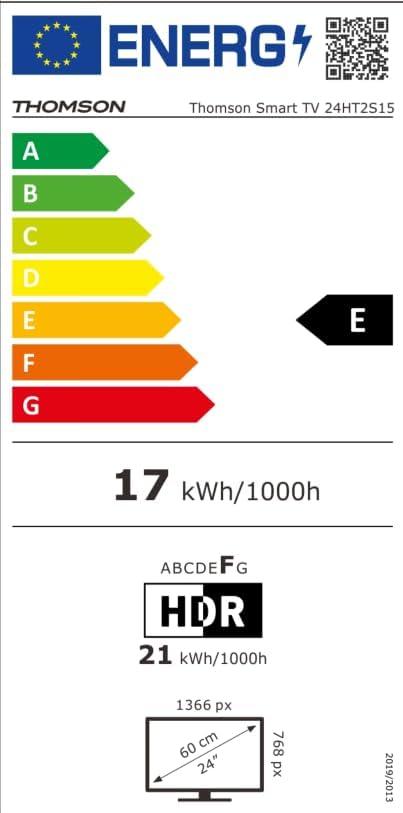
Image: The EU Energy Label for the Thomson Smart TV 24HT2S15, showing an energy efficiency class of E and energy consumption of 17 kWh/1000h for SDR and 21 kWh/1000h for HDR.
8. Waarborg en Ondersteuning
8.1 Waarborginligting
Thomson products are covered by a 3-year warranty. For detailed information regarding warranty claims, returns, or defective products, please refer to the warranty card included in your package or visit the Thomson support webwebwerf.
For specific information on purchases made via Amazon, consult Amazon's help pages regarding returns and defective products.
8.2 Kliëntediens
If you require further assistance or have questions not covered in this manual, please contact Thomson customer support:
- Vervaardiger: Stroomview GmbH
- E-pos: kontak@stroomview.com
- Webwebwerf: www.stroomview.com
- Telefoon: +4318900066
Please have your model number (24HT2S15) and purchase details ready when contacting support.