
1. Inleiding
Thank you for choosing the PureMate 12L/Day Dehumidifier. This appliance is designed to effectively remove excess moisture from your indoor environment, helping to prevent dampness, condensation, mould, and musty odours. By maintaining optimal humidity levels, it contributes to a healthier and more comfortable living space. Please read this manual thoroughly before operating the dehumidifier to ensure safe and efficient use.
This dehumidifier features a 12-litre per day extraction capacity, an automatic humidity sensor, a digital display, a 24-hour timer, auto shut-off, and options for continuous drainage or manual tank emptying. It is also equipped with castor wheels and a carry handle for easy portability.
2. Veiligheidsinstruksies
To reduce the risk of fire, electric shock, or injury, always observe the following basic safety precautions:
- Lees alle instruksies sorgvuldig deur voordat u die toestel gebruik.
- Ensure the power supply matches the rating label on the dehumidifier.
- Do not operate the dehumidifier with a damaged cord or plug. If the supply cord is damaged, it must be replaced by the manufacturer, its service agent, or similarly qualified persons to avoid a hazard.
- Always place the unit on a firm, level surface.
- Maintain at least 20 cm (8 inches) clearance around the unit for proper air circulation.
- Moenie voorwerpe in die luginlaat of -uitlaat steek nie.
- Hou die toestel weg van hittebronne, direkte sonlig en vlambare materiale.
- Ontkoppel die eenheid voordat u dit skoonmaak, skuif of enige onderhoud uitvoer.
- Hierdie toestel is nie bedoel vir gebruik deur persone (insluitend kinders) met verminderde fisiese, sensoriese of geestelike vermoëns, of 'n gebrek aan ervaring en kennis nie, tensy hulle toesig of instruksies oor die gebruik van die toestel gegee is deur 'n persoon wat verantwoordelik is vir hul veiligheid.
- Kinders moet onder toesig wees om te verseker dat hulle nie met die toestel speel nie.
- Do not use the appliance in areas where water is likely to splash onto it.
3. Produk verbyview
The PureMate 12L/Day Dehumidifier is designed for efficient moisture removal and ease of use. Below are the key components and features.

Prent 3.1: Voorkant view of the PureMate 12L/Day Dehumidifier, showing its compact design and the '12L Per Day' capacity label.
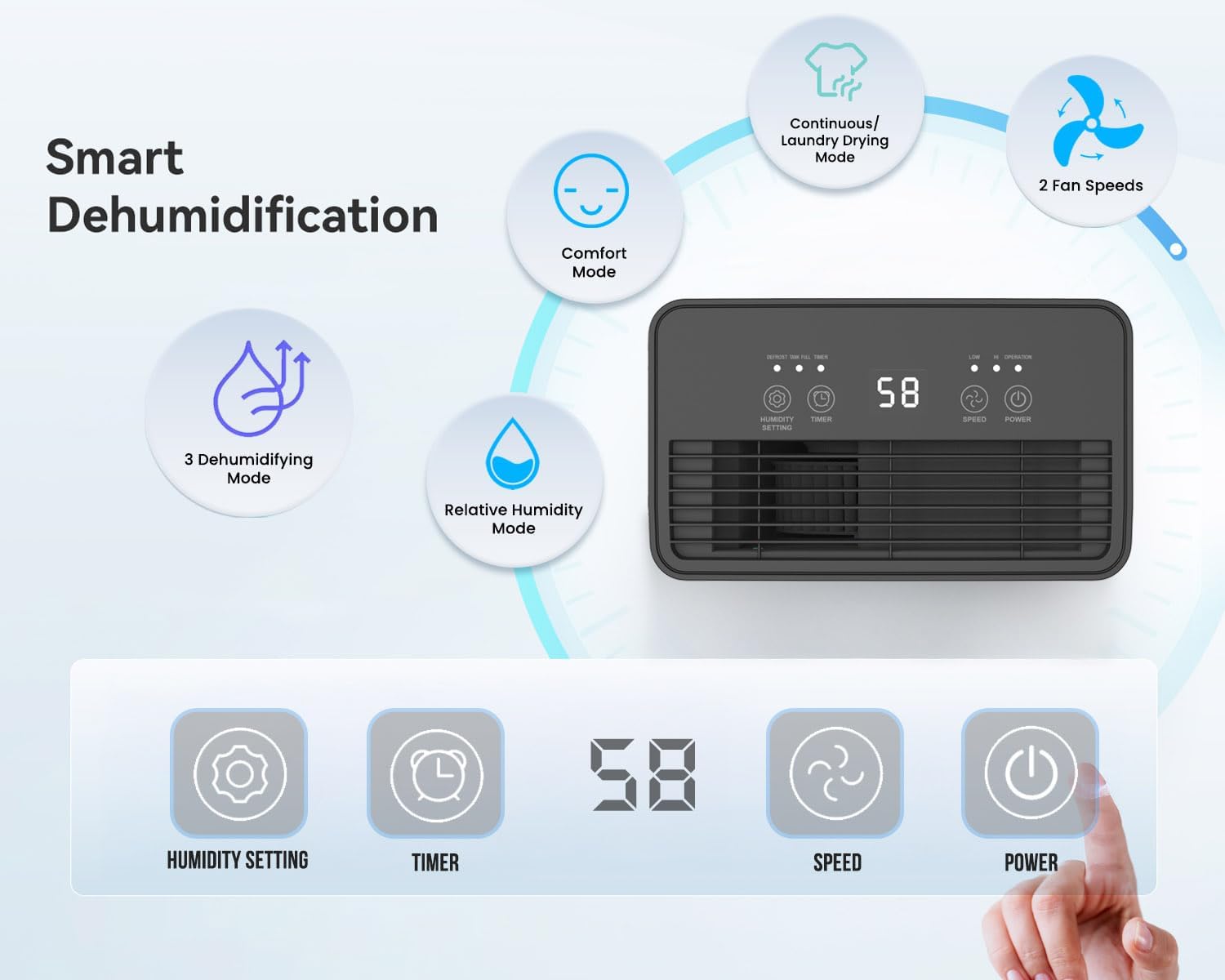
Prent 3.2: Illustration of the dehumidifier's smart features and control panel. It highlights Comfort Mode, Continuous/Laundry Drying Mode, 2 Fan Speeds, 3 Dehumidifying Modes, Relative Humidity Mode, and the digital display with buttons for Humidity Setting, Timer, Speed, and Power.
Sleutel kenmerke:
- Kragtige vogverwydering: Onttrek tot 12 liter vog per dag.
- Customisable Humidity Control: Offers Continuous Mode, Comfort Mode, and adjustable Relative Humidity (30-90% RH).
- Digital Display & Controls: Intuitive LED display and touch panel for easy operation.
- 24-uur timer: Laat geskeduleerde werking toe.
- Outo-afskakel: Activates when the 2-litre water tank is full.
- Dubbele Dreineringsopsies: Manual tank emptying or continuous drainage via a hose.
- Wasbare lugfilter: Improves air quality by capturing dust.
- Draagbare ontwerp: Equipped with castor wheels and an integrated handle for easy movement.
- Lae geraas werking: Operates quietly at 33-37 dB.
4. Opstelling
4.1 Uitpak
- Verwyder die ontvochtiger versigtig uit sy verpakking.
- Verwyder alle verpakkingsmateriaal, insluitend enige kleefband of beskermende films.
- Bewaar die verpakking vir toekomstige berging of vervoer indien nodig.
4.2 Plasing
Proper placement is crucial for optimal performance and safety.
- Place the dehumidifier on a firm, level surface to prevent vibration and water spillage.
- Ensure there is at least 20 cm (8 inches) of clear space around the air inlet and outlet to allow for proper airflow. Do not block these openings.
- Vermy die plasing van die eenheid naby hitte-opwekkende toestelle of in direkte sonlig.
- For best results, close all doors and windows in the room where the dehumidifier is operating to create an enclosed environment.
4.3 Kragverbinding
- Maak seker dat die kragkabel volledig uitgerek en nie beskadig is nie.
- Steek die kragkabel in 'n geaarde elektriese aansluiting wat ooreenstem met die voltage vereistes van die eenheid.
5. Bedryfsinstruksies
The dehumidifier features an intuitive touch control panel and digital display for easy operation.

Prent 5.1: Close-up of the dehumidifier's touch control panel and the removable 2-litre water tank, illustrating the high-extraction capacity and drainage options.
5.1 Krag aan/af
- Druk die KRAG knoppie op die beheerpaneel om die eenheid aan of af te skakel.
5.2 Dehumidifying Modes
Die ontvochtiger bied verskeie bedryfsmodusse om aan verskillende behoeftes te voldoen:
- Relative Humidity Mode: Druk die HUMIDITEIT INSTELLING button to set your desired humidity level between 30% and 90% RH (Relative Humidity) in 5% increments. The unit will automatically adjust its operation to maintain this level.
- Geriefsmodus: This mode automatically sets the target humidity based on the current room temperature for optimal comfort.
- Deurlopende modus: The unit operates continuously without targeting a specific humidity level, ideal for very damp conditions or for drying laundry.
- Wasgoed droogmodus: Similar to Continuous Mode, this setting is optimized for drying clothes indoors by continuously removing moisture from the air.

Prent 5.2: Visual representation of the Continuous mode and various humidity solutions provided by the dehumidifier, including dry laundry, protection against black mould, and elimination of window condensation.
5.3 Fan Spoed
- Druk die SPOED button to cycle between different fan speeds (e.g., Low, High). Higher fan speed results in faster dehumidification.
5.4 24-uur-tydteller
- Druk die TIMER button to set the desired operating duration (in hours) for the unit to turn on or off automatically.
- Each press increases the timer setting. Once the desired time is set, the unit will operate for that duration or turn off after that duration, depending on its current state.

Prent 5.3: Depicts the 24-hour timer function and the quiet operation of the dehumidifier (33-37 dB), allowing for undisturbed use even during sleep.
5.5 Digital Display and Indicator Lights
- The digital display shows the current room humidity level or the set humidity/timer value.
- Humiditeitsaanwyserlig: The unit features an LED light that changes color based on the ambient humidity level:
- ROOI: Humidity level is greater than 65%.
- GROEN: Humidity level is between 40% and 55%.
- BLOU: Humidity level is less than 40%.
- Outomatiese Ontdooiingsfunksie: The unit automatically performs defrosting when frost builds up on the evaporator coils, ensuring efficient operation in cooler temperatures.

Prent 5.4: Illustrates the Automatic Dehumidification Mode, where the unit adjusts target humidity based on room temperature, and the Auto Defrost Function. Also shows the Humidity Indicator Light with its color codes (Red, Green, Blue) for different humidity ranges.
6. Dreineringsopsies
The PureMate dehumidifier offers two methods for water drainage:
6.1 Manual Water Tank Emptying
- The dehumidifier is equipped with a 2-litre water tank.
- When the tank is full, the unit will automatically shut off, and an indicator light (usually 'Full' or 'Tank Full') will illuminate.
- Trek die watertenk versigtig uit die eenheid.
- Gooi die versamelde water in 'n wasbak of drein.
- Reinsert the empty water tank firmly into the unit. The dehumidifier will resume operation.
6.2 Deurlopende dreinering
- For maintenance-free operation, you can connect a 12mm hose (not included) for continuous drainage.
- Locate the continuous drainage outlet on the back or side of the unit.
- Attach one end of a 12mm hose to this outlet.
- Ensure the other end of the hose is placed in a drain or a larger container, ensuring a downward slope for gravity drainage.
- Once connected, the water will bypass the internal tank and drain directly.
7. Onderhoud
Gereelde onderhoud verseker optimale werkverrigting en lang lewensduur van u ontvochtiger.
7.1 Skoonmaak van die lugfilter
The washable air filter helps to capture dust and improve air quality. Clean it regularly, typically every two weeks, or more often if used in a dusty environment.
- Skakel die ontvochtiger af en trek die stekker uit die stopcontact.
- Vind en verwyder die lugfilter (gewoonlik aan die agterkant of kant van die eenheid).
- Gently wash the filter under running tap water. For stubborn dirt, use a soft brush and mild detergent.
- Rinse thoroughly and allow the filter to air dry completely before reinserting it. Do not use a dryer or direct heat.
- Once dry, place the filter back into its position.
7.2 Skoonmaak van die watertenk
Clean the water tank periodically to prevent mould and bacteria growth.
- Skakel die eenheid af en koppel dit uit.
- Verwyder die watertenk.
- Was die tenk met warm water en 'n sagte skoonmaakmiddel. Spoel deeglik af.
- Dry the tank completely before placing it back into the dehumidifier.
7.3 Skoonmaak van die buitekant
- Vee die buitekant van die ontvochtiger af met 'n sagte, damp lap.
- Moenie skuurmiddels, oplosmiddels of harde chemikalieë gebruik nie, aangesien dit die oppervlak kan beskadig.
8. Probleemoplossing
Indien u probleme met u ontvochtiger ondervind, verwys asseblief na die volgende algemene probleme en oplossings:
| Probleem | Moontlike oorsaak | Oplossing |
|---|---|---|
| Ontvochtiger skakel nie aan nie. | No power supply. Power cord not plugged in. Water tank full or not correctly inserted. | Kontroleer die kragaansluiting. Maak die watertenk leeg en plaas dit korrek terug. |
| No water collected or very little water collected. | Room humidity is already low. Temperature is too low (below 5°C). Air filter is clogged. Dehumidifier is in continuous drainage mode. | Increase target humidity setting. Ensure room temperature is adequate. Clean the air filter. Check if continuous drainage hose is properly connected and draining. |
| Eenheid is raserig. | Unit not on a level surface. Air filter clogged. | Plaas die eenheid op 'n plat, stabiele oppervlak. Maak die lugfilter skoon. |
| Lugvloei is swak. | Air inlet/outlet blocked. Air filter clogged. | Ensure clear space around the unit. Clean the air filter. |
If the problem persists after trying these solutions, please contact PureMate customer support.
9. Spesifikasies
Detailed technical specifications for the PureMate 12L/Day Dehumidifier PM411.

Prent 9.1: Diagram illustrating the dimensions of the PureMate Dehumidifier: 41.5cm Height, 29cm Width, 17cm Depth.
| Kenmerk | Spesifikasie |
|---|---|
| Handelsmerk | PureMate |
| Model Naam | PM411 |
| Ontvochtigingskapasiteit | 12 Litres per Day |
| Tenk Volume | 2 liter |
| Produk Afmetings (D x B x H) | 17 x 29 x 41.5 cm |
| Item gewig | 8 kg |
| Bedryfsmodus | Automatic, Continuous |
| Spesiale kenmerke | Countdown Timer, Programmable |
| Boonste temperatuurgradering | 30 grade Celsius |
10. Waarborg en Ondersteuning
For warranty information, please refer to the warranty card included with your product or visit the official PureMate website. If you require technical support, troubleshooting assistance beyond this manual, or have any questions regarding your PureMate 12L/Day Dehumidifier, please contact PureMate customer service through their official channels.