
1. Inleiding
The AJAZZ AKP03 Macro Keypad Stream Controller is a versatile device designed to enhance productivity and streamline workflows for gamers, streamers, and professionals. Featuring six programmable keys with LCD displays, three physical knobs, and three toggle switches, it offers extensive customization options for various tasks.
This manual provides detailed instructions for setting up, operating, and maintaining your AKP03 device, ensuring optimal performance and user experience.
2. Produkkenmerke
- Six Programmable Macro Keys: Customizable LCD displays for single or continuous actions.
- Three Physical Knobs: For precise control over various functions.
- Three Toggle Switches: Additional control options.
- Een-klik-bediening: Instant execution of macro commands, text input, application launches, and media control.
- Intuitive Driver Software: Drag-and-drop functionality for easy key assignment and property configuration.
- Wye verenigbaarheid: Seamless integration with platforms like Streamlabs, Twitch, YouTube, and various software applications on Windows and Mac.
- Removable 40° Stand: Provides an ergonomic viewing angle and stable placement.

Figuur 2.1: oorview of the AJAZZ AKP03 Macro Keypad, highlighting its programmable buttons, toggle switches, and scroll wheels.
3. Pakketinhoud
Verifieer dat alle items in jou pakket teenwoordig is:
- AJAZZ AKP03 Macro Keypad Stream Controller
- USB-C na USB-A-kabel
- Removable 40° Stand
- Gebruikershandleiding (hierdie dokument)
4. Opstelling
4.1 Fisiese verbinding
- Attach the removable 40° stand to the bottom of the AKP03 for an ergonomic angle, if desired.
- Connect the provided USB-C cable to the USB-C port on the AKP03.
- Connect the USB-A end of the cable to an available USB port on your computer (PC or Mac).
- Die toestel sal outomaties aanskakel.

Figure 4.1: Attaching the removable 40° stand to the AKP03.
4.2 Sagteware-installasie
To unlock the full customization capabilities of your AKP03, you must install the dedicated driver software.
- Maak jou oop web browser and navigate to the official AJAZZ webwebwerf: www.a-jazz.com.
- Locate the 'Driver Download' section.
- Soek vir 'AKP03' or browse for the corresponding driver for your model.
- Download the driver software compatible with your operating system (Windows or macOS).
- Begin die installeerder en volg die instruksies op die skerm om die installasie te voltooi.
- Herbegin jou rekenaar as jy gevra word.
Video 4.1: Demonstrates the software installation process and initial setup for the AJAZZ Macro Keypad.
5. Bedryfsinstruksies
5.1 Customizing Keys and Knobs
The AKP03's driver software provides a user-friendly interface for customization:
- Launch the 'Stream Dock AJAZZ' software from your desktop or applications folder.
- The software will display a visual representation of your AKP03.
- To assign an action, drag and drop a desired function (e.g., launch application, media control, macro command) from the software's library onto one of the six programmable keys.
- For knobs, select the knob in the software and assign functions such as volume control, scrolling, or zooming.
- You can configure properties for each assigned action, including specific file paaie, web URLs, or macro sequences.
- The LCD displays on the keys will update to show the assigned icon or text.
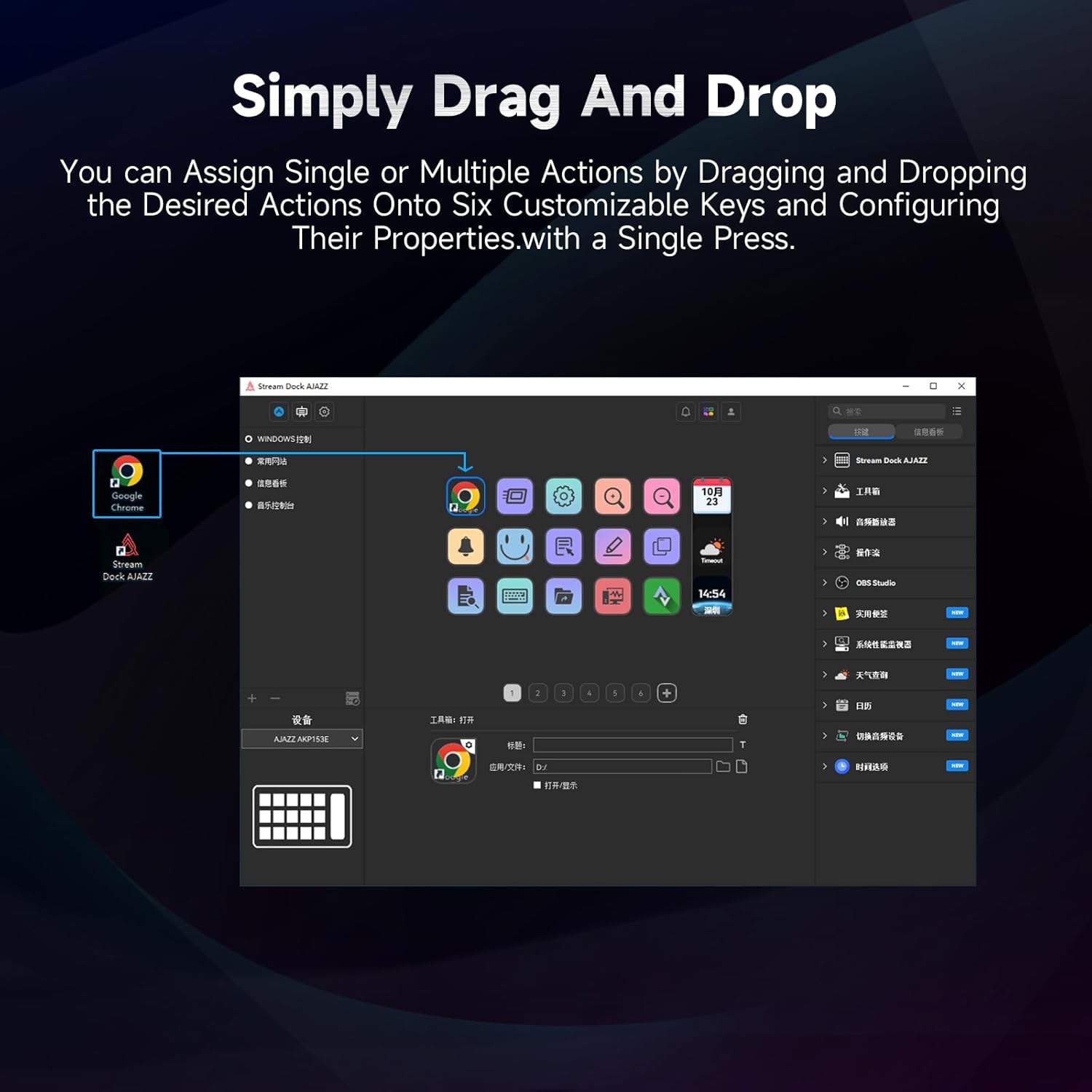
Figure 5.1: Customizing keys using the drag-and-drop interface in the AJAZZ software.
Video 5.1: Demonstration of assigning actions to keys for launching web pages and software with a single click.
5.2 Using Profiles and Pages
The software supports multiple profiles and pages, allowing you to switch between different sets of key assignments for various applications or tasks.
- Skep nuwe profiles for specific games, editing software, or streaming setups.
- Binne elke profile, you can create multiple pages of key assignments, accessible by navigating through the device's buttons or software interface.
- The AKP03 automatically switches to the relevant profile when a linked application is in focus.
Video 5.2: Illustrates the multi-functional capabilities and profile switching of the AKP03 for various tasks.
6. Onderhoud
To ensure the longevity and optimal performance of your AJAZZ AKP03, follow these maintenance guidelines:
- Skoonmaak: Use a soft, dry cloth to wipe the surface of the device. Avoid abrasive cleaners or solvents.
- Berging: Bêre die toestel op 'n koel, droë plek weg van direkte sonlig en uiterste temperature.
- Kabelversorging: Vermy die USB-kabel te veel te buig of te draai om skade te voorkom.
- Sagteware-opdaterings: Gaan gereeld die AJAZZ na webwebwerf vir sagteware- en firmware-opdaterings om versoenbaarheid en toegang tot nuwe funksies te verseker.
7. Probleemoplossing
If you encounter issues with your AKP03, refer to the following common troubleshooting steps:
- Toestel word nie herken nie:
- Ensure the USB cable is securely connected to both the AKP03 and your computer.
- Probeer om aan 'n ander USB-poort te koppel.
- Herbegin jou rekenaar.
- Verify that the driver software is correctly installed and up to date.
- Sleutels reageer nie:
- Check the software to ensure keys are properly assigned and the correct profile aktief is.
- Maak seker dat die drywersagteware in die agtergrond loop.
- Sagteware kwessies:
- Reinstall the driver software.
- Check for software updates on the AJAZZ webwebwerf.
8. Spesifikasies
| Kenmerk | Detail |
|---|---|
| Handelsmerk | AJAZZ |
| Model Naam | AKP03 |
| Versoenbare toestelle | PC, skootrekenaar |
| Tipe beheerder | Sleutelbord |
| Verbindingstegnologie | USB-C |
| Knoppie Hoeveelheid | 6 Programmable Keys (with LCD displays), 3 Physical Knobs, 3 Toggle Switches |
| Item gewig | 0.32 kilogram |
| Itemafmetings (L x B x H) | 5 x 3 x 2 duim |
| Kragbron | Elektries met koord |
9. Waarborg en Ondersteuning
9.1 Waarborginligting
The AJAZZ AKP03 Macro Keypad Stream Controller comes with a 1-jaar beperkte waarborg vanaf die aankoopdatum. Hierdie waarborg dek vervaardigingsdefekte en wanfunksies onder normale gebruik. Dit dek nie skade wat veroorsaak word deur misbruik, ongelukke, ongemagtigde wysigings of onbehoorlike installasie nie.
Behou asseblief jou aankoopbewys vir waarborgeise.
9.2 Kliëntediens
For technical assistance, troubleshooting, or warranty inquiries, please contact AJAZZ customer support:
- Webwebwerf: www.a-jazz.com (Refer to the 'Support' or 'Contact Us' section)
- E-pos: [Insert Customer Support Email, if available]
- Telefoon: [Insert Customer Support Phone Number, if available]
Our support team is available to assist you with any questions or concerns regarding your product.