
1. Inleiding
This manual provides essential information for the safe and efficient use of your Grundig 65 GQ 700A 65" 4K Ultra HD Google Smart QLED TV. Please read these instructions thoroughly before operating the device and retain them for future reference. This TV features Wide Color Gamut Technology for a vibrant viewondervinding.
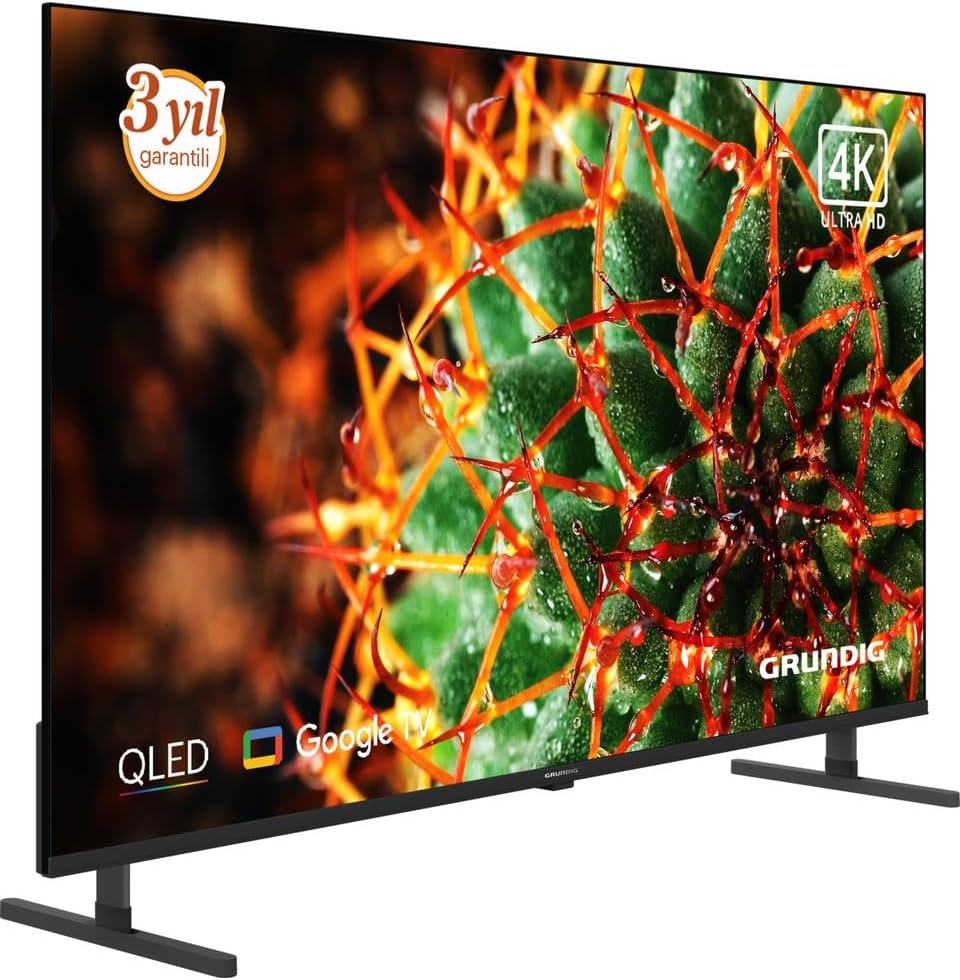
Figuur 1: Voorkant view of the Grundig 65 GQ 700A QLED TV.
2. Veiligheidsinligting
Volg altyd die volgende veiligheidsmaatreëls om elektriese skok, brand of besering te voorkom:
- Moenie die TV aan reën of vog blootstel nie.
- Moenie die TV oopmaak nieasing; verwys alle diens na gekwalifiseerde personeel.
- Verseker behoorlike ventilasie rondom die TV.
- Hou die TV weg van direkte sonlig, hittebronne en uiterste temperature.
- Use only the power adapter supplied with the TV.
- Position the TV on a stable, level surface or mount it securely to a wall.
- Hou klein onderdele en verpakkingsmateriaal buite bereik van kinders.
3. Opstelling
3.1 Uitpak
Carefully remove the TV and all accessories from the packaging. Check for any damage during transit. Retain the packaging for future transport or service needs.
3.2 Bevestiging van die staander
If you are not wall-mounting the TV, attach the included stand according to the instructions provided in the separate stand assembly guide. Ensure all screws are tightened securely.
3.3 Muurbevestiging (Opsioneel)
If you choose to wall-mount your TV, use a VESA-compatible wall mount kit (sold separately) and follow the wall mount manufacturer's instructions. Ensure the wall can support the weight of the TV and the mount. It is recommended to have professional installation for wall mounting.
3.4 Aansluiting van randapparatuur
Connect your external devices to the TV using the appropriate ports. Refer to the image below for port locations.

Figure 2: Rear panel connections of the TV.
- HDMI-poorte: Connect Blu-ray players, game consoles, and other HDMI-enabled devices. This model features 2 HDMI ports.
- USB-poorte: Koppel USB-bergingstoestelle vir mediaweergawe.
- Ethernet (LAN)-poort: Koppel 'n Ethernet-kabel vir 'n bedrade internetverbinding.
- Antenne-/kabelinvoer: Koppel jou antenna- of kabeltelevisiesein.
- Kragtoevoer: Verbind die meegeleverde kragadapter.
3.5 Aanvanklike Aanskakeling en Eerste Opstelling
- Connect the power adapter to the TV and then to a power outlet.
- Druk die aan/uit-knoppie op die TV of die afstandbeheerder om die TV aan te skakel.
- Volg die instruksies op die skerm om die aanvanklike opstelling te voltooi, wat die volgende insluit:
- Taalkeuse.
- Netwerkverbinding (Wi-Fi of Ethernet).
- Google Account sign-in (for Google TV features).
- Kanaalskandering (vir antenna/kabel).
- Aanvaarding van terme en voorwaardes.
4. Bediening van die TV
4.1 Afstandbeheer oorview
The remote control allows you to access all functions of your TV. Ensure batteries are correctly inserted.
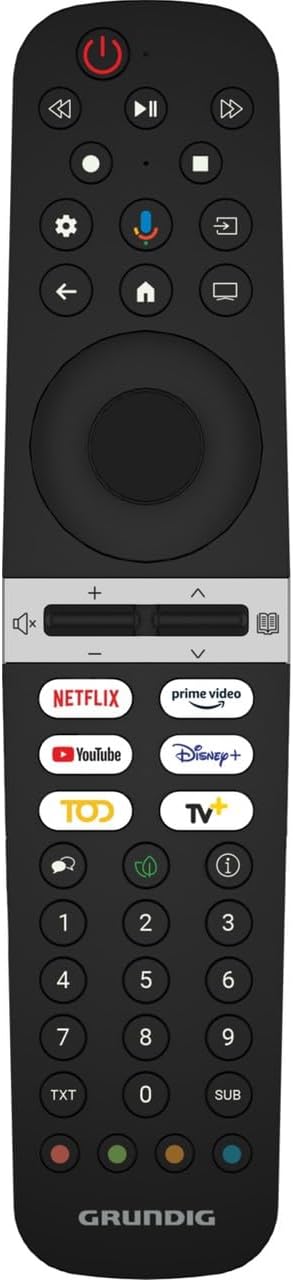
Figure 3: Grundig TV Remote Control.
- Kragknoppie: Skakel die TV aan of af.
- Navigasie-knoppie (Op/Af/Links/Regs/OK): Navigeer deur spyskaarte en bevestig keuses.
- Volume +/-: Pas die volumevlak aan.
- Kanaal +/-: Verander TV-kanale.
- Tuisknoppie: Keer terug na die Google TV-tuisskerm.
- Invoerknoppie: Kies invoerbronne (HDMI, USB, TV).
- App-knoppies: Direct access to popular streaming services like Netflix, Prime Video, YouTube, and Disney+.
- Google Assistent-knoppie: Aktiveer stembeheer.
4.2 Basiese Funksies
- Skakel aan/af: Druk die aan/af-knoppie op die afstandbeheerder of TV.
- Volume aanpassing: Gebruik die Volume +/- knoppies.
- Kanaalkeuse: Gebruik die Kanaal +/- knoppies of die nommerblok.
- Invoerbronkeuse: Press the Input button and select the desired source from the menu.
4.3 Slim-TV-funksies (Google TV)
Your TV runs on Google TV, providing access to a vast array of apps, streaming services, and smart features.
- Tuisskerm: Press the Home button to access personalized content recommendations, installed apps, and settings.
- Google Assistent: Press the Google Assistant button on your remote and speak into the microphone to search for content, control smart home devices, or get information.
- App Store: Download and install additional apps from the Google Play Store.
- Chromecast Ingeboude: Cast content from your compatible mobile devices or computer directly to the TV.
4.4 Beeld- en klankinstellings
Access the settings menu to customize picture and sound preferences:
- Prentmodusse: Kies uit verskeie voorafinstellings (bv. Standaard, Lewendig, Fliek, Speletjie) of pas instellings soos helderheid, kontras, kleur en skerpte aan.
- Klankmodusse: Select audio presets (e.g., Standard, Music, Movie, Speech) or adjust equalizer settings.
- Gevorderde instellings: Explore options for motion smoothing, local dimming, and audio output.
5. Onderhoud
5.1 Skoonmaak van die TV
- Ontkoppel altyd die TV voordat u skoonmaak.
- Skerm: Vee die skerm liggies af met 'n sagte, pluisvrye lap. Vir hardnekkige merke, gebruik 'n skermskoonmaker wat spesifiek vir TV's ontwerp is, en wend dit op die lap aan, nie direk op die skerm nie.
- Casing: Vee die TV afasing with a soft, dry cloth. Do not use abrasive cleaners, waxes, or solvents.
5.2 Sagteware-opdaterings
Jou TV kan sagteware-opdaterings ontvang om werkverrigting te verbeter en nuwe funksies by te voeg. Maak seker dat jou TV aan die internet gekoppel is om hierdie opdaterings te ontvang. Jy kan gewoonlik handmatig in die TV se instellingskieslys vir opdaterings kyk.
6. Probleemoplossing
As jy probleme met jou TV ondervind, raadpleeg die volgende algemene oplossings:
| Probleem | Moontlike Oplossing |
|---|---|
| Geen krag nie | Check if the power cord is securely connected to the TV and the power outlet. Ensure the power outlet is working. Try a different outlet. |
| Geen beeld nie, maar klank is teenwoordig | Maak seker dat die korrekte invoerbron gekies is. Kontroleer kabelverbindings na eksterne toestelle. Probeer om die TV te herbegin. |
| Geen klank nie, maar beeld is teenwoordig | Check the volume level and ensure the TV is not muted. Verify audio cable connections if using external speakers. Check sound output settings. |
| Afstandbeheer werk nie | Replace the batteries. Ensure there are no obstructions between the remote and the TV's IR sensor. Point the remote directly at the TV. |
| Kan nie aan Wi-Fi koppel nie | Maak seker dat jou Wi-Fi-router aan is en werk. Voer die Wi-Fi-wagwoord weer in. Probeer om beide die TV en die router te herbegin. Skuif die TV nader aan die router indien moontlik. |
| Probleme met beeldkwaliteit (bv. vaag, verwring) | Check the resolution settings of the input source. Adjust picture settings (brightness, contrast, sharpness). Ensure the input cable is not damaged. |
Indien die probleem voortduur nadat u hierdie oplossings probeer het, kontak asseblief Grundig-kliëntediens.
7. Spesifikasies
The following are the technical specifications for the Grundig 65 GQ 700A TV (Model: GY8T00):
| Kenmerk | Detail |
|---|---|
| Handelsmerk | Grundig |
| Model Naam | GY8T00 |
| Skerm grootte | 65 duim |
| Vertoon tegnologie | QLED |
| Resolusie | 4K Ultra HD |
| Herlaaitempo | 60 Hz |
| Verbindingstegnologie | USB, HDMI, Ethernet (LAN) |
| Totale HDMI-poorte | 2 |
| Ingesluit komponente | Kragadapter |
| Produk Afmetings (D x B x H) | 1.4D x 3.53G x 1.4Y meters |
| Produk Gewig | 500 gram |
| Agterlig tegnologie | LED (Full Array Local Dimming) |
| Modeljaar | 2025 |
| Energiedoeltreffendheidklas | F |
Note: Product dimensions (1.4D x 3.53G x 1.4Y meters) and weight (500 Grams) provided in the source data appear to be incorrect for a 65-inch television and may refer to packaging or be a data entry error. Please refer to the official Grundig product page for accurate physical specifications.
8. Waarborg en ondersteuning
8.1 Waarborginligting
This product comes with a Distributor Guaranteed warranty. For specific terms and conditions, please refer to the warranty card included with your product or contact your local Grundig distributor.
8.2 Kliëntediens
For technical assistance, troubleshooting beyond this manual, or warranty claims, please contact Grundig customer support. You can find contact information on the official Grundig webwebwerf of in die dokumentasie wat saam met jou TV voorsien word.
Aanlyn hulpbronne: Besoek die amptenaar Grundig webwebwerf vir produkregistrasie, algemene vrae en bykomende ondersteuningsmateriaal.