
FreedConn R3PRO
FreedConn R3Pro Motorcycle Intercom with 2K Camera
Gebruikershandleiding
Inleiding
Thank you for choosing the FreedConn R3Pro Motorcycle Intercom with 2K Camera. This device is designed to enhance your riding experience by providing seamless communication, high-definition video recording, and entertainment features. This manual provides detailed instructions on how to set up, operate, and maintain your R3Pro unit. Please read it carefully before use to ensure optimal performance and safety.
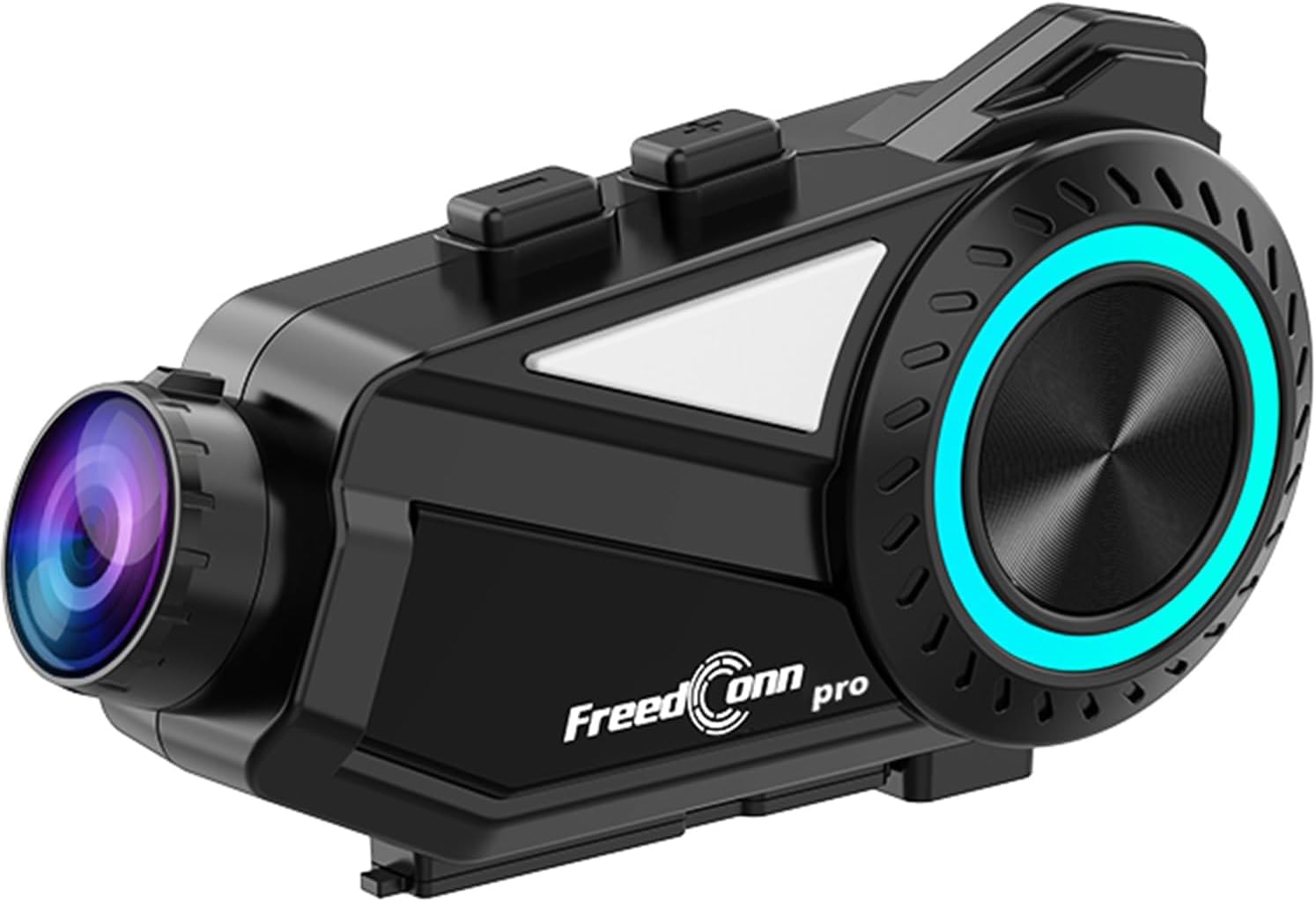
A sleek, black FreedConn R3Pro motorcycle intercom unit, featuring a camera lens on one end and a control dial with blue LED illumination on the side. It is designed to attach to a motorcycle helmet.
Produk verbyview
Sleutel kenmerke
- Bluetooth 5.1-verbinding: High-speed chip for stable connections, supporting HFP/HSP/A2DP protocols.
- Groep interkom: Supports up to 6 riders simultaneously with a communication range of 1.2km.
- 2K Camera & Loop Recording: Captures clear 1440p video, with adjustable lens and 360-degree unit rotation. Supports up to 512GB memory cards.
- Gevorderde geraaskansellasie: CVC and DSP/C technologies reduce wind and engine noise for clear audio up to 120km/h.
- Langdurige battery: 2000mAh battery provides up to 45 hours of talk time and 7 hours of continuous recording.
- Toegewyde mobiele toepassing: "RoadCam" app for real-time video viewing and downloading via Wi-Fi.
- FM Radio: Built-in FM radio function for entertainment and information.
- Stemassistent-ondersteuning: One-touch activation for hands-free control.
- IP65 waterdig en stofdig: Ontwerp om verskillende weerstoestande te weerstaan.
- Universele paring: Compatible with other intercom brands (FODSPORTS, SENA) and various Bluetooth devices.
Pakketinhoud

This image displays the contents of the FreedConn R3Pro package, including the Bluetooth kit, 2-in-1 soft & hard microphones, hook clip, velcro clip, headphone velcro, USB cable, and manual. Below, a seven-step visual guide illustrates how to install the intercom unit onto a motorcycle helmet.
The FreedConn R3Pro package typically includes:
- FreedConn R3Pro Intercom Unit
- 2-in-1 Soft & Hard Microphones
- Helmet Mounting Kit (Hook Clip, Velcro Clip)
- Koptelefoon Velcro-kussings
- USB-laaikabel
- Gebruikershandleiding
Komponent Diagram

A detailed diagram of the FreedConn R3Pro unit, highlighting its various buttons and ports. Labels indicate the camera, WiFi button, recorder power ON/OFF, record/pause button, multi-function button, Bluetooth ON/OFF/intercom button, LED indicator, volume/next track, volume/previous track, microphone, earphone jack, reset button, TF card slot, and charging/USB port.
Familiarize yourself with the buttons and ports on your R3Pro unit:
- Kamera: Integrated 2K camera lens.
- WiFi-knoppie: Activates Wi-Fi for app connection.
- Recorder Power ON/OFF / Record/Pause Button: Controls camera recording.
- Multifunksie-knoppie: Used for various controls including pairing and voice assistant.
- Bluetooth ON/OFF / Intercom Button: Manages Bluetooth and intercom functions.
- LED-aanwyser: Wys toestelstatus.
- Volume / Next Track: Adjusts volume and skips tracks.
- Volume / Previous Track: Adjusts volume and goes to previous tracks.
- Mikrofoonpoort: Connects the external microphone.
- Oortelefoonaansluiting: Connects the helmet speakers.
- Herstel-knoppie: For device reset.
- TF-kaartgleuf: For inserting a microSD card for recording.
- Charging / USB Port: Vir laai en data-oordrag.
Opstelling
1. Helmet Installation
Follow these steps to securely install the R3Pro unit on your motorcycle helmet:
- Attach the hook clip or velcro clip to the side of your helmet.
- Mount the R3Pro unit onto the attached clip.
- Insert the microphone into the helmet's interior, positioning it near your mouth.
- Attach the speakers inside the helmet using the provided velcro pads, ensuring they are aligned with your ears.
- Connect the microphone and speaker cables to the corresponding ports on the R3Pro unit.
2. Aanvanklike paring (Bluetooth)

An illustration showing the internal Bluetooth 5.1 chip of the FreedConn R3Pro, emphasizing high-speed communication, energy saving, low latency, and ultra-stability. An inset image demonstrates the multi-function button used for automatic pairing after the initial setup.
The R3Pro features automatic pairing after the first successful connection:
- Ensure your R3Pro unit is charged.
- Turn on the R3Pro unit.
- Aktiveer Bluetooth op jou slimfoon of ander toestel.
- Soek vir "FreedConn R3Pro" in your device's Bluetooth settings and select it to pair.
- Once paired, the unit will automatically connect to your device when powered on.
3. App Connection (RoadCam)

This image illustrates the loop recording capability of the R3Pro and its integration with the "RoadCam" smartphone application. A motorcycle rider is shown, with the app interface on a phone displaying real-time video footage, indicating that recorded videos can be viewed and downloaded via Wi-Fi.
To connect to the dedicated "RoadCam" app:
- Download the "RoadCam" app from your smartphone's app store.
- Turn on the R3Pro unit and activate its Wi-Fi function (refer to the component diagram for the Wi-Fi button).
- Connect your smartphone to the R3Pro's Wi-Fi network (SSID and password usually found in the manual or on the device).
- Open the "RoadCam" app to view real-time video, manage recordings, and download files.
Bedryfsinstruksies
Krag aan/af
- Krag aan: Press and hold the Power button (refer to component diagram) until the LED indicator lights up.
- Skakel af: Druk en hou die aan/af-knoppie in totdat die LED-aanwyser afskakel.
Interkom Kommunikasie

An image depicting multiple motorcycle riders on a road, connected wirelessly by the FreedConn R3Pro intercoms. It highlights the automatic communication reconnection feature, allowing riders to rejoin the conversation seamlessly even if they temporarily separate up to 1.2km.
- Begin Interkom: Press the Intercom button to start a conversation with paired units.
- Groep interkom: The R3Pro supports up to 6 riders for simultaneous communication. Follow the specific pairing instructions in the full manual for multi-unit connections.
- Outomatiese herverbinding: If riders separate and exceed the 1.2km range, the units will automatically reconnect once they are back within range.
Kamera werking

This image demonstrates the adjustable camera features of the FreedConn R3Pro. It shows the camera lens can be adjusted by 30 degrees and the main unit can rotate 360 degrees, allowing riders to capture various angles.
- Begin/stop opname: Press the Record/Pause button (refer to component diagram) to start or stop video recording.
- Loop opname: The camera supports loop recording, automatically overwriting the oldest files wanneer die geheuekaart vol is.
- Kamera verstelling: The camera lens can be adjusted by 30 degrees, and the entire unit can rotate 360 degrees for optimal viewhoeke.
- Geheuekaart: Insert a microSD card (up to 512GB) into the TF card slot before recording.
Music Playback & Sharing

This image illustrates the R3Pro's universal pairing with various Bluetooth devices like smartphones, action cameras, and other Bluetooth earphones. It also shows two riders sharing music, emphasizing the ability to enjoy favorite tunes with a partner.
- Speel/pouse: Use the multi-function button for music control.
- Volgende / vorige snit: Use the Volume/Next Track and Volume/Previous Track buttons.
- Musiekdeling: Share audio with a paired intercom unit up to 50 meters away.
FM Radio

A motorcycle rider is shown with the R3Pro, indicating the built-in FM radio feature. The image displays a frequency range from 76-108MHz, suggesting support for Japanese frequencies, and mentions support for sports broadcasts and news.
- Aktiveer FM-radio: Press the designated FM radio button (refer to the full manual for specific button assignment).
- Skandeer kanale: The unit will automatically scan and save available FM stations.
- Verander kanale: Use the Volume/Next Track and Volume/Previous Track buttons to switch between stations.
Telefoonoproepe

An image showing a motorcycle rider receiving a call, with a graphic indicating automatic answering after 15 seconds of no operation. It also states that hands-free calls are possible while riding, and music playback resumes after the call ends.
- Beantwoord oproep: The R3Pro supports automatic answering after 15 seconds of no operation. You can also tap the multi-function button to answer.
- Beëindig oproep: Tap the multi-function button to end a call.
- Verwerp oproep: Druk en hou die multifunksieknoppie in om 'n inkomende oproep te verwerp.
- Dubbele telefoonverbinding: The unit can connect to two smartphones simultaneously, allowing real-time switching between call, music, and navigation functions.
Stemassistent

An illustration showing how to activate the voice assistant by long-pressing the multi-function button for 2 seconds. Examples of voice commands are displayed, such as "Soek vir gas station," "Call Mr. Matsumoto," "What day is today?", and "How's the weather tomorrow?".
To activate your smartphone's voice assistant (e.g., Siri, Google Assistant):
- Aktiveer: Druk die multifunksionele knoppie vir 2 sekondes in.
- Once activated, you can issue commands for navigation, calls, weather checks, and more.
Geraasonderdrukking

A diagram illustrating the effect of noise cancellation, showing sound waves before and after processing, with a significant reduction in noise. It also displays the internal components of the speaker, highlighting Hi-Res audio quality and an omnidirectional microphone for clear conversations up to 120km/h.
The R3Pro features advanced CVC and DSP/C noise cancellation technology, which automatically reduces ambient noise such as wind and engine sounds. This ensures clear voice communication and high-quality music playback even at speeds up to 120km/h.
Onderhoud
Laai die battery

'n Beeldvertoningasing the 2000mAh battery of the R3Pro, indicating approximately 2.5 hours for a full charge. It highlights extended usage times: 42 hours for music, 33 hours for talk, and 7-8 hours for recording, with support for up to 512GB memory cards for loop recording.
- Connect the R3Pro to a power source using the provided USB charging cable via the Charging/USB Port.
- 'n Volle lading neem gewoonlik ongeveer 2.5 uur.
- Die LED-aanwyser sal die laaistatus wys (bv. rooi vir laai, blou vir volledig gelaai).
Skoonmaak en versorging

An image showing the FreedConn R3Pro unit being splashed with water, illustrating its IP65 waterproof and dustproof rating. This indicates stable communication and recording are possible even in sudden rain or bad weather conditions.
- Vee die eenheid af met 'n sagte, damp lap. Moenie harde chemikalieë of skuur skoonmaakmiddels gebruik nie.
- Maak seker dat alle poorte droog is voordat u bykomstighede laai of koppel.
- The IP65 rating protects against water jets and dust, but avoid submerging the unit in water.
Probleemoplossing
Algemene kwessies en oplossings
| Kwessie | Moontlike oorsaak | Oplossing |
|---|---|---|
| Eenheid skakel nie aan nie | Low battery; Faulty power button | Charge the unit fully; Contact support if issue persists. |
| Kan nie met slimfoon koppel nie | Bluetooth not enabled; Unit not in pairing mode; Interference | Ensure Bluetooth is on; Put R3Pro in pairing mode; Move away from other devices; Reset unit. |
| Interkom verbind nie | Units out of range; Incorrect pairing sequence; Low battery | Ensure units are within 1.2km; Re-pair units; Charge batteries. |
| Swak klankgehalte/geraas | Microphone/speaker placement; High wind noise; Interference | Adjust microphone/speaker; Ensure CVC/DSP is active; Check for obstructions. |
| Kamera neem nie op nie | No microSD card; Full microSD card; Card error | Insert/replace microSD card; Format card; Check card compatibility. |
| Programverbindingkwessies | Wi-Fi not enabled on R3Pro; Incorrect Wi-Fi password; App not updated | Enable R3Pro Wi-Fi; Re-enter password; Update RoadCam app. |
If you encounter issues not listed here or if the suggested solutions do not resolve the problem, please refer to the comprehensive troubleshooting section in the full user manual or contact customer support.
Spesifikasies
| Kenmerk | Detail |
|---|---|
| Handelsmerk | FreedConn |
| Model Naam | R3 PRO |
| Verbindingstegnologie | Bluetooth 5.1, Wi-Fi |
| Interkomreeks | Up to 1.2 km (multi-person) |
| Groep -interkom | Up to 6 riders simultaneously |
| Video-opname-resolusie | 1440p (2K) |
| Kamerakenmerke | 30-degree lens adjustment, 360-degree unit rotation, Loop Recording |
| Geheuekaartondersteuning | Tot 512 GB microSD |
| Geraasonderdrukking | CVC, DSP/C |
| Battery kapasiteit | 2000mAh litiumioon |
| Deurlopende praattyd | Tot 45 uur |
| Deurlopende opnametyd | Ongeveer 7 uur |
| Laai tyd | Ongeveer 2.5 uur |
| Waterdigte gradering | IP65 |
| Afmetings | 14.8 x 11.5 x 6.4 cm |
| Gewig | 450 g |
Waarborg en Ondersteuning
The FreedConn R3Pro comes with a 1 jaar waarborg vanaf die aankoopdatum, wat vervaardigingsfoute dek. Bewaar asseblief u bewys van aankoop vir waarborgeise.
For technical support, troubleshooting assistance, or warranty inquiries, please contact FreedConn customer service through the retailer where you purchased the product or visit the official FreedConn webwebwerf vir kontakinligting.