
1. Inleiding
The CHNADKS RM-66 Radon Detector is a portable device designed for continuous monitoring of radon gas levels in indoor environments. It features a high-precision semiconductor sensor, a 2.0-inch TFT color display, and provides both audible and visual alarms when radon levels exceed user-defined thresholds. This manual provides essential information for the safe and effective operation, maintenance, and troubleshooting of your RM-66 Radon Detector.
2. Veiligheidsinligting
- Lees alle instruksies sorgvuldig deur voordat u die toestel gebruik.
- Moenie probeer om die toestel oop te maak of te wysig nie. Dit kan die waarborg ongeldig maak en veiligheidsrisiko's inhou.
- Hou die toestel weg van water en oormatige humiditeit.
- Vermy om die toestel vir lang tye aan uiterste temperature of direkte sonlig bloot te stel.
- Gebruik slegs die meegeleverde Tipe-C-laaikabel of 'n gesertifiseerde ekwivalent.
- Hou buite bereik van kinders.
- Sorg vir behoorlike ventilasie tydens laai om oorverhitting te voorkom.
3. Pakketinhoud
Verifieer dat alle items in die pakket teenwoordig is:
- 1 × CHNADKS RM-66 Radon Detector
- 1 × Tipe-C-laaikabel
- 1 × Gebruikershandleiding (hierdie dokument)

4. Produk verbyview
The RM-66 Radon Detector is equipped with advanced features for accurate and convenient radon monitoring.
4.1 Sleutelkenmerke
- High-Precision Semiconductor Sensor: Ensures accurate radon detection with a measurement range of 0.09–1000 pCi/L (3.3 Bq/m³ – 37 kBq/m³).
- TFT Color Display: A 2.0-inch screen with a graphical interface for clear and easy reading of radon levels.
- Hoorbare en visuele alarms: Provides instant alerts when radon levels exceed user-defined safe thresholds.
- Draagbare ontwerp: Compact and includes an adjustable rear kickstand for flexible placement.
- Long-Term Monitoring: Stores up to 504 days of historical radon data, recording every 6 hours.
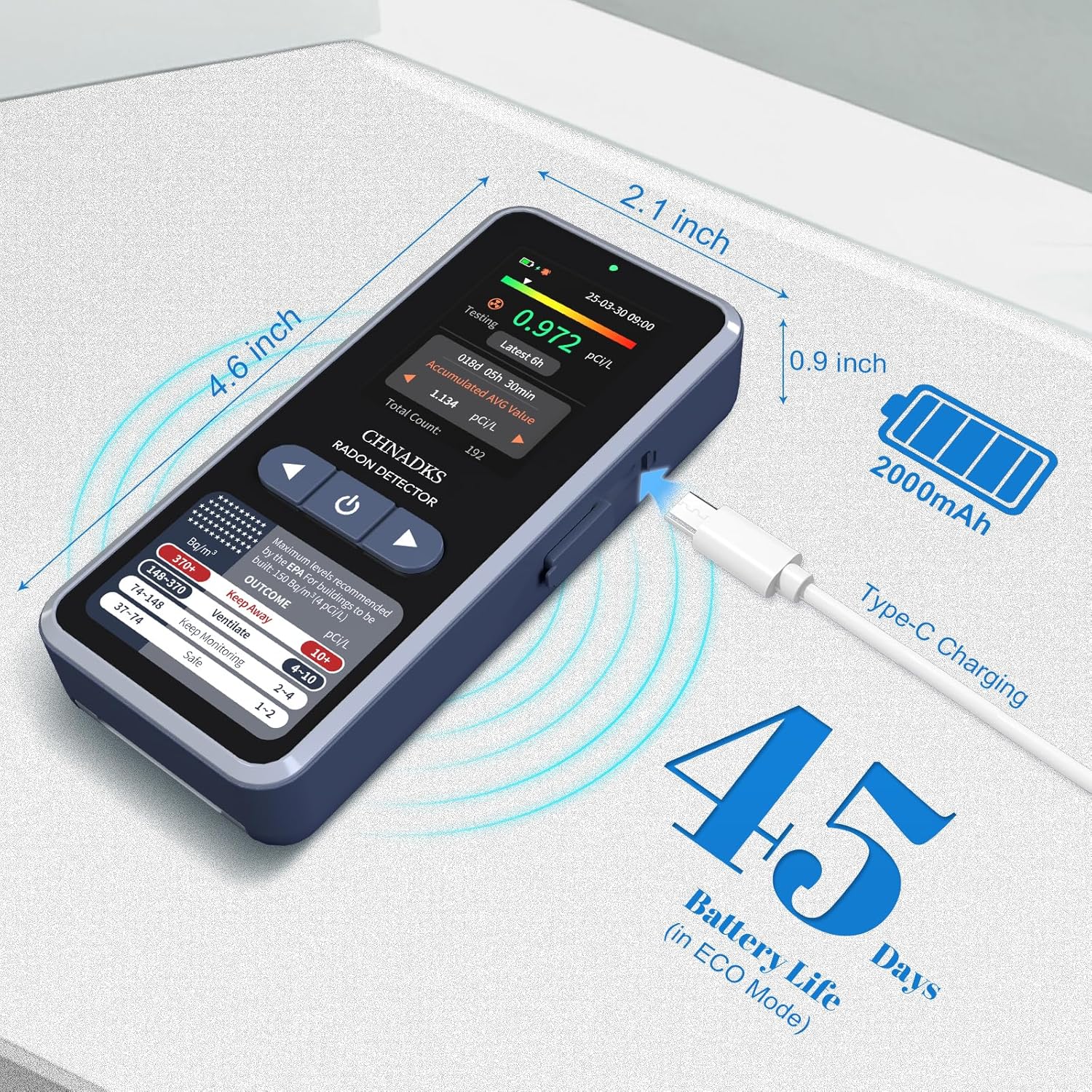
- Herlaaibare battery: Max 45 days of battery life in screen-off mode, with fast Type-C charging.
- Aanpasbare instellings: Adjustable measurement units (pCi/L/Bq/m³), alarm thresholds, and screen sleep time.
4.2 Toestelkomponente

The device features scientifically designed air vents to enable efficient radon diffusion into the detector, ensuring fast and reliable readings.

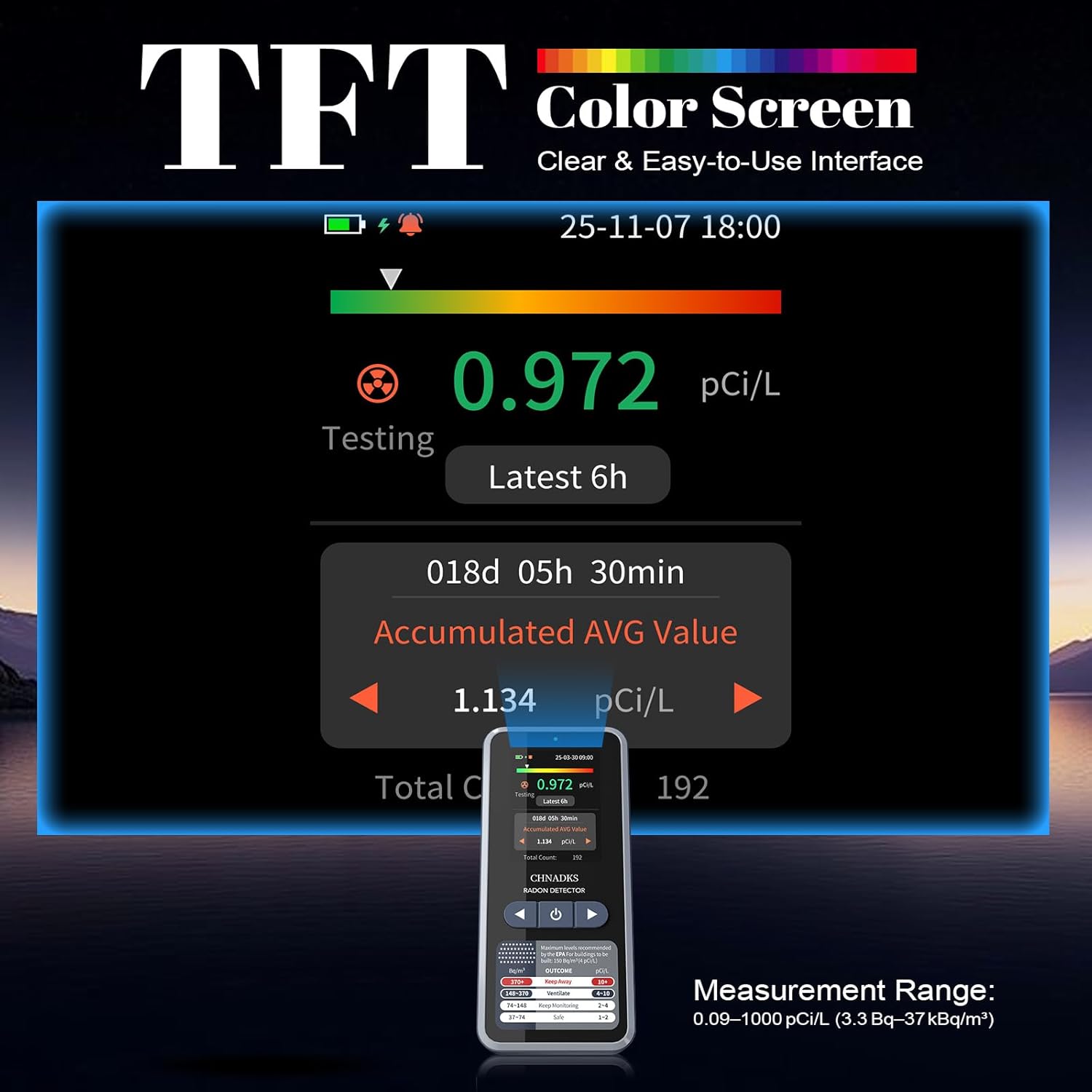
The color TFT screen provides a clear graphical interface, including current radon levels, accumulated average, and a color progress bar for quick interpretation. Dual alerts (red indicator light and beep) activate when levels exceed thresholds.
5. Opstelling
5.1 Aanvanklike laai
Before first use, fully charge the RM-66 Radon Detector. Connect the provided Type-C charging cable to the device's charging port and plug the other end into a standard USB power adapter (DC 5V 1A, not included). A full charge takes approximately 3.5 hours when the device is off.
5.2 Aan-/afskakel
- Om aan te skakel: Press and hold the power button (usually located on the front panel below the screen) for a few seconds until the display illuminates.
- Om af te skakel: Press and hold the power button until the device prompts you to confirm shutdown, then select 'Yes'.
5.3 Placement for Monitoring
For accurate readings, place the detector in the lowest lived-in area of your home, such as a basement or ground floor. Ensure it is:
- At least 20 inches (50 cm) from the floor and ceiling.
- At least 8 inches (20 cm) from other objects.
- Away from direct drafts, vents, windows, and doors.
- Not in areas of high humidity (e.g., bathrooms) or extreme temperatures.

6. Bedryfsinstruksies
6.1 Initial Measurement
Once powered on, the device will automatically begin monitoring. The first data display will appear after 6 hours, and readings will update every 60 minutes thereafter. For reliable results, continuous monitoring for at least 48 hours is recommended, with longer periods (e.g., 30 days) providing more accurate long-term averages.
6.2 Navigering van die skerm
The 2.0-inch TFT color screen displays various information:
- Current Radon Level: Real-time measurement.
- Latest 6h Average: Average radon level over the last 6 hours.
- Accumulated Average Value: Long-term average since the device was last reset or powered on.
- Battery aanwyser: Shows current battery status.
- Alarm aanwyser: Appears when radon levels exceed the set threshold.
6.3 Aanpassing van instellings
Access the device's menu to adjust settings:
- Meeteenhede: Switch between pCi/L and Bq/m³.
- Alarmdrempels: Set the desired radon level at which the audible and visual alarms will activate.
- Screen Sleep Time: Adjust the duration before the screen automatically turns off to conserve battery.
- Particle Sound: The particle sound can be turned off if desired.
Refer to the on-screen prompts and navigation buttons for specific steps to change these settings.
7. Understanding Radon Readings and Alarms
Radon levels are typically measured in picocuries per liter (pCi/L) in the United States and becquerels per cubic meter (Bq/m³) internationally. The RM-66 allows you to select your preferred unit.
- 1 pCi/L ≈ 37 Bq/m³
The EPA (Environmental Protection Agency) recommends taking action to reduce radon levels if they are 4 pCi/L (148 Bq/m³) or higher. The device's display provides a color-coded guide for interpreting radon levels:
- Dual Alerts: When radon levels exceed the set threshold, the device will emit an audible beep and activate a red indicator light. You can adjust the alarm threshold in the settings.
8. Long-Term Monitoring
The RM-66 Radon Detector is designed for long-term monitoring, storing up to 504 days of historical radon data. Data is recorded every 6 hours, allowing you to track trends and identify potential issues over time. This feature is crucial for understanding seasonal variations and the effectiveness of mitigation efforts.
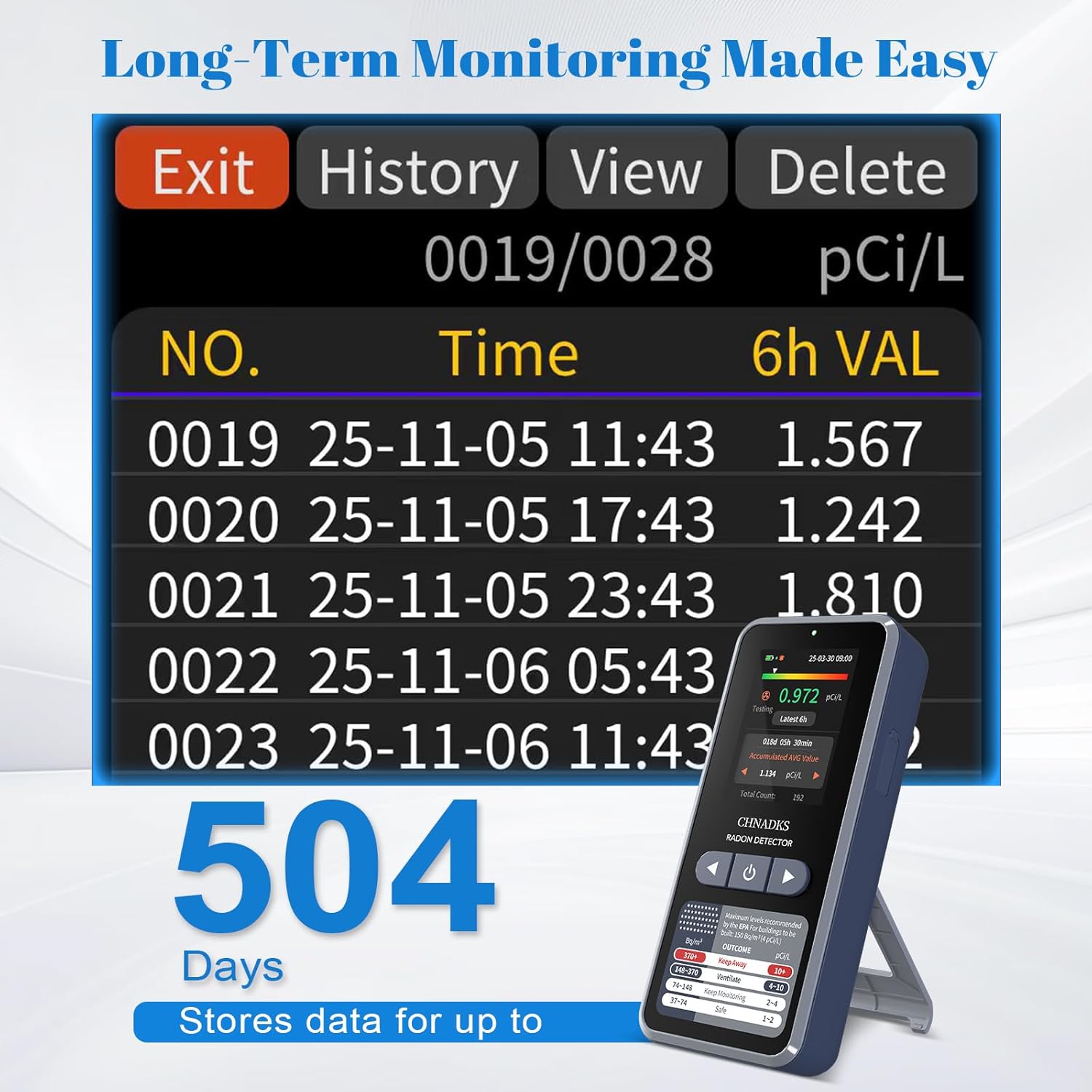
Om view historical data, navigate to the "History" section in the device menu. You can scroll through past readings to analyze trends.
9. Onderhoud
- Skoonmaak: Wipe the device with a soft, dry cloth. Do not use abrasive cleaners or solvents. Ensure no liquid enters the air vents or charging port.
- Batterysorg: For optimal battery life, avoid fully discharging the device frequently. Charge it regularly, especially if storing for extended periods.
- Berging: Bêre die toestel op 'n koel, droë plek weg van direkte sonlig en uiterste temperature wanneer dit nie gebruik word nie.
10. Probleemoplossing
| Probleem | Moontlike oorsaak | Oplossing |
|---|---|---|
| Toestel skakel nie aan nie. | Lae battery of toestelwanfunksie. | Laai die toestel vir ten minste 30 minute. Kontak ondersteuning as dit steeds nie aanskakel nie. |
| Onakkurate of wisselende lesings. | Improper placement, environmental factors, or initial measurement period. | Ensure proper placement (refer to Section 5.3). Allow at least 48 hours for stable readings. Avoid placing near drafts or vents. |
| Alarm klink gereeld. | High radon levels or alarm threshold set too low. | Check current radon levels. Consider adjusting the alarm threshold in settings if appropriate, or take action to mitigate radon. |
| Die skerm is leeg of reageer nie. | Screen sleep mode, low battery, or software issue. | Press any button to wake the screen. Charge the device. If unresponsive, try a soft reset (power off and on). |
11. Spesifikasies
| Model | RM-66 |
| Handelsmerk | CHNADKS |
| Meetreeks | 0.09–1000 pCi/L (3.3 Bq/m³ – 37 kBq/m³) |
| Soort sensor | High-precision semiconductor sensor |
| Vertoon | 2.0-duim TFT-kleurskerm |
| Dataopdateringsinterval | First data in 6 hours, then every 60 minutes |
| Historical Data Storage | Up to 504 days (recorded every 6 hours) |
| Kragbron | Rechargeable Battery (Type-C) |
| Batterylewe | Max 45 days (screen-off mode) |
| Laai tyd | Approx. 3.5 hours (shutdown mode) |
| Produk afmetings | 2.3D x 5.3B x 11.7H Sentimeter |
| Item gewig | 0.11 Kilogram (110 g) |
| Materiaal | ABS |
| Land van oorsprong | China |
12. Waarborg en Ondersteuning
The CHNADKS RM-66 Radon Detector comes with a standard manufacturer's warranty. Please refer to the warranty card included in your package or contact CHNADKS customer support for detailed warranty terms and conditions.
For technical assistance, troubleshooting, or any questions regarding your device, please contact CHNADKS customer support through their official webwebwerf of die kontakinligting verskaf met jou aankoop.
13. Beskikkingsinligting
Do not dispose of this device with general household waste. Electronic products contain materials that can be harmful to the environment if not disposed of properly. Please recycle the device at an authorized collection point for electronic waste or return it to your retailer for proper disposal. The internal battery should also be disposed of according to local regulations.