
1. Opstelgids
This section provides instructions for the initial setup of your OPPO A6 Pro 5G CPH2781 smartphone.
1.1 Uitpak en Aanvanklike Inspeksie
Verwyder alle komponente versigtig uit die verpakking. Verifieer dat die volgende items teenwoordig is:
- OPPO A6 Pro 5G CPH2781 device
- 80W SUPERVOOC Flash Charge adapter
- USB Tipe C-kabel
- SIM-uitwerpinstrument
- Vinnige Begingids en Veiligheidsinligting
Inspekteer die toestel vir enige sigbare skade voordat u voortgaan.
1.2 SIM-kaart en berginginstallasie
The OPPO A6 Pro 5G supports Dual SIM functionality. Follow these steps to install your SIM cards:
- Vind die SIM-kaartlaai aan die kant van die toestel.
- Plaas die SIM-uitwerpgereedskap in die klein gaatjie langs die laai en druk liggies totdat die laai uitspring.
- Plaas jou Nano-SIM-kaarte in die aangewese gleuwe op die laai. Maak seker dat die goue kontakte na onder wys.
- Carefully reinsert the SIM card tray into the device until it clicks into place.
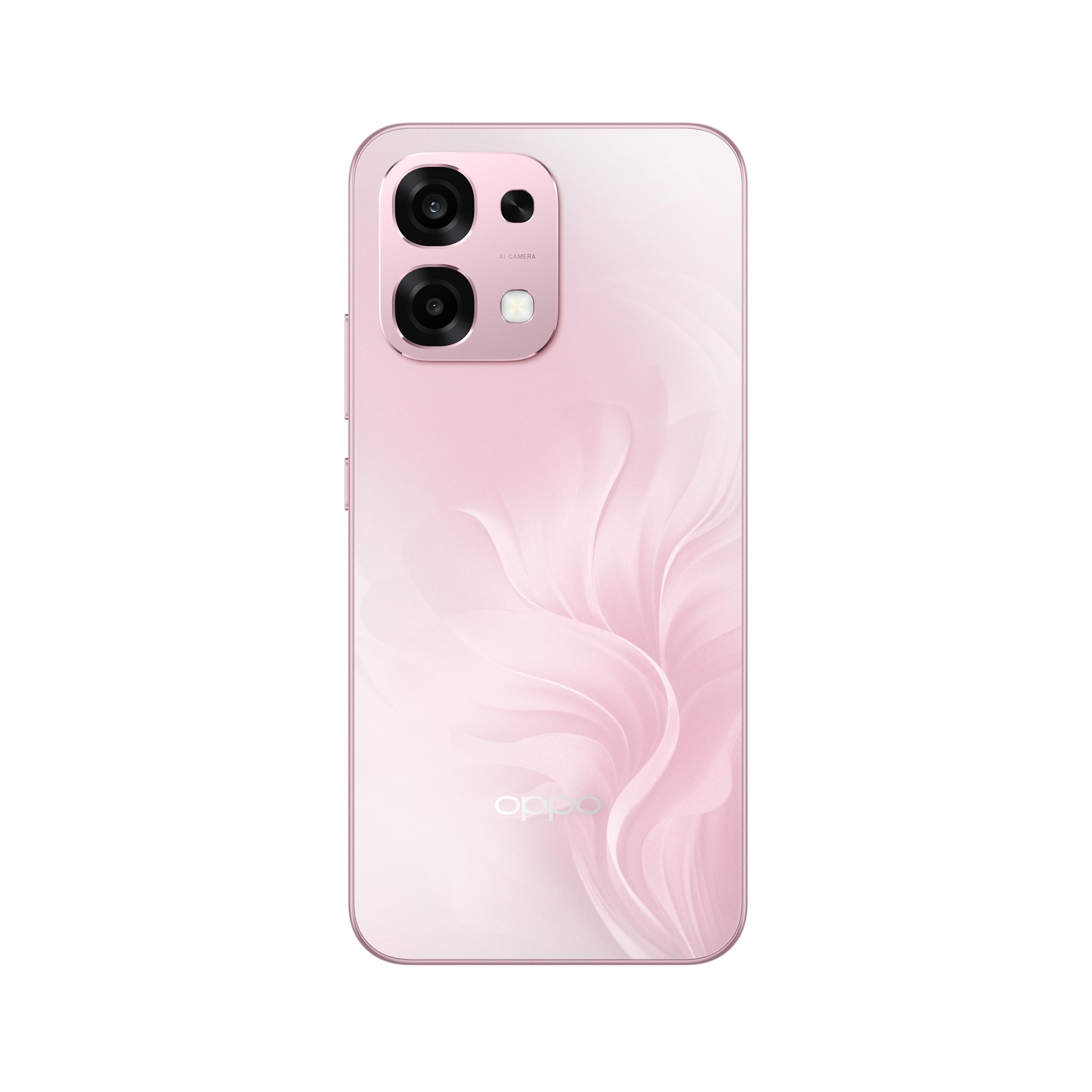
Figuur 1: Agter view of the OPPO A6 Pro 5G CPH2781, highlighting the camera array and device color.
1.3 Aanskakeling en aanvanklike konfigurasie
Om jou toestel vir die eerste keer aan te skakel:
- Press and hold the Power button (located on the right side) until the OPPO logo appears on the screen.
- Volg die aanwysings op die skerm om jou taal en streek te kies en aan 'n Wi-Fi-netwerk te koppel.
- Meld aan met jou Google-rekening of skep 'n nuwe een om toegang tot Google-dienste en die Play Winkel te verkry.
- Complete the setup wizard, including setting up screen lock methods (PIN, pattern, password, or Face Recognition).
1.4 Laai die toestel
Your OPPO A6 Pro 5G is equipped with 80W SUPERVOOC Flash Charge technology for rapid charging. Use the provided 80W SUPERVOOC adapter and USB Type-C cable for optimal charging performance.
- Koppel die USB Tipe-C-kabel aan die laaipoort aan die onderkant van die foon.
- Connect the other end of the cable to the 80W SUPERVOOC adapter.
- Steek die adapter in 'n kragaansluiting.
- Die laai-aanwyser sal op die skerm verskyn.
2. Bedryfsinstruksies
This section covers the basic operation and key features of your OPPO A6 Pro 5G CPH2781.
2.1 Navigating ColorOS
Your device runs on ColorOS, OPPO's customized Android operating system. Common navigation gestures include:
- Swiep op: Access the app drawer (if enabled) or return to the home screen.
- Swiep af: Open the notification panel and quick settings.
- Swiep links/regs: Navigate between home screen pages.
- Tik: Kies 'n item of maak 'n toepassing oop.
- Lang pers: Kry toegang tot kontekstuele spyskaarte of skuif programikone.
2.2 Vertoonkenmerke
The OPPO A6 Pro 5G features a 6.57-inch 120Hz AMOLED Ultra Bright Display, providing vivid colors and smooth scrolling. You can adjust display settings such as brightness, color mode, and refresh rate in the Settings menu under "Display & Brightness".
2.3 Kameragebruik
The device is equipped with an advanced camera system. To open the camera, tap the Camera app icon on your home screen or lock screen. Key features include:
- Fotomodusse: Standard, Portrait, Night, Pro, Panorama.
- Video-opname: Supports various resolutions and frame rates.
- AI kamera: Utilizes artificial intelligence for scene recognition and optimal photo settings.

Figure 2: Detail of the OPPO A6 Pro 5G CPH2781 camera module.
2.4 KI-kenmerke
The OPPO A6 Pro 5G integrates several AI-powered features to enhance user experience:
- AI Eraser 2.0: For intelligent object removal in photos.
- AI Assistance for Documents: Helps in scanning and managing documents.
- AI Assistant for Notes: Enhances note-taking capabilities.
2.5 Konnektiwiteit
Your device supports 5G cellular technology, Bluetooth, and LTE. AI LinkBoost 3.0 automatically optimizes network performance for stable connections.
- Wi-Fi: Koppel aan draadlose netwerke via Instellings > Wi-Fi.
- Bluetooth: Pair with other Bluetooth devices via Settings > Bluetooth.
- Mobiele netwerk: Manage 5G/LTE settings via Settings > Mobile Network.
3. Onderhoud en versorging
Proper maintenance ensures the longevity and optimal performance of your OPPO A6 Pro 5G CPH2781.
3.1 Batterysorg
The device is equipped with a 6500mAh battery. To maximize battery life:
- Vermy uiterste temperature.
- Use the provided 80W SUPERVOOC Flash Charge adapter and cable.
- Vermy om die battery gereeld heeltemal te ontlaai.
- Aktiveer kragbesparingsmodusse wanneer nodig.
3.2 Water- en stofbestandheid
The OPPO A6 Pro 5G CPH2781 has an IP69 rating, indicating resistance to dust and high-pressure water jets. While resistant, it is not waterproof under all conditions. To maintain resistance:
- Ensure the SIM tray is fully closed and sealed.
- Vermy om die toestel in water te onderdompel.
- Do not expose the device to saltwater, chlorinated water, or other liquids.
- If the device gets wet, wipe it dry with a clean, soft cloth before charging.
3.3 Physical Protection
The device is certified to military standards for durability. It also comes with a built-in screen protector. For additional protection:
- Consider using a protective case.
- Avoid dropping the device or exposing it to severe impacts.
- Maak die skerm en liggaam skoon met 'n sagte, pluisvrye lap.
4. Probleemoplossing
This section addresses common issues you might encounter with your OPPO A6 Pro 5G CPH2781.
4.1 Toestel skakel nie aan nie
- Maak seker dat die battery gelaai is. Koppel die toestel vir ten minste 10 minute aan die laaier.
- Perform a forced restart by pressing and holding the Power button and Volume Up button simultaneously for about 10-15 seconds.
4.2 Poor Network Connectivity
- Kontroleer of jou SIM-kaart behoorlik ingesit is.
- Verify that mobile data is enabled in Settings.
- Probeer om die toestel te herbegin.
- Reset network settings (Settings > System settings > Back up and reset > Reset phone > Reset network settings).
- Maak seker dat jy binne netwerkdekking is.
4.3 Programme wat vasval of vries
- Maak die toepassing toe en heropen.
- Clear the app's cache and data (Settings > Apps > App management > [App Name] > Storage usage > Clear cache/Clear data).
- Dateer die toepassing op na die nuutste weergawe vanaf die Google Play Winkel.
- Ensure your ColorOS is up to date (Settings > About device > Up to date).
4.4 Battery dreineer vinnig
- Gaan batteryverbruik na in Instellings > Battery om kraghonger programme te identifiseer.
- Verminder die skermhelderheid en skermtydvertraging.
- Deaktiveer onnodige funksies soos GPS, Bluetooth of Wi-Fi wanneer dit nie gebruik word nie.
- Aktiveer kragbesparingsmodus.
5. Spesifikasies
Below are the key technical specifications for the OPPO A6 Pro 5G CPH2781.
| Kenmerk | Spesifikasie |
|---|---|
| Handelsmerk | OPPO |
| Model Naam | A6 Pro (CPH2781) |
| Bedryfstelsel | ColorOS |
| RAM geheue | 8 GB (uitbreidbaar na 16 GB) |
| Berging kapasiteit | 256 GB |
| SVE Model | MediaTek Helio G100 |
| Skerm grootte | 6.57 duim |
| Tipe vertoon | AMOLED |
| Herlaaitempo | 120 Hz |
| Battery kapasiteit | 6500 mAh |
| Laai Tegnologie | 80W SUPERVOOC Flitslading |
| Sellulêre Tegnologie | 5G |
| SIM-kaartgleuftelling | Dubbele SIM |
| Waterweerstandvlak | IP69 (waterdig) |
| Biometriese sekuriteit | Gesigherkenning |
| Connector Tipe | USB Tipe C |
| Ingeboude media | Skermbeskermer |
6. Waarborginligting
Your OPPO A6 Pro 5G CPH2781 comes with a 2 jaar vervaardiger se waarborg. Hierdie waarborg dek defekte in materiaal en vakmanskap onder normale gebruik.
Please retain your proof of purchase for warranty claims. The warranty does not cover damage caused by misuse, accidents, unauthorized modifications, or normal wear and tear. For detailed terms and conditions, please refer to the warranty card included in your product packaging or visit the official OPPO webwebwerf.
7. Kliëntediens
For further assistance, technical support, or service inquiries regarding your OPPO A6 Pro 5G CPH2781, please contact OPPO customer service through the following channels:
- Amptelike OPPO Webwebwerf: Besoek OPPO-ondersteuning vir algemene vrae, probleemoplossingsgidse en kontakinligting.
- OPPO Store: Jy kan ook die amptenaar besoek OPPO Winkel op Amazon vir produkinligting en verwante bykomstighede.
- Dienssentrums: Locate authorized OPPO service centers in your region for in-person support.
When contacting support, please have your device model (CPH2781) and serial number ready.