
Inleiding
The Tilta Khronos Ultimate Kit is a comprehensive accessory system designed to enhance the filmmaking capabilities of your iPhone 17 Pro Max. This kit provides robust protection, advanced cooling, expanded connectivity, and precise control over your mobile videography. Please read this manual thoroughly to ensure proper setup and optimal use of all components.
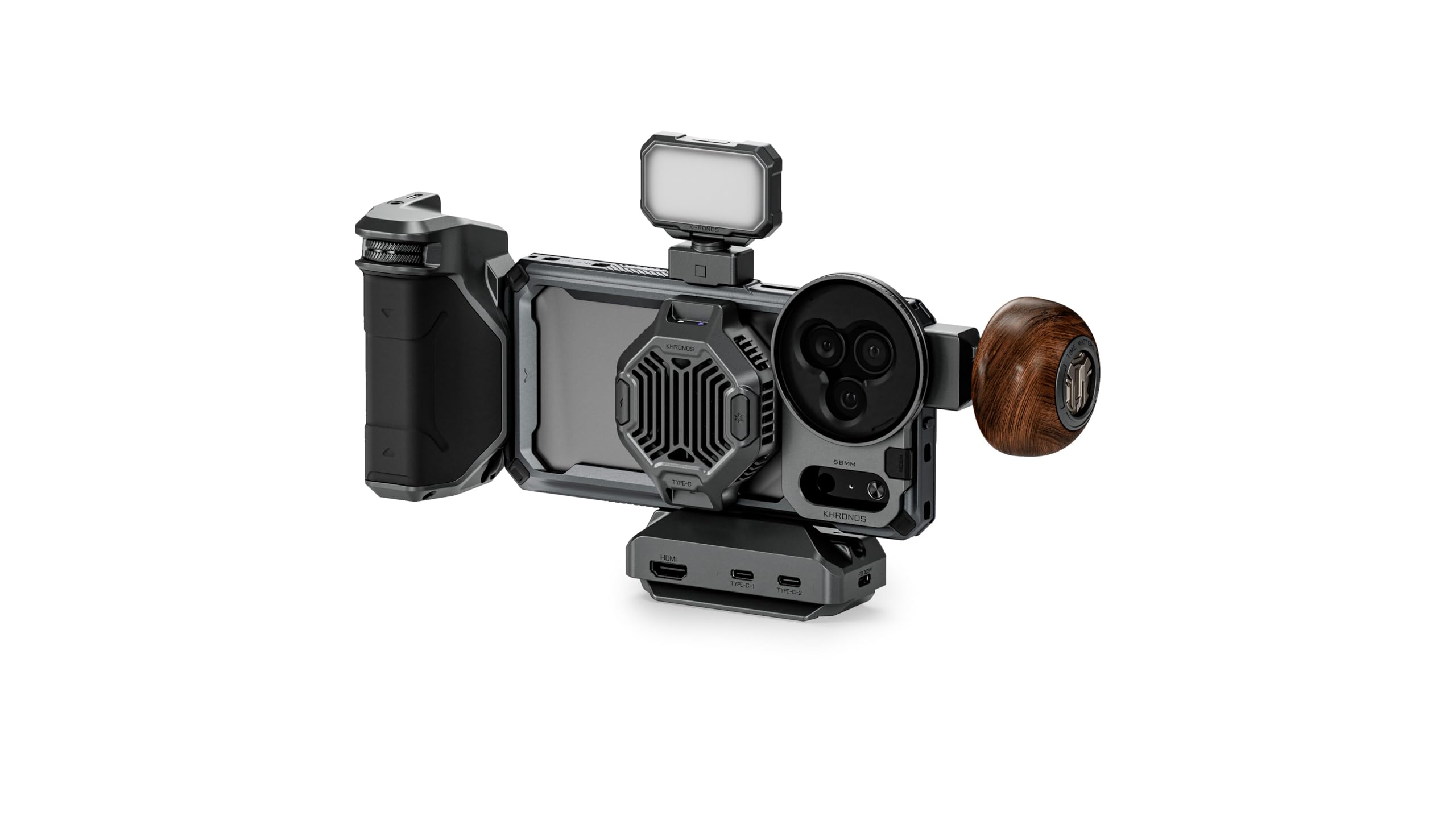
Figure 1: Tilta Khronos Ultimate Kit for iPhone 17 Pro Max, showcasing all components assembled.
Wat is in die boks
Verify that all the following components are included in your Tilta Khronos Ultimate Kit:
- Khronos iPhone 17 Pro Max Case - Space Gray (TK-IP17-PMFC-SG)
- Khronos Cooling System V2 for iPhone - Space Gray (TK-IP-CS2-SG)
- Khronos Focus PD Handle for iPhone - Space Gray (TK-IP-PH-SG)
- Khronos Quick Release USB-C Hub - Space Gray (TK-QRUH-SG)
- Khronos Circular Wooden Handle - Space Gray (TK-CWH-SG)
- Khronos 58mm Filter Tray for iPhone 17 Pro Max - Space Gray (TK-IP17-FT58M-SG)
- Khronos Magnetic 58mm Variable ND Filter (2-5 Stops) - Space Gray (TK-58-VND-SG)
- Khronos Mini LED Panel (Daylight) - Space Gray (TK-MLP-DL-SG)

Figure 2: All individual components included in the Khronos iPhone 17 Pro Max Ultimate Kit.
Opstel instruksies
Follow these steps to assemble your Tilta Khronos Ultimate Kit:
1. Install the Khronos iPhone 17 Pro Max Case
- Carefully place your iPhone 17 Pro Max into the Khronos case. Ensure it is seated securely and all ports and buttons align correctly.
- The case features a reinforced top cover to prevent bending and anti-slip side grips for a secure hold.

Figure 3: The Khronos case provides rugged protection with a reinforced top cover and anti-slip side grips.
2. Attach the Khronos Cooling System V2
- The Cooling System V2 attaches magnetically to the back of the Khronos case. Align the cooling module with the magnetic area on the case.
- Ensure a firm magnetic connection. The cooling system helps prevent overheating during extended recording sessions.

Figure 4: The MagSafe-compatible cooling fan magnetically attaches to the phone case.
3. Connect the Khronos Focus PD Handle
- Slide the Focus PD Handle onto the designated rail on the side of the Khronos case until it clicks into place.
- Connect the handle's USB-C cable to the iPhone's USB-C port or the USB-C Hub for power and control.

Figure 5: The Focus PD Handle provides enhanced precision and control for filmmaking.
4. Integrate the Khronos Quick Release USB-C Hub
- Attach the USB-C Hub to the bottom of the Khronos case using the quick-release mechanism.
- Connect the hub's integrated USB-C cable to your iPhone's USB-C port.

Figure 6: The Universal USB-C Hub offers multiple ports for expanded connectivity.
5. Install the Khronos 58mm Filter Tray and Variable ND Filter
- Mount the 58mm Filter Tray onto the lens area of the Khronos case.
- Place the Magnetic 58mm Variable ND Filter into the filter tray. The magnetic design allows for quick attachment and removal.

Figure 7: The Variable ND Filter provides 1-5 stops of exposure control.
6. Attach the Khronos Mini LED Panel
- Slide the Mini LED Panel onto the cold shoe mount located on the Khronos case.
- Maak seker dit is stewig vasgemaak.
Bedryfsinstruksies
Using the Focus PD Handle
- The Focus PD Handle provides tactile control for focus, zoom, and run/stop functions within compatible camera applications.
- Refer to your specific camera app's settings to map these controls.
- The integrated battery in the handle can power accessories or extend your iPhone's battery life.
Operating the Cooling System V2
- The Cooling System V2 features two adjustable cooling modes. Press the power button to cycle through modes.
- The system uses a powerful 22W cooling fan and MagSafe wireless charging support to maintain optimal device temperature.
Figure 8: The cooling fan features indicator lights for its operational status.
Utilizing the Quick Release USB-C Hub
- The USB-C Hub provides additional USB ports for connecting external SSDs for direct recording.
- Use the HDMI port to connect an external monitor for real-time video monitoring (supports 4K@60Hz output).
- The hub supports PD 3.0 with Max 20V/5A input for 100W fast charging.
Figure 9: The USB-C Hub offers HDMI output and multiple USB-C ports for various accessories.
Adjusting the Variable ND Filter
- Rotate the outer ring of the Variable ND Filter to adjust the light reduction from 2 to 5 stops.
- This allows for greater exposure control in bright conditions without altering shutter speed or aperture.
Figure 10: The Variable ND Filter allows for precise light control, demonstrated from ND 2 to ND 32.
Algemene gebruikswenke
- The Khronos system supports both horizontal and vertical shooting modes.
- The case features a multi-functional back plate that can act as a kickstand or a flat head/box cutter.
- An optional magnetic ring stand doubles as a grip and rotates 360 degrees.

Figure 11: The Khronos system supports both horizontal and vertical shooting orientations.
Amptelike Produkvideo
Video 1: Oorview of the Tilta Khronos Ecosystem for iPhone 17 Pro/Pro Max, demonstrating key features and assembly.
Onderhoud
- Skoonmaak: Use a soft, dry cloth to clean the surfaces of all components. For stubborn dirt, a slightly damp 'n Lap met sagte seep kan gebruik word, gevolg deur deeglike droogmaak. Vermy harde chemikalieë of skuurmiddels.
- Berging: Bêre die stel op 'n koel, droë plek weg van direkte sonlig en uiterste temperature wanneer dit nie gebruik word nie.
- Lensversorging: For the ND filter, use a lens cleaning solution and a microfiber cloth specifically designed for optical surfaces.
Probleemoplossing
Cooling System Not Activating
- Ensure the cooling module is securely attached to the case and has a stable power connection.
- Check if the iPhone is properly seated in the case, allowing for correct magnetic alignment.
Focus PD Handle Controls Unresponsive
- Verify the USB-C connection between the handle and the iPhone/USB-C Hub.
- Confirm that your camera application supports external controls and that the handle functions are correctly mapped within the app settings.
- Check the handle's battery level.
USB-C Hub Connectivity Issues
- Ensure the hub is firmly connected to the iPhone's USB-C port.
- Test with different cables or accessories to isolate the issue.
- Restart your iPhone if external devices are not recognized.
Spesifikasies
| Handelsmerk | Tilta |
| Model Naam | Khronos |
| Modelnommer | TK-IP17-PMB-SG |
| Versoenbare toestelle | iPhone 17 Pro Max |
| Kleur | Ruimtegrys |
| Item gewig | 5.03 pond |
| UPC | 810193520526 |
| Video-opname-formaat | MP4 |
| Video-opname-resolusie | 4K (3840 x 2160) |
| Light Sensitivity (ND Filter) | 2-5 Stops |
| Waterweerstandvlak | Nie waterbestand nie |
Waarborg en Ondersteuning
Waarborg inligting
The Tilta Khronos Ultimate Kit comes with a 2 jaar meganiese waarborg en a 1-year electronic warranty from the date of purchase. This warranty covers defects in materials and workmanship under normal use. It does not cover damage caused by misuse, accidents, unauthorized modifications, or improper maintenance.
Kliënte ondersteuning
For technical assistance, troubleshooting, or warranty claims, please contact Tilta customer support through their official website or the retailer where the product was purchased. Please have your product model number (TK-IP17-PMB-SG) and proof of purchase available when contacting support.