
1. oorview
The NBD K200 is a compact digital camera designed for capturing high-quality photos and videos. It features a 64MP photo resolution, 4K video recording capabilities, 16X digital zoom, and autofocus. Its lightweight design and user-friendly interface make it suitable for various users, including beginners and travelers.

Beeld: Oorview of the NBD K200 camera highlighting its 64MP, 4K, Beauty Mode, Backlight Portrait, Auto Focus, 16X Zoom, Smart Stabilization, and Built-in Filters features.
Pakketinhoud
Maak seker dat alle items in die pakket teenwoordig is:
- NBD K200 Digital Camera Body
- 64GB TF Card (MicroSD Card)
- USB-C-kabel
- Nekband
- Gebruikershandleiding (hierdie dokument)

Image: The NBD K200 camera, USB cable, card reader, 64GB memory card, lens cleaning cloth, and camera wrist strap, presented as a complete kit.
2. Opstelling
2.1 Laai die battery
Before first use, fully charge the camera battery. The camera uses a Lithium Ion battery.
- Insert the battery into the camera's battery compartment.
- Connect the camera to a power source using the provided USB-C cable.
- The charging indicator light will show the charging status. A full charge typically allows for over 300 photos.

Image: The NBD K200 camera connected via USB-C cable to a power bank, illustrating the charging process and highlighting its powerful battery life for approximately 300 photos per charge.
2.2 Plaas die geheue kaart
The camera supports microSD cards. A 64GB TF card is included.
- Vind die geheuekaartgleuf op die kamera.
- Insert the TF card into the slot with the gold contacts facing the correct direction until it clicks into place.
- Om te verwyder, druk die kaart liggies totdat dit uitspring.
3. Bedien die kamera
3.1 Krag aan/af
Druk en hou die aan/af-knoppie in om die kamera aan of af te skakel.
3.2 Basiese kontroles
The camera features a Multi-Functional Roller Button for simplified operation.
- Rolknoppie: Used for one-touch mode switching and precise zoom adjustment. Roll left to zoom out, roll right to zoom in.
- Ontspanknop: Press to take a photo or start/stop video recording.
- Modusknoppie: Cycles through different shooting modes.
- Flitsknoppie: Activates the built-in flash.
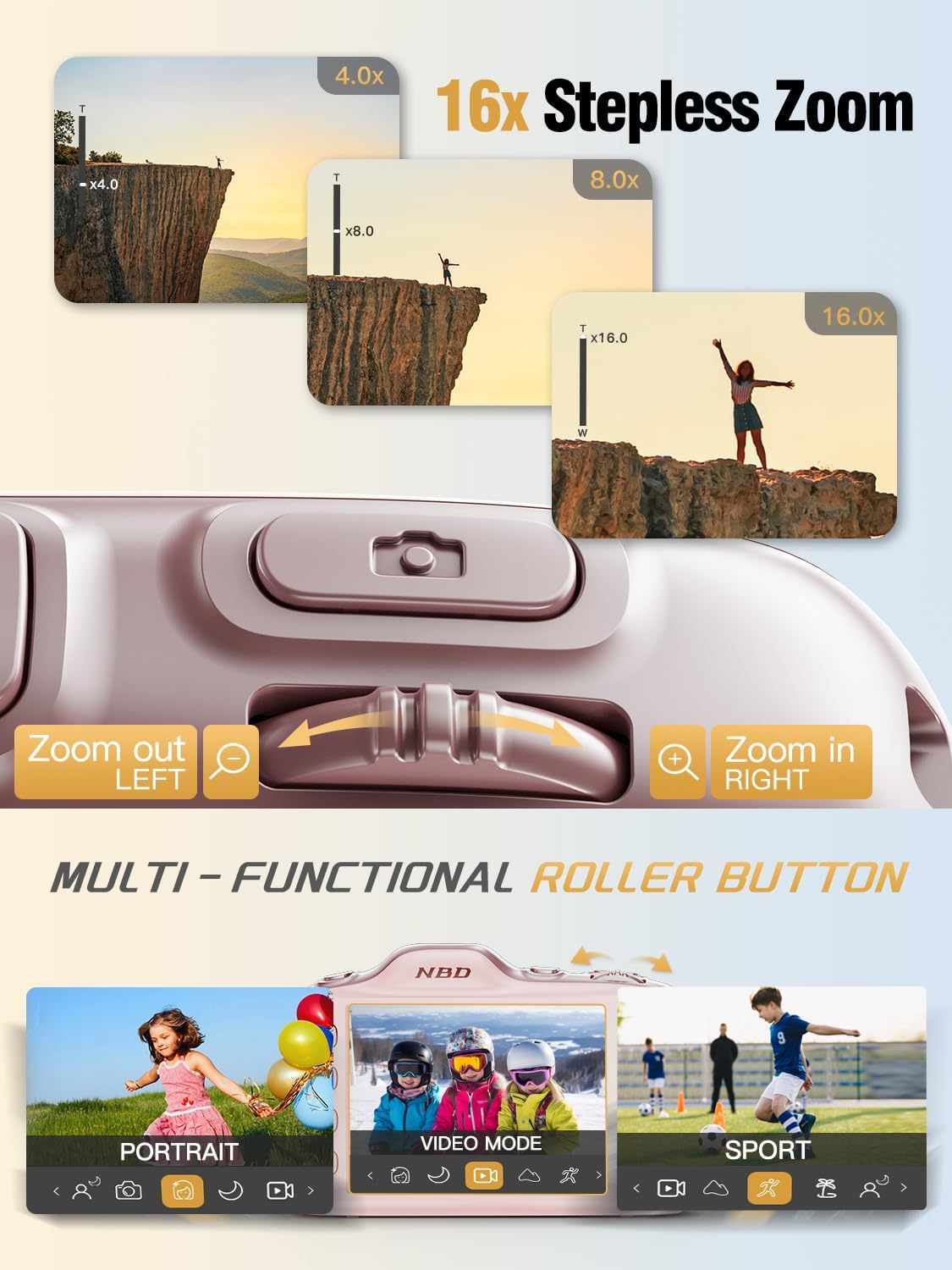
Image: Close-up of the NBD K200 camera's top, highlighting the 16x stepless zoom roller button for zooming in and out, and the mode switch for selecting different shooting modes like Portrait, Video, and Sport.
3.3 Foto's neem
The camera features autofocus for clear images.
- Point the camera at your subject. The autofocus system will automatically detect and focus.
- Use the roller button to adjust the 16X digital zoom as needed.
- Press the shutter button fully to capture the photo.

Image: A woman holding the NBD K200 camera, with the screen displaying an autofocus frame around a subject's face, illustrating the camera's auto-focus capability for effortless portrait photography.
3.4 Opneem van video's
The camera supports 4K video recording at various frame rates (24, 30, 60 FPS).
- Switch to video mode using the mode button or roller.
- Press the shutter button to start recording. A red indicator will typically appear on the screen.
- Druk weer die ontspanknoppie om op te neem.

Image: A young girl running through a field with balloons, illustrating the NBD K200 camera's 4K 30FPS cinema capture capability for smooth, ultra HD video recording.
3.5 Opnamemodusse en -kenmerke
The NBD K200 offers several modes and features to enhance your photography.
- Skoonheidsmodus: Enhances facial features for portraits and selfies.
- Nagmodus: Optimizes settings for low-light conditions, smoothing grain and balancing tones.
- Portretmodus: Designed for capturing natural radiance in subjects, balancing tones and softening light.
- Sportmodus: Ideal for capturing fast-moving subjects with anti-shake stabilization.
- Burst-modus: Captures multiple photos in quick succession (up to 10FPS) for action shots.
- Built-in Filters: Apply various creative filters like Vintage, Cool Tone, Warm Tone, Sepia, Sketch, and Japan Style.
- Selfontspanner: Options for 3, 5, 7, or 10-second delays for group shots or selfies.

Image: A circular diagram illustrating the NBD K200 camera's various shooting modes, including Photo, Video, Night Mode, Portrait Mode, Burst Mode, and Beauty Mode, with example images for each.

Beeld: Bvamples of built-in filters available on the NBD K200 camera, including Vintage, Cool Tone, Warm Tone, Sepia, Sketch, and Japan Style, demonstrating how they alter image ambiance.
3.6 Oordrag Files
Transfer photos and videos to a computer or smartphone using the USB-C cable.
- Connect the camera to your device using the USB-C cable.
- The camera will appear as a removable storage device.
- Sleep en los files na jou verlangde plek.
4. Onderhoud
4.1 Batterysorg
- Charge the battery fully before extended storage.
- Vermy om die battery aan uiterste temperature bloot te stel.
- Gebruik slegs die voorsiene of goedgekeurde laaikabels en -adapters.
4.2 Skoonmaak van die kamera
- Gebruik 'n sagte, pluisvrye lap om die kamera se liggaam skoon te maak.
- For the lens, use a specialized lens cleaning cloth and solution. Avoid touching the lens directly.
- Moenie harde chemikalieë of skuurmateriaal gebruik nie.
4.3 Berging
- Bêre die kamera op 'n koel, droë plek weg van direkte sonlig.
- If storing for a long period, remove the battery.
- Keep the camera in its protective case or a soft pouch to prevent scratches.
5. Probleemoplossing
Indien u probleme ondervind, raadpleeg die volgende algemene oplossings:
| Probleem | Moontlike Oplossing |
|---|---|
| Kamera skakel nie aan nie | Maak seker dat die battery gelaai en korrek geplaas is. |
| Kan nie foto's/video's neem nie | Check if the memory card is inserted and has sufficient space. Ensure the camera is not in playback mode. |
| Beelde is vaag | Ensure autofocus is engaged. Check for smudges on the lens. Hold the camera steady or use anti-shake feature. |
| Kamera word nie deur rekenaar herken nie | Ensure the USB-C cable is securely connected. Try a different USB port or cable. |
| Flits werk nie | Ensure the flash is enabled in the camera settings or via the dedicated flash button. |
6. Spesifikasies
Detailed technical specifications for the NBD K200 Digital Camera:
| Kenmerk | Detail |
|---|---|
| Handelsmerk | NBD |
| Model Naam | K200 |
| Effektiewe stilresolusie | 64 MP |
| Video-resolusie | 4K (2160p) |
| Raamtempo | 24, 30, 60 FPS |
| Zoem | 16X digitale zoom |
| Outofokus | Yes (Contrast Detection) |
| Beeldstabilisasie | Anti-skud |
| Fotosensortegnologie | CMOS (1/2.4-duim) |
| Diafragma | F1.8 |
| Minimum sluiterspoed | 1/4000 sekondes |
| Tipe vertoon | LCD (2.8 Inches, Color Screen) |
| Bergingsmedia | microSD (up to 64GB included) |
| File Format (Photo) | JPEG (Fine Quality) |
| File Formaat (Video) | MOV |
| Battery Tipe | Litiumioon |
| Konnektiwiteit | USB-C |
| Item gewig | 0.26 Kilogram (ongeveer 121g) |
| Waterweerstandvlak | Nie waterbestand nie |
7. Waarborg en Ondersteuning
For warranty information and technical support, please refer to the contact details provided with your purchase or visit the official NBD webwebwerf. Bewaar u bewys van aankoop vir waarborgeise.