
Inleiding
This manual provides detailed instructions for the setup, operation, and maintenance of your LIGE EF21-B Smart Watch. Please read this manual thoroughly before using the device to ensure proper function and to maximize your user experience. Keep this manual for future reference.
Wat is in die boks
Upon opening your LIGE EF21-B Smart Watch package, you should find the following items:
- 1 x LIGE EF21-B Smart Watch
- 1 x Vlekvrye Staal Band
- 1 x silikoon band
- 1 x USB-magnetiese laaikabel
- 1 x Type-C Magnetic Charging Cable
- 1 x handleiding

Image: The LIGE EF21-B Smart Watch shown with both USB and Type-C magnetic charging cables, highlighting the included accessories.
Opstelling
1. Laai die slimhorlosie
Before initial use, fully charge your smart watch. Connect the magnetic charging cable to the charging contacts on the back of the watch and plug the USB or Type-C end into a compatible power source (e.g., computer, wall adapter). The watch display will indicate charging status. A full charge typically takes approximately 3 hours.

Image: The LIGE EF21-B Smart Watch connected to its magnetic charger, displaying a charging animation and indicating its 600mAh battery capacity.
2. App Installasie
To unlock the full functionality of your LIGE EF21-B Smart Watch, you need to install the companion application, FitCloudPro, op jou slimfoon.
- Scan the QR code provided in the watch's interface or in the included manual to download the FitCloudPro app.
- Alternatively, search for "FitCloudPro" in your smartphone's app store (Google Play Store for Android, Apple App Store for iOS).
- Install the application and grant necessary permissions when prompted.
3. Koppeling van toestelle
After installing the app and fully charging your watch:
- Maak die FitCloudPro-app op jou slimfoon oop.
- Maak seker dat Bluetooth op jou slimfoon geaktiveer is.
- Navigeer in die toepassing na die "Toestel"- of "Voeg toestel by"-afdeling.
- The app will search for available devices. Select "EF21-B" from the list to initiate pairing.
- Follow any on-screen prompts on both your phone and watch to confirm the pairing.
Bedryfsinstruksies
Basiese navigasie
The LIGE EF21-B Smart Watch features a 1.43-inch AMOLED touchscreen display and a rotary encoder crown for navigation.
- Raakskerm: Swipe left, right, up, or down to navigate through menus and access different features. Tap to select items.
- Rotary Encoder Crown: Rotate the crown to scroll through lists, adjust settings, or zoom in/out on certain interfaces. Press the crown to return to the home screen or confirm selections.
- Syknoppies: The watch includes additional side buttons that can be customized for quick access to specific functions or apps.

Beeld: 'n Nabyskoot view of the LIGE EF21-B Smart Watch's 1.43-inch AMOLED display, showcasing its vibrant colors and sharp resolution.
Bluetooth-oproepe en kennisgewings
Sodra dit met jou slimfoon gekoppel is, ondersteun die horlosie Bluetooth-oproepe en boodskapkennisgewings.
- Maak/beantwoord oproepe: You can answer or reject incoming calls directly from your watch. Use the built-in microphone and speaker for hands-free communication.
- Boodskapherinneringe: Receive real-time notifications for calls, SMS, and various social media apps directly on your watch display.

Image: A user interacting with the LIGE EF21-B Smart Watch to answer a Bluetooth call, demonstrating its clear two-way communication capabilities.

Image: The LIGE EF21-B Smart Watch showing incoming notifications from various social media applications, ensuring discreet awareness of important messages.
Gesondheidsmonitering
Die horlosie bied omvattende gesondheidsopsporingsfunksies:
- Hartslagmonitering: Monitor jou hartklop deurlopend deur die dag. View real-time data and historical trends in the FitCloudPro app.
- Slaapmonitering: Automatically records your sleep patterns, including deep sleep, light sleep, and wake times. Provides insights to help improve sleep quality.
- Bloedsuurstof (SpO2) dophou: Meet jou bloedsuurstofvlakke.
- Stresvlakmonitering: Tracks daily stress levels to help you manage well-being.
Let wel: Hierdie toestel is nie 'n mediese toestel nie. Gesondheidsdata is slegs vir verwysing en moet nie vir mediese diagnose of behandeling gebruik word nie.

Image: The LIGE EF21-B Smart Watch displaying continuous heart rate monitoring data, showing BPM and historical trends.

Image: The LIGE EF21-B Smart Watch displaying sleep monitoring data, including total sleep time and sleep stage breakdown over several days.
Sportmodusse
Die horlosie ondersteun meer as 200 sportmodusse om jou fisiese aktiwiteite akkuraat op te spoor.
- Kies jou verlangde sportsoort vanaf die horlosie se spyskaart.
- The watch will record data such as distance, steps, calories burned, and heart rate during your workout.
- Review detailed analysis of your training results in the FitCloudPro app.

Image: The LIGE EF21-B Smart Watch displaying its interface for selecting from over 100 sports modes, with examples of users engaged in golf, climbing, and running.
Ander kenmerke
The LIGE EF21-B Smart Watch includes several additional smart features:
- AI Voice Assistant: Interact with your watch using voice commands for various tasks.
- Flitslig: Utilize the built-in LED flashlight for convenience in low-light conditions.
- Musiekbeheer: Beheer musiekweergawe op jou slimfoon direk vanaf jou horlosie.
- Weervoorspelling: Kry intydse weeropdaterings.
- Wekker: Stel alarms en herinnerings.
- Vind my foon: Vind jou verlore slimfoon.
- Kamera afstandsbediening: Gebruik jou horlosie as 'n afstandbeheerder vir jou foon se kamera.
- Waterherinnering: Receive prompts to drink water throughout the day.
- sakrekenaar: 'n Basiese sakrekenaarfunksie is beskikbaar.

Image: The LIGE EF21-B Smart Watch showcasing its diverse range of smart features, including music control, weather, health monitoring, and a flashlight icon.
Video: 'n Oorview of the LIGE EF21-B Smart Watch's key features, including its AMOLED display, rotary crown, health monitoring, sports modes, and charging capabilities.
Onderhoud
Skoonmaak
Om die voorkoms en funksionaliteit van jou horlosie te behou:
- Vee die horlosieskerm en -liggaam af met 'n sagte, pluisvrye lap.
- Vir hardnekkige vuiligheid, effens dampMaak die lap met water skoon. Vermy die gebruik van harde chemikalieë of skuurmiddels.
- Maak die laaikontakte gereeld skoon om doeltreffende laai te verseker.
Waterbestandheid (IP68)
The LIGE EF21-B Smart Watch is rated IP68, meaning it is resistant to dust and can withstand immersion in water up to 1.5 meters for up to 30 minutes. This makes it suitable for daily use, such as washing hands or light rain exposure. However, it is not recommended for hot showers, saunas, or diving, as steam and high water pressure can compromise the seals.
Battery sorg
Om die batterylewe te verleng:
- Vermy om die battery gereeld heeltemal te ontlaai.
- Bêre die horlosie op 'n koel, droë plek wanneer dit nie vir lang tye gebruik word nie.
- Use only the provided charging cables.
Probleemoplossing
If you encounter issues with your LIGE EF21-B Smart Watch, refer to the following common solutions:
| Probleem | Moontlike Oplossing |
|---|---|
| Horlosie skakel nie aan nie | Maak seker dat die horlosie volledig gelaai is. Druk en hou die aan/af-knoppie vir 'n paar sekondes in. |
| Kan nie met foon koppel nie | Ensure Bluetooth is enabled on your phone and the watch. Restart both devices. Make sure the FitCloudPro app has necessary permissions. |
| Kennisgewings nie ontvang nie | Check app permissions for notifications on your phone. Ensure the watch is connected via Bluetooth. Verify notification settings within the FitCloudPro app. |
| Onakkurate gesondheidsdata | Ensure the watch is worn snugly on your wrist. Clean the sensor on the back of the watch. Remember, this is not a medical device. |
| Kort batterylewe | Reduce screen brightness, disable unnecessary features (e.g., always-on display), and limit frequent heart rate monitoring. |
Indien die probleem voortduur, kontak asseblief kliëntediens.
Spesifikasies
Key technical specifications for the LIGE EF21-B Smart Watch:
- Model: EF21-B
- Vertoon: 1.43-duim AMOLED, 466x466 piksels
- Battery kapasiteit: 600 mAh litium polimeer
- Batterylewe: 10+ days (typical use), 30+ days (standby)
- Laai tyd: Ongeveer 3 uur
- Waterweerstand: IP68
- Verbinding: Bluetooth
- Verenigbaarheid: Android 8.0+ / iOS 12.0+ (via FitCloudPro App)
- Sensors: Heart Rate, Blood Oxygen, Pedometer
- Spesiale kenmerke: Bluetooth Call, Voice Assistant, 200+ Sports Modes, Flashlight, Music Control, Notifications, Sleep Monitor, Activity Tracker
- Afmetings: Watch case approx. 47-48mm diameter, 22mm lug width. Max wrist circumference: 250mm, Min wrist circumference: 150mm.
- Gewig: 180 gram (ongeveer 6.3 onse)
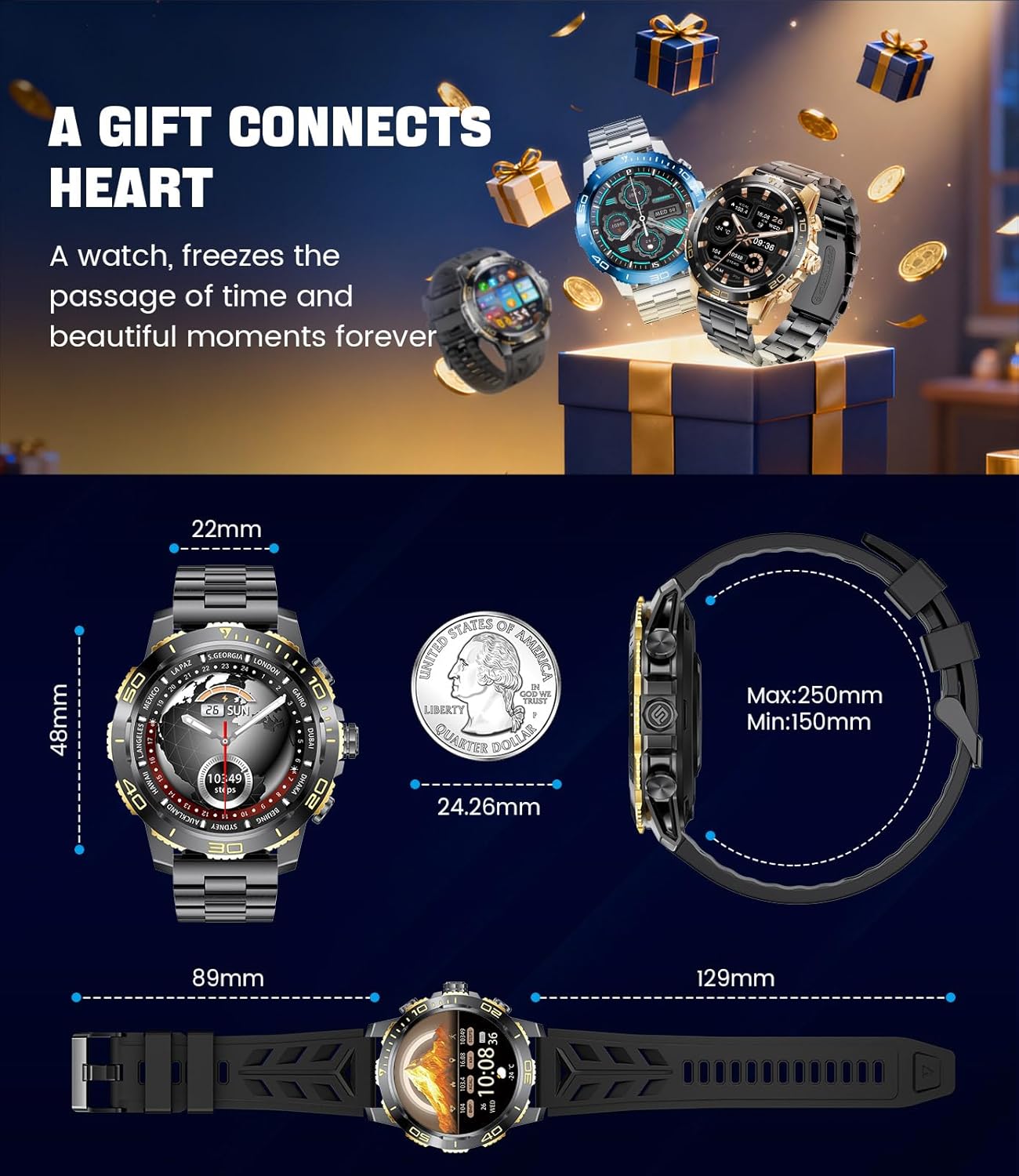
Image: Detailed dimensions of the LIGE EF21-B Smart Watch, including case diameter, strap width, and wrist circumference range.
Waarborg en Ondersteuning
Your LIGE EF21-B Smart Watch comes with a manufacturer's warranty. Please refer to the warranty card included in your packaging for specific terms and conditions.
For any questions, technical support, or warranty claims, please contact LIGE customer service through the platform where you purchased the product. Our professional customer service team is available to assist you.