
1. Inleiding
This user manual provides comprehensive instructions for the NICGIGA 10-Port 10Gbps Unmanaged Ethernet Switch, Model S25-0802T. It covers product features, installation, operation, and troubleshooting to ensure optimal performance and longevity of your device. Please read this manual thoroughly before using the switch.
2. Produk verbyview
The NICGIGA S25-0802T is an unmanaged Ethernet switch designed to expand your network capabilities with high-speed connectivity. It features a durable metal casing and a fanless design for quiet operation.
- Poortkonfigurasie: 8 x 2.5Gb Base-T RJ45 ports and 2 x 10Gb RJ45 uplink ports.
- Speed Compatibility: Ports 1-8 support 2.5G/1G/100Mbps. Ports 9-10 support 10G/5G/2.5G/1G/100Mbps.
- Outomatiese MDI/MDIX: Automatically detects and adjusts for straight-through or crossover cables.
- Plug and Play: No software configuration required for operation.
- High Switching Capacity: Tot 60 Gbps.
- Thermal Design: Fanless for silent operation, with double-sided cooling holes and a metal case for efficient heat dissipation.
- Monteer opsies: Supports desktop placement and wall mounting.

3. Pakketinhoud
Verifieer dat alle items in die pakket teenwoordig is:
- NICGIGA 10-Port Unmanaged Ethernet Switch (Model: S25-0802T)
- Kragadapter (GS 12V 1.5A)
- Gebruikershandleiding (hierdie dokument)
4. Opstelinstruksies
The NICGIGA S25-0802T switch is designed for simple plug-and-play operation. No software installation or complex configuration is required.
- Kragverbinding: Connect the included DC 12V 1.5A power adapter to the switch's power input port and then to a power outlet. The Power LED on the switch will illuminate.
- Netwerktoestelverbinding: Connect your network devices (e.g., computers, NAS, routers, access points) to any of the RJ45 ports (1-10) on the switch using standard Ethernet cables.
- Verifieer verbinding: Once connected, the corresponding Link/Act LEDs for each port will illuminate, indicating an active connection.

5. Bedryfsinstruksies
The switch operates automatically once powered on and devices are connected. It supports auto-negotiation for speed and duplex mode, and auto MDI/MDIX for cable type detection.
- Automatic Speed Detection: The switch ports automatically detect the speed of the connected device (100Mbps, 1Gbps, 2.5Gbps, 5Gbps, or 10Gbps) and adjust accordingly.
- Volle dupleks werking: All ports support full-duplex mode for maximum data throughput.
- Non-Blocking Architecture: The switch provides full wire-speed forwarding on all ports, ensuring efficient data transfer without bottlenecks.

6. Installasie
The NICGIGA S25-0802T switch offers flexible installation options:
- Werkskermplasing: Plaas die skakelaar op 'n plat, stabiele oppervlak. Verseker voldoende ventilasie rondom die toestel.
- Muur berg: The switch can be mounted on a wall using appropriate screws (not included) and the mounting slots on the underside of the device. Ensure the mounting surface is sturdy enough to support the switch's weight.


7. LED-aanwysers
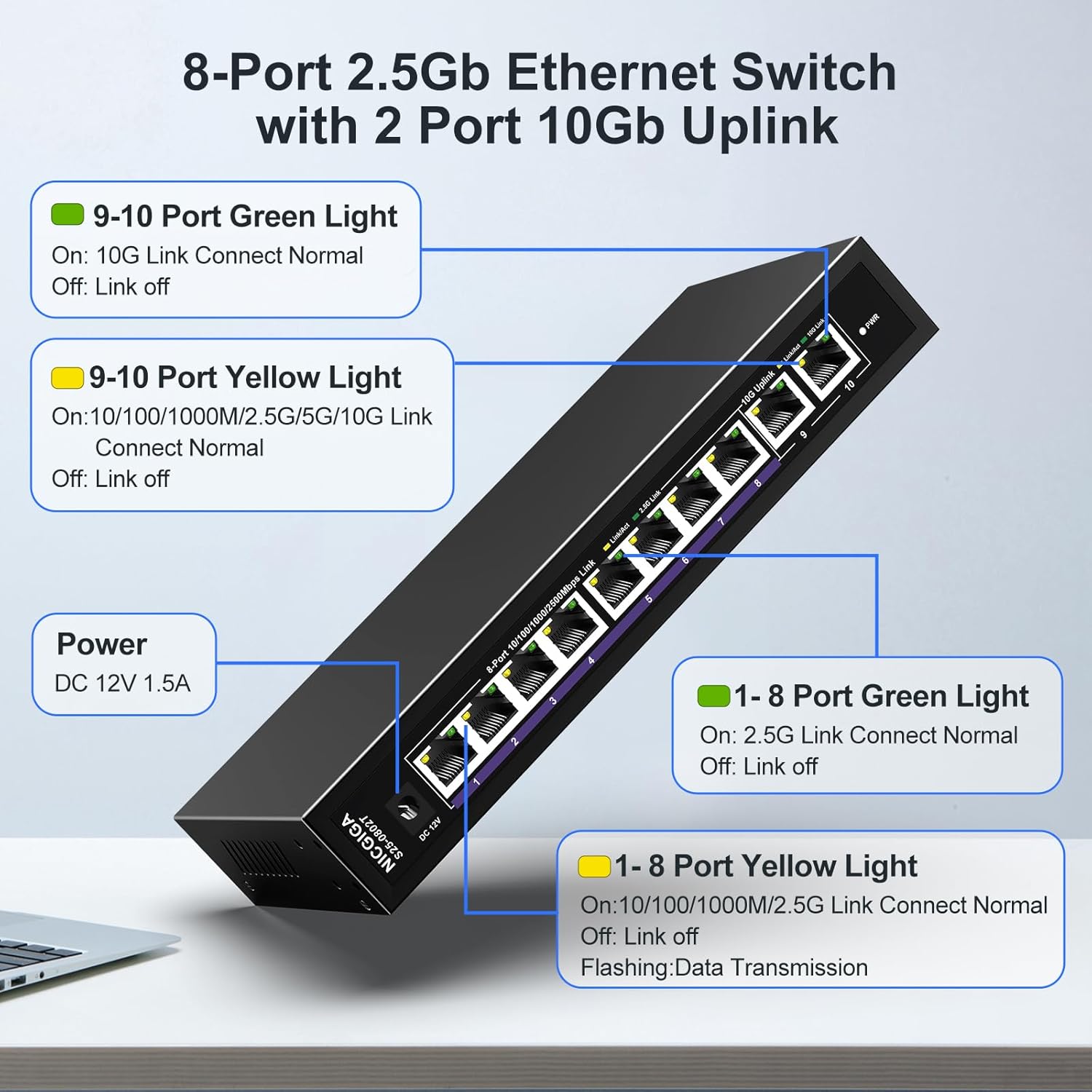
The switch features LED indicators to provide real-time status information for each port and the device itself.
| Aanwyser | Status | Beskrywing |
|---|---|---|
| Krag | On | Die skakelaar is aangeskakel. |
| Ports 1-8 Green Light | On | 2.5G Link Connect Normal. |
| Af | Link off. | |
| Ports 1-8 Yellow Light | On | 10/100/1000M/2.5G Link Connect Normal. |
| Flitsend | Data Transmission. | |
| Af | Link off. | |
| Ports 9-10 Green Light | On | 10G Link Connect Normal. |
| Af | Link off. | |
| Ports 9-10 Yellow Light | On | 10/100/1000M/2.5G/5G/10G Link Connect Normal. |
| Flitsend | Data Transmission. | |
| Af | Link off. |
8. Network Cable Compatibility
Using appropriate Ethernet cables is crucial for achieving optimal network speeds.
- For 2.5Gbps Ports (1-8):
- CAT5e Cable (≤100m)
- CAT6/6a Cable (≤100m)
- CAT7 Cable (≤100m)
- For 10Gbps Ports (9-10):
- CAT6 Cable (≤55m)
- CAT6a Cable (≤100m)
- CAT7 Cable (≤100m)


9. Spesifikasies
| Kenmerk | Detail |
|---|---|
| Modelnommer | S25-0802T |
| Aantal poorte | 10 (8 x 2.5Gb RJ45, 2 x 10Gb RJ45) |
| Tipe koppelvlak | RJ45 |
| Data-oordragtempo | 60 Gigabit per sekonde (skakelkapasiteit) |
| Boonste temperatuurgradering | 50 grade Celsius |
| Item gewig | 1.76 pond |
| Pakket afmetings | 9.8 x 9.61 x 2.99 duim |
| Kleur | Swart |
| Versoenbare toestelle | Rekenaar, Spelkonsole, Skootrekenaar, Drukker, Router |
| Vervaardiger | NICGIGA |
10. Probleemoplossing
If you encounter issues with your NICGIGA switch, refer to the following common troubleshooting steps:
- Geen krag:
- Maak seker dat die kragadapter stewig aan die skakelaar en 'n werkende kragaansluiting gekoppel is.
- Verifieer dat die kragaansluiting funksioneel is.
- Geen skakellig:
- Kontroleer of die Ethernet-kabel stewig aan beide die skakelaarpoort en die netwerktoestel gekoppel is.
- Probeer 'n ander Ethernet-kabel.
- Maak seker dat die gekoppelde toestel aangeskakel is en dat die netwerkadapter geaktiveer is.
- Verify the cable type is appropriate for the desired speed (refer to Section 8).
- Stadige netwerkspoed:
- Ensure your network cables are rated for the desired speed (e.g., CAT6a or CAT7 for 10Gbps).
- Check the network adapter settings on your connected devices to ensure they are configured for auto-negotiation or the correct speed.
- Confirm that the connected devices themselves support the higher speeds (2.5Gbps or 10Gbps).
- Intermitterende verbinding:
- Inspect Ethernet cables for damage.
- Ensure the switch is placed in a well-ventilated area to prevent overheating, although its fanless design is optimized for heat dissipation.
- Avoid placing the switch near strong electromagnetic interference sources.
11. Onderhoud
To ensure the longevity and optimal performance of your switch, follow these maintenance guidelines:
- Skoonmaak: Gebruik 'n sagte, droë lap om die buitekant van die skakelaar skoon te maak. Moenie vloeibare of aërosol skoonmaakmiddels gebruik nie.
- Ventilasie: Ensure that the ventilation holes on the sides of the switch are not obstructed to allow for proper heat dissipation.
- Omgewing: Operate the switch within its specified temperature range (-10~50°C) and humidity levels.
- Krag siklus: If the switch becomes unresponsive, disconnect the power adapter, wait for 10 seconds, and then reconnect it.

12. Waarborg en Ondersteuning
NICGIGA provides the following support for this product:
- Waarborg: 'n Eenjaarwaarborg word vanaf die aankoopdatum verskaf.
- Tegniese ondersteuning: Lifetime technical support is available for the product.
For warranty claims or technical assistance, please contact NICGIGA customer support through the retailer where the product was purchased or visit the official NICGIGA webwebwerf.