
Inleiding
This manual provides detailed instructions for the installation, operation, and maintenance of your Reobiux 2K Outdoor WiFi Surveillance Camera, Model K6Q-1P. Please read this manual thoroughly before using the product to ensure proper functionality and safety.
Pakketinhoud
Verifieer dat al die items wat hieronder gelys word in u pakket ingesluit is. Indien enige items ontbreek of beskadig is, kontak asseblief kliëntediens.
- 1 x Bewakingskamera
- 1 x kragadapter
- 1 x Stel monteerskroewe
- 1 x Waterproof Cover Kit
- 1 x Gebruikershandleiding
Produk verbyview
The Reobiux 2K Outdoor WiFi Surveillance Camera (Model K6Q-1P) is an advanced security solution featuring a dual-lens design for comprehensive monitoring. It offers 2K resolution, color night vision, motion detection, two-way audio, and compatibility with Amazon Alexa.
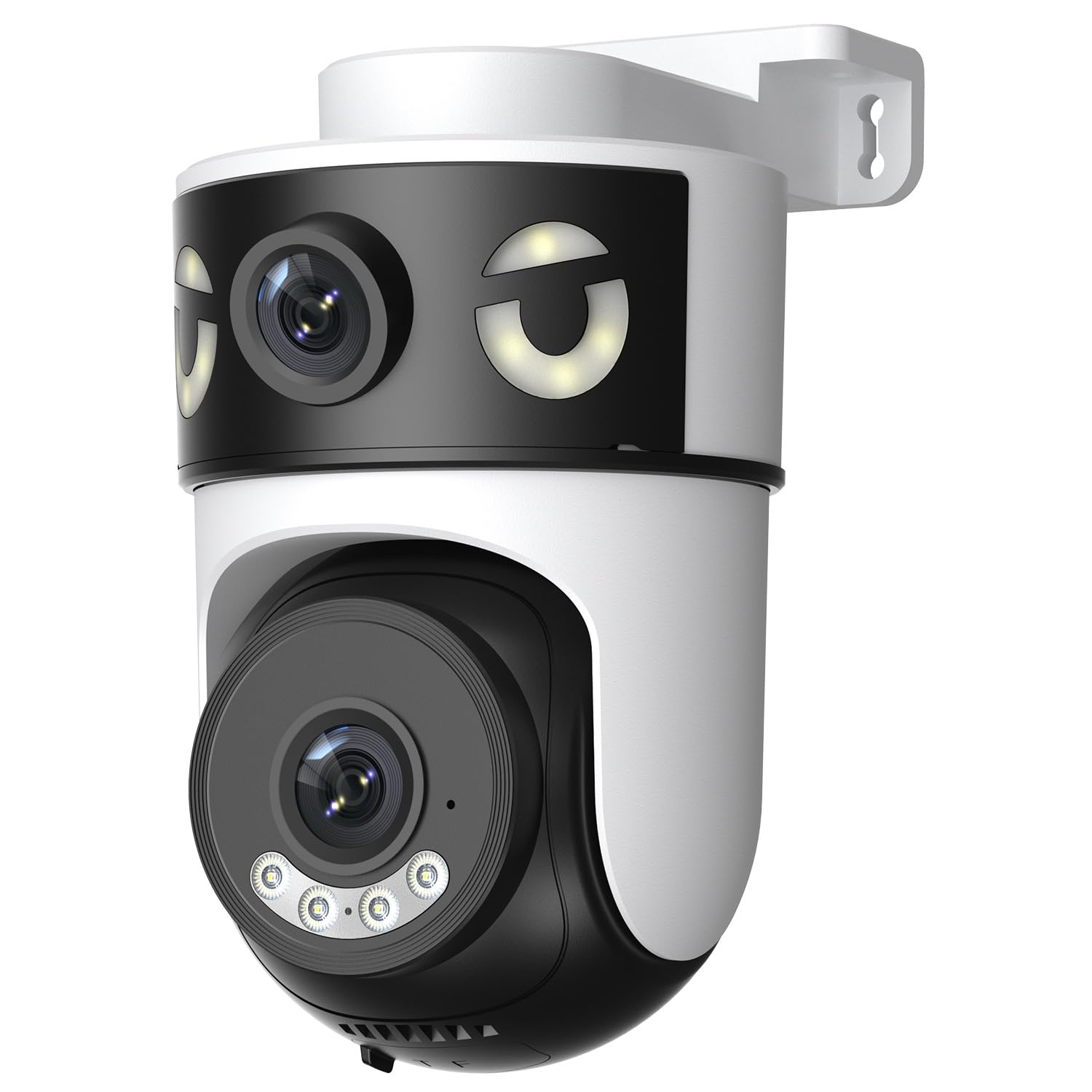
Image: Reobiux 2K Outdoor WiFi Surveillance Camera, Model K6Q-1P. This image shows the camera unit with its dual lenses, two external antennas, and a wall-mount bracket.
Sleutel kenmerke
- Dual Lens & 355° View: Unique 2-in-1 design supporting fixed area surveillance and mobile full-view monitoring. Features two high-resolution lenses; one fixed and one rotatable for wide panoramic views.
- 2K Resolution & Color Night Vision: Delivers clear and detailed images and videos. Offers three night vision modes: Infrared, Color, and Smart Night Vision for reliable 24-hour surveillance.
- Motion Detection & Alarm Siren: Advanced motion detection sends real-time alarm notifications to your mobile device upon detecting movement.
- Two-Way Audio & Multi-User Access: Built-in microphone and speaker allow for remote communication. Supports sharing camera access with multiple users.
- SD Card/Cloud Storage & Alexa Compatibility: Supports 24-hour continuous recording to a Micro SD card (max 128GB) or cloud server. Compatible with Amazon Alexa for voice control.
Opstelgids
1. Monteer die kamera
The camera is designed for wall mounting. Choose a suitable location that provides the desired surveillance coverage and is within range of your Wi-Fi network and a power outlet.
- Mark the drilling points on the wall using the camera's base as a template.
- Drill holes and insert the wall plugs if necessary.
- Secure the camera to the wall using the provided mounting screws.
- Ensure the camera is firmly attached and the waterproof cover kit is properly installed to protect connections.
2. Aanskakel
Connect the provided power adapter to the camera's power input and then plug it into a standard electrical outlet. The camera will power on and initiate its startup sequence.
3. Netwerkverbinding (Wi-Fi)
The camera connects via 2.4GHz Wi-Fi. Follow these steps to connect your camera to your home network:
- Laai die af O-kam Pro application from the App Store (iOS) or Google Play Store (Android) on your smartphone or tablet.
- Registreer vir 'n nuwe rekening of meld aan as jy reeds een het.
- Follow the in-app instructions to add your new camera. This typically involves scanning a QR code on the camera or manually entering its ID.
- Kies jou 2.4GHz Wi-Fi-netwerk en voer die wagwoord in wanneer gevra word.
- Wait for the camera to connect to the network. A voice prompt or indicator light will confirm a successful connection.

Image: Reobiux camera with a smartphone displaying the O-kam Pro app interface, demonstrating remote control and live view vermoëns.
Bedryfsinstruksies
Leef View en Pan/Kantelbeheer
Once connected, open the O-kam Pro app to access the live feed from your camera. The dual-lens system provides both a fixed wide view and a movable PTZ (Pan-Tilt-Zoom) view.
- Tap on the camera in the app to view die regstreekse stroom.
- Use the on-screen controls to pan (horizontal rotation up to 355°) and tilt (vertical movement) the movable lens to adjust the viewing hoek.
- Switch between the fixed and movable lens views within the app interface.
Nagsigmodusse
Die kamera bied drie nagsigmodusse:
- Infrarooi Nagvisie: Provides black and white images in low-light conditions using infrared LEDs.
- Kleur Nag Visie: Utilizes built-in spotlights to provide full-color images at night.
- Slim nagvisie: Automatically switches between infrared and color night vision based on detected motion or light conditions.
- You can select your preferred night vision mode in the O-kam Pro app settings.
Bewegingsopsporing en waarskuwings
Configure motion detection settings and receive alerts on your mobile device:
- Navigate to the camera settings in the O-kam Pro app.
- Aktiveer bewegingsopsporing en pas sensitiwiteitsvlakke aan soos nodig.
- Set up alert notifications to be sent to your smartphone.
- You can also enable the alarm siren to deter intruders.
Tweerigting-klank
Use the two-way audio feature to communicate through the camera:
- In die lewendige view interface of the O-kam Pro app, tap the microphone icon to speak. Your voice will be transmitted through the camera's speaker.
- Tik die luidspreker-ikoon om na klank van die kamera se omgewing te luister.
Video-opname en -berging
The camera supports continuous 24-hour recording. You have two storage options:
- Mikro-SD-kaart: Insert a Micro SD card (up to 128GB, not included) into the designated slot on the camera. The camera will automatically begin recording to the card.
- Wolkberging: Subscribe to a cloud storage plan through the O-kam Pro app for secure off-site video storage.
- Toegang opgeneem footage via the O-kam Pro app.
Amazon Alexa-integrasie
Integrate your Reobiux camera with Amazon Alexa for voice control:
- Open die Amazon Alexa-app op u mobiele toestel.
- Go to "Skills & Games" and search for the "O-kam Pro" skill.
- Enable the skill and link your O-kam Pro account.
- Discover devices. You can now use voice commands like "Alexa, show me the front door camera" to view the live feed on compatible Alexa devices.
Onderhoud
- Skoonmaak: Vee die kameralens en -liggaam gereeld af met 'n sagte, damp lap om stof en vuiligheid te verwyder. Moenie harde chemikalieë of skuurmiddels gebruik nie.
- Weerbeskerming: The camera is waterproof, but ensure all connections are sealed properly, especially the power cable and any SD card slots, to maintain its weather resistance.
- Firmware -opdaterings: Check the O-kam Pro app periodically for firmware updates to ensure optimal performance and security.
Probleemoplossing
- Kamera skakel nie aan nie:
- Ensure the power adapter is securely connected to both the camera and a working electrical outlet. Verify the outlet has power.
- Kan nie aan Wi-Fi koppel nie:
- Ensure your Wi-Fi network is 2.4GHz. Check your Wi-Fi password for accuracy. Move the camera closer to your Wi-Fi router to improve signal strength. Restart your router and the camera.
- Geen lewe nie view or recording:
- Check your internet connection. Ensure the camera is connected to Wi-Fi. Verify that the Micro SD card is inserted correctly and not full, or that your cloud storage subscription is active.
- Bewegingsopsporingswaarskuwings nie ontvang nie:
- Check app notification settings on your phone and within the O-kam Pro app. Ensure motion detection is enabled and sensitivity is set appropriately. Verify your phone has an active internet connection.
- Tweerigting-klank werk nie:
- Ensure your phone's microphone and speaker are enabled for the O-kam Pro app. Check the volume settings on your phone and within the app. Ensure there are no obstructions blocking the camera's microphone or speaker.
Spesifikasies
| Kenmerk | Spesifikasie |
|---|---|
| Handelsmerk | Reobiux |
| Model Naam | K6Q-1P |
| Modelnommer | REO-K6Q-1P |
| Montage tipe | Muurmontering |
| Video-opname-resolusie | 2K |
| Aantal items | 1 |
| Draadlose kommunikasietegnologie | Wi-Fi (2.4GHz) |
| Viewing Hoek | 355 grade (Pan) |
| Installasie tipe | Inskroef |
| Materiaal | Plastiek |
| Voltage | 5 Volt (DC) |
| Krag | 5 Watt |
| Waterweerstandvlak | Waterdig |
| Spesiale kenmerke | Two-Way Audio, Local Recording, HD Resolution, PTZ Technology |
| Aanbevole gebruik | Buitelugsekuriteit |
| Versoenbare toestelle | Skootrekenaar, slimfoon, tablet, televisie |
| Kragbron | Elektriese kabel |
| Verbindingsprotokol | RTSP |
| Tipe beheerder | O-kam Pro App |
Waarborg en Ondersteuning
For warranty information and technical support, please refer to the official Reobiux website or contact Reobiux customer service directly. Keep your purchase receipt as proof of purchase for warranty claims.
Manufacturer: Reobiux