
Inleiding
The Peplink MAX BR1 Pro 5G (HW3) is a rugged, enterprise-grade 5G router designed to provide high-speed, reliable internet connectivity in various environments. Featuring an X65 5G modem, Wi-Fi 6, and advanced networking capabilities like SpeedFusion, this device ensures consistent performance for business-critical applications, vehicles, and remote sites. This manual provides essential information for setting up, operating, and maintaining your router.
Pakketinhoud
Verifieer dat al die items wat hieronder gelys word, in jou pakket ingesluit is:
- 1x BR1 Pro 5G (HW3) Router
- 4x LTE/5G Antennas
- 2x Dual Band Wi-Fi Antennas
- 1x GPS Active Antenna
- 1x 12V 2A 4 Pin DC Power Supply

Produk verbyview
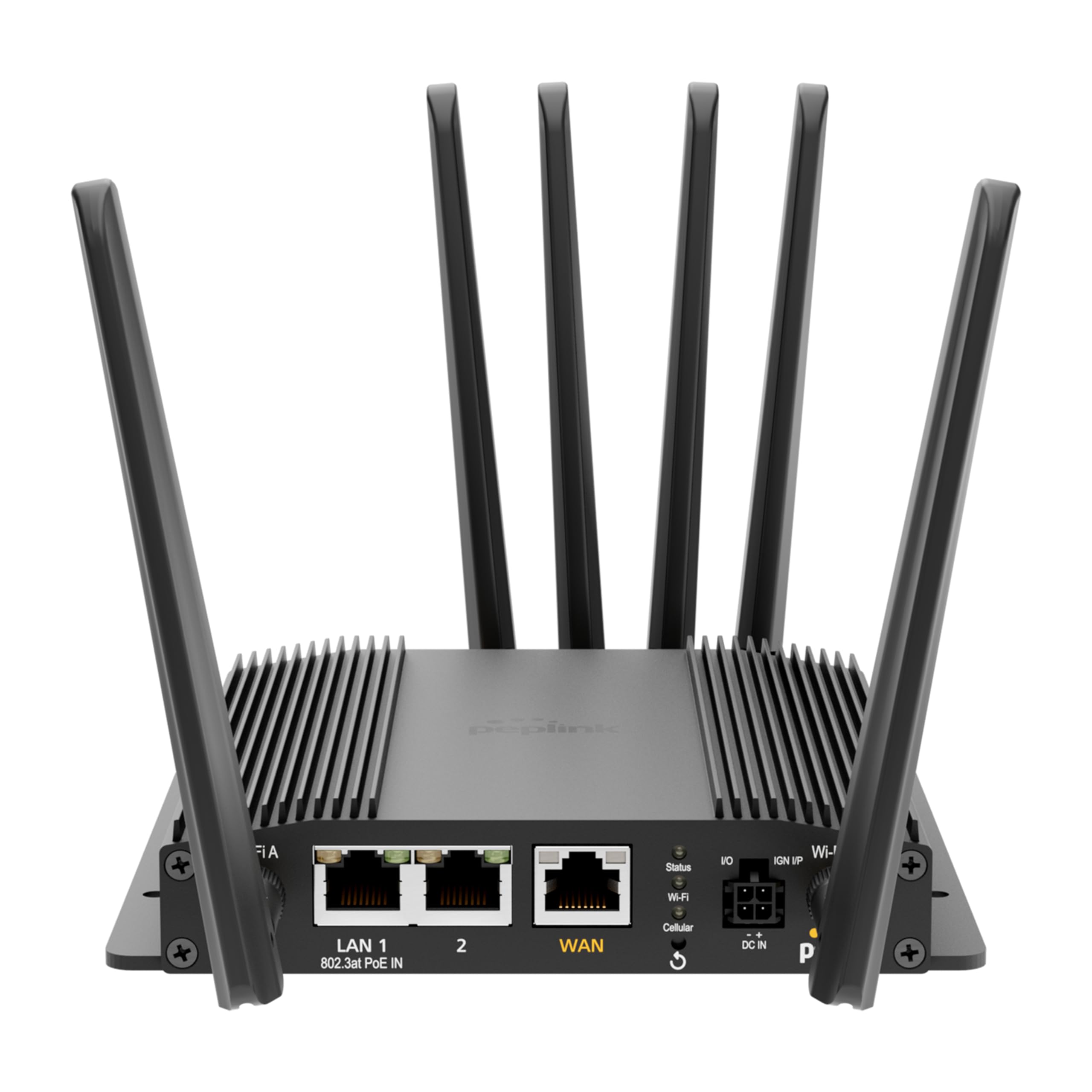
The Peplink MAX BR1 Pro 5G (HW3) features a robust design with multiple connectivity options and indicators.
Voorpaneel

- LAN 1 (802.3at PoE IN): Gigabit Ethernet port with Power over Ethernet input capability.
- LAN 2: Gigabit Ethernet-poort.
- WAN: Gigabit Ethernet port for primary internet connection.
- Wi-Fi Antenna A & B: Connectors for dual-band Wi-Fi antennas.
- Status-LED: Indicates device operational status.
- Wi-Fi LED: Indicates Wi-Fi activity.
- Cellular LED: Indicates cellular signal strength and connection status.
- I/O & IGN I/P: Input/Output and Ignition Input ports for specialized applications.
- DC IN: Kraginvoerpoort.
Agterpaneel
- Cellular A, B, C, D: Connectors for LTE/5G cellular antennas.
- GPS: Connector for the GPS active antenna.
- Cellular SIM: Redundant SIM slots for 5G/LTE connectivity.
Opstelling
1. SIM-kaart installasie
- Maak seker dat die router afgeskakel is.
- Locate the Cellular SIM slots on the rear panel.
- Insert your activated Nano-SIM cards into the designated slots until they click into place. The router supports redundant SIM slots for failover.
2. Antennaverbinding
- Connect the 4 LTE/5G antennas to the Cellular A, B, C, and D ports on the rear panel.
- Attach the 2 Dual Band Wi-Fi antennas to the Wi-Fi Antenna A and B ports on the front panel.
- Connect the GPS Active Antenna to the GPS port on the rear panel.
- Ensure all antenna connections are finger-tight.
3. Kragverbinding
- Connect the 12V 2A 4 Pin DC Power Supply to the DC IN port on the front panel.
- Alternatively, if using Power over Ethernet, connect an 802.3at PoE-compliant power source to the LAN 1 port.
4. Aanvanklike konfigurasie
- Power on the router. Wait for the Status LED to indicate readiness.
- Connect a computer to one of the LAN ports or connect to the default Wi-Fi network (SSID and password usually found on a label on the device).
- Maak oop a web browser and navigate to the router's default IP address (e.g., http://192.168.50.1).
- Follow the on-screen wizard to set up your administrative password, time zone, and initial WAN connections.
Bedryfsinstruksies
Netwerkverbinding
- 5G/LTE Cellular: The router automatically detects and connects to available 5G or LTE networks via the installed SIM cards. It supports major US carriers (AT&T, Verizon, T-Mobile, FirstNet) and global bands.
- Wi-Fi 6: The built-in Wi-Fi 6 (802.11ax) supports 2x2 MU-MIMO technology, operating in both Wi-Fi WAN and/or AP Mode for fast wireless connections.
- Ethernet WAN: Connect a wired internet source to the WAN port for primary or backup connectivity.
Gevorderde kenmerke
- SpeedFusion: Utilize Peplink's SpeedFusion bonding and Hot Failover technologies to ensure unbreakable connections and maintain uptime for critical applications.
- GPS & Fleet Ready: Integrated GPS with InControl 2 provides real-time location tracking and remote management capabilities, ideal for mobile deployments.
- Edge Intelligence: Run lightweight applications and diagnostics directly on the router, leveraging its Docker support and 8GB storage.
- PoE-in Power: Supports Power over Ethernet input for flexible deployment in locations with limited power outlets.

Onderhoud
Firmware-opdaterings
Kontroleer gereeld vir en installeer firmware-opdaterings deur die router se web administration interface. Firmware updates provide new features, security enhancements, and bug fixes. Refer to the Peplink official webwebwerf vir die nuutste firmware en opdateringsinstruksies.
Skoonmaak
Use a soft, dry cloth to clean the exterior of the router. Avoid using liquid cleaners or aerosols, which may damage the device. Ensure ventilation slots are clear of dust and debris to prevent overheating.
Probleemoplossing
If you encounter issues with your Peplink MAX BR1 Pro 5G (HW3) router, consider the following:
- Geen internetverbinding nie: Check the Cellular LED for signal strength. Ensure SIM cards are properly inserted and activated. Verify WAN cable connection if using Ethernet.
- Stadige snelhede: Check cellular signal strength. Ensure antennas are correctly positioned. Consider network congestion or data plan limits.
- Wi-Fi-probleme: Verify Wi-Fi antennas are connected. Check Wi-Fi LED. Ensure devices are within range and connected to the correct SSID.
- Kragkwessies: Ensure the power adapter is securely connected or PoE is active on LAN 1.
- Fabrieksinstelling: If problems persist, a factory reset may resolve configuration issues. Refer to the device's web interface or the official Peplink documentation for instructions on performing a factory reset.
Spesifikasies
| Kenmerk | Detail |
|---|---|
| Handelsmerk | Peplink |
| Model Naam | MAX BR1 Pro 5G (HW3) |
| Verbindingstegnologie | 5G, Ethernet, Wi-Fi |
| Draadlose kommunikasie standaard | 802.11ax (Wi-Fi 6) |
| Frekwensiebandklas | Dubbelband |
| Data-oordragtempo | 1 Gigabits Per Second (LAN), up to 4.1 Gbps (5G downlink) |
| Maximum Upstream Data Transfer Rate | 900 megabits per sekonde |
| Aantal poorte | 3 (LAN 1, LAN 2, WAN) |
| PoE-invoer | 802.3at PoE IN on LAN 1 |
| SIM-gleuwe | Redundant Cellular SIM slots |
| GPS | Integrated GPS with Active Antenna support |
| Edge Computing | Docker support, 8GB storage |
| Veiligheidsprotokol | WPA2-Enterprise, WPA2-PSK, WPA3 |
| Item gewig | 0.43 kilogram |
| Itemafmetings L x B x H | 5.68 cm L x 5.78 cm B x 1.15 cm H |
Waarborg en Ondersteuning
The Peplink MAX BR1 Pro 5G (HW3) comes with a 1 Year PrimeCare Warranty. For detailed warranty terms, technical support, and additional resources, please visit the official Peplink webwebwerf of kontak hul kliëntediens. Bewaar u aankoopbewys vir waarborgeise.
For further assistance, refer to the comprehensive documentation available on the Peplink Official Webwebwerf.