
Inleiding
This instruction manual provides detailed information for the safe and effective use of your NBD S205D 8K 64MP Digital Camera. Please read this manual thoroughly before operating the device and retain it for future reference. The NBD S205D is designed for high-quality photo and video capture, featuring 8K video recording, a 64MP sensor, autofocus, 16x digital zoom, and Wi-Fi connectivity.
Veiligheidsinligting
- Do not expose the camera to water or excessive moisture.
- Vermy om die kamera te laat val of dit aan harde impakte bloot te stel.
- Hou die kamera weg van sterk magnetiese velde.
- Moenie probeer om die kamera uitmekaar te haal of te wysig nie. Dit sal die waarborg ongeldig maak.
- Use only NBD-approved accessories and power adapters.
- Berg die kamera op 'n koel, droë plek wanneer dit nie gebruik word nie.
- Hou buite bereik van kinders.
Pakketinhoud
Verifieer dat alle items in jou pakket teenwoordig is:
- NBD S205D Digital Camera
- 2 x Lithium-ion Batteries (2000 mAh each)
- 64GB mikro SD kaart
- USB-laaikabel
- Gebruikershandleiding (hierdie dokument)
- Kamera band
- Microphone (if included in kit)
Produk verbyview
Familiarize yourself with the camera's components.
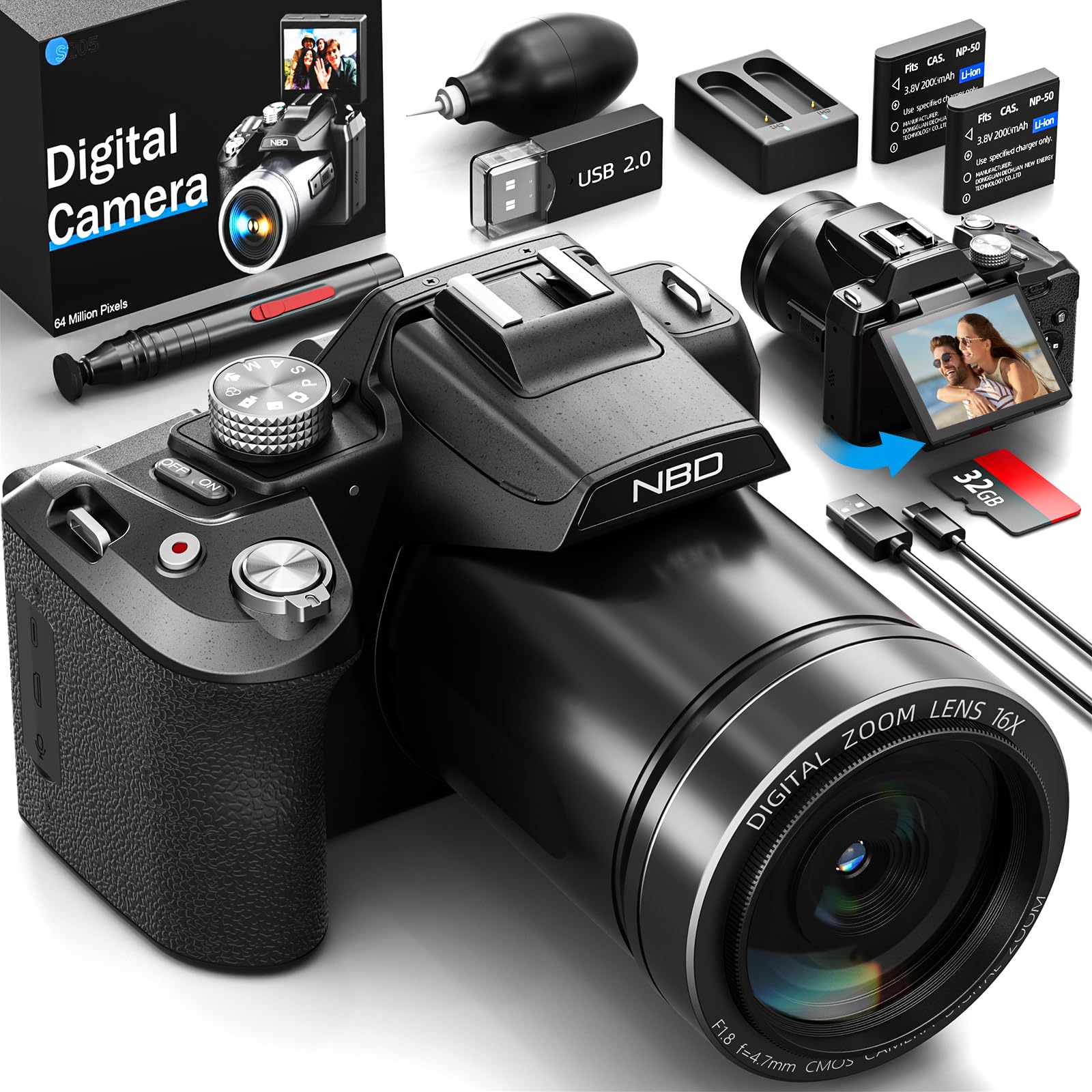
Beeld: Voorkant view of the NBD S205D Digital Camera, showing the lens, flash, and the 3-inch 180-degree rotatable screen in an open position. The camera body is deep black.
Sleutelkomponente:
- Lens: Captures images and videos. Features F1.8 night vision.
- Flits: Verskaf beligting in lae ligtoestande.
- 3" 180° Rotatable Screen: For framing shots, reviewing content, and vlogging.
- Kragknoppie: Skakel die kamera aan/af.
- Ontspanknop: Press halfway to focus, fully to capture a photo.
- Modusskakelaar: Selects shooting modes (e.g., Photo, Video, Playback).
- Zoemhefboom: Controls digital zoom (up to 16x).
- Navigasie-knoppies: For menu navigation and setting adjustments.
- Mikrofooninvoer: For external microphone connection.
- USB-poort: Vir laai en data-oordrag.
- SD-kaartgleuf: For inserting the Micro SD card.
- Battery kompartement: Houses the Lithium-ion batteries.
Opstelling
1. Laai die batterye
- Maak die batteryvakdeksel oop.
- Insert the two provided Lithium-ion batteries, ensuring correct polarity.
- Maak die batterykompartement se deksel toe.
- Connect the camera to a power source using the USB charging cable. The charging indicator will illuminate.
- Charge until the indicator light changes or turns off, indicating a full charge.
2. Die invoeging van die mikro-SD-kaart
- Vind die SD-kaartgleuf aan die kant van die kamera.
- Insert the 64GB Micro SD card with the gold contacts facing down, until it clicks into place.
- Om te verwyder, druk die kaart liggies totdat dit uitspring.
- Let wel: Ensure the camera is powered off before inserting or removing the SD card to prevent data corruption.
3. Aanvanklike aanskakeling
- Druk en hou die aan/af-knoppie in totdat die skerm verlig.
- Follow the on-screen prompts to set the language, date, and time.
Bedryfsinstruksies
1. Neem foto's
- Turn the Mode Dial to Fotomodus.
- Frame your shot using the rotatable screen.
- Press the Shutter button halfway down to activate autofocus. The focus frame will turn green when focused.
- Druk die Sluiterknoppie volledig om die foto te neem.
- Use the Zoom Lever to adjust the 16x digital zoom.
2. Opneem van video's
- Turn the Mode Dial to Videomodus.
- Press the Shutter button to start recording. A red indicator will appear on the screen.
- Druk weer op die sluiterknop om die opname te stop.
- The camera supports resolutions up to 8K/30FPS and 4K/60FPS. Adjust video resolution in the camera settings menu.
3. Afspeelmodus
- Turn the Mode Dial to Afspeelmodus.
- Use the Navigation buttons to browse through your photos and videos.
- Press the OK/Enter button to view 'n foto of speel 'n video.
4. Wi-Fi-konneksie
- Enable Wi-Fi in the camera's settings menu.
- Download the NBD camera app on your smartphone or tablet.
- Connect your smart device to the camera's Wi-Fi network (SSID and password displayed on camera screen).
- Use the app to remotely control the camera, transfer files, and share content.
5. Night Vision (F1.8 Lens)
The camera's F1.8 lens is designed to capture significantly more light in low-light conditions, enhancing image clarity and detail without requiring additional settings. Simply use the camera as normal in dim environments.
Onderhoud
- Maak die lens skoon: Gebruik 'n sagte, pluisvrye lap wat spesifiek vir kameralense ontwerp is. Moenie skuurmiddels of harde chemikalieë gebruik nie.
- Skoonmaak van die skerm: Wipe the screen gently with a microfiber cloth.
- Liggaam skoonmaak: Gebruik 'n sagte, droë lap om die kamera se liggaam af te vee. Vir hardnekkige vuiligheid, liggies dampen die lap met water.
- Berging: When not in use for extended periods, remove the batteries and store the camera in a dry, dust-free environment.
- Batterysorg: Recharge batteries regularly, even if not fully depleted, to maintain battery health.
Probleemoplossing
| Probleem | Moontlike oorsaak | Oplossing |
|---|---|---|
| Kamera skakel nie aan nie. | Die battery is leeg of verkeerd geplaas. | Charge the batteries fully. Ensure batteries are inserted with correct polarity. |
| Kan nie foto's/video's neem nie. | SD-kaart is vol, gesluit of nie ingesit nie. | Insert a formatted SD card. Check if the SD card's write-protect switch is off. Delete unnecessary files of vervang die kaart. |
| Beelde is vaag. | Lens is dirty, camera shake, or focus issue. | Clean the lens. Hold the camera steady or use a tripod. Ensure autofocus locks before shooting. |
| Wi-Fi-verbinding misluk. | Incorrect password, camera Wi-Fi not enabled, or app issue. | Verify Wi-Fi is enabled on the camera. Re-enter password. Restart camera and smart device. Reinstall the app if necessary. |
| Kort batterylewe. | Frequent use of flash, Wi-Fi, or high-resolution recording. | Reduce use of power-intensive features. Carry spare charged batteries. |
Spesifikasies
| Modelnommer | NBD-EU-S205D (S205D) |
| sensor Tegnologie | CMOS, 1/2-inch |
| Maksimum Beeldresolusie | 64 Megapixels (via interpolation) |
| Video-opname-resolusie | 8K/30FPS, 5K, 4K/60FPS, 2K, 1080P, 720P |
| Lensopening | F1.8 (Night Vision) |
| Zoem tipe | 16x digitale zoom |
| Vertoon | 3-inch 180° Rotatable OLED Screen (360 x 640 resolution) |
| Fokus Tipe | Outomaties, Handmatig |
| Beeldstabilisasie | Digitaal |
| Konnektiwiteit | Wi-Fi, USB |
| Bergingsmedia | Mikro SD-kaart (tot 128 GB, 64 GB ingesluit) |
| File Formate | MP4 (Video), JPEG (Photo) |
| Battery Tipe | Lithium-ion (2 x 2000 mAh included) |
| Afmetings (L x B x H) | 12.7 x 12.5 x 8.5 cm |
| Gewig | Ongeveer. 500g |
| Kleur | Diep Swart |
Waarborg en Ondersteuning
The NBD S205D Digital Camera comes with a lewenslange waarborg, covering manufacturing defects and malfunctions under normal use. For warranty claims or technical assistance, please contact NBD customer support.
NBD offers 24/7 kliëntediens to assist you with any questions or issues you may encounter. Please refer to the contact information provided on the NBD official website or your product packaging for support channels.
Let wel: The warranty does not cover damage caused by misuse, accidents, unauthorized repairs, or normal wear and tear.