
1. Inleiding
This manual provides essential instructions for the setup, operation, and maintenance of your Laxasfit H9 Pro Max Smart Watch. Designed for daily wear, this smartwatch combines modern technology with a user-friendly interface to help you monitor your health and stay connected. Please read this manual thoroughly before using your device to ensure proper functionality and longevity.
2. Pakketinhoud
Verifieer dat al die items wat hieronder gelys word, in u produkpakket teenwoordig is:
- H9 Pro Max Smart Watch
- USB-laaikabel
- Gebruikershandleiding
- Extra Strap (Black Silicone)

'n Oorhoofse view of the H9 Pro Max Smart Watch package contents, including the watch with a pink strap, an additional black strap, a USB charging cable, and the product box.
3. Aan die gang
3.1. Laai die slimhorlosie
Before initial use, fully charge your H9 Pro Max Smart Watch. Connect the provided USB charging cable to the charging dock and align the watch with the magnetic pins on the dock. Connect the USB end to a standard USB power adapter (not included) or a computer USB port. A full charge typically takes approximately 2 hours.
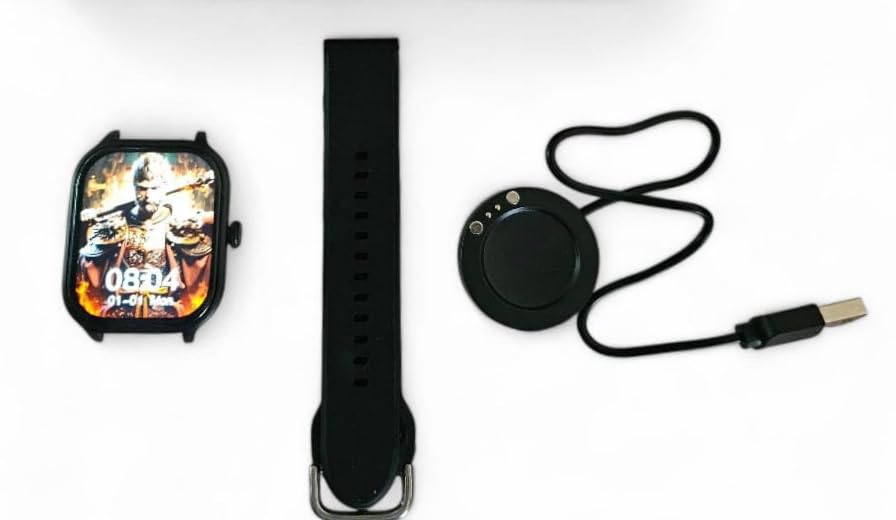
The H9 Pro Max Smart Watch face, a black silicone strap, and the circular USB charging dock laid out separately.
3.2. Skakel aan/af
- Om aan te skakel: Druk en hou die syknoppie in totdat die skerm verlig.
- Om af te skakel: Druk en hou die syknoppie in, en kies dan die 'Skakel af'-opsie op die skerm.
3.3. Bandinstallasie
The H9 Pro Max Smart Watch comes with interchangeable straps. To attach or change a strap, align the spring bar with the lug holes on the watch body and gently push until it clicks into place. Ensure both ends of the spring bar are securely seated.
3.4. Programinstallasie en toestelparing
To unlock the full functionality of your smartwatch, download the companion application on your smartphone. The app is compatible with both Android and iOS devices.
- Scan the QR code in the user manual (if provided) or search for the official app in your smartphone's app store.
- Installeer die toepassing op jou slimfoon.
- Aktiveer Bluetooth op jou slimfoon.
- Open the app and follow the on-screen instructions to pair your H9 Pro Max Smart Watch. Ensure the watch is powered on and within Bluetooth range of your phone.
4. Bediening van jou slimhorlosie
4.1. Basiese navigasie
The H9 Pro Max Smart Watch features a responsive touchscreen display for navigation:
- Swiep op/af: Blaai deur spyskaarte of kennisgewings.
- Swiep links/regs: Kry toegang tot verskillende widgets of vinnige instellings.
- Tik: Kies 'n item of bevestig 'n aksie.
- Druk die syknoppie: Return to the home screen or activate a specific function (configurable in settings).
4.2. Aanpassing van horlosieskerms
Personalize your smartwatch by changing the watch face. You can select from various pre-installed designs or download additional options through the companion app. To change the watch face directly on the device, press and hold the current watch face, then swipe left or right to browse available options and tap to select.
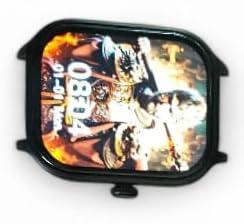
’n Nabyskoot view of the H9 Pro Max Smart Watch display, showing a customized watch face with time and date.
4.3. Slim kenmerke
The H9 Pro Max Smart Watch offers several features to support your daily activities and health monitoring:
- Aktiwiteitspoorder: Monitor stappe geneem, afstand afgelê en kalorieë verbrand.
- Hartklopmonitor: Provides real-time heart rate readings.
- Slaapmonitor: Hou slaappatrone en -kwaliteit dop.
Access these features through the watch's menu or the companion app for detailed insights and historical data.
4.4. Kennisgewings
Once paired with your smartphone, the H9 Pro Max Smart Watch can display notifications for calls, messages, and app alerts. Ensure notification permissions are enabled in both your phone's settings and the companion app.
5. Onderhoud
5.1. Skoonmaak
Om die voorkoms en funksionaliteit van jou slimhorlosie te behou:
- Vee die skerm en horlosie se liggaam af met 'n sagte, pluisvrye lap.
- Vir hardnekkige vlekke, effens dampMaak die lap met water skoon. Vermy die gebruik van harde chemikalieë of skuurmiddels.
- Maak die laaikontakte gereeld skoon om doeltreffende laai te verseker.
5.2. Batteryversorging
Om die batterylewe te verleng:
- Vermy uiterste temperature, aangesien dit die battery se werkverrigting kan benadeel.
- Laai die horlosie gereeld, maar vermy om dit vir lang tye heeltemal ontlaai te laat.
- If storing the watch for a long time, charge it to about 50% before storage.
6. Probleemoplossing
If you encounter issues with your H9 Pro Max Smart Watch, try the following common troubleshooting steps:
- Horlosie skakel nie aan nie: Maak seker dat die horlosie volledig gelaai is. Koppel dit vir ten minste 30 minute aan die laaier.
- Kan nie met slimfoon koppel nie: Check that Bluetooth is enabled on your phone and the watch. Restart both devices and try pairing again. Ensure the companion app has necessary permissions.
- Onakkurate gesondheidsdata: Maak seker dat die horlosie styf om jou pols gedra word, nie te styf of te los nie. Maak die sensor aan die agterkant van die horlosie skoon.
- Kennisgewings verskyn nie: Verify that notifications are enabled in your phone's settings and within the smartwatch companion app. Check that the watch is connected via Bluetooth.
- Skerm reageer nie: Try restarting the watch by pressing and holding the side button. If unresponsive, allow the battery to fully drain and then recharge.
7. Produkspesifikasies
| Kenmerk | Spesifikasie |
|---|---|
| Handelsmerk | Laxasfit |
| Model | H9 Pro Max |
| Vertoon grootte | 1.9 duim |
| Tipe vertoon | Digitaal |
| Bedryfstelselversoenbaarheid | Android, iOS |
| Versoenbare toestelle | Slimfone |
| Spesiale kenmerke | Activity Tracker, Heart Rate Monitor, Sleep Monitor |
| Geheue berging kapasiteit | 1 MB |
| Battery Tipe | Lithium Metal (Built-in) |
| Battery Gemiddelde Lewe | Tot 1 dag |
| Laai tyd | 2 ure |
| Draadlose konneksie | Bluetooth |
| Connector Tipe | USB |
| Primary Interface | Raakskerm |
| Materiaal | Metaal, plastiek |
| Item gewig | 85 g |
| Pakket afmetings | 15 x 12 x 8.5 cm |
8. Waarborg en Ondersteuning
Your Laxasfit H9 Pro Max Smart Watch comes with a 3 maande waarborg vanaf die aankoopdatum. Hierdie waarborg dek vervaardigingsdefekte onder normale gebruik. Bewaar asseblief u bewys van aankoop vir waarborgeise.
For technical assistance, troubleshooting beyond this manual, or warranty inquiries, please refer to the contact information provided with your purchase documentation or visit the official Laxasfit support webwebwerf.


