
Baseus E20
Baseus E20 Ware Draadlose Oordopjes Gebruikershandleiding
Model: E20
1. Inleiding
Thank you for choosing the Baseus E20 True Wireless Earbuds. These earbuds are designed to provide a high-quality audio experience with powerful bass, clear calls, and reliable connectivity. This manual will guide you through the setup, operation, and maintenance of your new earbuds.
2. Wat is in die boks
- Baseus E20 True Wireless Earbuds (Left and Right)
- Laaikas
- USB-C-laaikabel
- Gebruikershandleiding

Image: Baseus E20 True Wireless Earbuds shown inside their charging case, highlighting key features like powerful bass, IPX5 water resistance, 33 hours listening time, and environmental noise cancellation.
3. Produk verbyview
3.1 Oordopkomponente
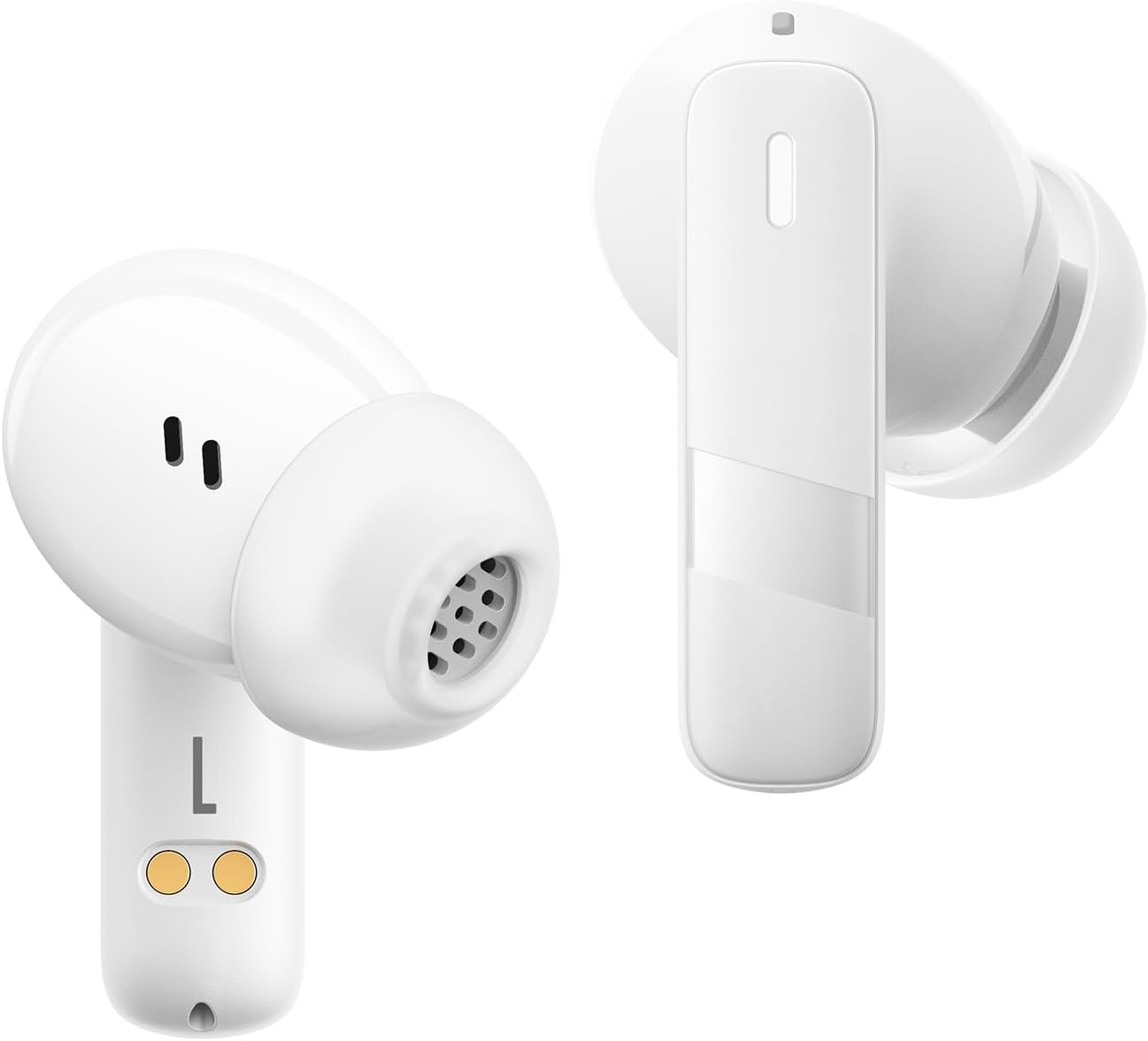
Beeld: 'n Nabyskoot view of the Baseus E20 True Wireless Earbuds, showing the ergonomic design, speaker grille, and charging contacts.
- Raakbeheerarea: Vir die bestuur van terugspeel, oproepe en modusse.
- Mikrofoon: For calls and voice commands (2 ENC Mics).
- Spreker: Delivers audio (12mm drivers).
- Laai kontakte: For charging the earbuds in the case.
3.2 Laaikas
- Laaipoort: USB-C-poort vir die laai van die kas.
- Aanwyserlig: Toon laaistatus en batteryvlak.
4. Opstelling
4.1 Laai die oordopjes en houer
Laai die oordopjes en die laaikassie volledig voor die eerste gebruik.
- Plaas die oorfone in die laaikas. Maak seker dat die laaikontakte in lyn is.
- Koppel die USB-C-laaikabel aan die laaipoort op die omhulsel en aan 'n kragbron.
- The indicator light on the case will show the charging status. Once fully charged, the light will indicate completion or turn off.

Image: The Baseus E20 charging case is shown connected to a USB-C charging cable, illustrating the charging process and highlighting the 33-hour total listening time.
4.2 Bluetooth -koppeling
Pair your Baseus E20 earbuds with your device for the first time.
- Open the charging case. The earbuds will automatically enter pairing mode, and their indicator lights will flash.
- Aktiveer Bluetooth op jou toestel (slimfoon, tablet, skootrekenaar).
- Soek vir "Baseus E20" in the list of available Bluetooth devices and select it to connect.
- Once connected, the earbud indicator lights will turn off or show a steady light, and you will hear a confirmation tone.
Let wel: After the initial pairing, the earbuds will automatically connect to the last paired device when taken out of the case, provided Bluetooth is enabled on the device.

Image: A detailed diagram illustrating the Bluetooth 5.3 chip, emphasizing a more stable and efficient connection for the Baseus E20 earbuds.
5. Bedryfsinstruksies
The Baseus E20 earbuds feature intuitive touch controls. The following table outlines the common functions:

Image: A visual guide to the touch control areas on the Baseus E20 earbuds, detailing single, double, and triple tap functions for various operations.
| Aksie | Funksie |
|---|---|
| Dubbeltik (L of R) | Answer/Hang up Call, Play/Pause Music |
| Drievoudige tik (L of R) | Aktiveer stemassistent |
| Long Press (L or R) | Cycle Noise Cancellation Modes (Default > Normal > Transparency) |
| Long Press (L or R) | Cycle Spatial Audio Modes (Music Mode > Theater Mode > Normal) |
Let wel: Specific functions may vary slightly depending on your connected device and operating system.
5.1 Oproepbestuur
- Beantwoord/beëindig oproep: Dubbeltik op enige oordopje.
- Verwerp oproep: Druk en hou enige oordopjes vir 2 sekondes.

Image: An internal diagram of the Baseus E20 earbud highlighting the dual-mic Environmental Noise Cancellation (ENC) system for clear calls.
5.2 Musiekweergawe
- Speel/pouse: Dubbeltik op enige oordopje.
5.3 Stemassistent
- Aktiveer stemassistent: Tik drie keer op enige oordopje.
5.4 Geraasbeheermodusse
The Baseus E20 earbuds offer different noise control modes:
- Noise Cancellation (Default): Verminder omgewingsgeraas vir 'n meeslepende luisterervaring.
- Normale modus: Standaard klankweergawe sonder aktiewe geraasbeheer.
- Deursigtigheidmodus: Laat jou toe om jou omgewing te hoor terwyl jy na oudio luister.
To cycle through modes: Druk lank enige oordopje.
6. Onderhoud
6.1 Skoonmaak
- Maak die oordopjes gereeld skoon, veral die oordoppe en luidsprekerroosters, met 'n sagte, droë, pluisvrye lap.
- Maak seker dat die laaikontakte op beide die oordopjes en die houer skoon en droog is om laaiprobleme te voorkom.
- Do not use abrasive materials, solvents, or harsh chemicals.
6.2 Berging
- Bêre die oordopjes in hul laaikas wanneer dit nie gebruik word nie om hulle te beskerm en gelaai te hou.
- Vermy berging in uiterste temperature of hoë humiditeit.
6.3 Waterbestandheid (IPX5)
The Baseus E20 earbuds are IPX5 water-resistant, meaning they can withstand splashes and sweat. They are not designed for submersion in water or exposure to pressurized water jets. Ensure earbuds are dry before placing them back in the charging case to prevent damage.

Image: The Baseus E20 earbuds and charging case are depicted with water splashing around them, illustrating their IPX5 water-resistant capability for reliable performance in various conditions.
7. Probleemoplossing
| Probleem | Moontlike Oplossing |
|---|---|
| Oorknoppies koppel nie |
|
| Geen geluid van een oordopje nie |
|
| Laaikas laai nie |
|
| Swak oproepkwaliteit |
|
8. Spesifikasies
| Kenmerk | Detail |
|---|---|
| Model Naam | E20 |
| Bluetooth weergawe | 5.3 |
| Bestuurder grootte | 12 mm |
| Totale speeltyd | Tot 33 uur (met laadkas) |
| Earbuds Playback Time | Tot 6 uur (enkele lading) |
| Waterweerstand | IPX5 |
| Mikrofone | 2 ENC Mics for Clear Calls |
| Tipe beheer | Raak Beheer |
| Laaipoort | USB-C |
| Item gewig | 3.2 onse |
| Versoenbare toestelle | Cellphones, Laptops, Tablets, Devices with Bluetooth Audio Capability (iOS, Android, Windows, Mac OS, Switch) |

Image: A cutaway diagram illustrating the 12mm PU diaphragm driver, emphasizing its role in producing strong and accurate ultra-low frequencies for powerful bass.
9. Produk verbyview Video
Video: 'n Amptelike oorwinningview of the Baseus E20 True Wireless Earbuds, demonstrating features such as touch controls, powerful bass, IPX5 water resistance, 33-hour battery life, ENC for clear calls, and Bluetooth 5.3 connectivity. The video shows the earbuds in various usage scenarios, including listening to music, making calls, and being used in different weather conditions.
10. Waarborg en Ondersteuning
Baseus products come with a standard manufacturer's warranty. For detailed warranty information, product support, or service inquiries, please refer to the warranty card included in your product packaging or visit the official Baseus webwebwerf. Bewaar u aankoopbewys as bewys van aankoop vir waarborgeise.
Aanlyn ondersteuning: Vir verdere hulp, besoek asseblief die Amptelike Baseus-winkel op Amazon of hul amptenaar webwebwerf.
Ask a question about this manual
Ask about setup, troubleshooting, compatibility, parts, safety, or missing instructions. Manuals+ will review the question and use this page’s manual context to help answer it.