
OHAYO X10 Max
OHAYO X10 Max Bluetooth Speaker Instruction Manual
Welcome to your new OHAYO X10 Max Portable Bluetooth Speaker.
1. Belangrike veiligheidsinligting
- Moenie die luidspreker vir lang tye aan uiterste temperature of direkte sonlig blootstel nie.
- Keep the speaker away from heat sources, sharp objects, and corrosive materials.
- Do not disassemble, repair, or modify the speaker yourself. Contact qualified service personnel if needed.
- Maak seker dat die laaipoortdeksel stewig toe is wanneer die luidspreker naby water gebruik word om sy IPX7-waterdigtheidsgradering te handhaaf.
- Gebruik slegs die meegeleverde laaikabel of 'n gesertifiseerde USB-C-kabel vir laai.
2. Pakketinhoud
- 1 x OHAYO X10 Max Bluetooth Speaker (White)
- 1 x USB-C Charging Cable (charging plug not contained)
- 1 x 3.5 mm AUX-kabel
- 1 x Gebruikershandleiding
- 1 x Lanyard
3. Produk verbyview
The OHAYO X10 Max is a versatile portable Bluetooth speaker designed for high-quality audio and durability. It features a powerful 25W sound output with active bass, IPX7 waterproofing, and a long-lasting 24-hour battery. Enjoy dynamic sound with colorful RGB lighting effects, dual pairing for stereo sound, and multiple input modes.
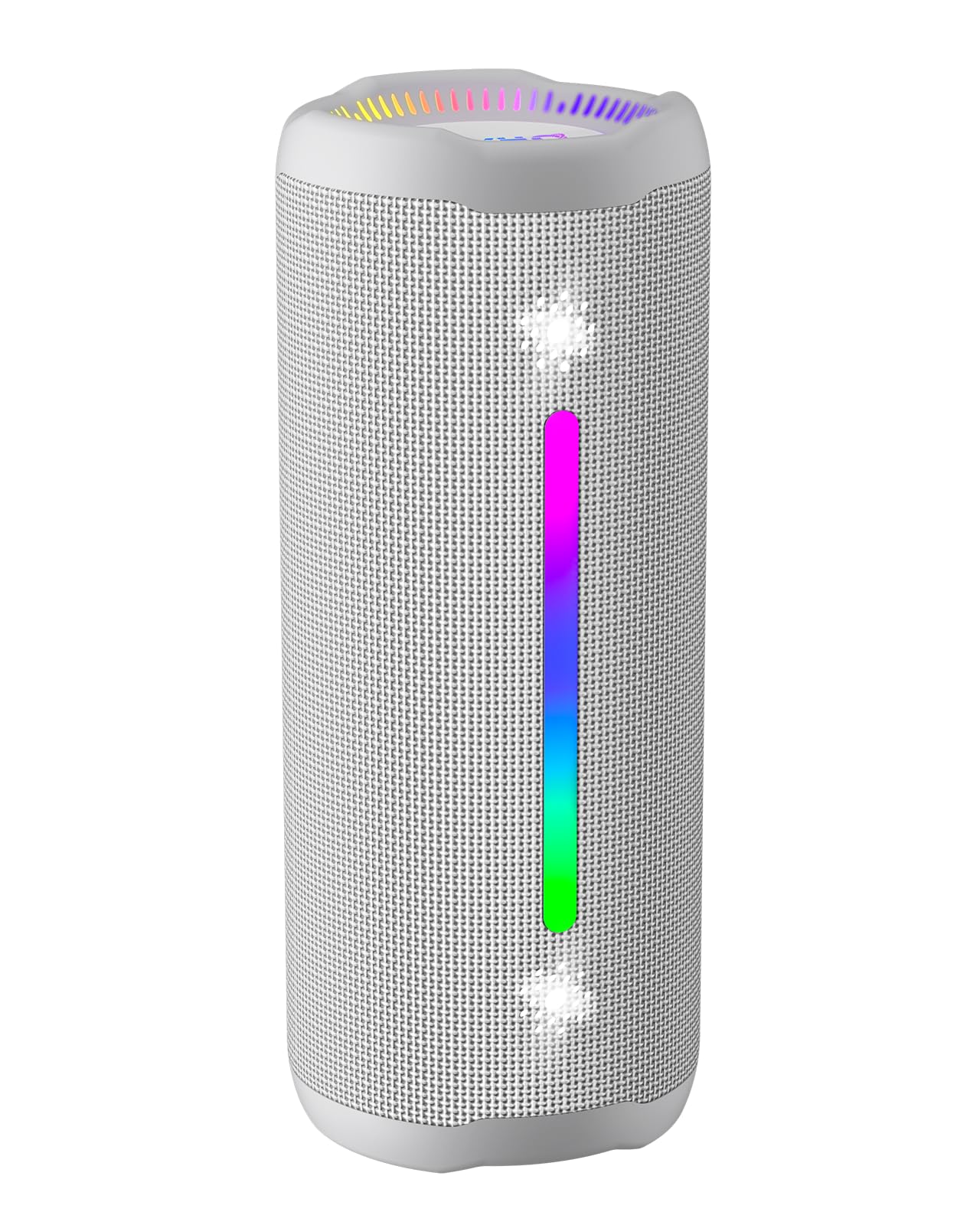
Figure 3.1: OHAYO X10 Max Bluetooth Speaker (White)

Figure 3.2: OHAYO X10 Max Bluetooth Speaker - Fully upgraded from appearance to performance.

Figure 3.3: 25W Deep Bass Sound - Independent channel design for accurate audio performance.

Figure 3.4: 6 Dazzling RGB Light Effects - Syncs with music for an immersive experience.

Figure 3.5: IPX7 Waterproof - Highly sealed design for use in various environments.

Figure 3.6: 24H Ultra-Long Battery Life - 6600mAh battery for extended playback.
4. Kontroles en aanwysers
The OHAYO X10 Max features intuitive controls for easy operation.

Figure 4.1: Control Panel and Ports
- Kragknoppie: Press and hold to power on/off. Short press to switch between input modes (Bluetooth, AUX, TF Card, USB-Audio).
- Volume op (>): Druk kort om die volume te verhoog. Druk lank vir die volgende snit.
- Volume af (<): Druk kort om die volume te verlaag. Druk lank vir die vorige snit.
- Bas-knoppie: Press to activate/deactivate Bass Boost mode.
- Speel/Pouseer/Oproep-knoppie: Short press to play/pause music. Short press to answer/end calls. Long press to reject calls. Double press to activate voice assistant.
- Battery-aanwyserligte: Four LED lights indicate battery level.
- RGB Light Strip: Displays various colorful lighting effects.
- Laaipoort (USB-C): Vir die laai van die luidspreker.
- AUX-in-poort: Vir bedrade klankverbinding.
- TF-kaartgleuf: Vir die speel van musiek direk vanaf 'n MicroSD-kaart.
5. Opstelling
5.1 Laai die luidspreker
Before first use, fully charge the speaker. Connect the provided USB-C charging cable to the speaker's charging port and the other end to a 5V/2A USB power adapter (not included). The battery indicator lights will blink during charging and remain steady when fully charged.
5.2 Aan-/afskakel
Press and hold the Power button for approximately 3 seconds to turn the speaker on or off. A voice prompt will confirm the action.
5.3 Bluetooth -koppeling
- Turn on the speaker. It will automatically enter Bluetooth pairing mode, indicated by a blinking blue LED.
- Aktiveer Bluetooth op jou toestel (slimfoon, tablet, ens.).
- Soek vir "X10 Max" in your device's Bluetooth list and select it to connect.
- Sodra dit gekoppel is, sal 'n stemboodskap die suksesvolle paring bevestig.
5.4 Ware Draadlose Stereo (TWS) Paring
To achieve a true wireless stereo experience, you can pair two OHAYO X10 Max speakers together.

Figure 5.1: True Wireless Stereo Pairing
- Ensure both X10 Max speakers are powered on and not connected to any other Bluetooth device.
- On one speaker (this will be the primary speaker), double-press the Power button. It will enter TWS pairing mode.
- Die twee luidsprekers sal outomaties aan mekaar koppel. 'n Stemboodskap sal suksesvolle TWS-paring bevestig.
- Koppel nou jou toestel aan die primêre luidspreker via Bluetooth soos beskryf in afdeling 5.3.
5.5 Connecting via AUX
Use the provided 3.5mm AUX cable to connect the speaker to devices without Bluetooth capability.
Figure 5.2: 4 Input Modes - Including AUX, TF, and USB-Audio.
- Connect one end of the AUX cable to the speaker's AUX-in port.
- Koppel die ander kant aan die klankuitset van jou toestel.
- The speaker will automatically switch to AUX mode. If not, short press the Power button to cycle through modes until AUX mode is activated.
5.6 Using TF Card
Insert a MicroSD (TF) card with MP3/WAV/FLAC/WMA audio files into the TF card slot. The speaker will automatically switch to TF card mode and begin playback. Short press the Power button to cycle through modes if needed.
5.7 Using USB-Audio
Connect the speaker to a computer using the USB-C cable. The speaker can function as an external audio output device for your computer. Short press the Power button to cycle through modes if needed.
6. Bedryfsinstruksies
6.1 Musiek speel
- Speel/pouse: Short press the Play/Pause/Call button.
- Volumebeheer: Short press the Volume Up (>) or Volume Down (<) buttons.
- Volgende snit: Long press the Volume Up (>) button.
- Vorige snit: Long press the Volume Down (<) button.
6.2 Basversterkingfunksie
Press the 'BASS' button to activate or deactivate the enhanced bass mode. This feature provides deeper and richer low frequencies for a more impactful audio experience.
6.3 RGB lig modusse
The speaker features dynamic RGB lighting. The lights will automatically sync with the music beat. To turn the lights on/off, refer to the specific control instructions in your quick start guide or experiment with the mode button if available.
6.4 Handvrye oproepe
Wanneer dit via Bluetooth aan jou slimfoon gekoppel is, kan die luidspreker vir handvrye oproepe gebruik word.

Figuur 6.1: Handvrye oproepfunksie
- Beantwoord/beëindig oproep: Short press the Play/Pause/Call button.
- Verwerp oproep: Long press the Play/Pause/Call button.
- Aktiveer stemassistent: Double press the Play/Pause/Call button.
7. Onderhoud
- Skoonmaak: Vee die luidspreker af met 'n sagte, damp lap. Moenie harde chemikalieë of skuur skoonmaakmiddels gebruik nie.
- Berging: Bêre die luidspreker op 'n koel, droë plek weg van direkte sonlig en uiterste temperature wanneer dit nie vir lang tye gebruik word nie.
- Batterysorg: To prolong battery life, charge the speaker at least once every three months if not used regularly.
8. Probleemoplossing
| Probleem | Moontlike oorsaak | Oplossing |
|---|---|---|
| Luidspreker skakel nie aan nie. | Lae battery. | Laai die luidspreker volledig. |
| Kan nie via Bluetooth koppel nie. | Luidspreker nie in paringsmodus nie; toestel Bluetooth af; te ver van toestel. | Ensure speaker is in pairing mode (blinking blue LED). Turn on device Bluetooth. Move device closer to speaker (within 10 meters). |
| Geen geluid of lae volume nie. | Volume te laag op luidspreker of toestel; verkeerde invoermodus. | Increase volume on both speaker and device. Check if the correct input mode (Bluetooth, AUX, TF) is selected. |
| TWS-koppeling het misluk. | Speakers too far apart; one speaker already connected to another device. | Ensure speakers are close to each other. Disconnect any existing Bluetooth connections before TWS pairing. |
| Klank vervorming. | Volume te hoog; lae battery. | Verlaag die volume. Laai die luidspreker. |
9. Spesifikasies
| Kenmerk | Spesifikasie |
|---|---|
| Model Naam | X10 Maks |
| Bluetooth weergawe | 5.3 |
| Draadlose kommunikasietegnologie | Bluetooth |
| Luidspreker Maksimum uitsetkrag | 35 Watts (25W effective) |
| Battery kapasiteit | 6600 mAh |
| Speeltyd | Up to 24 hours (varies with volume and light use) |
| Waterweerstandvlak | IPX7 (waterdig) |
| Invoer Voltage | 5 Volt (DC) |
| Frekwensierespons | 20 KHz |
| Sein-tot-geraas verhouding | 80 dB |
| Tipe oudiobestuurder | Dinamiese bestuurder |
| Woofer deursnee | 75 millimeter |
| Tweeter-deursnee | 26 millimeter |
| Produk afmetings | 2.95" D x 2.95" B x 7.28" H |
| Item gewig | 450 gram (15.9 onse) |
| Materiaal | Akrilonitrielbutadieenstireen (ABS), aluminium |
| Beheer metode | Drukknop |
| Spesiale kenmerke | Bass Boost, AUX, Hi-Res Audio, 24-Hour Playtime, IPX7 Waterproof, TF Card Port, Dual Passive Radiators, Hands-free, True Wireless Stereo Pairing, Shockproof |
10. Waarborg en Ondersteuning
The OHAYO X10 Max Bluetooth Speaker comes with an extended warranty. For specific warranty details and to register your product, please refer to the information provided in your quick start guide or contact OHAYO customer support.
For technical support or customer service inquiries, please contact OHAYO Direct. Contact information may be found in your product packaging or on the official OHAYO webwebwerf.
11. Amptelike Produkvideo
Video 11.1: Official OHAYO Portable Bluetooth Speaker overview by OHAYO Direct. This video highlights key features and design elements of the speaker.