
Inleiding
Thank you for choosing the CASCHO Smart Watch P125. This device is designed to enhance your daily life with advanced health monitoring, fitness tracking, and smart communication features. This manual provides essential information for setting up, operating, and maintaining your smartwatch.
The CASCHO Smart Watch P125 features a 1.85-inch HD full-touch screen, a gold-tone metal bezel, and comes with two interchangeable straps (one metal mesh, one silicone). It offers 24/7 health monitoring including heart rate, blood oxygen (SpO2), blood pressure, and sleep patterns. With over 120 sports modes, Bluetooth 5.4 for calls and messages, and an AI voice assistant, it's a versatile companion for both Android and iOS users.
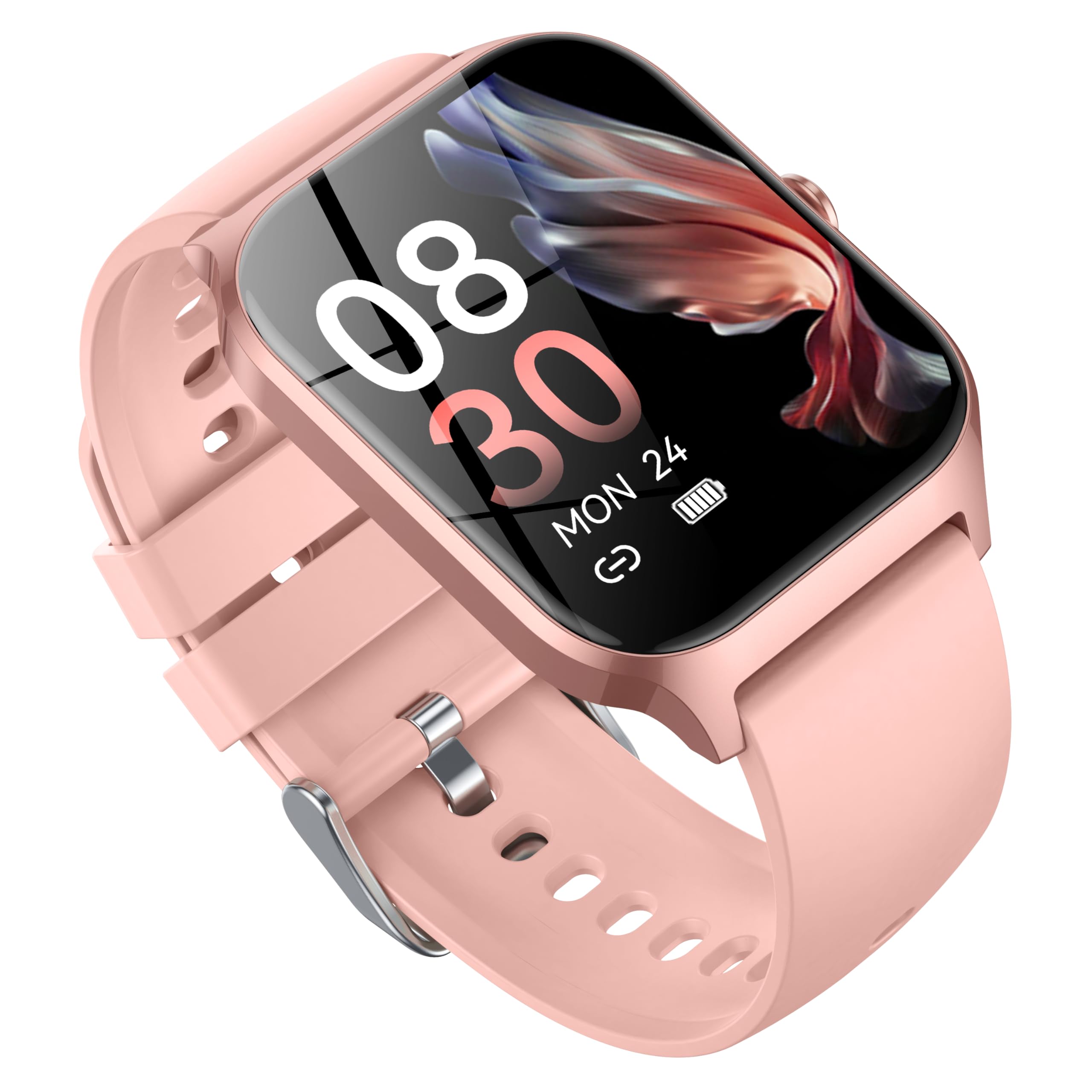
Image: CASCHO Smart Watch P125 in Lilac Pink with both mesh and silicone bands.
1. Opstelling
1.1 Laai die slimhorlosie
Before initial use, fully charge your smartwatch. The watch uses a magnetic charging cable. Ensure the charging pins align correctly with the magnetic contacts on the back of the watch. A full charge typically takes approximately 2 hours.
Video: Demonstrates how to correctly use the magnetic data cable to charge the CASCHO Smart Watch P125. The video highlights the magnetic poles for proper connection.
1.2 App-aflaai en -koppeling
- Scan the QR code provided in the user manual or on the watch screen to download the 'VeryFit' app from your device's app store (App Store for iOS, Google Play for Android).
- Maak seker dat Bluetooth op jou slimfoon geaktiveer is.
- Open the 'VeryFit' app, register or log in, and follow the on-screen instructions to add your device. Select 'P125' from the list of available devices to pair.
- Bevestig die paringsversoek op beide jou foon en slimhorlosie.
Video: Guide on how to connect the CASCHO Smart Watch P125 to your smartphone using the companion app.
1.3 Krag aan/af
- Krag aan: Druk en hou die syknoppie vir 'n paar sekondes in totdat die skerm aanskakel.
- Skakel af: From the watch face, swipe down to access the quick settings, tap the settings icon, then navigate to 'System' > 'Power Off'. Confirm to shut down.
2. Bediening van jou slimhorlosie
2.1 Basiese navigasie
- Swiep op/af: Blaai deur spyskaarte en kennisgewings.
- Swiep links/regs: Kry toegang tot vinnige funksies of widgets.
- Tik: Kies 'n item of bevestig 'n aksie.
- Druk die syknoppie: Return to the main watch face or wake the screen.
2.2 Gesondheidsmonitering
The CASCHO Smart Watch P125 continuously monitors key health metrics:
- Hartklop: Hartklopopsporing in reële tyd.
- Bloedsuurstof (SpO2): Meet bloedsuurstofversadigingsvlakke.
- Bloeddruk: Verskaf geskatte bloeddruklesings.
- Slaap dop: Automatically monitors sleep patterns (deep sleep, light sleep, wakefulness) and provides comprehensive analysis in the app.
- Stresopsporing: Help jou om jou stresvlakke deur die dag te verstaan.
- Vroulike menstruele siklusopsporing: Supports tracking and predictions for menstrual cycles.
2.3 Fitness Tracking (120+ Sports Modes)
Track your workouts with precision across a wide range of activities:
- Modusse sluit in: Walking, Running, Cycling, Swimming, Yoga, Basketball, Rock Climbing, Skateboarding, Roller Skating, Strength Training, HIIT, and many more.
- The watch accurately records steps, calories burned, and distance covered.
- Synchronize data with the 'VeryFit' app for detailed analysis and progress tracking.
Video: Verbyview of the multifunctional features of the CASCHO Smart Watch P125, including health and fitness tracking.
2.4 Kommunikasiekenmerke
- Bluetooth-oproepe: Make and answer calls directly from your wrist via Bluetooth 5.4.
- Boodskapkennisgewings: Receive alerts for incoming calls, SMS, and app notifications (e.g., WhatsApp, Facebook) directly on your watch.
- AI Voice Assistant: Utilize the built-in AI voice assistant for quick commands and information retrieval.
2.5 Pasmaak
- Gesigte kyk: Choose from over 200 watch face styles via the 'VeryFit' app or customize with your own photos.
- Verwisselbare bande: Easily swap between the included metal mesh and silicone straps to match your style or activity.
3. Onderhoud
- Skoonmaak: Regularly clean your watch and straps with a soft, damp lap. Vermy harde chemikalieë.
- Waterweerstand: The watch is IP68 water-resistant, suitable for daily use and light water exposure (e.g., hand washing, rain). Avoid hot water, saunas, or deep diving.
- Batterysorg: To prolong battery life, avoid extreme temperatures and do not leave the watch fully discharged for extended periods.
4. Probleemoplossing
- Horlosie skakel nie aan nie: Maak seker dat die horlosie ten volle gelaai is.
- Kan nie met foon koppel nie: Check if Bluetooth is enabled on your phone and the watch is within range. Restart both devices and try again. Ensure the 'VeryFit' app is updated.
- Onakkurate gesondheidsdata: Maak seker dat die horlosie styf om jou pols gedra word. Vermy oormatige beweging tydens metings.
- Kennisgewings nie ontvang nie: Check app notification settings on your phone and within the 'VeryFit' app. Ensure the app is running in the background.
5. Spesifikasies
| Handelsmerk | CASCHO |
| Modelnommer | P125 |
| Skerm grootte | 1.85 duim |
| Bedryfstelsel | Dra OS 1.0 |
| Verbindingstegnologie | Bluetooth 5.4 |
| Battery sel samestelling | Litiumioon (300mAh) |
| Waterweerstand | IP68 |
| Item gewig | 80 gram (2.82 onse) |
| Geheue berging kapasiteit | 1 GB |
| Spesiale kenmerk | Alarm Clock, Heart Rate Monitor, Sleep Monitor, Blood Oxygen Monitor, Activity Tracker, AI Voice Assistant |
6. Waarborg
Your CASCHO Smart Watch P125 comes with a standard manufacturer's warranty. Please refer to the warranty card included in your product packaging for specific terms and conditions. Keep your proof of purchase for any warranty claims.
7. Ondersteuning
For further assistance, technical support, or to provide feedback, please contact CASCHO customer service through the 'VeryFit' app or visit the official CASCHO website. You can also refer to the FAQ section within the app for common questions.