
1. Inleiding
Dankie vir die aankoopasing the Supersonic IQ Sound IQ-1505WK Portable Karaoke System. This device combines a powerful audio system with a 12.1-inch touch screen, running on Android 12.1, to provide a versatile entertainment experience. It is designed for karaoke, media playback, and smart functionalities, suitable for various events and personal use. Please read this manual thoroughly before operating the device to ensure proper use and to maximize its performance and longevity.
2. Veiligheidsinligting
- Kragbron: Use only the provided charging plug. Ensure the power voltage pas by die vereistes wat op die toestel gespesifiseer word.
- Water en vog: Do not expose the unit to rain, moisture, or immerse it in water. Keep liquids away from the device.
- Ventilasie: Moenie enige ventilasie-openinge blokkeer nie. Verseker voldoende lugvloei rondom die eenheid om oorverhitting te voorkom.
- Hitte: Hou die eenheid weg van hittebronne soos verkoelers, hitteregisters, stowe of ander toestelle wat hitte produseer.
- Skoonmaak: Ontkoppel die eenheid van die kragtoevoer voor skoonmaak. Gebruik 'n sagte, droë lap. Moenie vloeibare skoonmaakmiddels of aërosolskoonmakers gebruik nie.
- Diens: Moenie probeer om hierdie produk self te diens nie. Verwys alle diens na gekwalifiseerde dienspersoneel. Die oopmaak of verwydering van deksels kan u blootstel aan gevaarlike volumes.tage of ander gevare.
- Batteryveiligheid: The unit contains a rechargeable battery. Do not expose the battery to excessive heat or direct sunlight. Do not disassemble, puncture, or short-circuit the battery. Dispose of batteries properly according to local regulations.
- Plasing: Plaas die eenheid op 'n stabiele, plat oppervlak om te verhoed dat dit val.
3. Pakketinhoud
Merk asseblief die blokkie vir die volgende items:
- IQ Sound IQ-1505WK Portable Karaoke System
- 1x draadlose mikrofoon
- Laaiprop
- Afstandbeheer
- Gebruikershandleiding (hierdie dokument)
4. Produk verbyview
The IQ Sound IQ-1505WK is a feature-rich portable karaoke system designed for high-quality audio and interactive entertainment. It integrates a 12.1-inch capacitive touch screen, dual 5-inch woofers, and 2-inch tweeters for clear sound, powered by a 5000W peak output. Running on Android 12.1 with a quad-core processor, it offers Wi-Fi, Bluetooth, HDMI, USB, and Micro SD connectivity. A built-in 5400mAh rechargeable battery provides portability.
4.1. Toestel Views
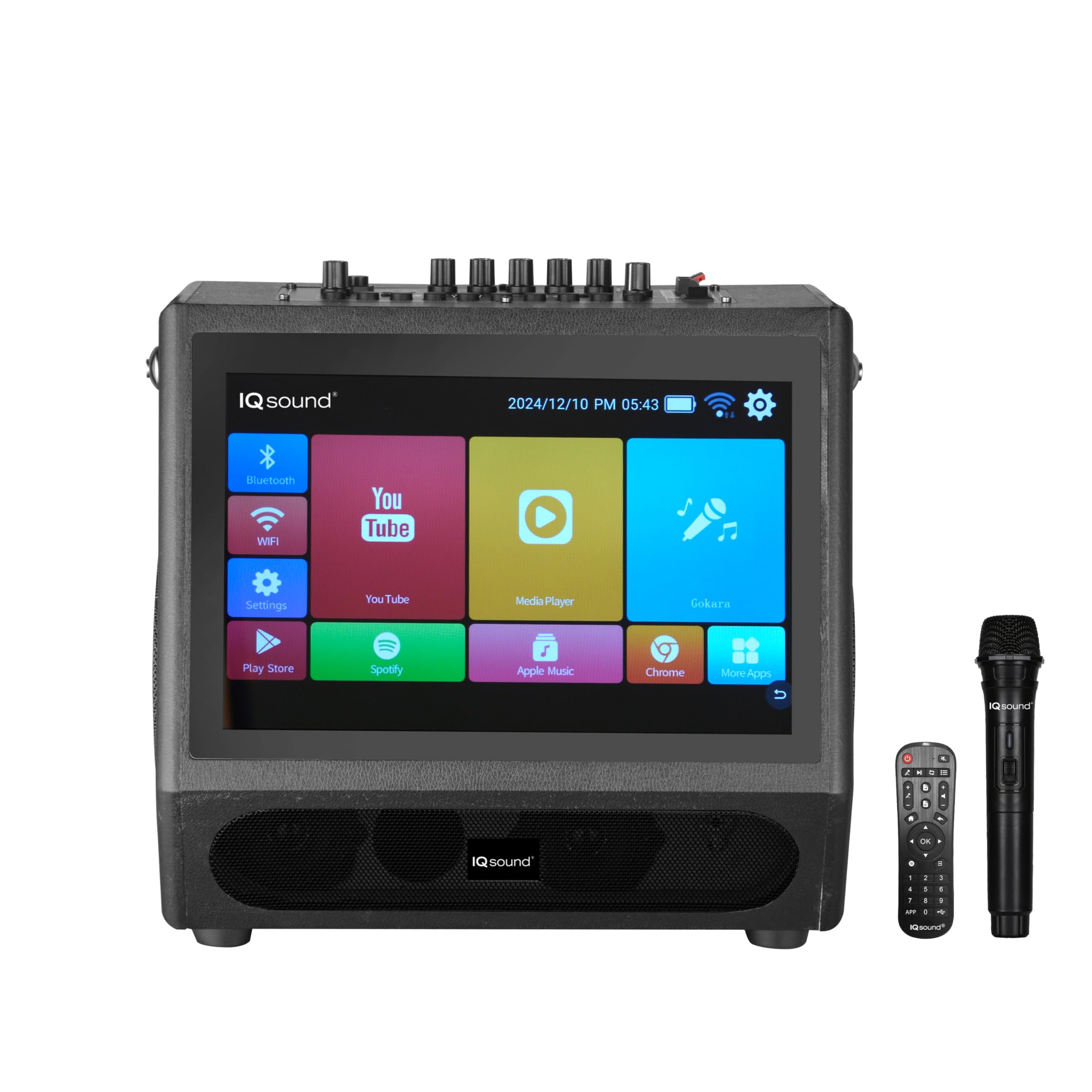
Figuur 1: Voorkant View. This image shows the front of the karaoke system, highlighting the large 12.1-inch touch screen interface with various application icons for Bluetooth, Wi-Fi, YouTube, Media Player, Settings, Play Store, Spotify, Apple Music, and Chrome. The IQ Sound logo is visible below the screen.
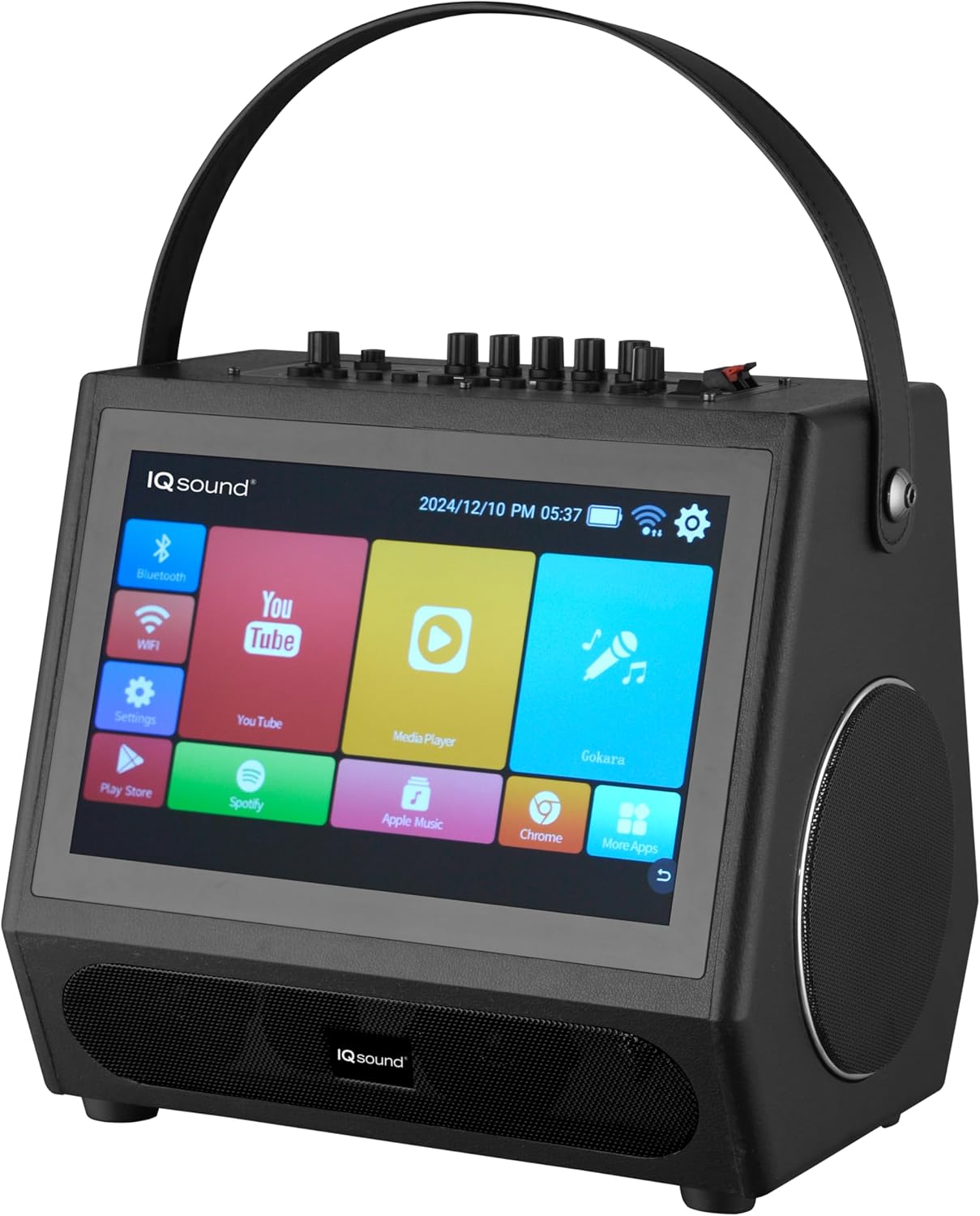
Figuur 2: Hoekig View with Handle. Hierdie view presents the karaoke system from an angle, showcasing its portable design with a sturdy carry handle on top. One of the side speakers is visible, along with the touch screen and a glimpse of the control panel on the top surface.

Figuur 3: Boonste paneelkontroles. Hierdie beeld bied 'n duidelike view of the top control panel. It features various knobs for volume, microphone input, echo, and bass/treble adjustments. Input ports such as MIC IN, AUDIO IN/AUDIO OUT, USB, TF CARD (Micro SD), HDMI OUT, and DC 13.5V IN are clearly labeled. A power switch is also visible.
5. Opstelling
5.1. Laai die battery
- Connect the provided charging plug to the DC 13.5V IN port on the top panel of the karaoke system.
- Plug the other end of the charging plug into a standard wall outlet.
- The charging indicator light (if present) will illuminate, indicating that the unit is charging.
- Allow the unit to charge fully before first use (approximately 3-4 hours). A full charge provides up to 2.5 hours of playtime.
5.2. Skakel aan/af
- To power on the system, locate the POWER switch on the top panel and slide it to the 'ON' position. The screen will light up.
- To power off, slide the POWER switch to the 'OFF' position.
5.3. Koppel die draadlose mikrofoon
- Ensure the wireless microphone has fresh batteries installed.
- Skakel die draadlose mikrofoon aan.
- The microphone should automatically pair with the karaoke system. If not, refer to the microphone's specific instructions for pairing.
- Adjust the 'MIC VOL' knob on the top panel to control the microphone's volume.
5.4. Wi-Fi-verbinding
- On the touch screen, tap the 'Settings' icon.
- Navigate to 'Network & Internet' or 'Wi-Fi'.
- Skakel Wi-Fi aan en kies die verlangde netwerk uit die lys.
- Voer die Wi-Fi-wagwoord in indien gevra en tik op 'Verbind'.
5.5. Bluetooth-koppeling
- On the touch screen, tap the 'Bluetooth' icon or go to 'Settings' > 'Connected devices' > 'Bluetooth'.
- Ensure Bluetooth is enabled on the karaoke system.
- On your external device (smartphone, tablet), enable Bluetooth and search for available devices.
- Select 'IQ-1505WK' from the list of found devices to pair.
- Once paired, you can stream audio from your external device to the karaoke system.
6. Bedryfsinstruksies
6.1. Aanraakskerm-koppelvlak
- The 12.1-inch touch screen operates like a standard Android tablet. Tap icons to open applications, swipe to navigate, and use the on-screen keyboard for input.
- The home screen provides quick access to essential functions like Bluetooth, Wi-Fi, YouTube, Media Player, and Settings.
6.2. Karaoke-funksie
- Use the 'YouTube' app or other compatible media players to find karaoke tracks with lyrics.
- Connect the wireless microphone as described in Section 5.3.
- Adjust the 'MIC VOL' and 'ECHO' knobs on the top panel to achieve your desired vocal effect.
- The system's powerful speakers will project your voice and the music.
6.3. Media Playback (USB/SD)
- Insert a USB drive into the 'USB' port or a Micro SD card into the 'TF CARD' slot on the top panel.
- Open the 'Media Player' app on the touch screen.
- Navigate to the USB or SD card storage to browse and play your audio or video files.
6.4. FM Radio
- Tap the 'FM Radio' app icon on the touch screen.
- Use the on-screen controls to scan for stations, save presets, and adjust volume.
6.5. HDMI-uitset
- Connect an HDMI cable (not included) from the 'HDMI OUT' port on the top panel to an HDMI input on an external display (TV, projector).
- The system's screen content will be mirrored on the external display, allowing for a larger viewing experience for lyrics or videos.
6.6. Afstandbeheergebruik
The included remote control allows for convenient operation of various functions from a distance. Point the remote control directly at the front of the karaoke system. Functions typically include:
- Krag aan/af
- Volume op/af
- Speel / Pouse
- Volgende/Vorige Snit
- Mode Selection (e.g., Bluetooth, FM, USB)
- Navigation for Android interface (directional buttons, OK, Return)
7. Onderhoud
7.1. Skoonmaak
- Ontkoppel altyd die eenheid voor skoonmaak.
- Gebruik 'n sagte, droë, pluisvrye lap om die buite-oppervlaktes af te vee.
- Vir die raakskerm, gebruik 'n skermspesifieke skoonmaakoplossing en 'n mikrofiberdoek. Moenie vloeistof direk op die skerm spuit nie.
- Avoid using abrasive cleaners, waxes, or solvents as they may damage the finish.
7.2. Batteryversorging
- Om die batterylewe te verleng, vermy om die battery gereeld heeltemal te ontlaai.
- If storing the unit for an extended period, charge the battery to about 50% and recharge every few months.
- Operating the unit in extremely hot or cold conditions can affect battery performance and lifespan.
8. Probleemoplossing
If you encounter any issues with your IQ Sound IQ-1505WK, please refer to the following table for common problems and solutions:
| Probleem | Moontlike oorsaak | Oplossing |
|---|---|---|
| Eenheid skakel nie aan nie. | Battery is leeg. Aan/af-skakelaar is af. | Connect the charging plug and allow the unit to charge. Ensure the power switch is in the 'ON' position. |
| Geen klank van luidsprekers nie. | Volume is too low. Input source not selected correctly. Cables are loose. | Increase the master volume. Ensure the correct input source (Bluetooth, USB, etc.) is selected. Check all cable connections. |
| Mikrofoon werk nie. | Microphone batteries are low/dead. Microphone is off. MIC VOL knob is low. | Replace microphone batteries. Turn on the microphone. Increase the 'MIC VOL' knob. |
| Bluetooth-saambinding misluk. | Bluetooth not enabled on device or system. Devices are too far apart. | Ensure Bluetooth is enabled on both devices. Keep devices within 10 meters (33 feet). Try restarting both devices. |
| Aanraakskerm reageer nie. | Tydelike sagtewarefout. | Restart the system by powering it off and then on again. |
9. Spesifikasies
| Kenmerk | Detail |
|---|---|
| Handelsmerk | Supersonies |
| Model | IQ-1505WK |
| Spesiale kenmerk | Draagbaar |
| Kragbron | Battery aangedrewe |
| Luidsprekerkonfigurasie | 2x 5-inch Woofers, 2x 2-inch Tweeters |
| Piek kraguitset | 5000 W |
| Vertoon | 12.1-duim kapasitiewe raakskerm |
| Bedryfstelsel | Android 12.1 |
| Verwerker | Vierkern |
| Interne berging | 32 GB |
| RAM | 2 GB |
| Konnektiwiteit | Wi-Fi, Bluetooth |
| Invoer/uitvoerpoorte | HDMI Out, USB, Micro SD (TF Card), MIC In, Audio In/Out |
| Battery | 5400mAh herlaaibare battery |
| Playtime (Battery) | Tot 2.5 uur |
| Afmetings (D x B x H) | 12.72" D x 12" B x 10.04" H |
| UPC | 639131215054 |
10. Waarborg en ondersteuning
10.1. Waarborginligting
Hierdie produk word gedek deur 'n 90-dae waarborg from the date of purchase. This warranty covers manufacturing defects in materials and workmanship under normal use. It does not cover damage caused by misuse, accident, unauthorized modification, or external causes such as power surges. Please retain your proof of purchase for warranty claims.
10.2. Kliëntediens
For technical assistance, warranty service, or general inquiries, please contact Supersonic customer support. Refer to the contact information provided with your product packaging or visit the official Supersonic webwebwerf vir die mees onlangse ondersteuningsbesonderhede.