
1. Inleiding
The Radioddity X1 Walkie Talkies are designed for reliable two-way communication in various environments. Featuring an IP67 waterproof and dustproof rating, durable construction, and advanced noise reduction, these FRS radios are suitable for outdoor adventures, professional use, and emergency situations. They offer a long communication range and include essential features like NOAA weather alerts and voice-activated transmission (VOX).

Image: The Radioddity X1 Walkie Talkie, showcasing sy robuuste ontwerp.
2. Wat is in die boks
Upon opening your Radioddity X1 package, you should find the following items:
- 2 x Radioddity X1 Walkie Talkies
- 2 x herlaaibare batterye
- 1 x 2-in-1 USB-C-laaikabel
- 2 x gordelklemme
- 2 x Handbande
- 1 x Adapters
- 1 x Gebruikershandleiding (hierdie dokument)

Image: All components included in the Radioddity X1 package, including two radios, batteries, charging cable, belt clips, hand straps, and adapters.
3. Opstelling
3.1. Battery Installasie
- Maak seker dat die walkie-talkie afgeskakel is.
- Vind die batterykompartement aan die agterkant van die eenheid.
- Align the battery with the contacts and gently push it into the compartment until it clicks into place.
3.2. Laai die battery
The Radioddity X1 features a 2500mAh rechargeable lithium battery. For optimal performance, fully charge the battery before first use.
- Connect the provided USB-C charging cable to the charging port on the walkie talkie.
- Connect the other end of the USB-C cable to the adapter, and then plug the adapter into a standard power outlet. Alternatively, you can connect the USB-C cable to a compatible USB power source (e.g., computer, power bank).
- Die battery-aanwyser op die skerm sal die laaistatus wys. 'n Volle lading neem gewoonlik etlike ure.
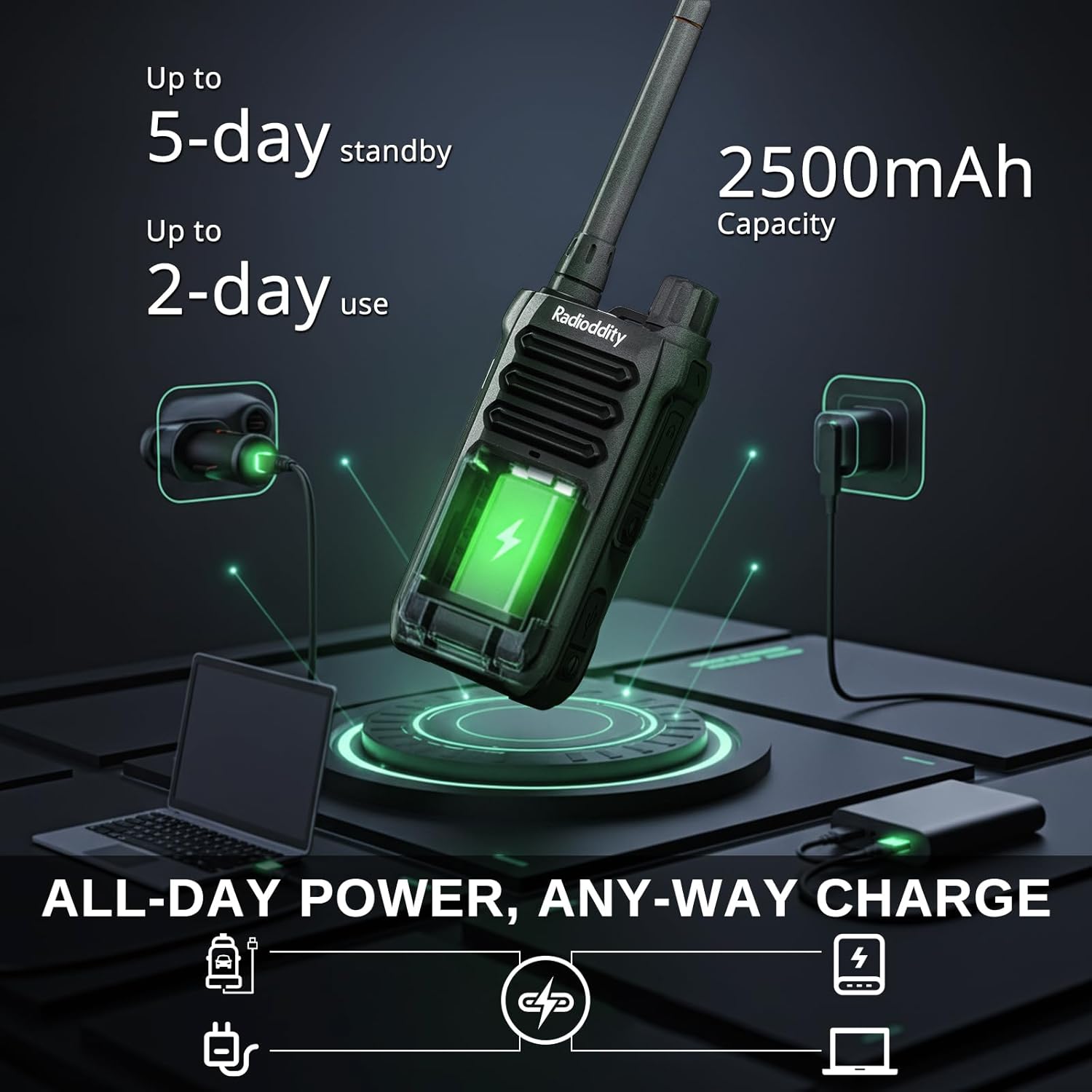
Image: The Radioddity X1 Walkie Talkie connected to a USB-C charger, illustrating the charging process.
3.3. Aanheg van bykomstighede
- Gordelklem: Secure the belt clip to the designated slot on the back of the walkie talkie.
- Handband: Thread the hand strap through the loop on the top or side of the walkie talkie for added security.
3.4. Skakel aan/af
To power on or off the device, rotate the power/volume knob located on the top of the unit clockwise to turn on, and counter-clockwise until it clicks to turn off.
4. Bedryfsinstruksies
4.1. Kanaalkeuse
The Radioddity X1 comes pre-programmed with 22 FRS channels. To select a channel:
- Druk die SPYSKAART knoppie om die spyskaart te betree.
- Gebruik die Op/af-pyltjie buttons to navigate to the channel setting.
- Druk OK om te bevestig, gebruik dan die Op/af-pyltjie knoppies om jou verlangde kanaal (1-22) te kies.
- Druk OK again to save the selection and SPYSKAART om uit te gaan.
4.2. Privaatheidskodes (CTCSS/DCS)
The radio supports 155 privacy codes (CTCSS/DCS) to filter out unwanted conversations on a channel. While not providing true privacy, these codes ensure you only hear transmissions from radios set to the same channel and code.
- Druk die SPYSKAART knoppie.
- Navigate to the CTCSS or DCS setting using the Op/af-pyltjie knoppies.
- Druk OK, then select your desired code.
- Druk OK te spaar en SPYSKAART to exit. Ensure all radios in your group use the same channel and privacy code.
4.3. Druk-om-te-praat (PTT)
To transmit, press and hold the large PTT button on the side of the radio. Speak clearly into the microphone. Release the PTT knoppie om te luister.
4.4. VOX Function (Voice Operated Transmission)
The VOX function allows for hands-free operation. When activated, the radio transmits automatically when it detects your voice.
- Druk die SPYSKAART knoppie.
- Navigeer na die VOX instelling.
- Druk OK, then select an appropriate sensitivity level (higher numbers for lower sensitivity).
- Druk OK te spaar en SPYSKAART om uit te gaan.

Image: Icon representing the Voice Operated Transmission (VOX) function.
4.5. NOAA Weather Alerts
Stay informed with 10 built-in NOAA weather channels providing real-time alerts.
- Druk die SPYSKAART knoppie.
- Navigeer na die NOAA instelling.
- Druk OK, then select the desired NOAA channel or activate weather alerts.
- Druk OK te spaar en SPYSKAART om uit te gaan.

Image: Icon representing the NOAA Scan & Alert feature.
4.6. Recording Playback
The Radioddity X1 features a unique recording playback function for up to 20 messages.
- To record, press and hold the dedicated REKORD button (if available, or refer to specific menu options).
- To play back recorded messages, press the HERSPEL knoppie.

Image: The Radioddity X1 display showing the recording and replay functions, highlighting its audio safety net capability.

Image: Icon representing the Recording function.
4.7. Geraasvermindering
The dual-way noise reduction feature ensures clear communication even in noisy environments.

Image: The Radioddity X1 in a construction setting, illustrating its noise reduction capabilities for clear communication.
5. Onderhoud
5.1. IP67 Waterproof and Dustproof Care
The Radioddity X1 is rated IP67, meaning it is dustproof and can withstand submersion in up to 1 meter of water for 30 minutes. To maintain its integrity:
- Ensure all port covers (e.g., charging port, accessory port) are securely closed before exposure to water or dust.
- After exposure to water, wipe the radio dry with a clean cloth. Do not charge the radio if the charging port is wet.
- Vermy langdurige onderdompeling verder as die gespesifiseerde diepte en tyd.

Image: The Radioddity X1 Walkie Talkie submerged in clear water, demonstrating its IP67 waterproof capability.

Image: The Radioddity X1 Walkie Talkie partially covered in sand, highlighting its dustproof design.
5.2. Batteryversorging
The 2500mAh battery provides up to 48 hours of average use. To prolong battery life:
- Vermy om die battery gereeld heeltemal te ontlaai.
- Bêre die radio op 'n koel, droë plek wanneer dit nie gebruik word nie.
- Gebruik slegs die meegeleverde laaikabel en adapter.
5.3. Skoonmaak
Vee die radio af met 'n sagte, damp lap. Moenie harde chemikalieë of skuur skoonmaakmiddels gebruik nie.
6. Probleemoplossing
| Probleem | Moontlike oorsaak | Oplossing |
|---|---|---|
| Geen krag nie | Battery is laag of nie korrek geïnstalleer nie. | Laai die battery of installeer dit weer. |
| Kan nie oordra of ontvang nie | Verkeerde kanaal of privaatheidskode. Buite bereik. | Verify channel and privacy code settings. Move closer to the other radio. |
| Swak klank kwaliteit | Swak sein, interferensie of volume te laag. | Adjust volume. Move to an area with less obstruction. Check for interference sources. |
| Kort kommunikasiereeks | Obstructions (buildings, terrain), low power channel. | Move to an open area. Use channels 1-7 or 15-22 for higher power output. |
7. Spesifikasies
| Kenmerk | Detail |
|---|---|
| Handelsmerk | Radiodood |
| Modelnommer | X1 |
| Kleur | Swart |
| Aantal kanale | 22 (FRS) |
| Frekwensiereeks | FRS |
| Maksimum praatbereik | 5 Miles (open areas), 2 Miles (urban settings) |
| Waterweerstandvlak | IP67 Waterdig |
| Spesiale kenmerke | Dust Proof, Emergency Alarm (SOS), Long Range, Shockproof, Voice Operated Transmission (VOX), Noise Reduction, NOAA Weather Alerts, Recording Playback |
| Battery kapasiteit | 2500mAh litium |
| Battery Gemiddelde Lewe | 48 ure |
| Laai | USB-C |
| Produk Afmetings (D x B x H) | 1.1" x 2.4" x 7.1" |
| FCC ID | 2AN62-X1 |

Image: Visual representation of the Radioddity X1's communication range, showing up to 5 miles in open areas and 2 miles in urban settings.

Image: The Radioddity X1 Walkie Talkie on the ground at a construction site, illustrating its durability and shockproof design after 1,000+ drop tests.
8. Waarborg en ondersteuning
8.1. Waarborginligting
The Radioddity X1 Walkie Talkies come with an 18 maande waarborg from the date of purchase. This warranty covers manufacturing defects and ensures your product is free from material and workmanship flaws under normal use. Please retain your proof of purchase for warranty claims.
8.2. Kliëntediens
For technical assistance, troubleshooting, or warranty inquiries, please visit the official Radioddity website or contact their customer support team. You can find contact information and additional resources on their webwebwerf: www.radioddity.com.
9. Produkvideo's
Radioddity X1 | Built for Harsh Conditions
Video: This official Radioddity video demonstrates the X1's robust features, including its IP67 dustproof and waterproof capabilities, drop resistance, car-crush resistance, long-range communication, and noise-cancelling audio, highlighting its suitability for challenging environments.