
Inleiding
Dankie vir die aankoopasing the AFEXOA DY29Z Night Light Bluetooth Speaker Alarm Clock. This versatile device combines a Bluetooth speaker, night light, alarm clock, sound machine, and MP3 player into one compact unit. This manual provides detailed instructions for setup, operation, and maintenance to ensure optimal performance and user satisfaction.

Figure 1: AFEXOA DY29Z device highlighting its 5-in-1 functionality.
Veiligheidsinligting
- Moenie die toestel aan water of oormatige vog blootstel nie.
- Vermy uiterste temperature en direkte sonlig.
- Moenie die toestel self uitmekaar haal of probeer herstel nie. Kontak kliëntediens vir bystand.
- Hou buite bereik van kinders en troeteldiere.
- Gebruik slegs die meegeleverde laaikabel of 'n gesertifiseerde Tipe-C-kabel vir laai.
Pakketinhoud
Kontroleer asseblief die pakket vir die volgende items:
- AFEXOA DY29Z Night Light Bluetooth Speaker Alarm Clock
- Tipe C USB-laaikabel
- Gebruikershandleiding
Produk verbyview
Voorpaneelkontroles
The front panel features an LED display for time and status, along with several control buttons:
- Timer-knoppie: Short press to pause, long press for standby (turns off sound and light).
- Bluetooth On/Off Button: Activates or deactivates Bluetooth mode.
- Vorige snit / Volume af-knoppie: Druk kort vir vorige snit, druk lank om die volume te verlaag.
- Volgende snit / Volume op-knoppie: Druk kort vir die volgende snit, druk lank om die volume te verhoog.
- Natural Sound & Lullaby Button: Cycles through built-in soothing sounds.
Rear Ports and Switches
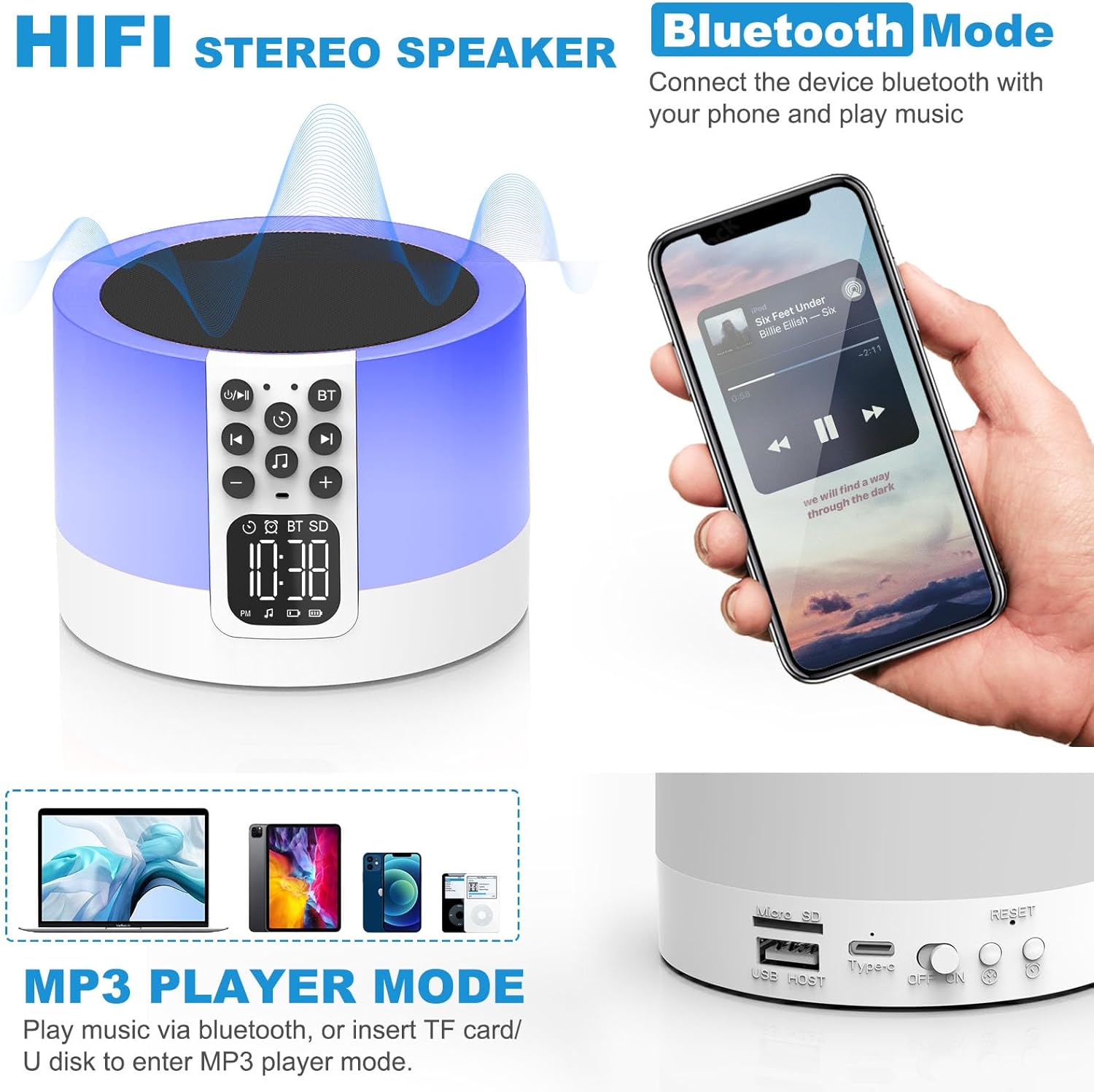
Figure 2: AFEXOA DY29Z showing Bluetooth connectivity and rear ports.
- Mikro SD/TF-kaartgleuf: Vir die speel van MP3 files vanaf 'n geheuekaart.
- USB HOST-poort: Vir die speel van MP3 files vanaf 'n USB -flash drive.
- Tipe-C kragpoort: Vir die laai van die toestel.
- Aan/af skakelaar: Hoofkragskakelaar vir die toestel.
- Herstel-knoppie: Small button to reset the device (requires a pin).
- Time Setup Button: Short press for 12h/24h mode, long press for time setup.
- Alarm Setup Button: For setting the alarm.
Opstelling
1. Laai die toestel
Before first use, fully charge the device. Connect the provided Type-C USB cable to the Type-C power port on the back of the device and plug the other end into a USB power adapter (not included), computer, or power bank.

Figuur 3: Laai die toestel via USB.
2. Stel die tyd in
- Turn on the device using the On/Off switch on the back.
- Long press the 'Time Setup' button on the back until the hour digits flash.
- Use the 'Previous Track / Volume Down' and 'Next Track / Volume Up' buttons on the front to adjust the hour.
- Press the 'Time Setup' button again to switch to minute adjustment. Adjust minutes using the volume buttons.
- Press the 'Time Setup' button a third time to confirm and exit time setting.
- Short press the 'Time Setup' button to toggle between 12-hour and 24-hour display formats.
Bedryfsinstruksies
1. Skakel aan/af
Slide the 'On/Off' switch on the back of the device to turn it on or off.
2. Bluetooth-luidsprekermodus
- Skakel die toestel aan.
- Press the 'Bluetooth On/Off' button on the front panel. The device will enter pairing mode, indicated by a flashing Bluetooth icon on the display.
- On your smartphone or other Bluetooth-enabled device, search for 'DY29Z' in the Bluetooth settings and select it to pair.
- Sodra dit gekoppel is, kan jy klank vanaf jou toestel deur die luidspreker speel.
- Use the 'Previous Track / Volume Down' and 'Next Track / Volume Up' buttons to control playback and volume.
3. Nagligfunksie
The device features a sensitive touch top mesh for light control.

Figure 4: Adjusting warm white light brightness via touch control.
- Warm Wit Lig: Tap the top mesh to cycle through 3 levels of warm white brightness (low, medium, high). Tap again to turn off.
- Multicolor Light: Long press the top mesh and then release to activate the ambient light mode, which cycles through various colors.
- Fixed Color Light: While in multicolor cycling mode, long press the top mesh again and release to fix the current color. Repeat to cycle through other fixed colors.

Figure 5: Various multicolor night light options.
4. Wekkerfunksie
Set and manage alarms with customizable tones.

Figure 6: Digital alarm clock with wake-up light.
- Stel die wekker in: Long press the 'Alarm Setup' button on the back until the alarm hour digits flash. Adjust the hour using the volume buttons. Press 'Alarm Setup' again to set minutes, then press again to confirm.
- Custom Alarm Tone: Insert a USB Flash Drive or Micro SD Card with your favorite MP3 music. The device will automatically use this as the alarm tone.
- Sluimer-funksie: When the alarm sounds, tap the top mesh to activate snooze. The alarm will sound again after 9 minutes. This can be repeated indefinitely.
- Stop die alarm: Press any button (except the top mesh for snooze) to stop the alarm for the day.
5. Sound Machine Function
The device offers 30 built-in soothing sounds to aid sleep and relaxation.
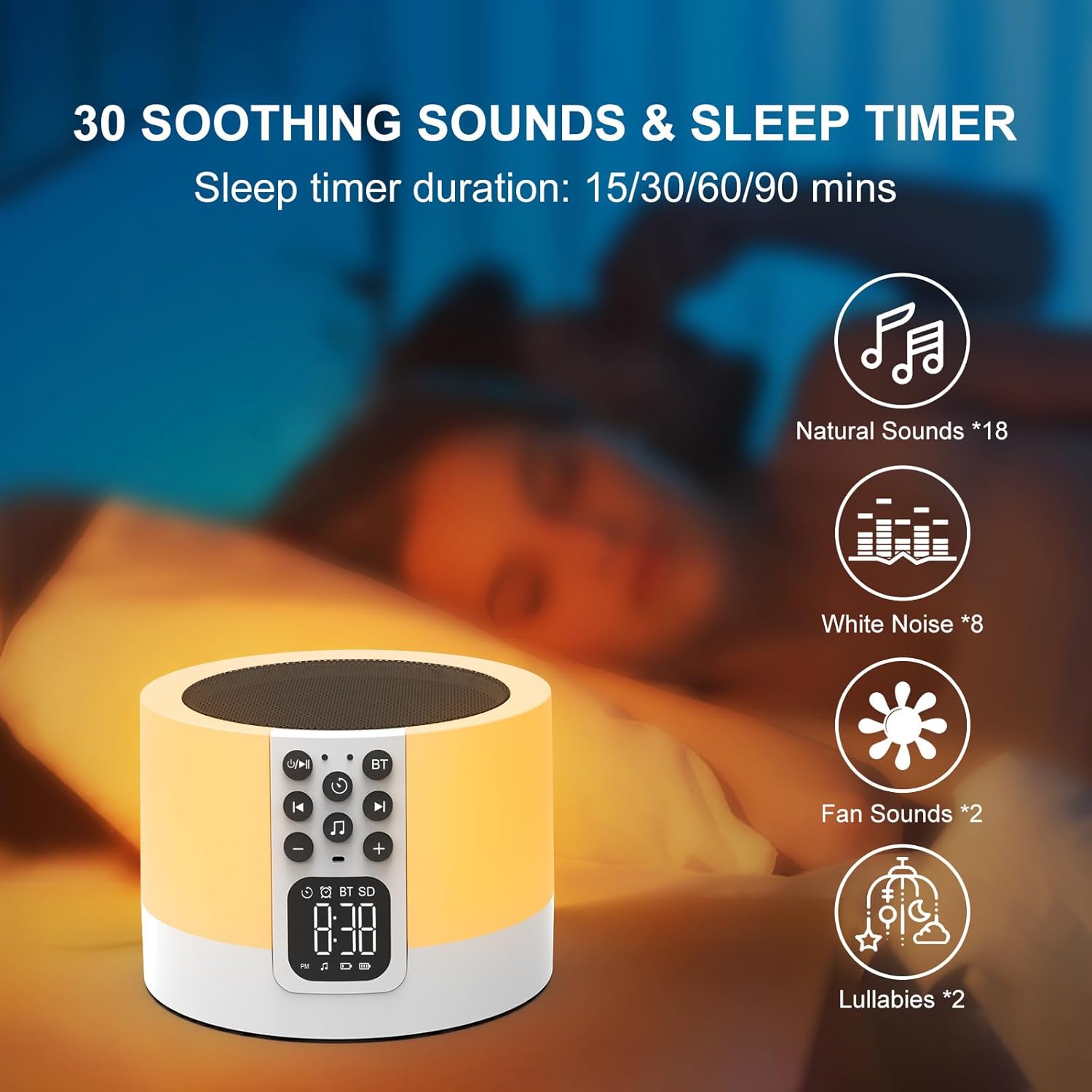
Figure 7: Soothing sounds and sleep timer options.
- Press the 'Natural Sound & Lullaby' button on the front panel to cycle through the 30 available sounds (including white noise, fan noise, pink noise, nature sounds, and lullabies).
- Slaaptimer: To set a sleep timer, short press the 'Timer' button repeatedly to select 15, 30, 60, or 90 minutes. The device will automatically turn off after the selected duration.
6. MP3 Player Mode
Play your own music directly from a USB flash drive or Micro SD card.

Figure 8: Using USB flash drives and Micro SD cards for MP3 playback.
- Insert a USB flash drive into the USB HOST port or a Micro SD card into the Micro SD/TF card slot on the back of the device.
- The device will automatically detect the storage and begin playing MP3 files.
- Use the 'Previous Track / Volume Down' and 'Next Track / Volume Up' buttons to navigate tracks and adjust volume.
7. Handvrye oproepe
When connected via Bluetooth to a smartphone, the device can be used for hands-free calls.
- When a call comes in, the device will ring.
- Press the 'Timer' button (which also functions as Play/Pause) to answer an incoming call.
- Press the 'Timer' button again to end the call.
Onderhoud
- Maak die toestel skoon met 'n sagte, droë lap. Moenie skuurmiddels of oplosmiddels gebruik nie.
- Maak seker dat alle poorte vry van stof en puin is.
- Bêre die toestel op 'n koel, droë plek wanneer dit nie vir lang tye gebruik word nie.
Probleemoplossing
| Probleem | Moontlike oorsaak | Oplossing |
|---|---|---|
| Toestel skakel nie aan nie. | Battery is leeg. Aan/af-skakelaar is af. | Laai die toestel volledig. Maak seker dat die Aan/Af-skakelaar in die 'Aan'-posisie is. |
| Kan nie via Bluetooth koppel nie. | Bluetooth not enabled on device or phone. Device is already paired with another unit. | Ensure Bluetooth is active on both devices. Disconnect from other devices. Restart pairing process. |
| Geen geluid van die luidspreker nie. | Volume is too low. Device is paused. Incorrect mode selected. | Increase volume. Press the 'Timer' button to unpause. Ensure correct mode (Bluetooth, MP3, Sound Machine) is active. |
| Naglig werk nie. | Device is off or in standby. | Ensure the device is powered on. Tap the top mesh to activate the light. |
| Die alarm lui nie. | Alarm not set correctly. Volume too low. | Verify alarm time and activation. Increase device volume. |
Spesifikasies
| Kenmerk | Detail |
|---|---|
| Handelsmerk | AFEXOA |
| Modelnommer | DY29Z |
| Verbindingstegnologie | Bluetooth, USB |
| Klankuitvoermodus | Stereo |
| Materiaal | Akrielnitril Butadieen Styreen (ABS) |
| Tipe luidspreker | Draagbare Bluetooth-luidspreker |
| Bykomende kenmerke | Alarm, Illuminated, Mood Light, Noise Machine, Timer |
| Beheer metode | Raak |
| Kragbron | Battery aangedrewe |
| Aantal batterye | 1 litiumioon (ingesluit) |
| Versoenbare toestelle | Skootrekenaar, MP3-speler, slimfoon, tablet |
Waarborg en Ondersteuning
This product comes with a limited warranty. For detailed warranty information or technical support, please refer to the product packaging or contact AFEXOA customer service. Keep your purchase receipt for warranty claims.