
1. Inleiding
This manual provides essential information for the safe and efficient operation of your Thomson 43UF4S35 43-inch 4K UHD Smart LED TV with Fire TV. Please read this manual thoroughly before using your television and retain it for future reference. This television combines a stunning 4K UHD display with the intuitive Fire TV operating system, offering integrated Alexa voice control, Apple AirPlay support, and comprehensive connectivity options for a complete entertainment experience.
2. Veiligheidsinligting
Neem die volgende veiligheidsmaatreëls in ag om brand, elektriese skok of beserings te voorkom:
- Moenie die TV aan reën of vog blootstel nie.
- Verseker behoorlike ventilasie; moenie ventilasie-openinge blokkeer nie.
- Moenie die TV op 'n onstabiele trollie, staander, driepoot, hakie of tafel plaas nie.
- Beskerm die kragkabel teen geloop of vasgeknyp.
- Ontkoppel die TV tydens weerligstorms of wanneer dit vir lang tye nie gebruik word nie.
- Verwys alle diens na gekwalifiseerde dienspersoneel.
3. Pakketinhoud
Verifieer dat alle items in die verpakking teenwoordig is:
- Thomson 43UF4S35 43-inch 4K UHD Smart LED TV
- Kragadapter
- Kragkabel
- Afstandsbediening (met batterye)
- TV-staander (2 stukke)
- Gebruikershandleiding (hierdie dokument)
4. Fisiese Oorview
4.1. Afmetings

Prent: Voorkant view of the Thomson 43UF4S35 TV with key dimensions labeled in centimeters. The TV measures 97 cm in width, 60 cm in total height with the stand, and has a screen height of 56 cm. The TV's depth is 9 cm, and the stand's depth is 27 cm.

Prent: Side profile of the Thomson 43UF4S35 TV, illustrating its slim design and the attached stand.
4.2. Agterpaneelverbindings

Prent: Gedetailleerd view of the rear connection panel of the Thomson 43UF4S35 TV. Ports are clearly labeled for Audio Out, CI+ slot, Headphone jack, three HDMI 2.1 inputs, LAN (Ethernet) port, Satellite input, Antenna input, and two USB 2.0 ports.
- AUDIO UIT: Vir die koppeling van eksterne klankstelsels.
- CI+: Common Interface Plus slot for conditional access modules (CAM) to decrypt pay-TV channels.
- KOPTELEFOON: 3.5 mm-aansluiting om oorfone aan te sluit.
- 3x HDMI 2.1: High-Definition Multimedia Interface inputs for connecting devices like Blu-ray players, game consoles, or set-top boxes.
- LAN: Ethernet-poort vir bedrade netwerkverbinding.
- SATELLIET: Input for satellite dish connection (DVB-S2).
- ANTENNA: Input for terrestrial antenna connection (DVB-T2) or cable TV (DVB-C).
- 2x USB 2.0: Universal Serial Bus ports for connecting USB storage devices for media playback or software updates.
5. Opstelling
5.1. Staansamestelling
- Plaas die TV versigtig met die gesig na onder op 'n sagte, plat oppervlak om skermskade te voorkom.
- Attach the two stand pieces to the designated slots on the bottom of the TV using the provided screws. Ensure they are securely fastened.
- Lig die TV regop en plaas dit op 'n stabiele, gelyk oppervlak.
5.2. Aansluitkrag
Connect the power adapter to the TV's power input, then plug the power cable into a wall outlet. The TV will enter standby mode.
5.3. Initial Setup (Fire TV)
- Druk die kragknoppie op die afstandbeheerder om die TV aan te skakel.
- Volg die instruksies op die skerm om jou taal te kies, aan 'n Wi-Fi-netwerk te koppel en by jou Amazon-rekening aan te meld.
- The Fire TV interface will guide you through setting up live TV channels (via the Triple Tuner) and installing your favorite streaming applications.
- Skep gebruiker profiles for personalized recommendations and settings.
6. Bediening van die TV
6.1. Afstandbeheer

Prent: The Bluetooth remote control for the Thomson 43UF4S35 TV, featuring a central navigation pad, number buttons, and dedicated quick access buttons for popular streaming services like Netflix, Prime Video, Amazon Music, and an Alexa voice control button.
The included Bluetooth remote control allows for easy navigation. It features dedicated buttons for quick access to popular streaming services such as Netflix, Prime Video, and Amazon Music. The central navigation pad is used for menu selection and browsing.
6.2. Fire TV-koppelvlak

Prent: A visual representation of the Fire TV home screen, displaying a selection of streaming applications and options for multiple user profiles, indicating the personalized nature of the interface.
The Fire TV operating system provides a user-friendly interface for accessing streaming services, live TV, and apps. Navigate using the remote control to browse content, launch applications, and manage settings. User profiles can be created to tailor recommendations and settings for different household members.
6.3. Alexa-stembeheer
Press the Alexa button on your remote control and speak your commands. You can ask Alexa to:
- Soek vir movies or TV shows.
- Begin toepassings.
- Beheer slimhuistoestelle.
- Check the weather or get information.
6.4. Apple AirPlay
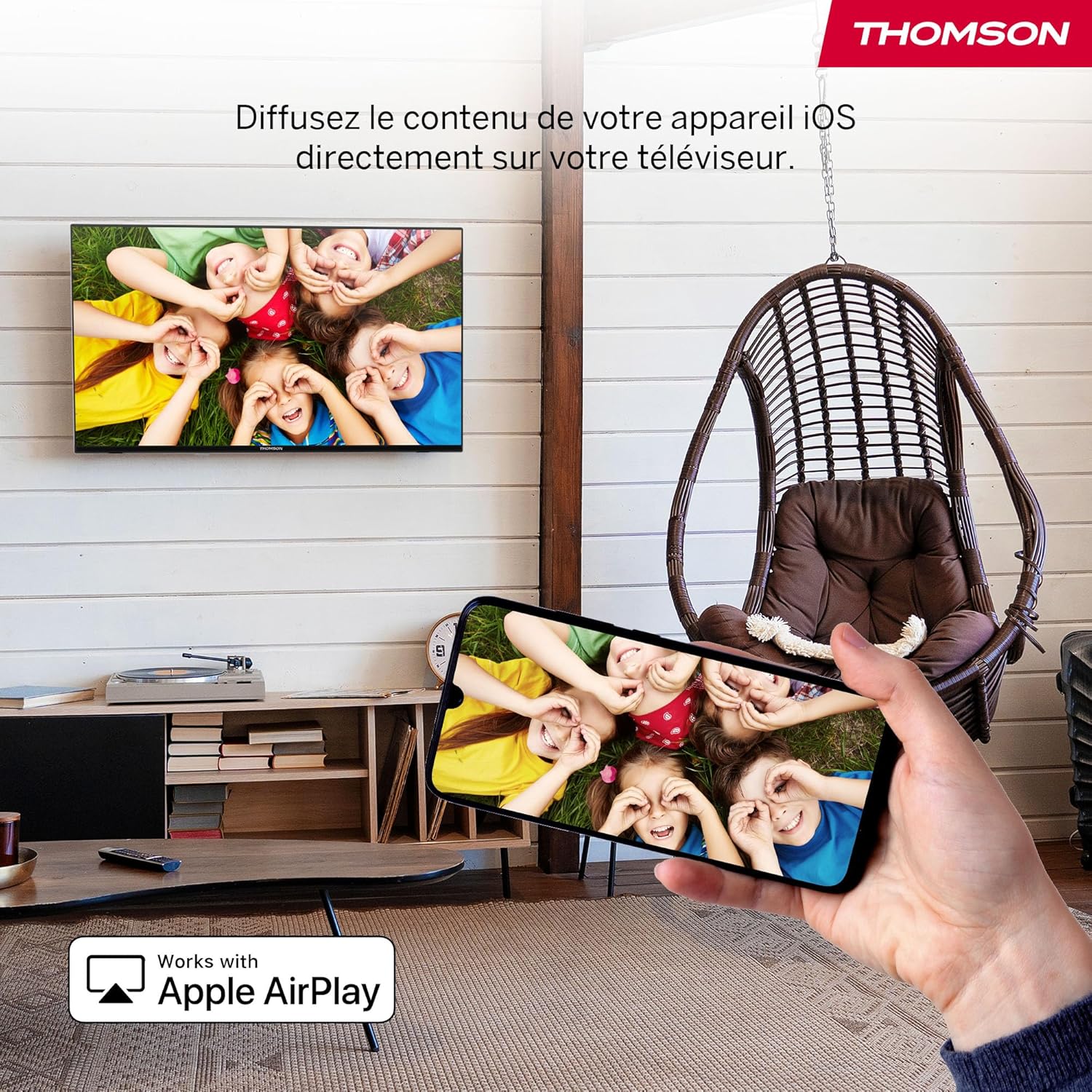
Prent: An illustration of Apple AirPlay in use, showing content from an iPhone being wirelessly streamed or mirrored to the Thomson TV, enabling seamless content sharing from iOS devices.
The TV supports Apple AirPlay, allowing you to stream content directly from your iPhone, iPad, or Mac. Ensure your Apple device and the TV are connected to the same Wi-Fi network. Select the AirPlay icon on your Apple device and choose your Thomson TV from the list of available devices.
6.5. Drievoudige stemapparaat
The integrated Triple Tuner supports DVB-C (cable), DVB-S2 (satellite), and DVB-T2 (terrestrial antenna) signals. Connect your preferred signal source to the corresponding input on the rear panel. During initial setup or via the TV settings, you can scan for available channels.
6.6. Smart Home Dashboard

Prent: A view of the Smart Home Dashboard accessible on the Thomson TV, presenting an organized interface for managing and controlling various smart home devices, including cameras and lighting, directly from the television screen.
Access the integrated Smart Home Dashboard to control compatible connected devices in your home. This feature allows you to manage smart lights, cameras, and other smart appliances directly from your TV screen.
7. Picture and Sound
7.1. 4K UHD with Dolby Vision

Prent: A side-by-side comparison illustrating the visual difference between Standard Dynamic Range (SDR) and Dolby Vision. The Dolby Vision image on the right displays significantly improved contrast, brighter highlights, and more vibrant colors in a landscape scene.
Experience exceptional clarity with 4K UHD resolution, offering four times the detail of Full HD. Dolby Vision further enhances the visual experience by providing superior brightness, contrast, and color accuracy, bringing scenes to life with stunning realism.
7.2. Dolby Atmos Sound
Prent: A visual representation of the Dolby Atmos audio experience, showing sound waves expanding from the television screen to envelop viewers, suggesting a multi-dimensional and immersive sound environment.
Dolby Atmos delivers rich, multi-dimensional sound that flows around you, creating an immersive audio experience. For the full effect, connect your TV to a compatible Dolby Atmos sound system.
8. Konnektiwiteit
Your Thomson TV offers a variety of connection options:
- HDMI: Connect up to three HDMI devices for high-definition audio and video.
- USB: Use the two USB 2.0 ports to play media from USB drives or for service updates.
- LAN (Ethernet): Vir 'n stabiele bedrade internetverbinding.
- Wi-Fi: Connect wirelessly to your home network for streaming and online features.
- Bluetooth: Pair Bluetooth-enabled devices such as headphones or soundbars.
- CI+: Insert a Conditional Access Module for encrypted digital TV services.
9. Onderhoud
Om die lang lewensduur en optimale werkverrigting van jou TV te verseker:
- Skoonmaak: Gently wipe the screen with a soft, dry, lint-free cloth. For stubborn marks, use a screen-specific cleaner applied to the cloth, not directly to the screen. Clean the TV body with a soft, dry cloth.
- Ventilasie: Maak seker dat die ventilasie-openinge aan die agterkant van die TV nie geblokkeer is nie.
- Sagteware-opdaterings: The Fire TV system will periodically check for and install software updates automatically when connected to the internet.
10. Probleemoplossing
Indien u probleme ondervind, raadpleeg die volgende algemene oplossings:
| Probleem | Moontlike Oplossing |
|---|---|
| Geen krag nie | Check if the power cable is securely connected to the TV and the wall outlet. Ensure the outlet is functioning. |
| Geen beeld nie, maar klank is teenwoordig | Verifieer dat die korrekte invoerbron gekies is. Kontroleer eksterne toestelverbindings. |
| Geen klank nie, maar beeld is teenwoordig | Check volume levels and mute settings. Ensure external audio devices are correctly connected and powered on. |
| Afstandbeheer werk nie | Replace batteries. Ensure there are no obstructions between the remote and the TV. Re-pair the Bluetooth remote if necessary (refer to Fire TV settings). |
| Kan nie aan Wi-Fi koppel nie | Maak seker dat jou router aangeskakel is en werk. Voer die Wi-Fi-wagwoord weer in. Probeer om beide die TV en die router te herbegin. |
| Swak beeldkwaliteit | Check antenna/cable/satellite connections. Adjust picture settings (brightness, contrast, sharpness). Ensure the content source is high quality. |
11. Spesifikasies
| Kenmerk | Detail |
|---|---|
| Handelsmerk | Thomson |
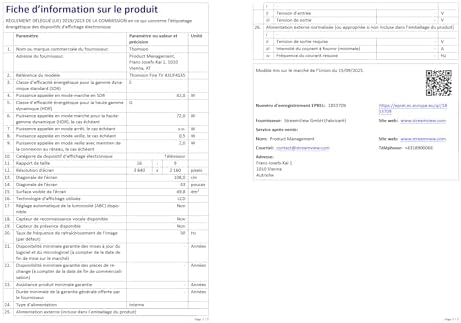
| Modelnommer | 43UF4S35 |
| Skerm grootte | 43 duim (109 cm) |
| Resolusie | 4K UHD (3840 2160 x XNUMX XNUMX) |
| Vertoon tegnologie | LCD |
| Herlaaitempo | 50 Hz |
| Bedryfstelsel | Vuur TV |
| Spesiale kenmerke | Dolby Vision, Dolby Atmos, Alexa Voice Control, Apple AirPlay, Smart Home Dashboard |
| Konnektiwiteit | Wi-Fi, Bluetooth, Ethernet (LAN), 3x HDMI 2.1, 2x USB 2.0, CI+, Audio Out, Headphones, Satellite, Antenna |
| Drievoudige Stemmer | DVB-C, DVB-S2, DVB-T2 |
| Kleur | Swart |
| Aspekverhouding | 16:9 |
| Produk Afmetings (D x B x H) | 9 cm x 97 cm x 60 cm |
| Ingesluit komponente | Power Adapter, Power Cable, Remote Control, Stand, User Manual |
| Vervaardiger | STROOMVIEW GMBH |
| Land van oorsprong | Turkye |
12. Waarborg en Ondersteuning
Your Thomson 43UF4S35 TV comes with a 3 jaar vervaardiger se waarborgHierdie waarborg dek defekte in materiaal en vakmanskap onder normale gebruik. Bewaar asseblief u bewys van aankoop vir waarborgeise.
For technical support, troubleshooting assistance, or warranty service, please contact your retailer or the manufacturer, STREAMVIEW GMBH. Refer to your purchase documentation for specific contact details.