
TOPUTURE TP5
TOPUTURE TP5 Folding Treadmill User Manual
Model: TP5 | Brand: TOPUTURE
Inleiding
This manual provides essential instructions for the safe and efficient use of your TOPUTURE TP5 Folding Treadmill. Please read this manual thoroughly before operating the device and retain it for future reference.
Belangrike veiligheidsinstruksies
To reduce the risk of serious injury, read all important precautions and instructions in this manual before using the treadmill. The manufacturer assumes no responsibility for personal injury or property damage sustained by or through the use of this product.
- Always ensure the safety key is properly attached to your clothing before starting the treadmill.
- Hou kinders en troeteldiere weg van die trapmeul tydens gebruik.
- Plaas die loopband op 'n gelyk oppervlak met voldoende ruimte daaromheen.
- Moenie die loopband gebruik as dit 'n beskadigde koord of prop het nie, of as dit nie behoorlik werk nie.
- Raadpleeg 'n dokter voordat u enige oefenprogram begin.
Opstelling en samestelling
The TOPUTURE TP5 treadmill comes largely pre-assembled. Follow these steps for quick setup:
- Uitpak: Carefully remove the treadmill from its packaging. Ensure all components are present.
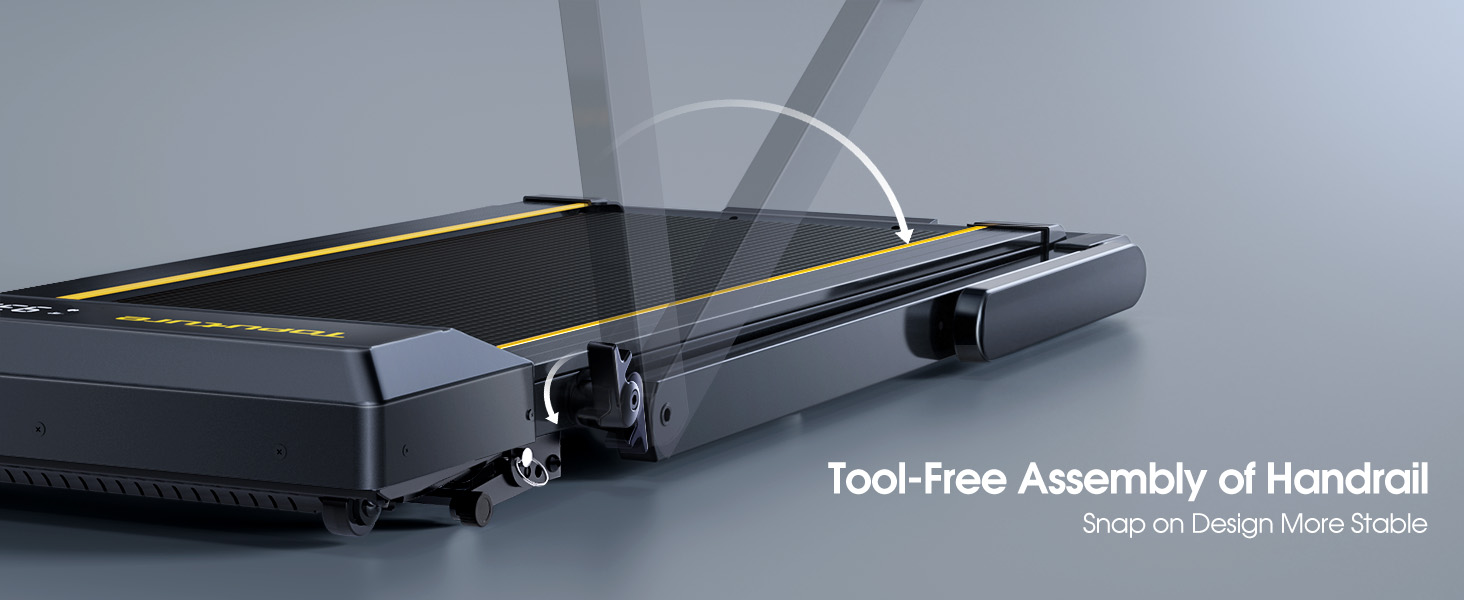
- Vou die stuurstang oop: Gently lift the handlebar into its upright position until it locks securely. The quick-release snaps allow for easy transition between walking pad and running treadmill configurations.
- Aansluitkrag: Steek die kragkabel in 'n geaarde elektriese aansluiting.
- Aanvanklike kontrole: Before first use, ensure the running belt is centered and properly tensioned. Refer to the maintenance section for belt adjustment if needed.

Bedryfsinstruksies
Beheerpaneel en skerm
The treadmill features a multifunctional LED display and touch controls. Information displayed includes time, speed, calories burned, distance, and heart rate.

Starting and Adjusting Speed
- Begin/Stop: Press the Start/Pause button on the control panel or remote to begin/end your workout.
- Spoedverstelling: Use the Speed +/- buttons on the control panel or remote to adjust the speed from 0.6 to 10 MPH.
- Programbeheer: Connect your smartphone or tablet via Bluetooth to control the treadmill and access guided workouts.

Hellingsfunksie
The treadmill offers three manual incline levels: 1%, 6%, and 12%. Adjust the incline by manually setting the support legs at the rear of the treadmill to the desired position.

Bluetooth-luidspreker
Connect your device to the treadmill's built-in Bluetooth speaker to enjoy music or audio during your workout.
Hartklopmonitor
Grip the hand sensors on both sides of the display to monitor your heart rate during exercise.
Onderhoud
- Smering: Regularly apply treadmill lubricant under the running belt to ensure smooth operation and prolong belt life. Refer to the lubricant instructions for frequency.
- Skoonmaak: Vee die loopband af met advertensieamp lap na elke gebruik om sweet en stof te verwyder.
- Bandverstelling: If the running belt feels loose or is off-center, use the provided tools to adjust the tension and alignment as per the detailed instructions in the full manual.

Probleemoplossing
If you encounter any issues with your treadmill, please refer to the following common solutions:
- Loopband begin nie: Ensure the power cord is securely plugged in and the safety key is correctly placed on the console. Check the power switch on the treadmill.
- Gordel gly: The running belt may need tensioning. Refer to the maintenance section or the full manual for instructions on adjusting belt tension.
- Ongewone geluide: Check for any loose parts or foreign objects under the belt. Lubricate the running belt if it has not been done recently.
- Skerm werk nie: Maak seker dat alle verbindings veilig is. As die probleem voortduur, kontak kliëntediens.
Spesifikasies
| Kenmerk | Detail |
|---|---|
| Handelsmerk | TOPUTUUR |
| Model Naam | TP5 |
| Kleur | Swart |
| Produk afmetings | 52.3" D x 28.2" B x 5.1" H |
| Item gewig | 78 pond |
| Materiaal | Allooi staal |
| Maksimum spoed | 10 myl per uur |
| Maksimum helling persentasietage | 12% |
| Maksimum perdekrag | 2.5 HP |
| Maksimum gewig aanbeveling | 300 pond |
| Vertoon | LED |
| Verbindingstegnologie | Bluetooth |
| Spesiale kenmerke | Built-In Speaker, Foldable, Heart Rate Monitor, Portable, Shock Absorbent |
| Vergadering benodig | No (Pre-assembled) |
| Ingesluit komponente | Kragkoord |
Waarborg en Ondersteuning
Your TOPUTURE TP5 Treadmill comes with a een jaar waarborg. For any assistance, questions, or warranty claims, please contact TOPUTURE customer support.
Hoe om ondersteuning te kontak:
- Meld aan by jou Amazon-rekening.
- Gaan na "Jou Bestellings".
- Find the order ID for your treadmill.
- Klik op "Kontak Verkoper".
Please have your model name (TP5) and purchase details ready when contacting support.