
1. Produk verbyview
The PGST WiFi Home Alarm System Qek-a107s-b is a comprehensive wireless security solution designed for homes and offices. It supports dual network connectivity (WiFi and GSM) and offers various alarm states for enhanced protection. The system is expandable, allowing for the addition of up to 100 wireless sensors and 3 wired sensors.

Figure 1.1: PGST WiFi Home Alarm System Qek-a107s-b main unit and included accessories.
Sleutel kenmerke:
- Dual Network Support: Operates via WiFi (2.4G only) and GSM for reliable communication.
- Uitbreidbare stelsel: Supports up to 100 wireless sensors and 3 wired sensors.
- Multiple Arming Modes: Remote arming, home arming, delayed arming, and timely arming.
- Rugsteunbattery: Ensures continuous operation during power outages.
- Buigsame beheer: Arm/disarm via remote control, mobile app, RFID card, or phone call.
- Langafstandsein: Integrated antenna for wide coverage, up to 2,500 square feet.
- No Subscription Fees: Free app control without hidden costs or contracts.
2. Pakketinhoud
Upon unpacking, verify that all the following items are included in your PGST WiFi Home Alarm System Qek-a107s-b package:
- 1 x Alarmgasheer (hoofbeheerpaneel)
- 3 x Bewegingsdetektors
- 2 x afstandbeheerders
- 6 x Deur/Venster Sensors
- 2 x RFID-kaarte
- 1 x Bedrade Sirene
- All necessary batteries for included components.
3. Produkkomponente
3.1 Alarm Host (Main Control Panel)
The alarm host features a 4.3-inch TFT display and capacitive touch interface for easy navigation and control. It includes an SOS button and an RFID card sensing area for quick arming/disarming.

Figuur 3.1: Voorkant view of the alarm host, highlighting the 4.3 TFT display screen.
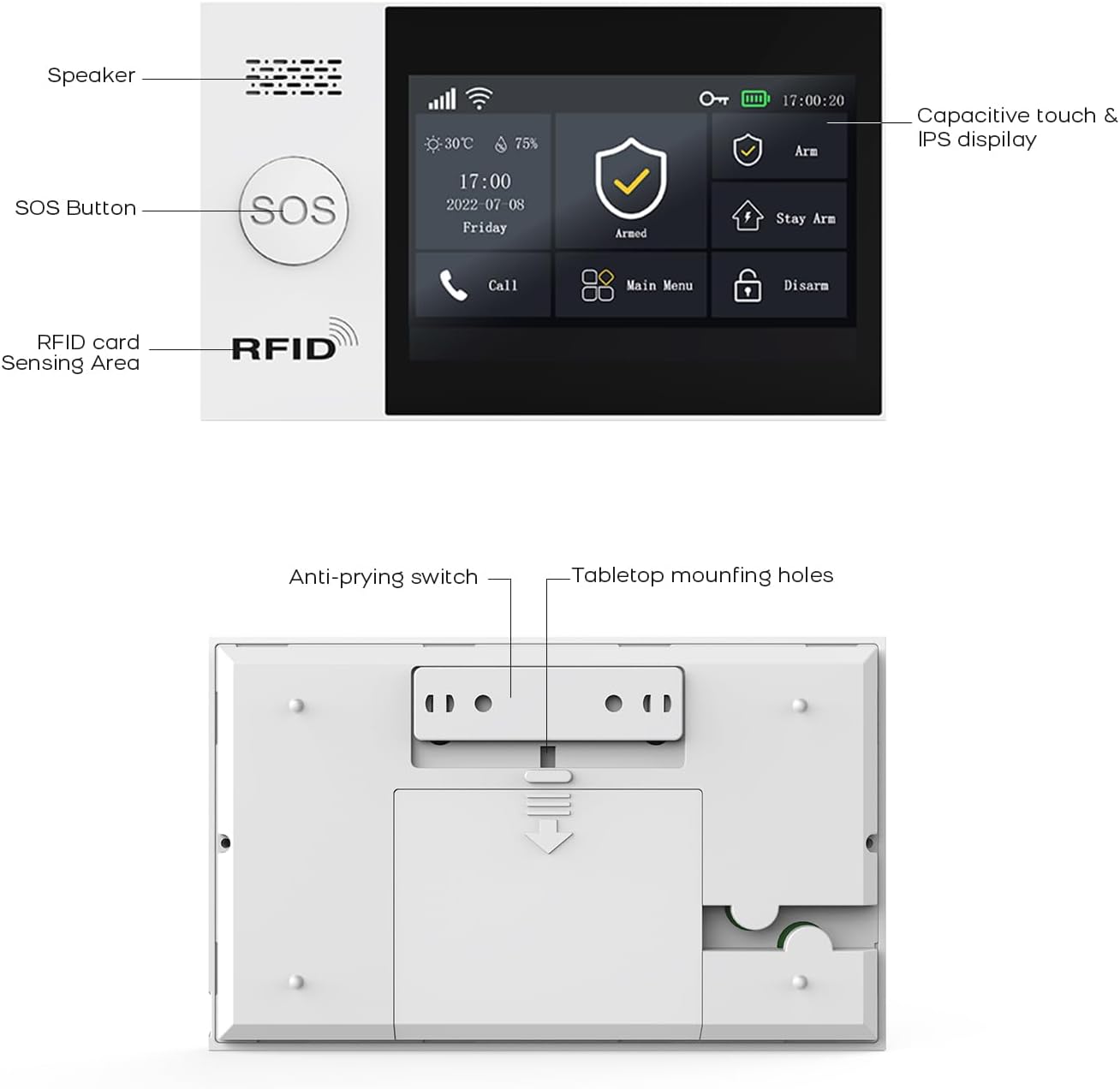
Figuur 3.2: Gedetailleerd view of the alarm host's front panel (speaker, SOS button, RFID area) and rear panel (anti-prying switch, tabletop mounting holes).
3.2 Sensors en Toebehore
The system includes various sensors and accessories to detect intrusions and provide comprehensive security. These include motion detectors, door/window sensors, remote controls, RFID cards, and a wired siren.
4. Opstelling en installering
The PGST alarm system is designed for easy DIY installation. Follow these steps to set up your system.
4.1 Aanvanklike opstart
- Connect the alarm host to a power outlet using the provided adapter.
- Ensure the backup battery is properly installed. The system will automatically switch to battery power during an outage.
4.2 Network Connection (WiFi & GSM)
- WiFi -verbinding:
- Access the network settings on the alarm host's display.
- Select your 2.4GHz WiFi network (5GHz networks are not supported).
- Enter your WiFi password to connect.
- GSM Connection:
- Insert a valid SIM card into the designated slot on the alarm host.
- The system will automatically detect and connect to the GSM network.
4.3 Sensorinstallasie
Strategically place motion detectors and door/window sensors in key areas of your home or office. Ensure sensors are within range of the alarm host.
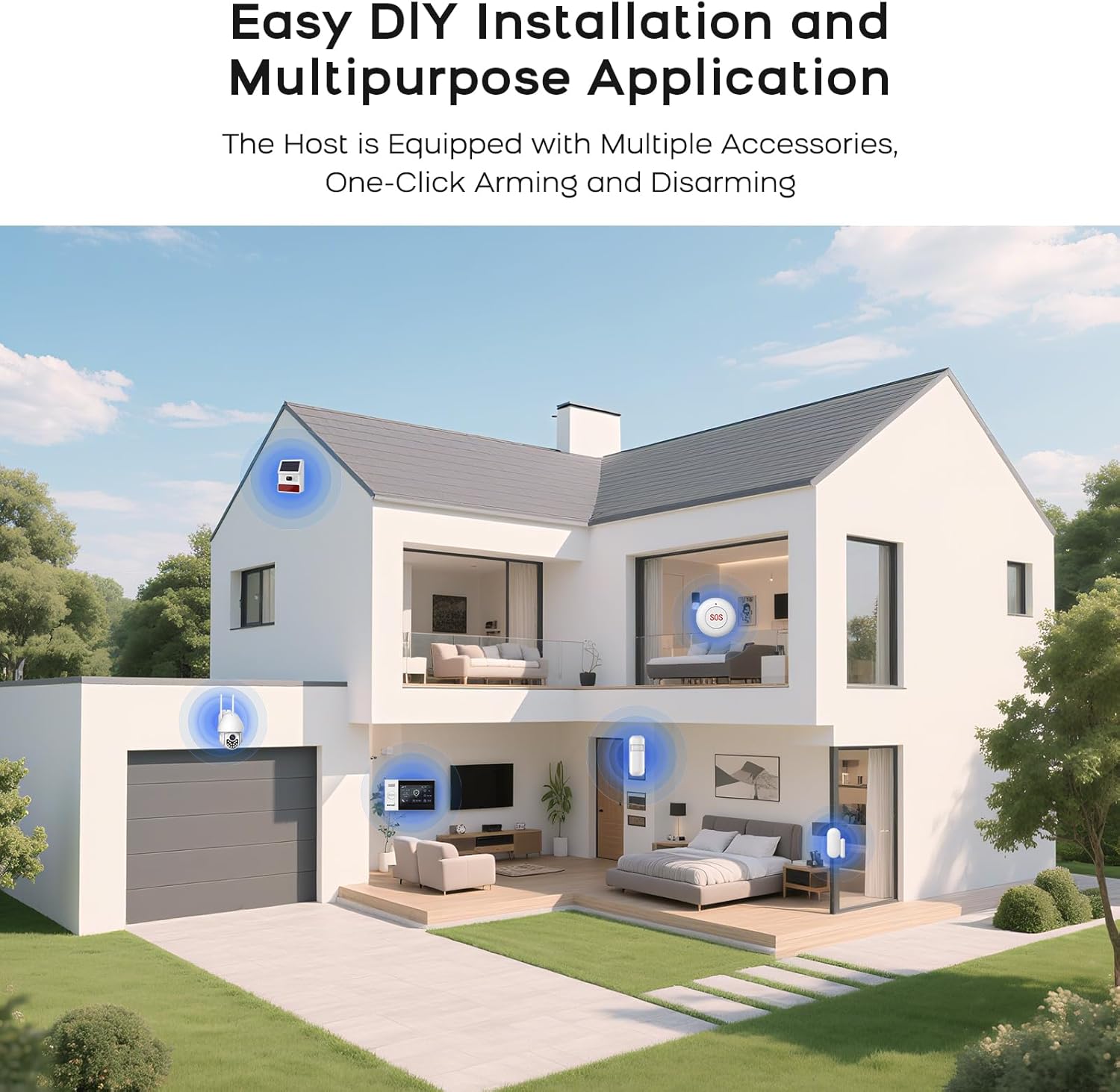
Figuur 4.1: Example of a typical alarm system installation layout in a home, showing placement of various sensors and the main unit.
- Deur/Venster Sensors: Monteer die twee dele van die sensor op die deur-/vensterraam en die deur/venster self, en maak seker dat hulle in lyn is en naby mekaar is wanneer hulle toe is.
- Bewegingsdetektors: Install in corners or areas with high traffic, ensuring a clear line of sight. Avoid placing near heat sources or direct sunlight.
- Koppel sensors: Refer to the alarm host's menu for instructions on pairing new sensors with the system.
5. Bedryfsinstruksies
5.1 Die Stelsel Bewapen en Deaktiveer
Die stelsel kan geaktiveer of gedeaktiveer word deur verskeie metodes te gebruik:
- Afstandbeheer: Press the arm or disarm button on the remote.
- Mobiele toepassing: Use the dedicated mobile application (SMART LIFE, TUYA) to arm or disarm remotely.
- RFID-kaart: Tap an authorized RFID card on the sensing area of the alarm host.
- Alarm Host Panel: Use the touch screen interface to select arming or disarming modes.
- Telefoonoproep: Arm or disarm the system by calling the alarm host's GSM number and following voice prompts.
5.2 Smart App Remote Control
The mobile application allows for remote control and scheduling of arming/disarming times.

Figure 5.1: The mobile application interface for programming timed arming and disarming schedules.
5.3 Stembeheer-integrasie
The system supports voice control via compatible smart assistants like Amazon Alexa and Google Assistant.

Figure 5.2: Demonstrating voice control integration with Amazon Alexa to arm the system.
5.4 Two-Way Voice Intercom Function
The alarm host features a two-way voice intercom function, allowing you to make and receive calls, and send voice messages through the system.

Figure 5.3: The two-way voice intercom function enables communication through the alarm system.
6. Onderhoud
6.1 Batterybestuur
The alarm host and wireless sensors are battery-powered. Regular monitoring of battery levels is crucial for uninterrupted operation.
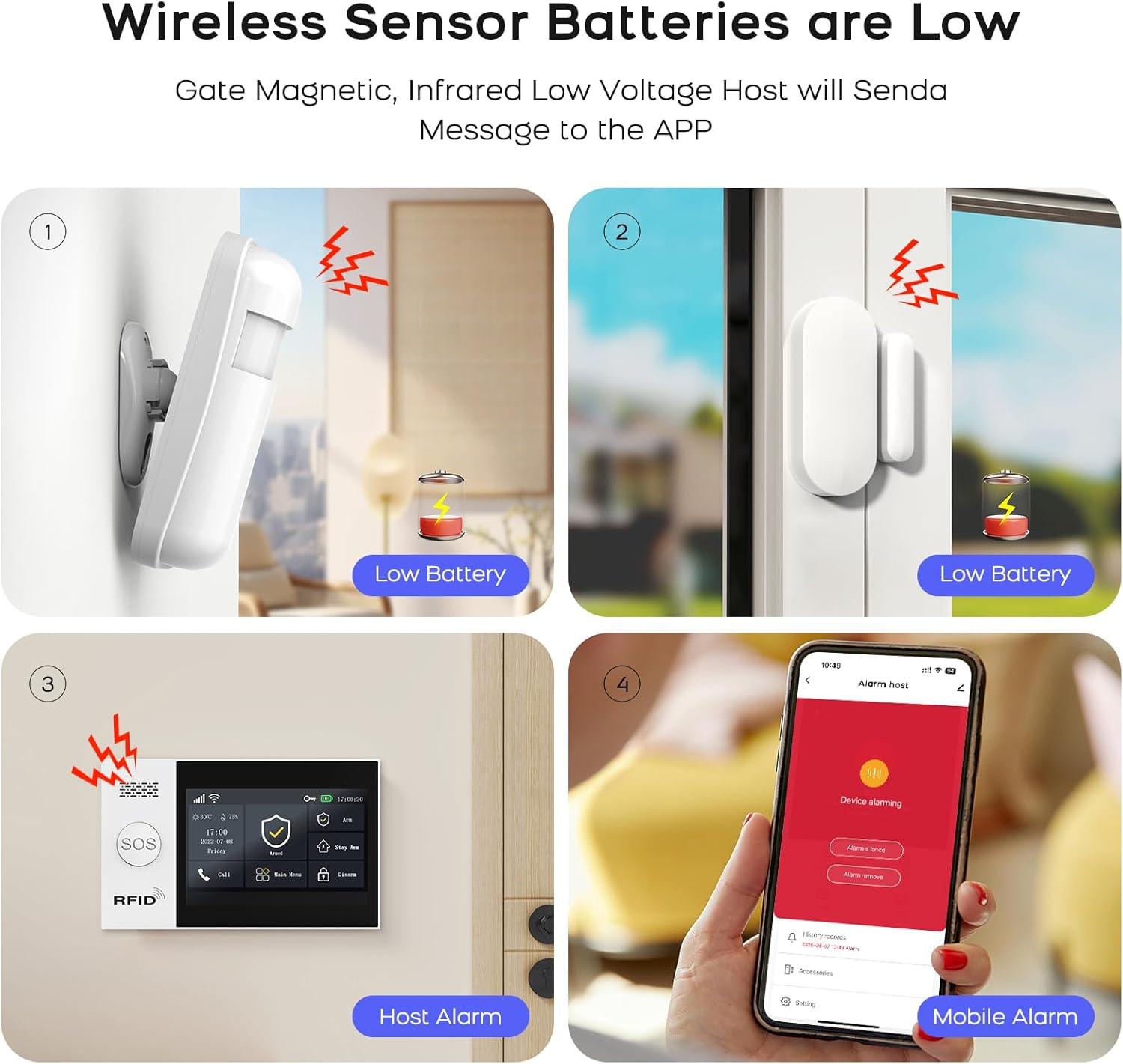
Figure 6.1: Visual representation of low battery alerts from wireless sensors and the alarm host, displayed on the host and mobile app.
- Draadlose sensorbatterye: When a wireless sensor's battery is low, the host will send a message to the mobile app. Replace batteries promptly to ensure continuous protection.
- Alarm Host Backup Battery: The alarm host has a built-in backup battery providing approximately 5.5 hours of operation during a power failure. The system will send an SMS notification if power is interrupted and restored.

Figure 6.2: The alarm host display indicating battery status and power consumption.
6.2 Skoonmaak
Wipe the alarm host and sensors with a soft, dry cloth. Avoid using abrasive cleaners or solvents that could damage the devices.
7. Probleemoplossing
| Probleem | Moontlike oorsaak | Oplossing |
|---|---|---|
| Stelsel koppel nie aan WiFi nie | Verkeerde WiFi-wagwoord; 5GHz-netwerk gekies; swak sein. | Verify password. Ensure you are connecting to a 2.4GHz network. Move the alarm host closer to the router or improve signal strength. |
| Sensors reageer nie | Low battery; out of range; not properly paired. | Replace sensor batteries. Relocate sensor closer to the alarm host. Re-pair the sensor with the alarm host. |
| No GSM network connection | SIM card not inserted correctly; invalid SIM card; no network coverage. | Ensure SIM card is correctly inserted. Verify SIM card is active and has credit. Check for GSM network coverage in your area. |
| Alarm host not powering on | Power adapter issue; backup battery depleted. | Check power adapter connection and power outlet. Allow backup battery to charge or replace if faulty. |
| Valse alarms | Onbehoorlike sensorplasing; omgewingsfaktore (troeteldiere, trek). | Adjust sensor sensitivity. Reposition motion detectors to avoid pets or drafts. Ensure door/window sensors are securely mounted. |
8. Spesifikasies
| Kenmerk | Detail |
|---|---|
| Handelsmerk | PGST |
| Model | Qek-a107s-b |
| Kragbron | Battery aangedrewe |
| Versoenbare toestelle | SMART LIFE, TUYA, Amazon Alexa, Google Assistant |
| Itemafmetings (LxBxH) | 18 x 12 x 3 cm (7.09 x 4.72 x 1.18 duim) |
| Vertoon | 4.3 inch TFT Capacitive Touch IPS Display |
| Draadlose frekwensie | 2.4GHz WiFi (5GHz word nie ondersteun nie) |
| Maksimum sensors ondersteun | 100 Draadloos, 3 Bedraad |
| Sirene-uitset | 120dB (Wired Siren) |
| Rugsteun batterylewe | Ongeveer. 5.5 uur |
9. Waarborg en Ondersteuning
For warranty information and technical support, please refer to the documentation included with your product or visit the official PGST webwebwerf. Bewaar u aankoopbewys as bewys van aankoop vir waarborgeise.
If you encounter any issues not covered in this manual, please contact PGST customer service for assistance.