
Laxasfit LF-01
Laxasfit LF-01 Slimhorlosie Gebruikershandleiding
Model: LF-01
1. Inleiding
Welcome to the user manual for your Laxasfit LF-01 Smart Watch. This guide provides essential information on setting up, operating, and maintaining your device to ensure optimal performance and a seamless user experience. Please read this manual thoroughly before using your smart watch.
1.1 Wat is in die boks
- Slimhorlosie
- Laai kabel
- Gebruikershandleiding
2. Opstelling
2.1 Laai die toestel
Before initial use, fully charge your Laxasfit LF-01 Smart Watch. Connect the provided charging cable to the charging port on the back of the watch and plug the USB end into a standard USB power adapter (not included) or a computer's USB port. The watch display will indicate charging status. A full charge typically takes approximately 2 hours.
2.2 App-installasie
To unlock the full potential of your smart watch, download and install the companion application on your smartphone. The application allows for data synchronization, notification management, and watch face customization.
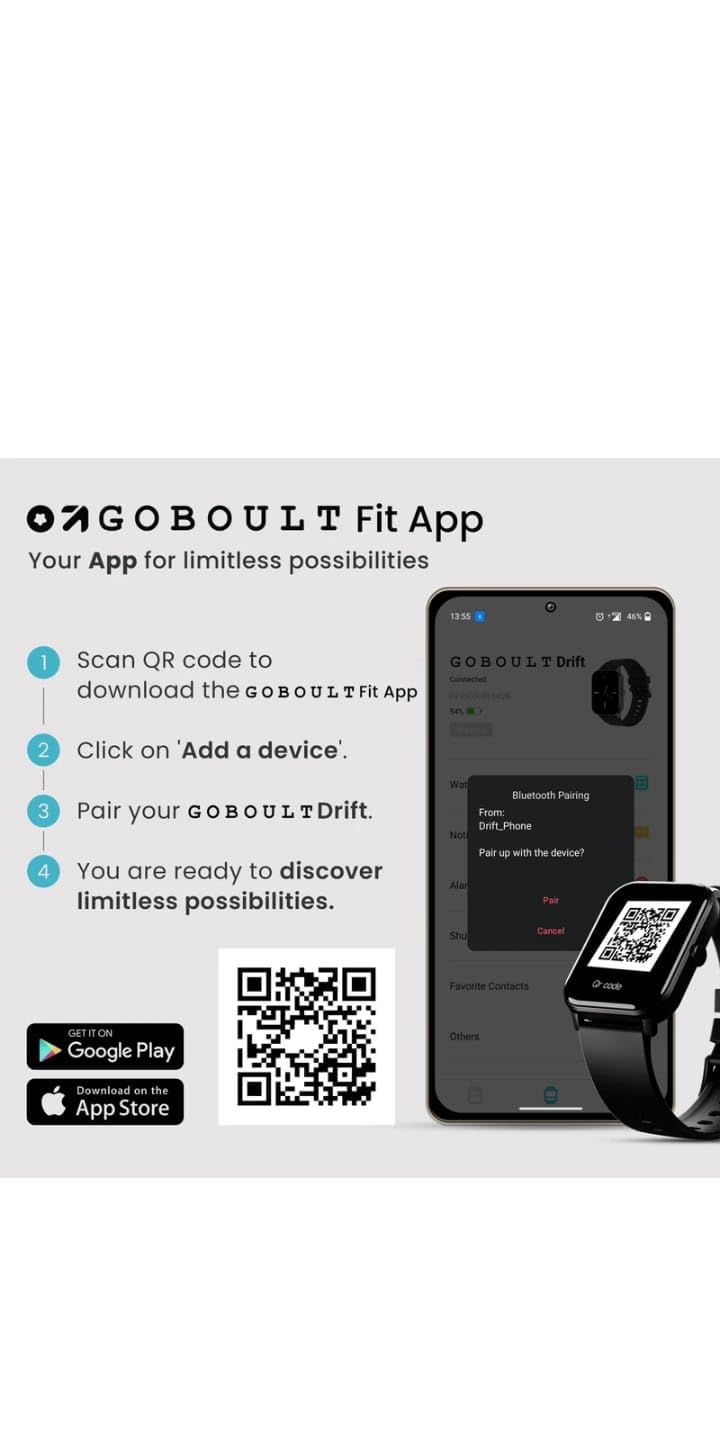
- Scan the QR code provided in the image below or search for "Boult Fit App" in your smartphone's app store (Google Play Store for Android, Apple App Store for iOS).
- Installeer die toepassing.
- Maak die toepassing oop en volg die instruksies op die skerm om 'n rekening te skep of aan te meld.

Prentbeskrywing: This image displays a smartphone screen with instructions for downloading and pairing the companion app. It shows four steps: "Scan QR code to download the Boult Fit App", "Click on 'Add a device'", "Pair your Boult Drift", and "You are ready to discover limitless possibilities." Below these steps are QR codes for both Google Play and the App Store, along with their respective logos. The right side of the image shows a smartwatch display and a phone screen demonstrating the Bluetooth pairing process within the app.
Download the Boult Fit App: https://app.moyoung.com/app-download/BoultFit
2.3 Koppel met jou slimfoon
After installing the app, follow these steps to pair your smart watch:
- Maak seker dat Bluetooth op jou slimfoon geaktiveer is.
- Open the companion app and navigate to the "Add Device" or "Pair Device" section.
- The app will search for available devices. Select "Laxasfit LF-01" or a similar device name from the list.
- Bevestig die paringsversoek op beide jou slimfoon en die slimhorlosie indien gevra.
- Once paired, the watch will synchronize data with your phone.
3. Sleutel kenmerke
The Laxasfit LF-01 Smart Watch offers a range of features designed to enhance your daily life and fitness tracking.
3.1 Gesondheidsmonitering
Monitor your vital health parameters directly from your wrist.
- Hartklopmonitor: Volg jou hartklop deur die dag.
- Slaap dop: Analiseer jou slaappatrone, insluitend diep slaap, ligte slaap en wakkerwordtye.
- Aktiwiteitnasporing: Teken stappe, afstand en kalorieë verbrand aan.

Prentbeskrywing: This image shows a collage of smartwatch features. Prominently featured is a smartwatch display showing a heart rate monitor with a graph and current heart rate (108 bpm). Other elements include icons for 7-day battery life, IP68 water resistance, 60 sports modes, mini games, 1.69" HD display, Bluetooth calling, and multiple watch faces.
3.2 Sportmodusse
The watch supports over 60 workout modes to accurately track various physical activities.
- Track specific metrics for activities like running, cycling, walking, and more.
- View real-time data such as duration, calories burned, and heart rate during workouts.

Prentbeskrywing: A man is shown performing an exercise with a battle rope, wearing a smartwatch on his wrist. The image highlights the watch's capability to track over 60 workout modes. An overlay shows a smartwatch display with fitness metrics: "Steps 25969", "Distance 10.56 km", and "Calories 2982 Kcal".
3.3 Bluetooth-oproepe
With its built-in speaker and microphone, the Laxasfit LF-01 allows you to manage calls directly from your wrist when connected to your smartphone via Bluetooth.
- Receive incoming call notifications.
- Beantwoord of verwerp oproepe.
- Make calls using the watch's interface (requires phone connection).
Prentbeskrywing: This image shows a smartwatch worn on a wrist, displaying an incoming call notification. The screen shows "Mom" as the caller, along with green (answer) and red (decline) call icons. Text above the watch states "Manage calls, the smart way." and "Bluetooth calling" with "Dedicated Speaker & Microphone" below.
3.4 Display and Watch Faces
- Vertoon tipe: LCD touchscreen for clear visibility and easy interaction.
- Pasmaakbare horlosies: Choose from over 140 watch faces via the companion app to personalize your device.
4. Operasie
4.1 Basiese navigasie
- Raakskerm: Veeg links/regs, op/af om deur spyskaarte en kenmerke te navigeer. Tik om te kies.
- Syknoppie: Typically used to wake the screen, return to the home screen, or access the app menu. Refer to the on-screen prompts for specific functions.
4.2 Using Fitness Tracking
Om 'n oefensessie te begin:
- Swipe on the watch face to find the "Workout" or "Sports Modes" icon.
- Tap to select your desired activity (e.g., Running, Cycling).
- Tap "Start" to begin tracking.
- Tydens die oefensessie kan jy view intydse data.
- Tap "Pause" or "End" to stop the workout. Data will sync with the app.
4.3 Managing Notifications
Once paired with your smartphone, the watch will display notifications for calls, messages, and other app alerts.
- Vee afwaarts vanaf die horlosieskerm om view onlangse kennisgewings.
- Tap on a notification to read the full message (if supported).
- Notifications can be managed and filtered through the companion app settings.
5. Onderhoud
5.1 Skoonmaak van jou slimhorlosie
- Vee die horlosieskerm en -bandjie gereeld af met 'n sagte, damp lap.
- Vermy die gebruik van harde chemikalieë of skuurmiddels, aangesien dit die toestel kan beskadig.
- Maak seker dat die laaikontakte skoon en droog is voor laai.
5.2 Batterysorg
- Vermy om die horlosie aan uiterste temperature bloot te stel.
- Moenie die horlosie vir lang tye heeltemal ontlaai laat nie.
- For optimal battery life, charge the device before it completely runs out of power.
6. Probleemoplossing
If you encounter issues with your Laxasfit LF-01 Smart Watch, refer to the following common solutions:
- Horlosie skakel nie aan nie: Maak seker dat die horlosie volledig gelaai is. Koppel dit vir ten minste 30 minute aan die laaier.
- Kan nie met slimfoon koppel nie:
- Maak seker dat Bluetooth op jou foon geaktiveer is.
- Maak seker dat die horlosie binne die bereik van jou foon is.
- Restart both your phone and the smart watch.
- Probeer om die toestel deur die toepassing te ontkoppel en weer te koppel.
- Onakkurate fiksheidsdata:
- Maak seker dat die horlosie styf om jou pols gedra word, ongeveer een vingerbreedte bokant die polsbeen.
- Calibrate the device through the app if an option is available.
- Kennisgewings verskyn nie:
- Check app notification settings on your phone and within the companion app.
- Maak seker dat die horlosie behoorlik via Bluetooth gekoppel is.
- Skerm reageer nie: Restart the watch by pressing and holding the side button (if applicable) or by connecting it to the charger.
If problems persist, consult the companion app's help section or contact customer support.
7. Tegniese spesifikasies
| Kenmerk | Spesifikasie |
|---|---|
| Model | LF-01 |
| Tipe vertoon | LCD |
| Konnektiwiteit | Bluetooth |
| Bedryfstelsel | Eiendomsbedryfstelsel |
| Geheue berging kapasiteit | 32 GB |
| Spesiale kenmerke | Fitness Tracking, Heart Rate Monitor, Notifications, Sleep Tracking |
| Versoenbare toestelle | Slimfoon, tablet |
| Laai tyd | 2 ure |
| Materiaal | Plastiek, silikoon |
| Item gewig | 200 g |
| Land van oorsprong | China |
8. Waarborg en Ondersteuning
8.1 Waarborginligting
Your Laxasfit LF-01 Smart Watch typically comes with a standard warranty. Please refer to your purchase documentation for specific warranty terms and conditions. A 10-day replacement policy may apply, and extended warranty options might be available for purchase.
8.2 Kliëntediens
For further assistance, technical support, or warranty claims, please refer to the contact information provided with your product packaging or visit the official Laxasfit website (if available). You may also contact the seller directly for support.
Ask a question about this manual
Ask about setup, troubleshooting, compatibility, parts, safety, or missing instructions. Manuals+ will review the question and use this page’s manual context to help answer it.